> [!IMPORTANT]
> This page provides a single-page view of all the pages in [Build hybrid and
> multicloud architectures using Google Cloud](https://docs.cloud.google.com/architecture/hybrid-multicloud-patterns). You can print this page, or you can save it in PDF format by using your browser's print function and choosing the **Save as PDF** option. This page does *not* provide a table of contents (ToC) pane on the right side.
This architecture guide provides practical guidance on planning and architecting
your hybrid and multicloud environments using Google Cloud. This document is the
first of three documents in the set. It examines the opportunities and
considerations associated with these architectures from a business and
technology point of view. It also analyzes and discusses many proven hybrid and
multicloud architecture patterns.
The document set for hybrid and multicloud architecture patterns consists of
these parts:
- Build hybrid and multicloud architectures: discusses planning a strategy for architecting a hybrid and multicloud setup with Google Cloud (this article).
- [Hybrid and multicloud architecture patterns](https://docs.cloud.google.com/architecture/hybrid-multicloud-patterns-and-practices): discusses common architecture patterns to adopt as part of a hybrid and multicloud strategy.
- [Hybrid and multicloud secure networking architecture patterns](https://docs.cloud.google.com/architecture/hybrid-multicloud-secure-networking-patterns): discusses hybrid and multicloud networking architecture patterns from a networking perspective.
You can read each of these architecture articles independently, but for the
most benefit, we recommend reading them in sequence before making an
architectural decision.
The rapid pace of change in market demands has increased the requirements and
expectations that are placed on enterprise IT, such as dynamic scale, increased
performance for optimized user experience, and security. Many enterprise-level
companies find it challenging to meet these demands and expectations using only
traditional infrastructure and processes. IT departments are also under pressure
to improve their cost effectiveness, making it difficult to justify additional
capital investments in data centers and equipment.
A hybrid cloud strategy that uses public cloud computing capabilities provides a
pragmatic solution. By using the public cloud, you can extend the capacity and
capabilities of your computing platforms without up-front capital investment
costs.
By adding one or more public cloud based solutions, like Google Cloud, to
your existing infrastructure, you not only preserve your existing investments,
but you also avoid committing yourself to a single cloud vendor. Also, by using
a hybrid strategy, you can modernize applications and processes incrementally as
resources permit.
To help you plan for your architectural decision and hybrid or multicloud
strategy planning, there are several potential challenges and design
considerations that you should consider. This multi-part architecture guide
highlights both the potential benefits of various architectures and the
potential challenges.
> [!NOTE]
> **Note:** This guide doesn't discuss multicloud architectures that use SaaS products, like customer relationship management (CRM) systems or email, alongside a cloud service provider (CSP).
## Overview of hybrid cloud and multicloud
Because workloads, infrastructure, and processes are unique to each enterprise,
each hybrid cloud strategy must be adapted to your specific needs. The result is
that the terms *hybrid cloud* and *multicloud* are sometimes used
inconsistently.
Within the context of this Google Cloud architecture guide, the term
*hybrid cloud* describes an architecture in which workloads are deployed across
multiple computing environments, one based in the public cloud, and at least one
being private---for example, an on-premises data center or a colocation facility.
The term *multicloud* describes an architecture that combines at least two
public CSPs. As illustrated in the following diagram,
sometimes this architecture includes a private computing environment (that might
include the use of a private cloud component). That arrangement is called a
hybrid and multicloud architecture.
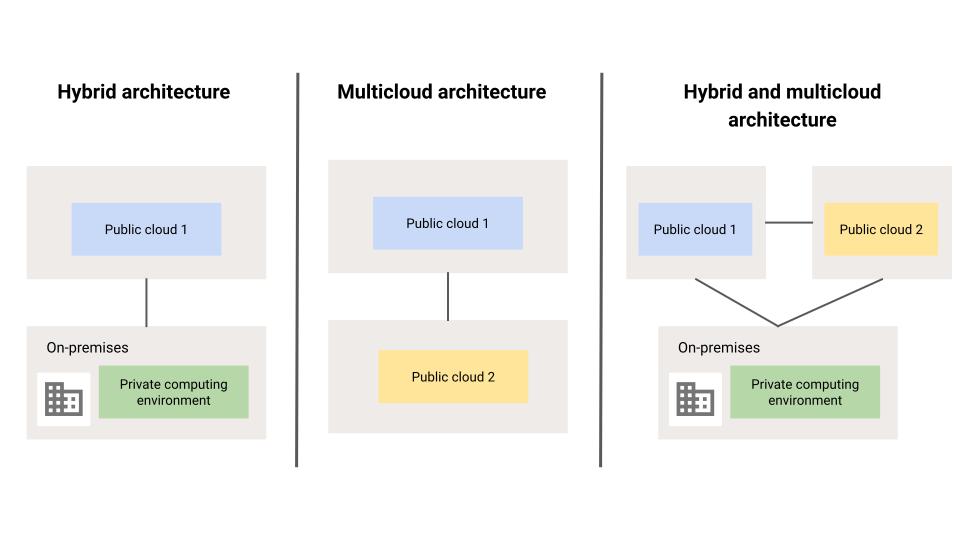
> [!NOTE]
> **Note:** The term *hybrid and multicloud* refers to any combination of the three architectures displayed in the preceding diagram. However, where possible this series attempts to be specific when discussing architecture patterns.
## Contributors
Author: [Marwan Al Shawi](https://www.linkedin.com/in/marwanalshawi) \| Partner Customer Engineer
Other contributors:
- [Saud Albazei](https://www.linkedin.com/in/albazei) \| Customer Engineer, Application Modernization
- [Anna Berenberg](https://www.linkedin.com/in/annaberenberg) \| Engineering Fellow
- [Marco Ferrari](https://www.linkedin.com/in/ferrarimark) \| Cloud Solutions Architect
- [Victor Moreno](https://www.linkedin.com/in/vimoreno) \| Product Manager, Cloud Networking
- [Johannes Passing](https://www.linkedin.com/in/johannespassing) \| Cloud Solutions Architect
- [Mark Schlagenhauf](https://www.linkedin.com/in/mark-schlagenhauf-63b98) \| Technical Writer, Networking
- [Daniel Strebel](https://www.linkedin.com/in/danistrebel) \| EMEA Solution Lead, Application Modernization
- [Ammett Williams](https://www.linkedin.com/in/ammett) \| Developer Relations Engineer
# Drivers, considerations, strategy, and approaches
This document defines and discusses business objectives, drivers, and
requirements, and how these factors can influence your design decisions when
constructing hybrid and multicloud architectures.
## Objectives
An organization can adopt a hybrid or multicloud architecture either as a
permanent solution to meet specific business objectives, or as a temporary state
to facilitate certain requirements, such as a migration to the cloud.
Answering the following questions about your business is a good way to define your business requirements, and to establish specific expectations about how to achieve some or all of your business objectives. These questions focus on what's needed for your business, not how to achieve it technically.
- Which business goals are driving the decision to adopt a hybrid or multicloud architecture?
- What business and technical objectives is a hybrid or multicloud architecture going to help achieve?
- What business drivers influenced these objectives?
- What are the specific business requirements?
In the context of hybrid and multicloud architectures, one business goal for an
enterprise customer might be to expand online sales operations or markets from a
single region to become one of the global leaders in their market segment. One
of the business objectives might be to start accepting purchase orders from
users across the globe (or from specific regions) within six months.
To support the previously mentioned business requirements and objectives, one
potential primary technical objective is to expand the IT infrastructure and
applications architecture of a company from an on-premises-only model to a
hybrid architecture, using the global capabilities and services of public
clouds. This objective should be specific and measurable, clearly defining the
expansion scope in terms of target regions and timelines.
> [!NOTE]
> **Note:** Sometimes business requirements are defined to satisfy certain business strategies. A business strategy can be defined as a long term plan to draw a path to achieve certain business objectives.
In general, a hybrid or multicloud architecture is rarely a goal in itself, but
rather a means of meeting technical objectives driven by certain business
requirements. Therefore, choosing the right hybrid or multicloud architecture
requires first clarifying these requirements.
It's important to differentiate between the business objectives and technical
objectives of your IT project. Your business objectives should focus on the goal
and mission of your organization. Your technical objectives should focus on
building a technological foundation that enables your organization to meet their
business requirements and objectives.
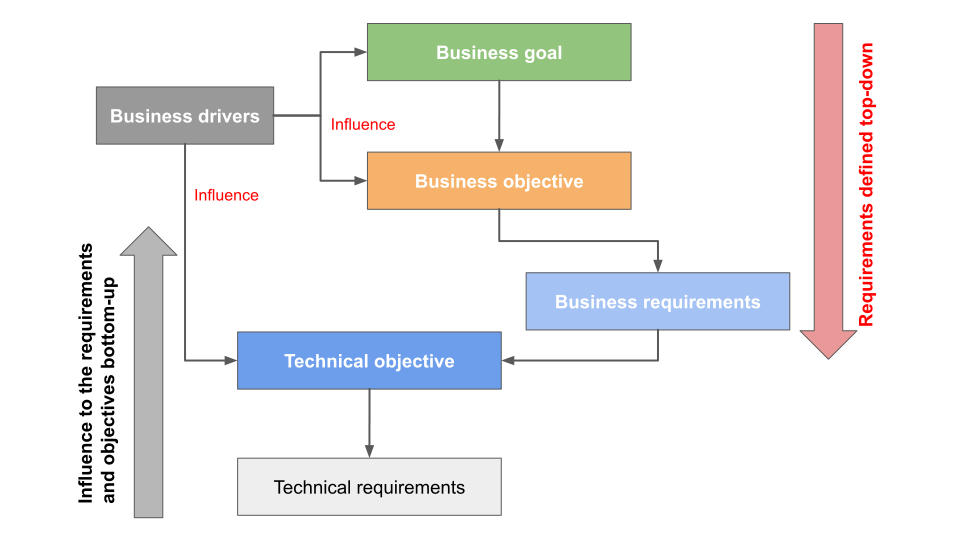
Business drivers influence the achievement of the business objective and goals.
Therefore, clearly identifying the business drivers can help shape the business
objectives or goals to be more relevant to market needs and trends.
The following flowchart illustrates business drivers, goals, objectives, and
requirements, and the technical objectives and requirements, and how all these
factors relate to each other:
## Business and technical drivers
Consider how your business drivers influence your technical objectives. Some
common, influencing, business drivers when choosing a hybrid
architecture include the following:
- Heeding laws and regulations about data sovereignty.
- Reducing capital expenditure (CAPEX) or general IT spending with the support of cloud financial management and cost optimization disciplines like [FinOps](https://cloud.google.com/learn/what-is-finops).
- Cloud adoption can be driven by scenarios that help reduce CAPEX, like building a Disaster Recovery solution in a hybrid or multicloud architecture.
- Improving the user experience.
- Increasing flexibility and agility to respond to changing market demands.
- Improving transparency about costs and resource consumption.
Consider your list of business drivers for adopting a hybrid or multicloud
architecture together. Don't consider them in isolation. Your final decision
should depend on the balance of your business priorities.
After your organization realizes the benefits of the cloud, it might decide to
fully migrate if there are no constraints---like costs or specific compliance
requirements that require highly secure data to be hosted on-premises---that
prevent it from doing so.
Although adopting a single cloud provider can offer several benefits, such as
reduced complexity, built-in integrations among services, and cost optimization
options like
[committed use discounts](https://docs.cloud.google.com/docs/cuds),
there are still some scenarios where a multicloud architecture can be beneficial
for a business. The following are the common business drivers for adopting a
multicloud architecture, along with the associated considerations for each
driver:
- **Heeding laws and regulations about data sovereignty** : The most common scenario is when an organization is expanding its business to a new region or country and has to comply with new data-hosting regulations.
- If the existing used cloud service provider (CSP) has no local cloud region in that country, then for compliance purposes the common solution is to use another CSP that has a local cloud region in that country.
- **Reducing costs**: Cost reduction is often the most common business driver for adopting a technology or architecture. However, it's important to consider more than just the cost of services and potential pricing discounts when deciding whether to adopt a multicloud architecture. Account for the cost of building and operating a solution across multiple clouds, and any architecture constraints that might arise from existing systems.
Sometimes, the potential challenges associated with a multicloud
strategy might outweigh the benefits. A multicloud strategy might introduce
additional costs later on.
[Common challenges](https://cloud.google.com/learn/what-is-multicloud#section-6)
associated with developing a multicloud strategy include the following:
- Increasing management complexity.
- Maintaining consistent security.
- Integrating software environments.
- Achieving consistent cross-cloud performance and reliability.
- Building a technical team with multicloud skills might be expensive and might require expanding the team, unless it's managed by a third party company.
- Managing the product pricing and management tools from each CSP.
- Without a solution that can provide unified cost visibility and dashboards, it can be difficult to efficiently manage costs across multiple environments. In such cases, you might use the Looker cloud cost management solution where applicable. For more information, see [The strategy for effectively optimizing cloud billing cost management](https://cloud.google.com/blog/products/data-analytics/cloud-cost-management).
- **Using the unique capabilities from each CSP** : A multicloud architecture enables organizations to use additional new technologies to improve their own business capability offerings without being limited to the choices offered by a single cloud provider.
- To avoid any unforeseen risk or complexity, assess your potential challenges through a feasibility and effectiveness assessment, including the common challenges mentioned previously.
- **Avoiding vendor lock-in** : Sometimes, enterprises want to avoid being locked into a single cloud provider. A multicloud approach lets them choose the best solution for their business needs. However, the feasibility of this decision depends on several factors, such as the following:
- Technical dependencies
- Interoperability considerations between applications
- Costs of rebuilding or refactoring applications
- Technical skill sets
- Consistent security and manageability
- **Enhancing the reliability and availability level of business critical
applications**: In some scenarios, a multicloud architecture can provide resilience to outages. For example, if one region of a CSP goes down, traffic can be routed to another CSP in the same region. This scenario assumes that both cloud providers support the required capabilities or services in that region.
When data residency regulations in a specific country or region mandate
the storage of sensitive data---like personally identifiable information
(PII)---within that location, a multicloud approach can provide a compliant
solution. By using two CSPs in one region to provide resilience to outages,
you can facilitate compliance with regulatory restrictions while also
addressing availability requirements.
The following are some resilience considerations to assess before
adopting a multicloud architecture:
- Data movement: How often might data move within your multicloud environment?
- Might data movement incur significant data transfer charges?
- Security and manageability: Are there any potential security or manageability complexities?
- Capability parity: Do both CSPs in the selected region offer the required capabilities and services?
- Technical skill set: Does the technical team have the skills required to manage a multicloud architecture?
Consider all these factors when assessing the feasibility of using a
multicloud architecture to improve resilience.
When assessing the feasibility of a multicloud architecture, it's important to
consider
[the long-term benefits](https://cloud.google.com/learn/what-is-multicloud#section-8).
For example, deploying applications on multiple clouds for disaster recovery or
increased reliability might increase costs in the short term, but could prevent
outages or failures. Such failures can cause long-term financial and
reputational damage. Therefore, it's important to weigh short-term costs against
the long-term potential value of adopting multicloud. Also, the long-term
potential value can vary based on the organization size, technology scale,
criticality of the technology solution, and the industry.
Organizations that plan to successfully create a hybrid or multicloud
environment, should consider
[building a Cloud Center of Excellence (COE)](https://services.google.com/fh/files/misc/cloud_center_of_excellence.pdf).
A COE team can become the conduit for transforming the way that
internal teams within your organization serve the business during your
transition to the cloud. A COE is one of the ways that your organization can
adopy the cloud faster, drive standardization, and maintain stronger alignment
between your business strategy and your cloud investments.
If the objective of the hybrid or multicloud architecture is to create a
temporary state, common business drivers include:
- The need to reduce CAPEX or general IT spending for short-term projects.
- The ability to provision such infrastructure quickly to support a business use case. For example:
- This architecture might be used for limited-time projects. It could be used to support a project that requires a high scale distributed infrastructure within a limited duration, while still using data that is on-premises.
- The need for multi-year digital transformation projects that require a large enterprise to establish and that use a hybrid architecture for some time to help them align their infrastructure and applications modernization with their business priorities.
- The need to create a temporary hybrid, multicloud, or mixed architecture after a corporate merger. Doing so enables the new organization to define a strategy for the final state of its new cloud architecture. It's common for two merging companies to use different cloud providers, or for one company to use an on-premises private data center and the other to use the cloud. In either case, the first step in merger and acquisition is almost always to integrate the IT systems.
## Technical drivers
The preceding section discussed business drivers. To get approved, major
architectural decisions almost always need the support of those drivers.
However, technical drivers, which can be based on either a technical gain or a
constraint, can also influence business drivers. In some scenarios, it's
necessary to translate technical drivers into business drivers and explain how
they might positively or negatively affect the business.
The following non-exhaustive list contains some common technical drivers for
adopting a hybrid or multicloud architecture:
- Building out technological capabilities, such as advanced analytics services and AI, that might be difficult to implement in existing environments.
- Improving the quality and performance of service.
- Automating and accelerating application rollouts to achieve a faster time to market and shorter cycle times.
- Using high-level APIs and services to speed up development.
- Accelerating the provisioning of compute and storage resources.
- Using serverless services to build elastic services and capabilities faster and at scale.
- Using global infrastructure capabilities to build global or multi-regional architectures to satisfy certain technical requirements.
The most common technical driver for both temporary hybrid and temporary
multicloud architectures is to facilitate a migration from on-premises to the
cloud or to an extra cloud. In general, cloud migrations almost always naturally
lead to hybrid cloud setup. Enterprises often have to systematically transition
applications and data based on their priorities. Similarly, a short-term setup
might be intended to facilitate a proof of concept using advanced technologies
available in the cloud for a certain period.
## Technical design decisions
The identified technical objective and its drivers are key to making a
business-driven architecture decision and to selecting one of the architecture
patterns discussed in this guide. For example, to support a specific business
goal, a company might set a business objective to build a research and
development practice for three to six months. The main business requirement to
support this objective might be to build the required technology environment for
research and design with the lowest possible CAPEX.
The technical objective in this case is to have a temporary hybrid cloud setup.
The driver for this technical objective is to take advantage of the on-demand
pricing model of the cloud to meet the previously mentioned business
requirement. Another driver is influenced by the specific technology
requirements that require a cloud-based solution with high compute capacity and
quick setup.
## Use Google Cloud for hybrid and multicloud architectures
Using open source solutions can make it easier to adopt a hybrid and multicloud
approach, and to minimize vendor lock-in. However, you should consider the
following potential complexities when planning an architecture:
- Interoperability
- Manageability
- Cost
- Security
Building on a cloud platform that contributes to and
[supports open source](https://cloud.google.com/learn/what-is-a-cloud-service-provider#section-7)
might help to simplify your path to adopting hybrid and multicloud
architectures.
[Open cloud](https://cloud.google.com/open-cloud)
empowers you with an approach that provides maximum choice and abstracts
complexity. In addition, Google Cloud offers the flexibility to migrate,
build, and optimize applications across hybrid and multicloud environments while
minimizing vendor lock-in, using best-in-breed solutions, and meeting regulatory
requirements.
Google is also one of the
[largest contributors](https://opensource.googleblog.com/2020/08/open-source-by-numbers-at-google.html)
to the open source ecosystem and works with the open source community to develop
well-known
[open source technologies](https://opensource.google/)
like Kubernetes. When rolled out as a managed service, Kubernetes can help
reduce complexities around hybrid and multicloud manageability and security.
# Plan a hybrid and multicloud strategy
This document focuses on how to apply predefined business
considerations when planning a hybrid and multicloud strategy. It expands on
guidance in
[Drivers, considerations, strategy, and approaches](https://docs.cloud.google.com/architecture/hybrid-multicloud-patterns/drivers).
That article defines and analyzes the business considerations
enterprises should account for when planning such a strategy.
## Clarify and agree on the vision and objectives
Ultimately, the main purpose of a hybrid or multicloud strategy is to achieve
the identified business requirements and the associated technical objectives for
each business use case aligned with specific business objectives. To achieve
this goal, create a well-structured plan that includes the following
considerations:
- Which workloads should be run in each computing environment.
- Which [application architecture patterns](https://docs.cloud.google.com/architecture/hybrid-multicloud-patterns) to apply across multiple workloads.
- Which technology and [networking architecture pattern](https://docs.cloud.google.com/architecture/hybrid-multicloud-secure-networking-patterns) to use.
Know that defining a plan that considers all workloads and requirements is
difficult at best, especially in a complex IT environment. In addition, planning
takes time and might lead to competing stakeholder visions.
To avoid such situations, initially formulate a vision statement that addresses
the following questions (at minimum):
- What's the targeted business use case to meet specific business objectives?
- Why is the current approach and computing environment insufficient to meet the business objectives?
- What are the primary technological aspects to optimize for by using the public cloud?
- Why and how is the new approach going to optimize and meet your business objectives?
- How long do you plan to use your hybrid or multicloud setup?
Agreeing on the key business and technical objectives and drivers, then
obtaining relevant stakeholder sign-off can provide a foundation for the next
steps in the planning process. To effectively align your proposed solution with
the overarching architectural vision of your organization, align with your team
and the stakeholders responsible for leading and sponsoring this initiative.
## Identify and clarify other considerations
While planning a hybrid or multicloud architecture, it's important to identify
and agree about the architectural and operational constraints of your project.
On the operations side, the following non-exhaustive list provides some
requirements that might create some constraints to consider when planning your
architecture:
- Managing and configuring multiple clouds separately versus building a holistic model to manage and secure the different cloud environments.
- Ensuring consistent authentication, authorization, auditing, and policies across environments.
- Using consistent tooling and processes across environments to provide a holistic view into security, costs, and opportunities for optimization.
- Using consistent compliance and security standards to apply unified governance.
On the architecture-planning side, the biggest constraints often stem from
existing systems and can include the following:
- Dependencies between applications
- Performance and latency requirements for communication between systems
- Reliance on hardware or operating systems that might not be available in the public cloud
- Licensing restrictions
- Dependence on the availability of required capabilities in the selected regions of a multicloud architecture
For more information about the other considerations related to workload
portability, data movement, and security aspects, see
[Other considerations](https://docs.cloud.google.com/architecture/hybrid-multicloud-patterns/other-considerations).
## Design a hybrid and multicloud architecture strategy
After you have clarified the specifics of the business and technical objectives
with the associated business requirements (and ideally clarified and agreed on a
vision statement), you can build your strategy to create a hybrid or multicloud
architecture.
The following flowchart summarizes the logical steps to build such a strategy.
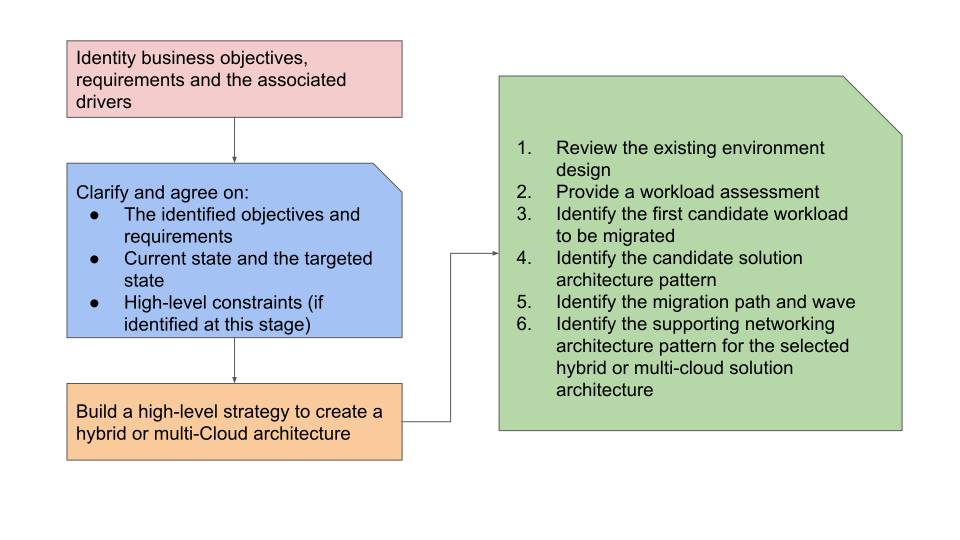
To help you determine your hybrid or multicloud architecture technical
objectives and needs, the steps in the preceding flowchart start with the
business requirements and objectives. How you implement your strategy can vary
depending on the objectives, drivers, and the technological migration path of
each business use case.
It's important to remember that a migration is a journey. The following diagram
illustrates the phases of this journey as described in
[Migrate to Google Cloud](https://docs.cloud.google.com/architecture/migration-to-gcp-getting-started).

This section provides guidance about the "Assess," "Plan," "Deploy," and
"Optimize" phases in the preceding diagram. It presents this information in the
context of a hybrid or multicloud migration. You should align any migration with
the guidance and best practices discussed in the
[migration path section](https://docs.cloud.google.com/architecture/migration-to-gcp-getting-started#the_migration_path)
of the Migrate to Google Cloud guide. These phases might apply to
each workload individually, not to all workloads at once. At any point in time,
several workloads might be in different phases:
### Assess phase
In the *Assess* phase, you conduct an initial workload assessment. During
this phase, consider the goals outlined in your vision and strategy planning
documents. Decide on a
[migration plan](https://docs.cloud.google.com/migration-center/docs/migration-planning-overview)
by first identifying a candidate list of workloads that could benefit from being
deployed or migrated to the public cloud.
To start, choose a workload that isn't business-critical or too difficult to
migrate (with minimal or no dependencies on any workload in other environments),
yet typical enough to serve as a blueprint for upcoming deployments or
migrations.
Ideally, the workload or application you select should be part of a targeted
business use case or function that has a measurable effect on the business after
it's complete.
To evaluate and mitigate any potential migration risks, conduct a
[migration risks assessment](https://docs.cloud.google.com/migration-center/docs/migration-risks).
it's important to assess your candidate workload to determine its suitability
for migration to a multicloud environment. This assessment involves evaluating
various aspects of the applications and infrastructure including the
following:
- Application compatibility requirements with your selected cloud providers
- Pricing models
- Security features offered by your selected cloud providers
- Application interoperability requirements
Running an assessment also helps you identify data privacy requirements,
compliance requirements, consistency requirements, and solutions across multiple cloud environments. The risks you identify can affect the workloads you choose
to migrate or operate.
There are several types of tools, like
[Google Cloud Migration Center](https://docs.cloud.google.com/migration-center/docs/migration-center-overview),
to help you assess existing workloads. For more information, see
[Migration to Google Cloud: Choose an assessment tool](https://docs.cloud.google.com/architecture/migration-to-google-cloud-choose-assessment-tool).
From a workload modernization perspective, the
[fit assessment tool](https://docs.cloud.google.com/migrate/containers/docs/mfit-about)
helps to assess a VM workload to determine if the workload is fit for
modernization to a container or for migration to Compute Engine.
### Plan phase
In the *Plan* phase, start with the identified applications and required cloud
workloads and perform the following tasks:
1. Develop a prioritized migration strategy that defines [application migration waves](https://docs.cloud.google.com/migration-center/docs/plan-migration-waves#group_applications_in_waves) and paths.
2. Identify the applicable [high-level hybrid or multicloud application architecture pattern](https://docs.cloud.google.com/architecture/hybrid-and-multi-cloud-architecture-patterns).
3. Select a networking architecture pattern that supports the selected application architecture pattern.
Ideally, you should incorporate the cloud networking pattern with the
[landing zone design](https://docs.cloud.google.com/architecture/landing-zones).
The landing zone design serves as a key foundational element of overall
hybrid and multicloud architectures. The design requires seamless
integration with these patterns. Don't design the landing zone in
isolation. Consider these networking patterns as a subset of the landing
zone design.
A landing zone might consist of different applications, each with a
different networking architecture pattern. Also, in this phase, it's
important to decide on the design of the
[Google Cloud organization, projects, and resource hierarchy](https://docs.cloud.google.com/architecture/landing-zones/decide-resource-hierarchy)
to prepare your cloud environment landing zone for the hybrid or multicloud
integration and deployment.
As part of this phase you should consider the following:
- Define the migration and modernization approach. There's more information about migration approaches later in this guide. It's also covered in more detail in the [migration types](https://docs.cloud.google.com/architecture/migration-to-gcp-getting-started#types_of_migrations) section of [Migrate to Google Cloud](https://docs.cloud.google.com/architecture/migration-to-gcp-getting-started).
- Use your assessment and discovery phase findings. Align them with the candidate workload you plan to migrate. Then develop an application [migration waves plan](https://docs.cloud.google.com/migration-center/docs/plan-migration-waves). The plan should incorporate the estimated resource sizing requirements that you determined during the assessment phase.
- Define the communication model required between the distributed applications and among application components for the intended hybrid or multicloud architecture.
- Decide on a suitable [deployment archetype](https://docs.cloud.google.com/architecture/deployment-archetypes) to deploy your workload, such as zonal, regional, multi-regional, or global, for the chosen architecture pattern. The archetype you select forms the basis for constructing the application-specific deployment architectures tailored to your business and technical needs.
- Decide on measurable success criteria for the migration, with clear milestones for each migration phase or wave. Selecting criteria is essential, even if the technical objective is to have the hybrid architecture as a short term setup.
- Define application SLAs and KPIs when your applications operate in a hybrid setup, especially for those applications that might have distributed components across multiple environments.
For more information, see
[About migration planning](https://docs.cloud.google.com/migration-center/docs/migration-planning-overview)
to help plan a successful migration and to minimize the associated risks.
### Deploy phase
In the *Deploy* phase, you are ready to start executing your migration
strategy. Given the potential number of requirements, it's best to take an
iterative approach.
Prioritize your workloads based on the migration and application waves that you
developed during the planning phase. With hybrid and multicloud architectures,
start your deployment by establishing the necessary connectivity
between Google Cloud and the other computing environments. To facilitate
the required communication model for your hybrid or multicloud architecture,
base the deployment on your selected design and network connectivity type, along
with the applicable networking pattern. We recommend that you take this approach
for your overall landing zone design decision.
In addition, you must test and validate the application or service based on the
defined application success criteria. Ideally, these criteria should include
both functional and load testing (non-functional) requirements before moving to
production.
### Optimize phase
In the *Optimize* phase, test your deployment: After you complete testing, and
the application or service meets the functional and performance capacity
expectations, you can move it to production. Cloud monitoring and visibility
tools, such as
[Cloud Monitoring](https://docs.cloud.google.com/monitoring),
can provide insights into the performance, availability, and health of your
applications and infrastructure and help you optimize where needed.
For more information, see
[Migrate to Google Cloud: Optimize your environment](https://docs.cloud.google.com/architecture/migration-to-google-cloud-optimizing-your-environment).
To learn more about how to design such tools for hybrid or multicloud
architecture, see
[Hybrid and multicloud monitoring and logging patterns](https://docs.cloud.google.com/architecture/hybrid-and-multi-cloud-monitoring-and-logging-patterns).
## Assess candidate workloads
The choice of computing environments for different workloads significantly
affects the success of a hybrid and multicloud strategy. Workload placement
decisions should align with specific business objectives. Therefore, these
decisions should be guided by targeted business use cases that enable measurable
business effects. However, starting with the most business-critical
workload/application isn't always necessary nor recommended. For more
information, see
[Choosing the apps to migrate first](https://docs.cloud.google.com/architecture/migration-to-gcp-assessing-and-discovering-your-workloads#choosing_the_apps_to_migrate_first)
in the Migrate to Google Cloud guide.
As discussed in the
[Business and technical drivers](https://docs.cloud.google.com/architecture/hybrid-multicloud-patterns/drivers)
section, there are different types of drivers and considerations for hybrid and
multicloud architectures.
The following summarized list of factors can help you evaluate your migration
use case in the context of a hybrid or multicloud architecture with
opportunities to have a measurable business effect:
- Potential for market differentiation or innovation that is enabled by using cloud services to enable certain business functions or capabilities, such as artificial intelligence capabilities that use existing on-premises data to train machine learning models.
- Potential savings in total cost of ownership for an application.
- Potential improvements in availability, resiliency, security, or performance---for example adding a disaster recovery (DR) site in the cloud.
- Potential speedup of the development and release processes---for example, building your development and testing environments in the cloud.
The following factors can help you evaluate
[migration risks](https://docs.cloud.google.com/migration-center/docs/migration-risks):
- The potential effect of outages that are caused by a migration.
- The experience your team has with public cloud deployments, or with deployments for a new or second cloud provider.
- The need to comply with any existing legal or regulatory restrictions.
The following factors can help you evaluate the technical difficulties of a
migration:
- The size, complexity, and age of the application.
- The number of dependencies with other applications and services across different computing environments.
- Any restrictions imposed by third-party licenses.
- Any dependencies on specific versions of operating systems, databases, or other environment configurations.
After you have assessed your initial workloads, you can start prioritizing them
and defining your
[migration waves](https://docs.cloud.google.com/migration-center/docs/plan-migration-waves#group_applications_in_waves)
and
[approaches](https://docs.cloud.google.com/architecture/hybrid-multicloud-patterns/adopt).
Then, you can identify applicable architecture patterns and supporting
[networking patterns](https://docs.cloud.google.com/architecture/hybrid-multicloud-secure-networking-patterns).
This step might require multiple iterations, because your assessment could
change over time. It's therefore worth re-evaluating workloads after you make
your first cloud deployments.
# Architectural approaches to adopt a hybrid or multicloud architecture
This document provides guidance on common and
proven approaches and considerations to migrate your workload to the cloud. It
expands on guidance in
[Design a hybrid and multicloud architecture strategy](https://docs.cloud.google.com/architecture/hybrid-multicloud-patterns/strategy#design_a_hybrid_and_multicloud_architecture_strategy),
which discusses several possible, and recommended, steps to design a strategy
for adopting a hybrid or multicloud architecture.
> [!NOTE]
> **Note:** The phrase *migrate your workload to the cloud* refers to hybrid and multicloud scenarios, not to a complete cloud migration.
## Cloud first
A common way to begin using the public cloud is the *cloud-first* approach.
In this approach, you deploy your new workloads to the public cloud while your
existing workloads stay where they are. In that case, consider a classic
deployment to a private computing environment only if a public cloud deployment
is impossible for technical or organizational reasons.
The cloud-first strategy has advantages and disadvantages. On the positive side,
it's forward looking. You can deploy new workloads in a modernized fashion while
avoiding (or at least minimizing) the hassles of migrating existing workloads.
While a *cloud-first* approach can provide certain advantages, it could
potentially result in missed opportunities for improving or using existing
workloads. New workloads might represent a fraction of the overall IT landscape,
and their effect on IT expenses and performance can be limited. Allocating time
and resources to migrating an existing workload could potentially lead to more
substantial benefits or cost savings compared to attempting to accommodate a new
workload in the cloud environment.
Following a strict *cloud-first* approach also risks increasing the overall
complexity of your IT environment. This approach might create redundancies,
lower performance due to potential excessive cross-environment communication, or
result in a computing environment that isn't well suited for the individual
workload. Also, compliance with industry regulations and data privacy laws can
restrict enterprises from migrating certain applications that hold sensitive
data.
Considering these risks, you might be better off using a cloud-first approach
only for selected workloads. Using a cloud-first approach lets you concentrate
on the workloads that can benefit the most from a cloud deployment or migration.
This approach also considers the modernization of existing workloads.
A common example of a cloud-first hybrid architecture is when legacy
applications and services holding critical data must be integrated with new data
or applications. To complete the integration, you can use a hybrid
architecture that modernizes legacy services by using API interfaces, which
unlocks them for consumption by new cloud services and applications.
With a cloud
[API management platform](https://docs.cloud.google.com/solutions/unlocking-legacy-applications),
like
[Apigee](https://docs.cloud.google.com/apigee),
you can implement such use cases with minimal application changes and add
security, analytics, and scalability to the legacy services.
## Migration and modernization
Hybrid multicloud and IT modernization are distinct concepts that are linked in
a virtuous circle. Using the public cloud can facilitate and simplify the
modernization of IT workloads. Modernizing your IT workloads can help you
get more from the cloud.
The primary goals of modernizing workloads are as follows:
- Achieve greater agility so that you can adapt to changing requirements.
- Reduce the costs of your infrastructure and operations.
- Increase reliability and resiliency to minimize risk.
However, it might not be feasible to modernize every application in the
migration process at the same time. As described in
[Migration to Google Cloud](https://docs.cloud.google.com/architecture/migration-to-gcp-getting-started),
you can implement one of the following
[migration types](https://docs.cloud.google.com/architecture/migration-to-gcp-getting-started#types_of_migrations),
or even combine multiple types as needed:
- Rehost (lift and shift)
- Replatform (lift and optimize)
- Refactor (move and improve)
- Rearchitect (continue to modernize)
- Rebuild (remove and replace, sometimes called *rip and replace*)
- Repurchase
When making strategic decisions about your hybrid and multicloud architectures,
it's important to consider the feasibility of your strategy from a cost and time
perspective. You might want to consider a phased migration approach, starting
with lifting and shifting or replatforming and then refactoring or
rearchitecting as the next step. Typically, lifting and shifting helps to
optimize applications from an
infrastructure perspective. After applications are running in the cloud, it's
easier to use and integrate cloud services to further optimize them using
cloud-first architectures and capabilities. Also, these applications can still
communicate with other environments over a hybrid network connection.
For example, you can refactor or rearchitect a large, monolithic VM-based
application and turn it into several independent microservices, based on a
cloud-based microservice architecture. In this example, the microservices
architecture uses Google Cloud managed container services like
[Google Kubernetes Engine (GKE)](https://docs.cloud.google.com/kubernetes-engine)
or
[Cloud Run](https://docs.cloud.google.com/run/docs/overview/what-is-cloud-run).
However, if the architecture or infrastructure of an application isn't supported
in the target cloud environment as it is, you might consider starting with
replatforming, refactoring, or rearchitecting your migration strategy to
overcome those constraints where feasible.
When using any of these migration approaches, consider modernizing your
applications (where applicable and feasible). Modernization can require adopting
and implementing
[Site Reliability Engineering (SRE)](https://cloud.google.com/sre)
or DevOps principles, such that you might also need to extend application
modernization to your private environment in a hybrid setup. Even though
implementing SRE principles involves engineering at its core, it's more of a
transformation process than a technical challenge. As such, it will likely
require procedural and cultural changes. To learn more about how the first step
to implementing SRE in an organization is to get leadership buy-in, see
[With SRE, failing to plan is planning to fail](https://cloud.google.com/blog/products/devops-sre/sre-success-starts-with-getting-leadership-on-board).
## Mix and match migration approaches
Each migration approach discussed here has certain strengths and weaknesses. A
key advantage of following a hybrid and multicloud strategy is that it isn't
necessary to settle on a single approach. Instead, you can decide which approach
works best for each workload or application stack, as shown in the following
diagram.
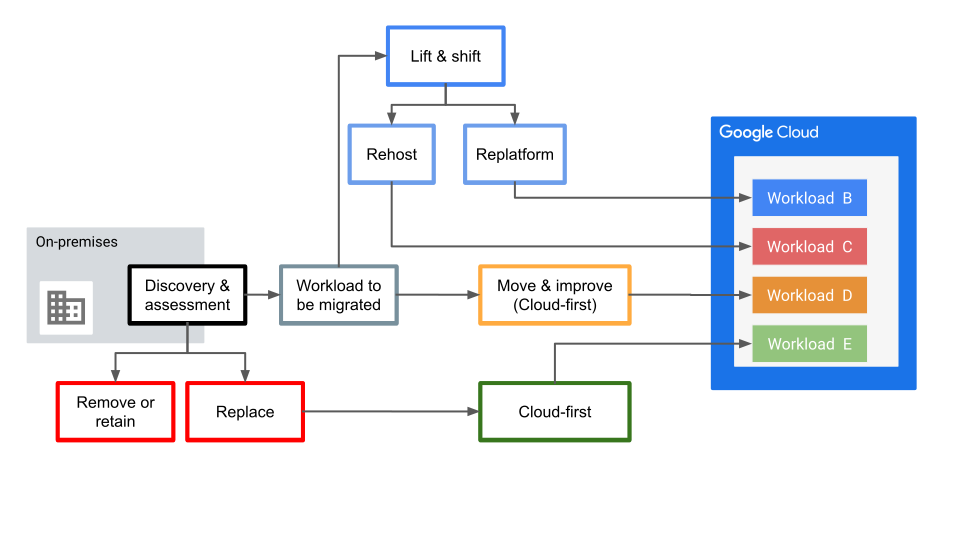
This conceptual diagram illustrates the various migration and modernization
paths or approaches that can be simultaneously applied to different workloads,
driven by the unique business, technical requirements, and objectives of each
workload or application.
In addition, it's not necessary that the same application stack components
follow the same migration approach or strategy. For example:
- The backend on-premises database of an application can be replatformed from self-hosted MySQL to a managed database using [Cloud SQL](https://docs.cloud.google.com/sql) in Google Cloud.
- The application frontend virtual machines can be refactored to run on containers using [GKE Autopilot](https://docs.cloud.google.com/kubernetes-engine/docs/concepts/autopilot-overview), where Google manages the cluster configuration, including nodes, scaling, security, and other preconfigured settings.
- The on-premises hardware load balancing solution and web application firewall WAF capabilities can be replaced with [Cloud Load Balancing](https://docs.cloud.google.com/load-balancing) and [Google Cloud Armor](https://docs.cloud.google.com/armor).
Choose rehost (lift and shift), if any of the following is true of the
workloads:
- They have a relatively small number of dependencies on their environment.
- They aren't considered worth refactoring, or refactoring before migration isn't feasible.
- They are based on third-party software.
Consider refactor (move and improve) for these types of workloads:
- They have dependencies that must be untangled.
- They rely on operating systems, hardware, or database systems that can't be accommodated in the cloud.
- They aren't making efficient use of compute or storage resources.
- They can't be deployed in an automated fashion without some effort.
Consider whether rebuild (remove and replace) meets your needs for these
types of workloads:
- They no longer satisfy current requirements.
- They can be incorporated with other applications that provide similar capabilities without compromising business requirements.
- They are based on third-party technology that has reached its end of life.
- They require third-party license fees that are no longer economical.
The
[Rapid Migration Program](https://docs.cloud.google.com/solutions/cloud-migration-program)
shows how Google Cloud helps customers to use best practices, lower risk,
control costs, and simplify their path to cloud success.
# Other considerations
This document highlights the core design considerations that play a
pivotal role in shaping your overall hybrid and multicloud architecture.
Holistically analyze and assess these considerations across your entire solution
architecture, encompassing all workloads, not just specific ones.
## Refactor
In a refactor migration, you modify your workloads to take advantage of cloud
capabilities, not just to make them work in the new environment. You can improve
each workload for performance, features, cost, and user experience. As
highlighted in
[Refactor: move and improve](https://docs.cloud.google.com/architecture/migration-to-gcp-getting-started#refactor_move_and_improve),
some refactor scenarios let you modify
workloads before migrating them to the cloud. This refactoring approach offers
the following benefits, especially if your goal is to build a hybrid
architecture as a long term targeted architecture:
- You can improve the deployment process.
- You can help speed up the release cadence and shorten feedback cycles by investing in continuous integration/continuous deployment (CI/CD) infrastructure and tooling.
- You can use refactoring as a foundation to build and manage hybrid architecture with application portability.
To work well, this approach typically requires certain investments in
on-premises infrastructure and tooling.
Combining Google Kubernetes Engine (GKE) with Google Distributed Cloud can be
useful in this approach for hybrid environments.
More information about GKE is covered in the following
section. You can also refer to the
[GKE hybrid
environment reference architecture](https://docs.cloud.google.com/anthos/docs/architecture/anthos-hybrid-environment)
for more details.
## Workload portability
With hybrid and multicloud architectures, you might want to be able to shift
workloads between the computing environments that host your data. To help enable
the seamless movement of workloads between environments, consider the following
factors:
- You can move an application from one computing environment to another without significantly modifying the application and its operational model:
- Application deployment and management are consistent across computing environments.
- Visibility, configuration, and security are consistent across computing environments.
- The ability to make a workload portable shouldn't conflict with the workload being cloud-first.
## Infrastructure automation
Infrastructure automation is essential for portability in hybrid and multicloud
architectures. One common approach to automating infrastructure creation is
through infrastructure as code (IaC). IaC involves managing your infrastructure
in files instead of manually configuring resources---like a VM, a security group,
or a load balancer---in a user interface.
[Terraform](https://www.terraform.io/)
is a popular IaC tool to define infrastructure resources in a file. Terraform
also lets you automate the creation of those resources in heterogeneous
environments.
For more information about Terraform core functions that can help you
automate provisioning and managing Google Cloud resources, see
[Terraform blueprints and modules for Google Cloud](https://docs.cloud.google.com/docs/terraform/blueprints/terraform-blueprints).
You can use configuration management tools such as
[Ansible](https://www.ansible.com/),
[Puppet](https://www.puppet.com/),
or
[Chef](https://www.chef.io/)
to establish a common deployment and configuration process. Alternatively, you
can use an image-baking tool like
[Packer](https://www.packer.io/)
to create VM images for different platforms. By using a single, shared
configuration file, you can use
[Packer and Cloud Build](https://docs.cloud.google.com/build/docs/building/build-vm-images-with-packer)
to create a VM image for use on Compute Engine. Finally, you can use solutions
such as Prometheus and Grafana to help ensure consistent monitoring across
environments.
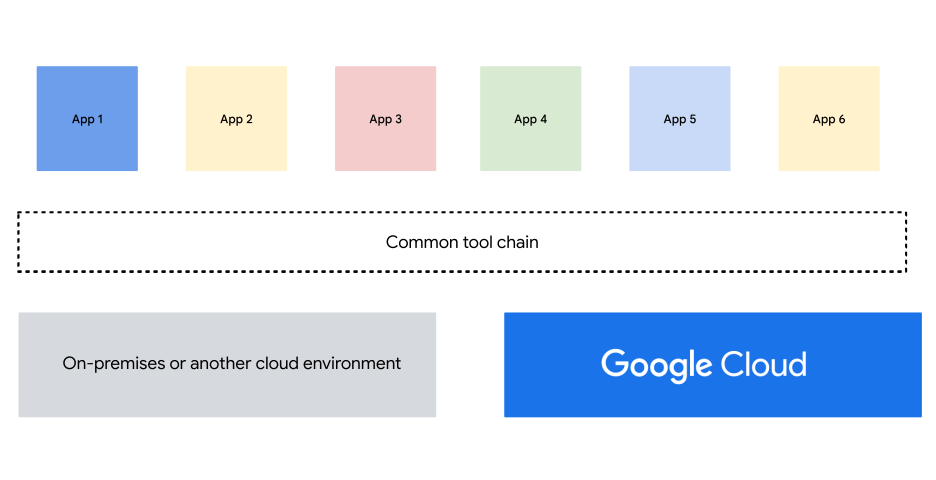
Based on these tools, you can assemble a common tool chain as illustrated in the
following logical diagram. This common tool chain abstracts away the differences
between computing environments. It also lets you unify provisioning, deployment,
management, and monitoring.
Although a common tool chain can help you achieve portability, it's subject to
several of the following shortcomings:
- Using VMs as a common foundation can make it difficult to implement true cloud-first applications. Also, using VMs only can prevent you from using cloud-managed services. You might miss opportunities to reduce administrative overhead.
- Building and maintaining a common tool chain incurs overhead and operational costs.
- As the tool chain expands, it can develop unique complexities tailored to the specific needs of your company. This increased complexity can contribute to rising training costs.
Before deciding to develop tooling and automation, explore the managed services
your cloud provider offers. When your provider offers managed services that
support the same use case, you can abstract away some of its complexity. Doing
so lets you focus on the workload and the application architecture rather than
the underlying infrastructure.
For example, you can use the
[Kubernetes Resource Model](https://cloud.google.com/blog/topics/developers-practitioners/build-platform-krm-part-2-how-kubernetes-resource-model-works)
to automate the creation of Kubernetes clusters using a declarative
configuration approach. You can use
[Deployment Manager convert](https://docs.cloud.google.com/deployment-manager/docs/dm-convert)
to convert your Deployment Manager configurations and templates
to other declarative configuration formats that Google Cloud supports
(like Terraform and the Kubernetes Resource Model) so they're portable when you
publish.
You can also consider
[automating](https://docs.cloud.google.com/deployment-manager/docs/best-practices#automation)
the creation of projects and the creation of resources within those projects.
This automation can help you adopt an infrastructure-as-code approach for
project provisioning.
## Containers and Kubernetes
Using cloud-managed capabilities helps to reduce the complexity of building and
maintaining a custom tool chain to achieve workload automation and portability.
However, only using VMs as a common foundation makes it difficult to implement
truly cloud-first applications. One solution is to use containers and Kubernetes
instead.
Containers help your software to run reliably when you move it from one
environment to another. Because containers decouple applications from the
underlying host infrastructure, they facilitate the deployment across computing
environments, such as hybrid and multicloud.
Kubernetes handles the orchestration, deployment, scaling, and management of
your containerized applications. It's open source and governed by the
[Cloud Native Computing Foundation](https://www.cncf.io/).
Using Kubernetes provides the services that form the foundation of a cloud-first
application. Because you can install and run Kubernetes on many computing
environments, you can also use it to establish a common runtime layer across
computing environments:
- Kubernetes provides the same services and APIs in a cloud or private computing environment. Moreover, the level of abstraction is much higher than when working with VMs, which generally translates into less required groundwork and improved developer productivity.
- Unlike a custom tool chain, Kubernetes is widely adopted for both development and application management, so you can tap into existing expertise, documentation, and third-party support.
- Kubernetes supports all container implementations that:
- Support the Kubernetes [Container Runtime Interface (CRI)](https://github.com/kubernetes/community/blob/master/contributors/devel/sig-node/container-runtime-interface.md)
- Are industry-adopted for application
- Aren't tied to any specific vendor
When a workload is running on Google Cloud, you can avoid the effort of
installing and operating Kubernetes by using a managed Kubernetes platform such
as GKE. Doing so can help operations staff shift their
focus from building and maintaining infrastructure to building and maintaining applications.
You can also use
[Autopilot](https://docs.cloud.google.com/kubernetes-engine/docs/concepts/autopilot-overview),
a GKE mode of operation that manages your cluster
configuration, including your nodes, scaling, security, and other preconfigured
settings. When using GKE Autopilot, consider your
scaling requirements and its
[scaling limits](https://docs.cloud.google.com/kubernetes-engine/quotas#limits_per_cluster).
Technically, you can install and run Kubernetes on many computing environments
to establish a common runtime layer. Practically, however, building and
operating such an architecture can create complexity. The architecture gets even
more complex when you require container-level security control (service
mesh).
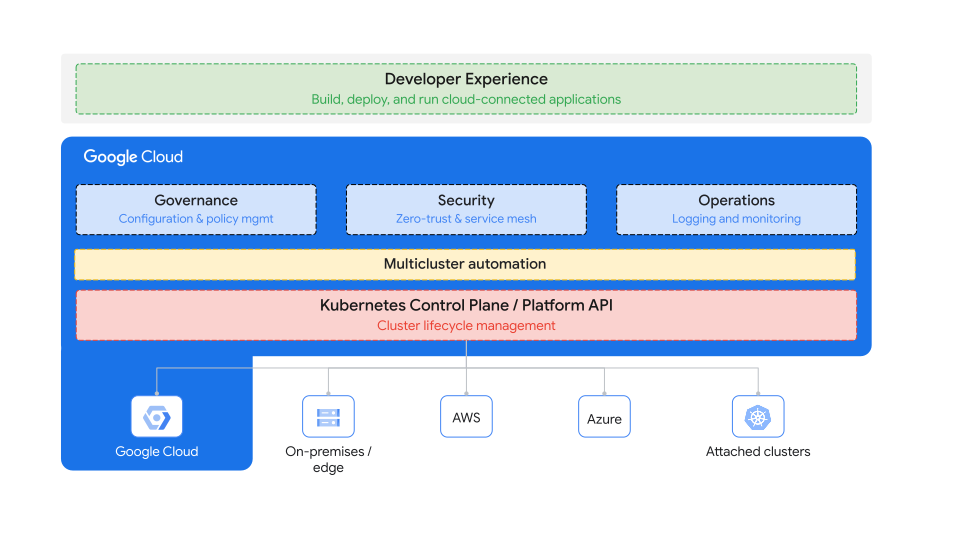
To simplify managing multi-cluster deployments, you can use
[GKE](https://docs.cloud.google.com/kubernetes-engine/docs/concepts/kubernetes-engine-overview)
to run modern applications anywhere at scale. GKE includes
powerful managed open source components to secure workloads, enforce compliance
policies, and provide deep network observability and troubleshooting.
As illustrated in the following diagram, using GKE
means you can
[operate multi-cluster applications as fleets](https://docs.cloud.google.com/kubernetes-engine/docs/fleets-overview).
GKE helps with the following design options to support
hybrid and multicloud architectures:
- Design and build cloud-like experiences on-premises or unified
solutions for transitioning applications to GKE hybrid
environment. For more information, see the
[GKE hybrid environment reference architecture](https://docs.cloud.google.com/anthos/docs/architecture/anthos-hybrid-environment).
- Design and build a solution to solve multicloud complexity with a
consistent governance, operations, and security posture with
GKE Multi-Cloud. For more information, see the
[GKE Multi-Cloud](https://docs.cloud.google.com/anthos/clusters/docs/multi-cloud)
documentation.
GKE also provides logical groupings of similar
environments with consistent security, configuration, and service management.
For example, GKE and related products allow you to create a
[zero trust distributed architecture](https://docs.cloud.google.com/architecture/network-hybrid-multicloud#zero_trust_distributed_architecture).
In a zero trust distributed architecture, services that are deployed
on-premises or in another cloud environment can communicate across environments
through end-to-end mTLS secure service-to-service communications.
## Workload portability considerations
Kubernetes and GKE provide a layer of abstraction for
workloads that can hide the many intricacies and differences between computing
environments. The following list describes some of those abstractions:
- An application might be portable to a different environment with minimal changes, but that doesn't mean that the application performs equally well in both environments.
- Differences in underlying compute, infrastructure security capabilities, or networking infrastructure, along with proximity to dependent services, might lead to substantially different performance.
- Moving a workload between computing environments might also require you to move data.
- Different environments can have different data storage and management services and facilities.
- The behavior and performance of load balancers provisioned with Kubernetes or GKE might differ between environments.
## Data movement
Because it can be complex to move, share, and access data at scale between
computing environments, enterprise-level companies might hesitate to build a
hybrid or multicloud architecture. This hesitation might increase if they are
already storing most of their data on-premises or in one cloud.
However, the various
[data movement options](https://cloud.google.com/data-movement)
offered by Google Cloud, provide enterprises with a comprehensive set of
solutions to help move, integrate, and transform their data. These options help
enterprises to store, share, and access data across different environments in a
way that meets their specific use cases. That ability ultimately makes it easier
for business and technology decision-makers to adopt hybrid and multicloud
architectures.
Data movement is an important consideration for hybrid and multicloud strategy
and architecture planning. Your team needs to identify your different business
use cases and the data that powers them. You should also think about storage
type, capacity, accessibility, and movement options.
If an enterprise has a data classification for regulated industries, that
classification can help to identify storage locations and cross-region data
movement restrictions for certain data classes. For more information, see
[Sensitive Data Protection](https://docs.cloud.google.com/sensitive-data-protection/docs/sensitive-data-protection-overview).
Sensitive Data Protection is a fully managed service designed to help you discover, classify, and protect your data assets.
To explore the process, from planning a data transfer to using best practices in
implementing a plan, see
[Migration to Google Cloud: Transferring your large datasets](https://docs.cloud.google.com/architecture/migration-to-google-cloud-transferring-your-large-datasets).
## Security
As organizations adopt hybrid and multicloud architectures, their attack
surface can increase depending on the way their systems and data are distributed
across different environments. Combined with the constantly evolving threat
landscape, increased attack surfaces can lead to an increased risk of
unauthorized access, data loss, and other security incidents. Carefully consider
security when planning and implementing hybrid or multicloud strategies.
For more information, see
[Attack Surface Management for Google Cloud](https://cloud.google.com/blog/products/identity-security/mandiants-attack-surface-management-now-works-with-google-cloud).
When architecting for a hybrid architecture, it's not always technically
feasible or viable to extend on-premises security approaches to the cloud.
However, many of the networking security capabilities of hardware
appliances are cloud-first features and they operate in a distributed
manner. For more information about the cloud-first network security capabilities
of Google Cloud, see
[Cloud network security](https://cloud.google.com/learn/what-is-cloud-network-security).
Hybrid and multicloud architectures can introduce additional security
challenges, such as consistency and observability. Every public cloud provider
has its own approach to security, including different models, best practices,
infrastructure and application security capabilities, compliance obligations,
and even the names of security services. These inconsistencies can increase
security risk. Also, the
[shared responsibility model](https://docs.cloud.google.com/architecture/framework/security/shared-responsibility-shared-fate)
of each cloud provider can differ. It's essential to identify and understand the
exact demarcation of responsibilities in a multicloud architecture.
Observability is key to gaining insights and metrics from the different
environments. In a multicloud architecture, each cloud typically provides tools
to monitor for
[security posture](https://docs.cloud.google.com/software-supply-chain-security/docs/assess)
and misconfigurations. However, using these tools results in siloed visibility,
which prevents building advanced threat intelligence across the entire
environment. As a result, the security team must switch between tools and
dashboards to keep the cloud secure. Without an overarching end-to-end security
visibility for the hybrid and multicloud environments, it's difficult to
prioritize and mitigate vulnerabilities.
To obtain the full
visibility and posture of all your environments, prioritize your vulnerabilities,
and mitigate the vulnerabilities you identify. We recommend a centralized
visibility model. A centralized visibility model avoids the need for manual
correlation between different tools and dashboards from different platforms. For
more information, see
[Hybrid and multicloud monitoring and logging patterns](https://docs.cloud.google.com/architecture/hybrid-and-multi-cloud-monitoring-and-logging-patterns).
As part of your planning to mitigate security risks and deploy workloads on
Google Cloud, and to help you plan and design your cloud solution for
meeting your security and compliance objectives, explore the Google Cloud
[security best practices center](https://cloud.google.com/security/best-practices)
and the
[enterprise foundations blueprint](https://docs.cloud.google.com/architecture/blueprints/security-foundations).
Compliance objectives can vary, as they are influenced by
both industry-specific regulations and the varying regulatory requirements of
different regions and countries. For more information, see the Google Cloud
[compliance resource center](https://cloud.google.com/compliance).
The following are some of the primary recommended
approaches for architecting secure hybrid and multicloud architecture:
- Develop a unified tailored cloud security strategy and architecture. Hybrid and
multicloud security strategies should be tailored to the specific needs and
objectives of your organization.
It's essential to understand the targeted
architecture and environment before implementing security controls, because
each environment can use different features, configurations, and services.
- Consider a unified security architecture across hybrid and multicloud
environments.
- Standardize cloud design and deployments, especially security design and
capabilities. Doing so can improve efficiency and enable unified governance
and tooling.
- Use multiple security controls.
Typically, no single security control can
adequately address all security protection requirements. Therefore,
organizations should use a combination of security controls in a layered
defense approach, also known as defense-in-depth.
- Monitor and continuously improve security postures: Your organization should
monitor its different environments for security threats and vulnerabilities.
It should also try to continuously improve its security posture.
- Consider using cloud security posture management (CSPM) to identify and
remediate security misconfigurations and cybersecurity threats. CSPM also
provides vulnerability assessments across hybrid and multicloud
environments.
[Security Command Center](https://docs.cloud.google.com/security-command-center)
is a built-in security and risk management solution for Google Cloud
that helps to identify misconfigurations and vulnerabilities and more.
[Security Health Analytics](https://docs.cloud.google.com/security-command-center/docs/concepts-security-health-analytics)
is a managed vulnerability assessment scanning tool. It's a feature of
Security Command Center that identifies security risks and vulnerabilities in your
Google Cloud environment and provides recommendations for remediating
them.
[Mandiant Attack Surface Management for Google Cloud](https://www.mandiant.com/resources/blog/cloud-visibility-attack-surface-management)
lets your organization better see their multicloud or hybrid cloud environment
assets. It automatically discovers assets from
multiple cloud providers, DNS, and the extended external attack surface to give
your enterprise a deeper understanding of its ecosystem. Use this information
to prioritize remediation on the vulnerabilities and exposures
that present the most risk.
- Cloud security information and event management (SIEM) solution: Helps to collect and analyze security logs from hybrid and multicloud environments to detect and respond to threats. [Google Security Operations SIEM](https://cloud.google.com/security/products/security-information-event-management) from Google Cloud helps to provide security Information and event management by collecting, analyzing, detecting, and investigating all of your security data in one place.
# Build hybrid and multicloud architectures using Google Cloud: What's next
- Learn more about [how to get started with your migration to Google Cloud](https://docs.cloud.google.com/architecture/migration-to-gcp-getting-started).
- Learn about common [architecture patterns](https://docs.cloud.google.com/architecture/hybrid-and-multi-cloud-architecture-patterns) for hybrid and multicloud, which scenarios they're best suited for, and how to apply them.
- Find out more about [networking patterns](https://docs.cloud.google.com/architecture/hybrid-and-multi-cloud-network-topologies) for hybrid and multicloud architectures, and how to design them.
- Explore, analyze, and compare the different [deployment archetypes](https://docs.cloud.google.com/architecture/deployment-archetypes) on Google Cloud.
- Learn about [landing zone design](https://docs.cloud.google.com/architecture/landing-zones) in Google Cloud.
- Learn more about [Google Cloud Well-Architected Framework](https://docs.cloud.google.com/architecture/framework)
- Read about our [best practices for migrating VMs to Compute Engine](https://docs.cloud.google.com/solutions/best-practices-migrating-vm-to-compute-engine).