> [!IMPORTANT]
> This page provides a single-page view of all the pages in [Build hybrid and
> multicloud architectures using Google Cloud](https://docs.cloud.google.com/architecture/hybrid-multicloud-patterns-and-practices). You can print this page, or you can save it in PDF format by using your browser's print function and choosing the **Save as PDF** option. This page does *not* provide a table of contents (ToC) pane on the right side.
This document is the second of three documents in a set. It discusses common hybrid and
multicloud architecture patterns. It also describes the scenarios that these
patterns are best suited for. Finally, it provides the best practices you can
use when deploying such architectures in Google Cloud.
The document set for hybrid and multicloud architecture patterns consists of
these parts:
- [Build hybrid and multicloud architectures](https://docs.cloud.google.com/architecture/hybrid-multicloud-patterns): discusses planning a strategy for architecting a hybrid and multicloud setup with Google Cloud.
- Hybrid and multicloud architecture patterns: discusses common architecture patterns to adopt as part of a hybrid and multicloud strategy (this document).
- [Hybrid and multicloud secure networking architecture patterns](https://docs.cloud.google.com/architecture/hybrid-multicloud-secure-networking-patterns): discusses hybrid and multicloud networking architecture patterns from a networking perspective.
Every enterprise has a unique portfolio of application workloads that place
requirements and constraints on the architecture of a hybrid or multicloud
setup. Although you must design and tailor your architecture to meet these
constraints and requirements, you can rely on some common patterns to define the foundational architecture.
An architecture pattern is a repeatable way to structure multiple functional
components of a technology solution, application, or service to create a
reusable solution that addresses certain requirements or use cases. A
cloud-based technology solution is often made of several distinct and
distributed cloud services. These services collaborate to deliver required
functionality. In this context, each service is considered a functional
component of the technology solution. Similarly, an application can consist of
multiple functional tiers, modules, or services, and each can represent a
functional component of the application architecture. Such an architecture can
be standardized to address specific business use cases and serve as a
foundational, reusable pattern.
To generally define an architecture pattern for an application or solution,
identify and define the following:
- The components of the solution or application.
- The expected functions for each component---for example, frontend functions to provide a graphical user interface or backend functions to provide data access.
- How the components communicate with each other and with external systems or users. In modern applications, these components interact through well-defined interfaces or APIs. There are a wide range of communication models such as asynchronous and synchronous, request-response, or queue-based.
The following are the two main categories of hybrid and multicloud architecture
patterns:
- [Distributed architecture patterns](https://docs.cloud.google.com/architecture/hybrid-multicloud-patterns-and-practices/distributed-patterns): These patterns rely on a distributed deployment of workloads or application components. That means they run an application (or specific components of that application) in the computing environment that suits the pattern best. Doing so lets the pattern capitalize on the different properties and characteristics of distributed and interconnected computing environments.
- Redundant architecture patterns: These patterns are based on redundant deployments of workloads. In these patterns, you deploy the same applications and their components in multiple computing environments. The goal is to either increase the performance capacity or resiliency of an application, or to replicate an existing environment for development and testing.
When you implement the architecture pattern that you select, you must use a
suitable
[deployment archetype](https://docs.cloud.google.com/architecture/deployment-archetypes).
Deployment archetypes are zonal, regional, multi-regional, or global. This
selection forms the basis for constructing application-specific deployment
architectures. Each deployment archetype defines a combination of failure
domains within which an application can operate. These failure domains can
encompass one or more
[Google Cloud zones or regions](https://docs.cloud.google.com/architecture/infra-reliability-guide/building-blocks#regions_and_zones),
and can be expanded to include your on-premises data centers or failure domains
in other cloud providers.
This series contains the following pages:
- [Distributed architecture patterns](https://docs.cloud.google.com/architecture/hybrid-multicloud-patterns-and-practices/distributed-patterns)
- [Tiered hybrid pattern](https://docs.cloud.google.com/architecture/hybrid-multicloud-patterns-and-practices/tiered-hybrid-pattern)
- [Partitioned multicloud pattern](https://docs.cloud.google.com/architecture/hybrid-multicloud-patterns-and-practices/partitioned-multicloud-pattern)
- [Analytics hybrid and multicloud pattern](https://docs.cloud.google.com/architecture/hybrid-multicloud-patterns-and-practices/analytics-hybrid-multicloud-pattern)
- [Edge hybrid pattern](https://docs.cloud.google.com/architecture/hybrid-multicloud-patterns-and-practices/edge-hybrid-pattern)
- Redundant architecture patterns
- [Environment hybrid pattern](https://docs.cloud.google.com/architecture/hybrid-multicloud-patterns-and-practices/environment-hybrid-pattern)
- [Business continuity hybrid and multicloud patterns](https://docs.cloud.google.com/architecture/hybrid-multicloud-patterns-and-practices/business-continuity-patterns)
- [Cloud bursting pattern](https://docs.cloud.google.com/architecture/hybrid-multicloud-patterns-and-practices/cloud-bursting-pattern)
## Contributors
Author: [Marwan Al Shawi](https://www.linkedin.com/in/marwanalshawi) \| Partner Customer Engineer
Other contributors:
- [Saud Albazei](https://www.linkedin.com/in/albazei) \| Customer Engineer, Application Modernization
- [Anna Berenberg](https://www.linkedin.com/in/annaberenberg) \| Engineering Fellow
- [Marco Ferrari](https://www.linkedin.com/in/ferrarimark) \| Cloud Solutions Architect
- [Victor Moreno](https://www.linkedin.com/in/vimoreno) \| Product Manager, Cloud Networking
- [Johannes Passing](https://www.linkedin.com/in/johannespassing) \| Cloud Solutions Architect
- [Mark Schlagenhauf](https://www.linkedin.com/in/mark-schlagenhauf-63b98) \| Technical Writer, Networking
- [Daniel Strebel](https://www.linkedin.com/in/danistrebel) \| EMEA Solution Lead, Application Modernization
- [Ammett Williams](https://www.linkedin.com/in/ammett) \| Developer Relations Engineer
# Distributed architecture patterns
When migrating from a non-hybrid or non-multicloud computing environment to a
hybrid or multicloud architecture, first consider the constraints of your
existing applications and how those constraints could lead to application
failure. This
consideration becomes more important when your applications or application
components operate in a distributed manner across different environments. After
you have considered your constraints, develop a plan to avoid or overcome them.
Make sure to consider the unique capabilities of each computing environment in a
distributed architecture.
> [!NOTE]
> **Note:** You can apply different architecture patterns to different applications, based on their use cases and requirements. This means that you might have multiple applications with different hybrid and multicloud architecture patterns operating at the same time.
## Design considerations
The following design considerations apply to distributed deployment patterns.
Depending on the target solution and business objectives, the priority and the
effect of each consideration can vary.
### Latency
In any architecture pattern that distributes application components (frontends,
backends, or microservices) across different computing environments,
communication latency can occur. This latency is influenced by the hybrid
network connectivity (Cloud VPN and Cloud Interconnect) and the
geographical distance between the on-premises site and the cloud
[regions](https://docs.cloud.google.com/docs/geography-and-regions#regions_and_zones),
or between cloud regions in a multicloud setup. Therefore, it's crucial to
assess the latency requirements of your applications and their sensitivity to
network delays. Applications that can tolerate latency are more suitable
candidates for initial distributed deployment in a hybrid or multicloud
environment.
### Temporary versus final state architecture
To specify the expectations and any potential implications for cost, scale, and
performance, it's important to analyze what type of architecture you need and
the intended duration as part of the planning stage. For example, if you plan to
use a hybrid or multicloud architecture for a long time or permanently, you
might want to consider using
[Cloud Interconnect](https://docs.cloud.google.com/network-connectivity/docs/interconnect/concepts/overview).
To reduce outbound data transfer costs and to optimize hybrid connectivity
network performance, Cloud Interconnect discounts the outbound data transfer charges that meet the
[discounted data transfer rate conditions](https://cloud.google.com/network-connectivity/docs/interconnect/pricing).
### Reliability
Reliability is a major consideration when architecting IT systems.
[Uptime availability](https://cloud.google.com/blog/products/gcp/available-or-not-that-is-the-question-cre-life-lessons)
is an essential aspect of system reliability. In Google Cloud, you can
increase the resiliency of an application by deploying redundant components of
that application across multiple zones in a single region^[1](https://docs.cloud.google.com/architecture/hybrid-multicloud-patterns-and-practices/one-page-view#fn1)^, or across
multiple regions, with switchover capabilities. Redundancy is one of the key
elements to improve the overall availability of an application. For applications
with a distributed setup across hybrid and multicloud environments, it's
important to maintain a consistent level of availability.
To enhance the availability of a system in an on-premises environment, or in
other cloud environments, consider what hardware or software redundancy---with
failover mechanisms---you need for your applications and their components.
Ideally, you should consider the availability of a service or an application
across the various components and supporting infrastructure (including
[hybrid connectivity availability](https://cloud.google.com/network-connectivity/docs/interconnect/sla))
across all the environments. This concept is also referred to as the composite
availability of an application or service.
Based on the dependencies between the components or services, the composite
availability for an application might be higher or lower than for an individual
service or component. For more information, see
[Composite availability: calculating the overall availability of cloud infrastructure](https://cloud.google.com/blog/products/devops-sre/composite-cloud-availability).
To achieve the level of system reliability that you want, define clear
reliability metrics and design applications to self-heal and endure disruptions effectively across the different environments. To help you define appropriate
ways to measure the customer experience of your services, see
[Define reliability based on user-experience goals](https://docs.cloud.google.com/architecture/framework/reliability/define-reliability-based-on-user-experience-goals).
### Hybrid and multicloud connectivity
The requirements of the communication between the distributed applications
components should influence your selection of a hybrid network connectivity
option. Each connectivity option has its advantages and disadvantages, as well
as specific drivers to consider, such as cost, traffic volume, security, and so
forth. For more information, see the
[connectivity design considerations](https://docs.cloud.google.com/architecture/hybrid-multicloud-secure-networking-patterns/design-considerations)
section.
### Manageability
Consistent and unified management and monitoring tools are essential for
successful hybrid and multicloud setups (with or without workload portability).
In the short term, these tools can add development, testing, and operations
costs. Technically, the more cloud providers you use, the more complex
[managing your environments](https://cloud.google.com/learn/what-is-multicloud#section-4)
becomes. Most public cloud vendors not only have different features, but also
have varying tools, SLAs, and APIs for managing cloud services. Therefore, weigh
the strategic advantages of your selected architecture against the potential
short-term complexity versus the long-term benefits.
### Cost
Each cloud service provider in a multicloud environment has its own billing
metrics and tools. To provide better visibility and unified dashboards, consider
using multicloud cost management and optimization tooling. For example, when
building cloud-first solutions across multiple cloud environments each
provider's products, pricing, discounts, and management tools can create cost
inconsistencies between those environments.
We recommend having a single, well-defined method for calculating the full costs
of cloud resources, and to provide cost visibility. Cost visibility is essential
for cost optimization. For example, by combining billing data from the cloud
providers you use and using Google Cloud
[Looker Cloud Cost Management Block](https://marketplace.looker.com/marketplace/detail/multicloud-billing-dashboard),
you can create a centralized view of your multicloud costs. This view can help
provide a consolidated reporting view of your spend across multiple clouds. For
more information, see
[The strategy for effectively optimizing cloud billing cost management](https://cloud.google.com/blog/products/data-analytics/cloud-cost-management).
We also recommend using FinOps practice to make costs visible.
As a part of a strong FinOps practice, a central team can delegate the decision making for resource optimization to any other teams involved in a project to
encourage individual accountability.
In this model, the central team should standardize the process, the reporting,
and the tooling for cost optimization. For more information about the different
cost optimization aspects and recommendations that you should consider, see
[Google Cloud Well-Architected Framework: Cost optimization](https://docs.cloud.google.com/architecture/framework/cost-optimization).
### Data movement
[Data movement](https://docs.cloud.google.com/architecture/hybrid-multicloud-patterns/other-considerations#data_movement)
is an important consideration for hybrid and multicloud strategy and
architecture planning, especially for distributed systems. Enterprises need to
identify their different business use cases, the data that powers them, and how
the data is classified (for regulated industries). They should also consider how
data storage, sharing, and access for distributed systems across environments
might affect application performance and data consistency. Those factors might
influence the application and the data pipeline architecture.
Google Cloud's comprehensive set of
[data movement options](https://cloud.google.com/data-movement)
makes it possible for businesses to meet their specific needs and adopt hybrid
and multicloud architectures without compromising simplicity, efficiency, or
performance.
### Security
When migrating applications to the cloud, it's important to consider
cloud-first security capabilities like consistency, observability, and unified
security visibility. Each public cloud provider has its own approach, best
practices, and capabilities for security. It's important to analyze and align
these capabilities to build a standard, functional security architecture. Strong
IAM controls, data encryption, vulnerability scanning, and
compliance with industry regulations are also important aspects of
cloud security.
When planning a migration strategy, we recommend that you analyze the
previously mentioned considerations. They can help you minimize the chances of
introducing complexities to the architecture as your applications or traffic
volumes grow. Also, designing and building a landing zone is almost always a
prerequisite to deploying enterprise workloads in a cloud environment. A landing
zone helps your enterprise deploy, use, and scale cloud services more securely
across multiple areas and includes different elements, such as identities,
resource management, security, and networking. For more information, see
[Landing zone design in Google Cloud](https://docs.cloud.google.com/architecture/landing-zones).
The following documents in this series describe other distributed architecture
patterns:
- [Tiered hybrid pattern](https://docs.cloud.google.com/architecture/hybrid-multicloud-patterns-and-practices/tiered-hybrid-pattern)
- [Partitioned multicloud pattern](https://docs.cloud.google.com/architecture/hybrid-multicloud-patterns-and-practices/partitioned-multicloud-pattern)
- [Analytics hybrid and multicloud pattern](https://docs.cloud.google.com/architecture/hybrid-multicloud-patterns-and-practices/analytics-hybrid-multicloud-pattern)
- [Edge hybrid pattern](https://docs.cloud.google.com/architecture/hybrid-multicloud-patterns-and-practices/edge-hybrid-pattern)
# Tiered hybrid pattern
The architecture components of an application can be categorized as either
*frontend* or *backend* . In some scenarios, these components can be hosted to
operate from different computing environments. As part of the *tiered hybrid*
architecture pattern, the computing environments are located in an on-premises
private computing environment and in Google Cloud.
Frontend application components are directly exposed to end users or devices. As
a result, these applications are often performance sensitive. To develop new
features and improvements, software updates can be frequent. Because frontend
applications usually rely on backend applications to store and manage data---and
possibly business logic and user input processing---they're often
[stateless](https://docs.cloud.google.com/architecture/framework#use_a_stateless_architecture)
or manage only limited volumes of data.
To be accessible and usable, you can build your frontend applications with
various frameworks and technologies. Some key factors for a successful frontend
application include application performance, response speed, and browser
compatibility.
Backend application components usually focus on storing and managing data. In
some architectures, business logic might be incorporated within the backend
component. New releases of backend applications tend to be less frequent than
releases for frontend applications. Backend applications have the following
challenges to manage:
- Handling a large volume of requests
- Handling a large volume of data
- Securing data
- Maintaining current and updated data across all the system replicas
The
[three-tier web app solution](https://console.cloud.google.com/products/solutions/details/three-tier-web-app)
is one of the most popular implementations for building business web
applications, like ecommerce websites containing different application
components. This architecture contains the following tiers. Each tier operates
independently, but they're closely linked and all function together.
- Web frontend and presentation tier
- Application tier
- Data access or backend tier
Putting these layers into containers separates their technical needs, like
scaling requirements, and helps to migrate them in a phased approach. Also, it
lets you deploy them on platform-agnostic cloud services that can be
portable across environments, use automated management, and scale with cloud
managed platforms, like Cloud Run or Google Kubernetes Engine (GKE). Also,
[Google Cloud-managed databases](https://cloud.google.com/products/databases)
like Cloud SQL help to provide the backend as the database layer.
> [!NOTE]
> **Note:** The implementation of this architecture and the definition of its components can vary depending on whether you separate the tiers into individual systems and layers or combine them.
The tiered hybrid architecture pattern focuses on deploying existing frontend
application components to the public cloud. In this pattern, you keep any
existing backend application components in their private computing environment.
Depending on the scale and the specific design of the application, you can
migrate frontend application components on a case-by-case basis. For more
information, see
[Migrate to Google Cloud](https://docs.cloud.google.com/architecture/migration-to-gcp-getting-started#the_migration_path).
If you have an existing application with backend and frontend components hosted
in your on-premises environment, consider the limits of your current
architecture. For example, as your application scales and the demands on its
performance and reliability increase, you should start evaluating whether parts
of your application should be refactored or moved to a different and more
optimal architecture. The *tiered hybrid* architecture pattern lets you shift
some application workloads and components to the cloud before making a complete
transition. It's also essential to consider the cost, time, and risk involved in
such a migration.
The following diagram shows a typical *tiered hybrid* architecture pattern.
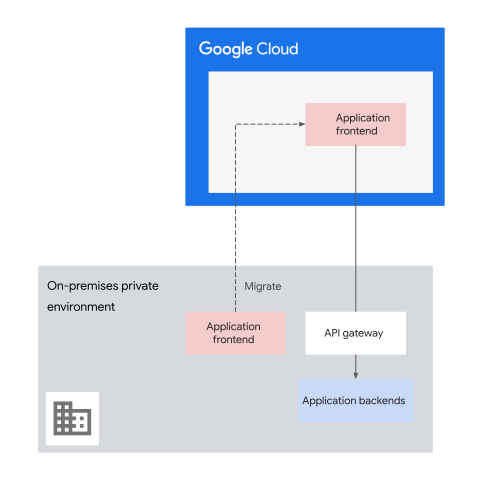
In the preceding diagram, client requests are sent to the application frontend
that is hosted in Google Cloud. In turn, the application frontend sends
data back to the on-premises environment where the application backend is hosted
(ideally through an API gateway).
With the *tiered hybrid* architecture pattern, you can take advantage of
Google Cloud infrastructure and global services, as shown in the example
architecture in the following diagram. The application frontend can be reached
over Google Cloud. It can also add elasticity to the frontend by using
auto-scaling to dynamically and efficiently respond to scaling demand without
over provisioning infrastructure. There are different architectures that
you can use to build and run scalable web apps on Google Cloud. Each
architecture has advantages and disadvantages for different requirements.
For more information, watch
[Three ways to run scalable web apps on Google Cloud](https://www.youtube.com/watch?v=PLu7M2rbkKA) on YouTube.
To learn more about different ways to modernize your ecommerce platform on
Google Cloud, see
[How to build a digital commerce platform on Google Cloud](https://cloud.google.com/blog/topics/developers-practitioners/how-build-digital-commerce-platform-google-cloud).
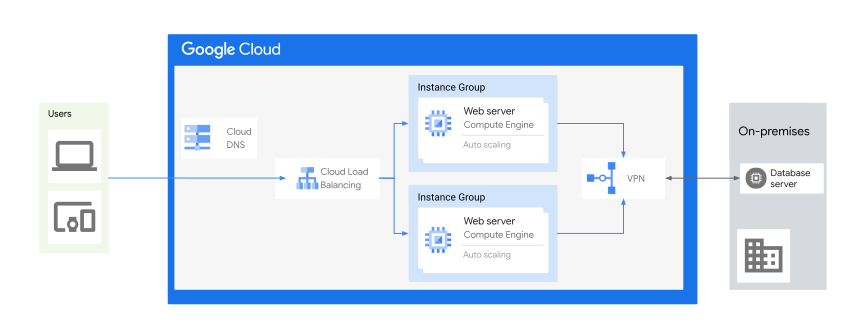
In the preceding diagram, the application frontend is hosted on
Google Cloud to provide a multi-regional and globally optimized user
experience that uses global
[load balancing](https://docs.cloud.google.com/load-balancing/docs/application-load-balancer),
autoscaling, and DDoS protection through
[Google Cloud Armor](https://docs.cloud.google.com/armor).
Over time, the number of applications that you deploy to the public cloud might
increase to the point where you might consider moving backend application
components to the public cloud. If you expect to serve heavy traffic, opting for
cloud-managed services might help you save engineering effort when managing your
own infrastructure. Consider this option unless constraints or requirements
mandate hosting backend application components on-premises. For example, if your
backend data is subject to regulatory restrictions, you probably need to keep
that data on-premises. Where applicable and compliant, however, using
[Sensitive Data Protection](https://docs.cloud.google.com/sensitive-data-protection)
capabilities like
[de-identification techniques](https://docs.cloud.google.com/sensitive-data-protection/docs/deidentify-sensitive-data),
can help you move that data when necessary.
In the tiered hybrid architecture pattern, you also can use
Google Distributed Cloud in some scenarios.
Distributed Cloud lets you run GKE
clusters on dedicated hardware that's provided and maintained by Google and
is separate from Google Cloud data center. To ensure
that Distributed Cloud meets your current and future
requirements, know the limitations of Distributed Cloud
when compared to a conventional cloud-based GKE zone.
## Advantages
Focusing on frontend applications first has several advantages including the
following:
- Frontend components depend on backend resources and occasionally on other frontend components.
- Backend components don't depend on frontend components. Therefore, isolating and migrating frontend applications tends to be less complex than migrating backend applications.
- Because frontend applications often are stateless or don't manage data by themselves, they tend to be less challenging to migrate than backends.
- Frontend components can be optimized as part of the migration to use [stateless architecture](https://docs.cloud.google.com/architecture/framework#use_a_stateless_architecture). For more information, watch [How to port stateful web apps to Cloud Run](https://www.youtube.com/watch?v=mgTI-paDNQ4) on YouTube.
Deploying existing or newly developed frontend applications to the public cloud
offers several advantages:
- Many frontend applications are subject to frequent changes. Running these applications in the public cloud simplifies the setup of a continuous integration/continuous deployment (CI/CD) process. You can use CI/CD to send updates in an efficient and automated manner. For more information, see [CI/CD on Google Cloud](https://docs.cloud.google.com/docs/ci-cd).
- Performance-sensitive frontends with varying traffic load can benefit substantially from the load balancing, multi-regional deployments, [Cloud CDN](https://docs.cloud.google.com/cdn/docs/overview) caching, serverless, and autoscaling capabilities that a cloud-based deployment enables (ideally with [stateless architecture](https://docs.cloud.google.com/architecture/framework#use_a_stateless_architecture)).
- Adopting microservices with containers using a cloud-managed platform,
like GKE, lets you use modern architectures
like [microfrontend](https://en.wikipedia.org/wiki/Microfrontend),
which extend microservices to the frontend components.
Extending microservices is commonly used with frontends that involve
multiple teams collaborating on the same application. That kind of team
structure requires an
iterative approach and continuous maintenance. Some of the advantages of
using microfrontend are as follows:
- It can be made into independent microservices modules for development, testing, and deployment.
- It provides separation where individual development teams can select their preferred technologies and code.
- It can foster rapid cycles of development and deployment without affecting the rest of the frontend components that might be managed by other teams.
- Whether they're implementing user interfaces or APIs, or handling
Internet of Things (IoT) data ingestion, frontend applications can benefit
from the capabilities of cloud services like
[Firebase](https://firebase.google.com/),
[Pub/Sub](https://docs.cloud.google.com/pubsub),
[Apigee](https://docs.cloud.google.com/apigee),
[Cloud CDN](https://docs.cloud.google.com/cdn/docs),
[App Engine](https://docs.cloud.google.com/appengine),
or
[Cloud Run](https://docs.cloud.google.com/run).
- [Cloud-managed API proxies](https://docs.cloud.google.com/apigee/docs/api-platform/fundamentals/understanding-apis-and-api-proxies#whatisanapiproxy)
help to:
- Decouple the app-facing API from your backend services, like microservices.
- Shield apps from backend code changes.
- Support your existing API-driven frontend architectures, like backend for frontend (BFF), microfrontend, and others.
- Expose your APIs on Google Cloud or other environments by implementing API proxies on Apigee.
You can also apply the *tiered hybrid* pattern in reverse, by deploying
backends in the cloud while keeping frontends in private computing environments.
Although it's less common, this approach is best applied when you're dealing
with a heavyweight and monolithic frontend. In such cases, it might be easier to
extract backend functionality iteratively, and to deploy these new backends in
the cloud.
The third part of this series discusses possible networking patterns to enable
such an architecture.
[Apigee hybrid](https://docs.cloud.google.com/apigee/docs/hybrid/v1.10/what-is-hybrid)
helps as a platform for building and managing API proxies in a hybrid deployment
model. For more information, see
[Loosely coupled architecture](https://dora.dev/devops-capabilities/technical/loosely-coupled-architecture/),
including tiered monolithic and microservices architectures.
## Best practices
Use the information in this section as you plan for your tiered hybrid architecture.
## Best practices to reduce complexity
When you're applying the *tiered hybrid* architecture pattern, consider the
following best practices that can help to reduce its overall deployment and
operational complexity:
- Based on the assessment of the communication models of the identified applications, select the most efficient and effective communication solution for those applications.
Because most user interaction involves systems that connect across
multiple computing environments, fast and low-latency connectivity between
those systems is important. To meet availability and performance
expectations, you should design for high availability, low latency, and
appropriate throughput levels. From a security point of view, communication
needs to be fine-grained and controlled. Ideally, you should expose
application components using secure APIs. For more information, see
[Gated egress](https://docs.cloud.google.com/architecture/hybrid-multicloud-secure-networking-patterns/gated-egress).
- To minimize communication latency between environments, select a [Google Cloud region](https://cloud.google.com/about/locations) that is geographically close to the private computing environment where your application backend components are hosted. For more information, see [Best practices for Compute Engine regions selection](https://docs.cloud.google.com/solutions/best-practices-compute-engine-region-selection).
- Minimize high dependencies between systems that are running in different environments, particularly when communication is handled synchronously. These dependencies can slow performance, decrease overall availability, and potentially incur additional outbound data transfer charges.
- With the *tiered hybrid* architecture pattern, you might have larger volumes of inbound traffic from on-premises environments coming into Google Cloud compared to outbound traffic leaving Google Cloud. Nevertheless, you should know the anticipated [outbound data transfer](https://cloud.google.com/vpc/network-pricing#internet_egress) volume leaving Google Cloud. If you plan to use this architecture long term with high outbound data transfer volumes, consider using Cloud Interconnect. Cloud Interconnect can help to optimize connectivity performance and might reduce outbound data transfer charges for traffic that meets certain conditions. For more information, see [Cloud Interconnect pricing](https://cloud.google.com/network-connectivity/docs/interconnect/pricing).
- To protect sensitive information, we recommend encrypting all communications [in transit](https://docs.cloud.google.com/architecture/landing-zones/decide-security#encrypt-transit). If encryption is required at the connectivity layer, you can use VPN tunnels, [HA VPN over Cloud Interconnect](https://docs.cloud.google.com/network-connectivity/docs/interconnect/concepts/ha-vpn-interconnect), and [MACsec for Cloud Interconnect](https://docs.cloud.google.com/network-connectivity/docs/interconnect/concepts/macsec-overview).
- To overcome inconsistencies in protocols, APIs, and authentication
mechanisms across diverse backends, we recommend, where applicable, to
deploy an API gateway or proxy as a unifying
[facade](https://cloud.google.com/apigee/resources/ebook/api-facade-pattern-register).
This gateway or proxy acts as a centralized control point and performs the
following measures:
- Implements additional security measures.
- Shields client apps and other services from backend code changes.
- Facilitates audit trails for communication between all cross-environment applications and its decoupled components.
- Acts as an [intermediate communication layer](https://docs.cloud.google.com/solutions/unlocking-legacy-applications#section-3) between legacy and modernized services.
- Apigee and [Apigee hybrid](https://docs.cloud.google.com/apigee/docs/hybrid/v1.10/what-is-hybrid) lets you host and manage enterprise-grade and hybrid gateways across on-premises environments, edge, other clouds, and Google Cloud environments.
- To facilitate the establishment of hybrid setups, use
Cloud Load Balancing with [hybrid connectivity](https://docs.cloud.google.com/load-balancing/docs/l7-internal#load_balancing_with_hybrid_connectivity).
That means you can extend the benefits of cloud load balancing to services
hosted on your on-premises compute environment. This approach enables
phased workload migrations to Google Cloud with minimal or no service
disruption, ensuring a smooth transition for the distributed services. For
more information, see
[Hybrid connectivity network endpoint groups overview](https://docs.cloud.google.com/load-balancing/docs/negs/hybrid-neg-concepts#hybrid_architecture).
- Sometimes, using an API gateway, or a proxy and
an [Application Load Balancer](https://docs.cloud.google.com/load-balancing/docs/application-load-balancer)
together, can provide a more robust solution for managing,
securing, and distributing API traffic at scale.
[Using Cloud Load Balancing with API gateways](https://docs.cloud.google.com/api-gateway/docs/gateway-serverless-neg)
lets you accomplish the following:
- Provide high-performing APIs with Apigee and Cloud CDN, to reduce latency, host APIs globally, and increase availability for peak traffic seasons. For more information, watch [Delivering high-performing APIs with
Apigee and Cloud CDN](https://www.youtube.com/watch?v=lwiJUaGPCK4) on YouTube.
- Implement advanced traffic management.
- Use Cloud Armor as a DDoS protection and network security service to protect your APIs.
- Manage efficient load balancing across gateways in multiple regions. For more information, watch [Securing APIs and Implementing multi-region failover with
Private Service Connect and Apigee](https://www.youtube.com/watch?v=AatzC4ct7co) on YouTube.
- Use
[API management and service mesh](https://cloud.google.com/resources/api-management-and-service-mesh-report)
to secure and control service communication and exposure with microservices
architecture.
- Use [Cloud Service Mesh](https://cloud.google.com/products/service-mesh) to allow for service-to-service communication that maintains the quality of service in a system composed of distributed services where you can manage authentication, authorization, and encryption between services.
- Use an API management platform like Apigee that lets your organization and external entities consume those services by exposing them as APIs.
- [Establish common identity](https://docs.cloud.google.com/architecture/authenticating-corporate-users-in-a-hybrid-environment)
between environments so that systems can authenticate securely across
environment boundaries.
- Deploy CI/CD and configuration management systems in the public cloud.
For more information, see
[Mirrored networking architecture pattern](https://docs.cloud.google.com/architecture/hybrid-multicloud-secure-networking-patterns/mirrored-pattern).
- To help increase operational efficiency, use consistent tooling and
CI/CD pipelines across environments.
## Best practices for individual workload and application architectures
- Although the focus lies on frontend applications in this pattern, stay aware of the need to modernize your backend applications. If the development pace of backend applications is substantially slower than for frontend applications, the difference can cause extra complexity.
- Treating APIs as backend interfaces streamlines integrations, frontend development, service interactions, and hides backend system complexities. To address these challenges, [Apigee](https://docs.cloud.google.com/apigee) facilitates API gateway/proxy development and management for hybrid and multicloud deployments.
- Choose the [rendering approach](https://developers.google.com/solutions/content-driven/hosting/rendering) for your frontend web application based on the content (static versus dynamic), the search engine optimization performance, and the expectations about page loading speeds.
- When selecting an architecture for content-driven web applications, various options are available, including monolithic, serverless, event-based, and microservice architectures. To select the most suitable architecture, thoroughly assess these options against your current and future application requirements. To help you make an architectural decision that's aligned with your business and technical objectives, see [Comparison of different architectures for content-driven web application backends](https://developers.google.com/solutions/content-driven/backend/architecture#comparison_of_different_architectures_for_content-driven_web_application_backends), and [Key Considerations for web backends](https://developers.google.com/solutions/content-driven/backend#key_considerations_for_web_backends).
- With a microservices architecture, you can use containerized applications
with Kubernetes as the common runtime layer. With the tiered hybrid
architecture pattern, you can run it in either of the following scenarios:
- Across both environments (Google Cloud and your
on-premises environments).
- When using containers and Kubernetes across environments, you have the flexibility to modernize workloads and then migrate to Google Cloud at different times. That helps when a workload depends heavily on another and can't be migrated individually, or to use hybrid workload portability to use the best resources available in each environment. In all cases, GKE can be a key enabling technology. For more information, see [GKE hybrid environment](https://docs.cloud.google.com/anthos/docs/architecture/anthos-hybrid-environment).
- In a Google Cloud environment for the migrated and
modernized application components.
- Use this approach when you have legacy backends on-premises that lack containerization support or require significant time and resources to modernize in the short-term.
For more information about designing and refactoring a monolithic app to
a microservice architecture to modernize your web application architecture,
see
[Introduction to microservices](https://docs.cloud.google.com/architecture/microservices-architecture-introduction).
- You can combine data storage technologies depending on the needs of
your web applications. Using Cloud SQL for structured data and
Cloud Storage for media files is a common approach to meet diverse data
storage needs. That said, the choice depends heavily on your use case. For
more information about data storage options for content-driven application
backends and effective modalities, see
[Data Storage Options for Content-Driven Web Apps](https://developers.google.com/solutions/content-driven/data-storage/options).
Also, see
[Your Google Cloud database options, explained](https://cloud.google.com/blog/topics/developers-practitioners/your-google-cloud-database-options-explained).
# Partitioned multicloud pattern
The *partitioned multicloud* architecture pattern combines multiple public
cloud environments that are operated by different cloud service providers. This
architecture provides the flexibility to deploy an application in an optimal
computing environment that accounts for the
multicloud drivers and considerations discussed in the first part of this
series.
The following diagram shows a partitioned multicloud architecture
pattern.
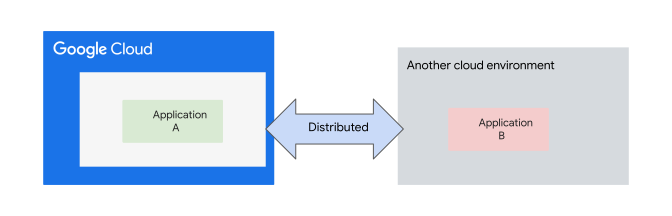
This architecture pattern can be built in two different ways. The first approach
is based on deploying the application components in different public cloud
environments. This approach is also referred to as a
[composite architecture](https://services.google.com/fh/files/misc/google-cloud-oci-guide.pdf)
and is the same approach as the
[*tiered hybrid* architecture pattern](https://docs.cloud.google.com/architecture/hybrid-multicloud-patterns-and-practices/tiered-hybrid-pattern).
Instead of using an on-premises environment with a public
cloud, however, it uses at least two cloud environments. In a composite
architecture, a single workload or application uses components from more than
one cloud. The second approach deploys different applications on different
public cloud environments.
The following non-exhaustive list describes some of the business drivers for the
second approach:
- To fully integrate applications hosted in disparate cloud environments during a merger and acquisition scenario between two enterprises.
- To promote flexibility and cater to diverse cloud preferences within your organization. Adopt this approach to encourage organizational units to choose the cloud provider that best suits their specific needs and preferences.
- To operate in a multi-regional or global-cloud deployment. If an enterprise is required to adhere to data residency regulations in specific regions or countries, then they need to choose from among the available cloud providers in that location if their primary cloud provider does not have a cloud region there.
With the partitioned multicloud architecture pattern, you can optionally
maintain the ability to shift workloads as needed from one public cloud
environment to another. In that case, the portability of your workloads becomes
a key requirement. When you deploy workloads to multiple computing environments,
and want to maintain the ability to move workloads between environments, you
must abstract away the differences between the environments. By using
Google Kubernetes Engine (GKE), you can design and build a solution to solve
multicloud complexity with consistent governance, operations, and security
postures. For more information, see
[GKE Multi-Cloud](https://docs.cloud.google.com/anthos/clusters/docs/multi-cloud).
As previously mentioned, there are some situations where there might be both
business and technical reasons to combine Google Cloud with another cloud
provider and to partition workloads across those cloud environments.
[Multicloud solutions](http://cloud.google.com/multicloud)
offer you the flexibility to migrate, build, and optimize applications
portability across multicloud environments while minimizing lock-in, and helping
you to meet your regulatory requirements. For example, you might
[connect Google Cloud with Oracle Cloud Infrastructure (OCI)](https://docs.cloud.google.com/network-connectivity/docs/interconnect/how-to/cci/oci/connectivity-overview), to build a multicloud solution that harnesses the capabilities of each
platform using a private Cloud Interconnect to combine components running in
OCI with resources running on Google Cloud. For more information, see
[Google Cloud and Oracle Cloud Infrastructure -- making the most of multicloud](https://services.google.com/fh/files/misc/google-cloud-oci-guide.pdf).
In addition,
[Cross-Cloud Interconnect](https://docs.cloud.google.com/network-connectivity/docs/interconnect/concepts/cci-overview)
facilitates high-bandwidth dedicated connectivity between Google Cloud and
other
[supported cloud service providers](https://docs.cloud.google.com/network-connectivity/docs/interconnect/concepts/cci-overview#supported-cloud-service-providers),
enabling you to architect and build multicloud solutions to handle high
inter-cloud traffic volume.
## Advantages
While using a multicloud architecture offers several business and technical
[benefits](https://cloud.google.com/learn/what-is-multicloud#section-5),
as discussed in
[Drivers, considerations, strategy, and approaches](https://docs.cloud.google.com/architecture/hybrid-multicloud-patterns/drivers),
it's essential to perform a detailed feasibility assessment of each potential
benefit. Your assessment should carefully consider any associated direct or
indirect
[challenges](https://cloud.google.com/learn/what-is-multicloud#section-6)
or potential roadblocks, and your ability to navigate them effectively. Also,
consider that the long-term growth of your applications or services can
introduce complexities that might outweigh the initial benefits.
Here are some key advantages of the partitioned multicloud architecture
pattern:
- In scenarios where you might need to minimize committing to a single
cloud provider, you can distribute applications across multiple cloud
providers. As a result, you could relatively reduce vendor lock-in with the
ability to change plans (to some extent) across your cloud providers.
[Open Cloud](https://cloud.google.com/open-cloud)
helps to bring Google Cloud capabilities, like
GKE, to different physical locations. By
extending Google Cloud capabilities on-premises, in multiple public
clouds, and on the edge, it provides flexibility, agility, and
[drives transformation](http://cloud.google.com/multicloud).
- For regulatory reasons, you can serve a certain segment of your user
base and data from a country where Google Cloud doesn't have a
cloud [region](https://docs.cloud.google.com/docs/geography-and-regions#regions_and_zones).
- The *partitioned multicloud* architecture pattern can help to reduce
latency and improve the overall quality of the user experience in locations
where the primary cloud provider does not have a cloud region or a
[point of presence](https://peering.google.com/#/infrastructure).
This pattern is especially useful when using high-capacity and low latency
multicloud connectivity, such as
[Cross-Cloud Interconnect](https://docs.cloud.google.com/network-connectivity/docs/interconnect/concepts/cci-overview)
and
[CDN Interconnect](https://docs.cloud.google.com/network-connectivity/docs/cdn-interconnect)
with a distributed CDN.
- You can deploy applications across multiple cloud providers in a way
that lets you choose among the best services that the other cloud providers
offer.
- The *partitioned multicloud* architecture pattern can help facilitate
and accelerate merger and acquisition scenarios, where the applications and
services of the two enterprises might be hosted in different public cloud
environments.
## Best practices
- Start by deploying a non-mission-critical workload. This initial deployment in the secondary cloud can then serve as a pattern for future deployments or migrations. However, this approach probably isn't applicable in situations where the specific workload is legally or regulatorily required to reside in a specific cloud region, and the primary cloud provider doesn't have a region in the required territory.
- Minimize dependencies between systems that are running in different public cloud environments, particularly when communication is handled synchronously. These dependencies can slow performance, decrease overall availability, and potentially incur additional outbound data transfer charges.
- To abstract away the differences between environments, consider using containers and Kubernetes where supported by the applications and feasible.
- Ensure that CI/CD pipelines and tooling for deployment and monitoring are consistent across cloud environments.
- Select the optimal network architecture pattern that provides the most efficient and effective communication solution for the applications you're using.
- Communication must be fine-grained and controlled. Use secure APIs to expose application components.
- Consider using either the [*meshed* architecture pattern](https://docs.cloud.google.com/architecture/hybrid-multicloud-secure-networking-patterns/meshed-pattern) or one of the [*gated* networking patterns](https://docs.cloud.google.com/architecture/hybrid-multicloud-secure-networking-patterns/gated-patterns), based on your specific business and technical requirements.
- To meet your availability and performance expectations, design for end-to-end high availability (HA), low latency, and appropriate throughput levels.
- To protect sensitive information, we recommend encrypting all
communications
[in transit](https://docs.cloud.google.com/architecture/landing-zones/decide-security#encrypt-transit).
- If encryption is required at the connectivity layer, various options are available, based on the selected hybrid connectivity solution. These options include VPN tunnels, HA VPN over Cloud Interconnect, and [MACsec for Cross-Cloud Interconnect](https://docs.cloud.google.com/network-connectivity/docs/interconnect/concepts/cci-overview#encryption).
- If you're using multiple CDNs as part of
your multicloud partitioned architecture pattern, and you're populating
your other CDN with large data files from Google Cloud, consider
using
[CDN Interconnect](https://docs.cloud.google.com/network-connectivity/docs/cdn-interconnect)
links between Google Cloud and
[supported providers](https://docs.cloud.google.com/network-connectivity/docs/cdn-interconnect#cdn-interconnect-providers)
to optimize this traffic and, potentially, its
[cost](https://docs.cloud.google.com/network-connectivity/docs/cdn-interconnect#pricing).
- [Extend your identity management solution](https://docs.cloud.google.com/architecture/authenticating-corporate-users-in-a-hybrid-environment)
between environments so that systems can authenticate securely across
environment boundaries.
- To effectively balance requests across Google Cloud and another
cloud platform, you can use Cloud Load Balancing. For more information,
see
[Routing traffic to an on-premises location or another cloud](https://docs.cloud.google.com/load-balancing/docs/negs/hybrid-neg-concepts#use-case_routing_traffic_to_an_on-premises_location_or_another_cloud).
- If the outbound data transfer volume from Google Cloud toward other environments is high, consider using [Cross-Cloud Interconnect](https://docs.cloud.google.com/network-connectivity/docs/interconnect/concepts/cci-overview).
- To overcome inconsistencies in protocols, APIs, and authentication
mechanisms across diverse backends, we recommend, where applicable, to
deploy an API gateway or proxy as a unifying
[facade](https://cloud.google.com/apigee/resources/ebook/api-facade-pattern-register).
This gateway or proxy acts as a centralized control point and performs the
following measures:
- Implements additional security measures.
- Shields client apps and other services from backend code changes.
- Facilitates audit trails for communication between all cross-environment applications and its decoupled components.
- Acts as an [intermediate communication layer](https://docs.cloud.google.com/solutions/unlocking-legacy-applications#section-3) between legacy and modernized services.
- Apigee and [Apigee hybrid](https://docs.cloud.google.com/apigee/docs/hybrid/v1.10/what-is-hybrid) lets you host and manage enterprise-grade and hybrid gateways across on-premises environments, edge, other clouds, and Google Cloud environments.
- In some of the following cases, using
[Cloud Load Balancing with an API gateway](https://docs.cloud.google.com/api-gateway/docs/gateway-serverless-neg)
can provide a robust and secure solution for managing, securing, and
distributing API traffic at scale across multiple regions:
- Deploying multi-region failover for Apigee API runtimes in different regions.
- Increasing performance
[with Cloud CDN](https://cloud.google.com/blog/products/api-management/api-performance-and-availability-with-apigee-x-and-cloud-cdn).
- Providing WAF and DDoS protection through Google Cloud Armor.
- Use consistent tools for logging and monitoring across cloud
environments where possible. You might consider using open source
monitoring systems. For more information, see
[Hybrid and multicloud monitoring and logging patterns](https://docs.cloud.google.com/architecture/hybrid-and-multi-cloud-monitoring-and-logging-patterns).
- If you're deploying application components in a distributed manner where
the components of a single application are deployed in more than one cloud
environment, see the
[best practices](https://docs.cloud.google.com/architecture/hybrid-multicloud-patterns-and-practices/tiered-hybrid-pattern#best-practices)
for the *tiered hybrid* architecture pattern.
# Analytics hybrid and multicloud pattern
This document discusses that the objective of the analytics hybrid and multicloud pattern is to capitalize on the split between transactional and analytics workloads.
In enterprise systems, most workloads fall into these categories:
- *Transactional* workloads include interactive applications like sales, financial processing, enterprise resource planning, or communication.
- *Analytics* workloads include applications that transform, analyze, refine, or visualize data to aid decision-making processes.
Analytics systems obtain their data from transactional systems by either
querying APIs or accessing databases. In most enterprises, analytics and
transactional systems tend to be separate and loosely coupled. The objective of
the *analytics hybrid and multicloud* pattern is to capitalize on this
pre-existing split by running transactional and analytics workloads in two
different computing environments. Raw data is first extracted from workloads
that are running in the private computing environment and then loaded into
Google Cloud, where it's used for analytical processing. Some of the results
might then be fed back to transactional systems.
The following diagram illustrates conceptually possible architectures by showing
potential data pipelines. Each arrow represents a possible data movement
and transformation pipeline option that can be based on
[ETL](https://cloud.google.com/learn/what-is-etl)
or ELT, depending on the available
[data quality](https://docs.cloud.google.com/dataplex/docs/auto-data-quality-overview)
and targeted use case.
To move your data into Google Cloud and unlock value from it, use
[data movement](https://cloud.google.com/data-movement)
services, a complete suite of data ingestion, integration, and replication
services.
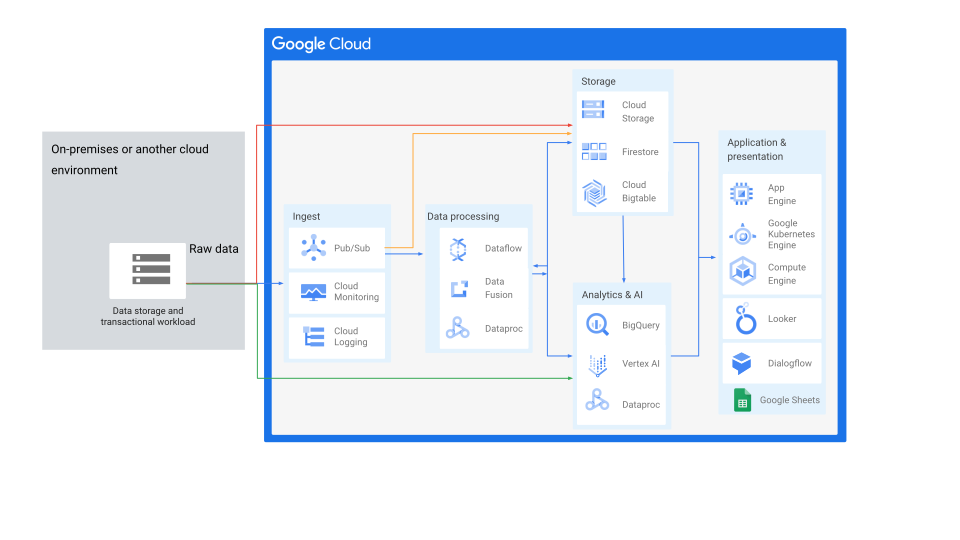
As shown in the preceding diagram, connecting Google Cloud with
on-premises environments and other cloud environments can enable various data
analytics use cases, such as data streaming and database backups. To power the
foundational transport of a hybrid and multicloud analytics pattern that
requires a high volume of data transfer, Cloud Interconnect and
[Cross-Cloud Interconnect](https://docs.cloud.google.com/network-connectivity/docs/interconnect/concepts/cci-overview)
provide dedicated connectivity to on-premises and other cloud providers.
## Advantages
Running analytics workloads in the cloud has several key advantages:
- Inbound traffic---moving data from your private computing environment or other clouds to Google Cloud---[might be free of charge](https://docs.cloud.google.com/vpc/network-pricing#general).
- Analytics workloads often need to process substantial amounts of data and can be bursty, so they're especially well suited to being deployed in a public cloud environment. By dynamically scaling compute resources, you can quickly process large datasets while avoiding upfront investments or having to overprovision computing equipment.
- Google Cloud provides a rich set of services to manage data throughout its entire lifecycle, ranging from initial acquisition through processing and analyzing to final visualization.
- Data movement services on Google Cloud provide a complete suite of products to move, integrate, and transform data seamlessly in different ways.
- Cloud Storage is well suited for [building a data lake](https://cloud.google.com/blog/topics/developers-practitioners/architect-your-data-lake-google-cloud-data-fusion-and-composer).
- Google Cloud helps you to modernize and optimize your data
platform to break down data silos. Using a
[data lakehouse](https://cloud.google.com/discover/what-is-a-data-lakehouse)
helps to standardize across different storage formats. It can also provide
the flexibility, scalability, and agility needed to help ensure that your
data generates value for your business, rather than inefficiencies. For
more information, see
[BigLake](https://cloud.google.com/biglake).
- [BigQuery Omni,](https://docs.cloud.google.com/bigquery/docs/omni-introduction)
provides compute power that runs locally to the storage on AWS or Azure. It
also helps you query your own data stored in Amazon Simple Storage Service
(Amazon S3) or Azure Blob Storage. This multicloud analytics capability
lets data teams break down data silos. For more information about querying
data stored outside of BigQuery, see
[Introduction to external data sources](https://docs.cloud.google.com/bigquery/docs/external-data-sources).
## Best practices
To implement the *analytics hybrid and multicloud* architecture pattern,
consider the following general best practices:
- Use the [handover networking pattern](https://docs.cloud.google.com/architecture/hybrid-multicloud-secure-networking-patterns/handover-pattern) to enable the ingestion of data. If analytical results need to be fed back to transactional systems, you might combine both the handover and the [*gated egress*](https://docs.cloud.google.com/architecture/hybrid-multicloud-secure-networking-patterns/gated-egress) pattern.
- Use [Pub/Sub](https://docs.cloud.google.com/pubsub) queues or [Cloud Storage](https://docs.cloud.google.com/storage) buckets to hand over data to Google Cloud from transactional systems that are running in your private computing environment. These queues or buckets can then serve as sources for data-processing pipelines and workloads.
- To deploy ETL and ELT data pipelines, consider using [Cloud Data Fusion](https://docs.cloud.google.com/data-fusion) or [Dataflow](https://docs.cloud.google.com/dataflow) depending on your specific use case requirements. Both are fully managed, cloud-first data processing services for building and managing data pipelines.
- To discover, classify, and protect your valuable data assets, consider using Google Cloud [Sensitive Data Protection](https://docs.cloud.google.com/sensitive-data-protection) capabilities, like [de-identification techniques](https://docs.cloud.google.com/sensitive-data-protection/docs/deidentify-sensitive-data). These techniques let you mask, encrypt, and replace sensitive data---like personally identifiable information (PII)---using a randomly generated or pre-determined key, where applicable and compliant.
- When you're performing an initial data transfer from your private
computing environment to Google Cloud, choose the transfer approach
that is best suited for your dataset size and available bandwidth. For more
information, see
[Migration to Google Cloud: Transferring your large datasets](https://docs.cloud.google.com/architecture/migration-to-google-cloud-transferring-your-large-datasets).
- If data transfer or exchange between Google Cloud and other clouds
is required for the long term with high traffic volume, you should evaluate
using Google Cloud
[Cross-Cloud Interconnect](https://docs.cloud.google.com/network-connectivity/docs/interconnect/concepts/cci-overview)
to help you establish high-bandwidth dedicated connectivity between
Google Cloud and other cloud service providers (available in certain
[locations](https://docs.cloud.google.com/network-connectivity/docs/interconnect/concepts/cci-overview#locations)).
- If encryption is required at the connectivity layer, various options are
available based on the selected hybrid connectivity solution. These options
include VPN tunnels, HA VPN over Cloud Interconnect, and
[MACsec for Cross-Cloud Interconnect](https://docs.cloud.google.com/network-connectivity/docs/interconnect/concepts/cci-overview#encryption).
- Use consistent tooling and processes across environments. In an
analytics hybrid scenario, this practice can help increase operational
efficiency, although it's not a prerequisite.
# Edge hybrid pattern
Running workloads in the cloud requires that clients in some scenarios have
fast and reliable internet connectivity. Given today's networks, this
requirement rarely poses a challenge for cloud adoption. There are, however,
scenarios when you can't rely on continuous connectivity, such as:
- Sea-going vessels and other vehicles might be connected only intermittently or have access only to high-latency satellite links.
- Factories or power plants might be connected to the internet. These facilities might have reliability requirements that exceed the availability claims of their internet provider.
- Retail stores and supermarkets might be connected only occasionally or use links that don't provide the necessary reliability or throughput to handle business-critical transactions.
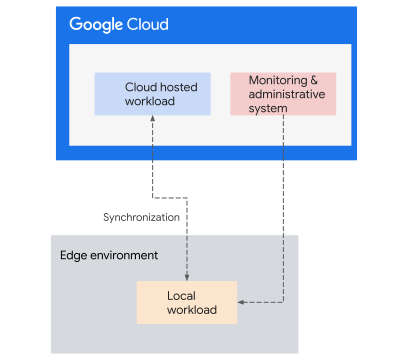
The *edge hybrid* architecture pattern addresses these challenges by running
time- and business-critical workloads locally, at the edge of the network, while
using the cloud for all other kinds of workloads. In an edge hybrid
architecture, the internet link is a noncritical component that is used for
management purposes and to synchronize or upload data, often asynchronously, but
isn't involved in time or business-critical transactions.
## Advantages
Running certain workloads at the edge and other workloads in the cloud offers
several advantages:
- Inbound traffic---moving data from the edge to Google Cloud---[might be free of charge](https://docs.cloud.google.com/vpc/network-pricing#general).
- Running workloads that are business- and time-critical at the edge helps ensure low latency and self-sufficiency. If internet connectivity fails or is temporarily unavailable, you can still run all important transactions. At the same time, you can benefit from using the cloud for a significant portion of your overall workload.
- You can reuse existing investments in computing and storage equipment.
- Over time, you can incrementally reduce the fraction of workloads that are run at the edge and move them to the cloud, either by reworking certain applications or by equipping some edge locations with internet links that are more reliable.
- Internet of Things (IoT)-related projects can become more cost-efficient by performing data computations locally. This allows enterprises to run and process some services locally at the edge, closer to the data sources. It also allows enterprises to selectively send data to the cloud, which can help to reduce the capacity, data transfer, processing, and overall costs of the IoT solution.
- Edge computing can act as an [intermediate communication layer](https://docs.cloud.google.com/solutions/unlocking-legacy-applications#section-3) between legacy and modernized services. For example, services that might be running a containerized API gateway such as Apigee hybrid). This enables legacy applications and systems to integrate with modernized services, like IoT solutions.
## Best practices
Consider the following recommendations when implementing the edge hybrid
architecture pattern:
- If communication is unidirectional, use the [gated ingress pattern](https://docs.cloud.google.com/architecture/hybrid-multicloud-secure-networking-patterns/gated-ingress).
- If communication is bidirectional, consider the [gated egress and gated ingress pattern](https://docs.cloud.google.com/architecture/hybrid-multicloud-secure-networking-patterns/gated-egress-ingress).
- If the solution consists of many edge remote sites connecting to Google Cloud over the public internet, you can use a software-defined WAN (SD-WAN) solution. You can also use [Network Connectivity Center](https://docs.cloud.google.com/network-connectivity/docs/network-connectivity-center/concepts/ra-overview) with a third-party SD-WAN router supported by a [Google Cloud partner](https://docs.cloud.google.com/network-connectivity/docs/network-connectivity-center/partners) to simplify the provisioning and management of secure connectivity at scale.
- Minimize dependencies between systems that are running at the edge and systems that are running in the cloud environment. Each dependency can undermine the reliability and latency advantages of an edge hybrid setup.
- To manage and operate multiple edge locations efficiently, you should have a centralized management plane and monitoring solution in the cloud.
- Ensure that CI/CD pipelines along with tooling for deployment and monitoring are consistent across cloud and edge environments.
- Consider using containers and Kubernetes when applicable and feasible, to abstract away differences among various edge locations and also among edge locations and the cloud. Because Kubernetes provides a common runtime layer, you can develop, run, and operate workloads consistently across computing environments. You can also move workloads between the edge and the cloud.
- To simplify the hybrid setup and operation, you can use [Google Distributed Cloud connected](https://docs.cloud.google.com/distributed-cloud/connected/latest/docs/overview) for this architecture (if containers are used across the environments). Consider [the possible connectivity options](https://docs.cloud.google.com/anthos/clusters/docs/bare-metal/latest/concepts/connect-on-prem-gcp) that you have to connect a GKE cluster running in your on-premises or edge environment to Google Cloud.
- As part of this pattern, although some Google Kubernetes Engine (GKE) components might sustain during a temporary connectivity interruption to Google Cloud, don't use a software-only Google Distributed Cloud deployment when it's disconnected from Google Cloud as a nominal working mode. For more information, see [Impact of temporary disconnection from Google Cloud](https://docs.cloud.google.com/anthos/docs/concepts/anthos-connectivity).
- To overcome inconsistencies in protocols, APIs, and authentication mechanisms across diverse backend and edge services, we recommend, where applicable, to deploy an API gateway or proxy as a unifying [facade](https://cloud.google.com/apigee/resources/ebook/api-facade-pattern-register). This gateway or proxy acts as a centralized control point and performs the following measures:
- Implements additional security measures.
- Shields client apps and other services from backend code changes.
- Facilitates audit trails for communication between all cross-environment applications and its decoupled components.
- Acts as an [intermediate communication layer](https://docs.cloud.google.com/solutions/unlocking-legacy-applications#section-3) between legacy and modernized services.
- Apigee and [Apigee Hybrid](https://docs.cloud.google.com/apigee/docs/hybrid/v1.10/what-is-hybrid) let you host and manage enterprise-grade and hybrid gateways across on-premises environments, edge, other clouds, and Google Cloud environments.
- [Establish common identity](https://docs.cloud.google.com/architecture/authenticating-corporate-users-in-a-hybrid-environment) between environments so that systems can authenticate securely across environment boundaries.
- Because the data that is exchanged between environments might be sensitive, ensure that all communication is encrypted in transit by using VPN tunnels, [TLS](https://docs.cloud.google.com/architecture/landing-zones/decide-security#option-2-require-layer7), or both.
# Environment hybrid pattern
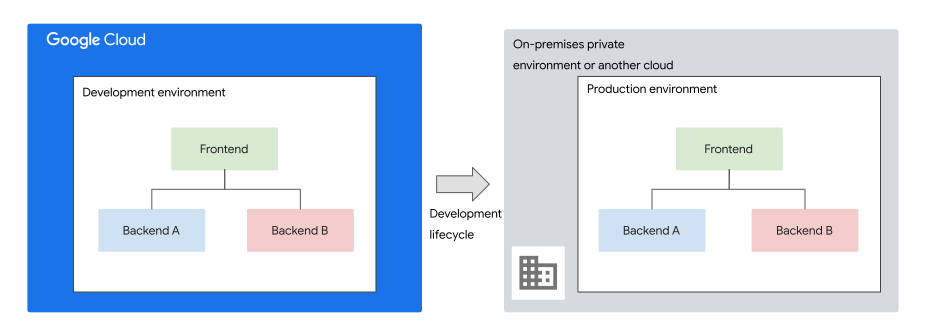
With the *environment hybrid* architecture pattern, you keep the production
environment of a workload in the existing data center. You then use the public
cloud for your development and testing environments, or other environments. This pattern relies on the redundant deployment of the same applications across
multiple computing environments. The goal of the deployment is to help increase capacity, agility, and resiliency.
When assessing which workloads to migrate, you might notice cases when running a
specific application in the public cloud presents challenges:
- Jurisdictional or regulatory constraints might require that you keep data in a specific country.
- Third-party licensing terms might prevent you from operating certain software in a cloud environment.
- An application might require access to hardware devices that are available only locally.
In such cases, consider not only the production environment but all
environments that are involved in the lifecycle of an application, including
development, testing, and staging systems. These restrictions often apply to the
production environment and its data. They might not apply to other
environments that don't use the actual data. Check with the compliance
department of your organization or the equivalent team.
The following diagram shows a typical *environment hybrid* architecture pattern:
Running development and test systems in different environments than your
production systems might seem risky and could deviate from your existing best
practices or from your attempts to minimize differences between your
environments. While such concerns are justified, they don't apply if you
distinguish between the stages of the development and testing processes:
Although development, testing, and deployment processes differ for each
application, they usually involve variations of the following stages:
- **Development**: Creating a release candidate.
- **Functional testing or user acceptance testing**: Verifying that the release candidate meets functional requirements.
- **Performance and reliability testing**: Verifying that the release candidate meets nonfunctional requirements. It's also known as load testing.
- **Staging or deployment testing**: Verifying that the deployment procedure works.
- **Production**: Releasing new or updated applications.
Performing more than one of these stages in a single environment is rarely
practical, so each stage usually requires one or more dedicated environments.
> [!NOTE]
> **Note:** The term *staging environment* is often confused with *testing
> environment*.
The primary purpose of a testing environment is to run functional tests. The
primary purpose of a staging environment is to test if your application
deployment procedures work as intended. By the time a release reaches a staging
environment, your functional testing should be complete. Staging is the last
step before you deploy software to your production deployment.
To ensure that test results are meaningful and that they apply to the production
deployment, the set of environments that you use throughout an application's
lifecycle must satisfy the following rules, to the extent possible:
- All environments are *functionally equivalent*. That is, the architecture, APIs, and versions of operating systems and libraries are equivalent, and systems behave the same across environments. This equivalence avoids situations where applications work in one environment but fail in another, or where defects aren't reproducible.
- Environments that are used for performance and reliability testing, staging, and production are [*non-functionally equivalent*](https://en.wikipedia.org/wiki/Non-functional_requirement). That is, their performance, scale, and configuration, and the way they're operated and maintained, are either the same or differ only in insignificant ways. Otherwise, performance and staging tests become meaningless.
In general, it's fine if the environments that are used for development and
functional testing differ non-functionally from the other environments.
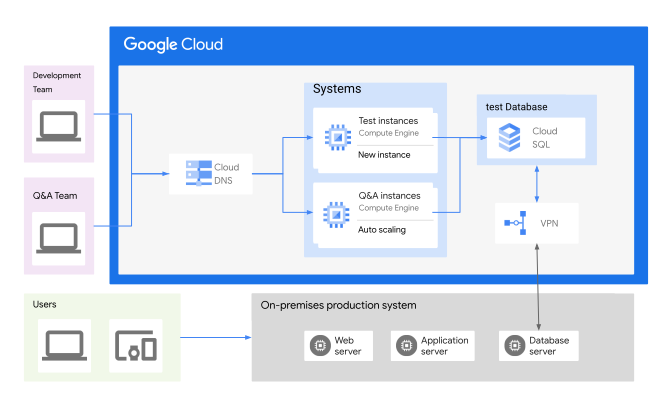
As illustrated in the following diagram, the test and development environments
are built on Google Cloud. A managed database, like Cloud SQL, can be
used as an option for development and testing in Google Cloud. Development
and testing can use the same database engine and version in the on-premises
environment, one that's functionally equivalent, or a new version that's rolled
out to the production environment after the testing stage. However, because the
underlying infrastructure of the two environments aren't identical, this
approach to performance load testing isn't valid.
The following scenarios can fit well with the environment hybrid pattern:
- Achieve functional equivalence across all environments by relying on Kubernetes as a common runtime layer where applicable and feasible. Google Kubernetes Engine (GKE) can be a key enabling technology for this approach.
- Ensure workload portability and abstract away differences between computing environments. With a [zero trust service mesh](https://docs.cloud.google.com/architecture/network-hybrid-multicloud#zero_trust_distributed_architecture), you can control and maintain the required communication separation between the different environments.
- Run development and functional testing environments in the public cloud. These environments can be functionally equivalent to the remaining environments but might differ in nonfunctional aspects, like performance. This concept is illustrated in the preceding diagram.
- Run environments for production, staging, and performance (load testing) and reliability testing in the private computing environment, ensuring functional and nonfunctional equivalence.
## Design Considerations
- **Business needs**: Each deployment and release strategy for applications has its own advantages and disadvantages. To ensure that the approach that you select aligns with your specific requirements, base your selections on a thorough assessment of your business needs and constraints.
- **Environment differences**: As part of this pattern, the main goal of using this cloud environment is for development and testing. The final state is to host the tested application in the private on-premises environment (production). To avoid developing and testing a capability that might function as expected in the cloud environment and fail in the production environment (on-premises), the technical team must know and understand the architectures and capabilities of both environments. This includes dependencies on other applications and on the hardware infrastructure---for example, security systems that perform traffic inspection.
- **Governance**: To control what your company is allowed to develop in the cloud and what data they can use for testing, use an approval and governance process. This process can also help your company make sure that it doesn't use any cloud features in your development and testing environments that don't exist in your on-premises production environment.
- **Success criteria** : There must be clear, predefined, and measurable testing success criteria that align with the software [quality assurance](https://en.wikipedia.org/wiki/Software_quality_assurance) standards for your organization. Apply these standards to any application that you develop and test.
- **Redundancy**: Although development and testing environments might not require as much reliability as the production environment, they still need redundant capabilities and the ability to test different failure scenarios. Your failure-scenario requirements might drive the design to include redundancy as part of your development and testing environment.
## Advantages
Running development and functional testing workloads in the public cloud has
several advantages:
- You can automatically start and stop environments as the need arises. For example, you can provision an entire environment for each commit or pull request, allow tests to run, and then turn it off again. This approach also offers the following advantages:
- You can reduce costs by stopping virtual machine (VM) instances when they're inactive, or by provisioning environments only on demand.
- You can speed up development and testing by starting [ephemeral environments](https://docs.cloud.google.com/build/docs/overview#build_security) for each pull-request. Doing so also reduces maintenance overhead and reduces inconsistencies in the build environment.
- Running these environments in the public cloud helps build familiarity and confidence in the cloud and related tools, which might help with migrating other workloads. This approach is particularly helpful if you decide to explore [Workload portability](https://docs.cloud.google.com/architecture/hybrid-multicloud-patterns/other-considerations#workload_portability) using containers and Kubernetes---for example, using [GKE](https://docs.cloud.google.com/anthos/docs/concepts/overview) across environments.
#### Best practices
To implement the environment hybrid architecture pattern successfully,
consider the following recommendations:
- Define your application communication requirements, including the optimal network and security design. Then, use the [*mirrored network* pattern](https://docs.cloud.google.com/architecture/hybrid-multicloud-secure-networking-patterns/mirrored-pattern) to help you design your network architecture to prevent direct communications between systems from different environments. If communication is required across environments, it has to be in a controlled manner.
- The application deployment and testing strategy you choose should align
with your business objectives and requirements. This might involve rolling
out changes without downtime or implementing features gradually to a
specific environment or user group before wider release.
- To make workloads portable and to abstract away differences between
environments, you might use containers with Kubernetes. For more
information, see
[GKE hybrid environment reference architecture](https://docs.cloud.google.com/anthos/docs/architecture/anthos-hybrid-environment).
- Establish a common tool chain that works across computing environments
for deploying, configuring, and operating workloads. Using Kubernetes gives
you this consistency.
- Ensure that CI/CD pipelines are consistent across computing
environments, and that the exact same set of binaries, packages, or
containers is deployed across those environments.
- When using Kubernetes, use a CI system such as
[Tekton](https://tekton.dev/docs/)
to implement a deployment pipeline that deploys to clusters and works across
environments. For more information, see
[DevOps solutions on Google Cloud](https://docs.cloud.google.com/solutions/devops).
- To help you with the continuous release of secure and reliable
applications, incorporate security as an integral part of the DevOps
process (DevSecOps). For more information, see
[Deliver and secure your internet-facing application in less than an hour using Dev(Sec)Ops Toolkit](https://cloud.google.com/blog/products/networking/introducing-the-devsecops-toolkit).
- Use the same tools for logging and monitoring across Google Cloud
and existing cloud environments. Consider using open source monitoring
systems. For more information, see
[Hybrid and multicloud monitoring and logging patterns](https://docs.cloud.google.com/architecture/hybrid-and-multi-cloud-monitoring-and-logging-patterns).
- If different teams manage test and production workloads, using separate
tooling might be acceptable. However, using the same tools with different
view permissions can help reduce your training effort and complexity.
- When you choose database, storage, and messaging services for functional
testing, use products that have a managed equivalent on Google Cloud.
Relying on managed services helps decrease the administrative effort of
maintaining development and testing environments.
- To protect sensitive information, we recommend encrypting all
communications in transit. If encryption is required at the connectivity
layer, various options are available that are based on the selected hybrid
connectivity solution. These options include VPN tunnels,
HA VPN over Cloud Interconnect, and MACsec for Cloud Interconnect.
The following table shows which Google Cloud products are compatible with
common OSS products.
| OSS product | Compatible with Google Cloud product |
|---|---|
| Apache HBase | Bigtable |
| Apache Beam | Dataflow |
| CDAP | Cloud Data Fusion |
| Apache Hadoop | Managed Service for Apache Spark |
| MySQL, PostgreSQL | Cloud SQL |
| Redis Cluster, Redis, Memcached | Memorystore |
| Network File System (NFS) | Filestore |
| JMS, Kafka | Pub/Sub |
| Kubernetes | GKE |
# Business continuity hybrid and multicloud patterns
The main driver of considering
[business continuity](https://en.wikipedia.org/wiki/Business_continuity_planning)
for mission-critical systems is to help an organization to be resilient and
continue its business operations during and following failure events. By
replicating systems and data over multiple geographical
[regions](https://docs.cloud.google.com/docs/geography-and-regions#regions_and_zones) and avoiding
single points of failure, you can minimize the risks of a natural disaster that
affects local infrastructure. Other failure scenarios include severe system
failure, a cybersecurity attack, or even a system configuration error.
Optimizing a system to withstand failures is essential for establishing
effective business continuity. System reliability can be influenced by several
factors, including, but not limited to, performance, resilience,
[uptime availability](https://cloud.google.com/blog/products/gcp/available-or-not-that-is-the-question-cre-life-lessons),
security, and
[user experience](https://docs.cloud.google.com/architecture/framework/reliability/define-reliability-based-on-user-experience-goals).
For more information on how to architect and operate reliable services on
Google Cloud, see the
[reliability](https://docs.cloud.google.com/architecture/framework/reliability)
pillar of the
[Google Cloud Well-Architected Framework](https://docs.cloud.google.com/architecture/framework)
and
[building blocks of reliability in Google Cloud](https://docs.cloud.google.com/architecture/infra-reliability-guide/building-blocks).
This architecture pattern relies on a redundant deployment of applications
across multiple computing environments. In this pattern, you deploy the same
applications in multiple computing environments with the aim of increasing
reliability.
Business continuity can be defined as the ability of an organization to continue
its key business functions or services at predefined acceptable levels following
a disruptive event.
[Disaster recovery (DR)](https://cloud.google.com/learn/what-is-disaster-recovery)
is considered a subset of business continuity, explicitly focusing on
ensuring that the IT systems that support critical business functions are
operational as soon as possible after a disruption. In general, DR strategies
and plans often help form a broader business continuity strategy. From a
technology point of view, when you start creating disaster recovery strategies,
your business impact analysis should define two key metrics: the
[recovery point objective (RPO)](https://en.wikipedia.org/wiki/Recovery_point_objective)
and the
[recovery time objective (RTO)](https://en.wikipedia.org/wiki/Recovery_time_objective).
For more guidance on using Google Cloud to address disaster
recovery, see the
[Disaster recovery planning guide](https://docs.cloud.google.com/architecture/dr-scenarios-planning-guide).
The smaller the RPO and RTO target values are, the faster services might recover
from an interruption with minimal data loss. However, this implies higher cost
because it means building redundant systems. Redundant systems that are capable
of performing near real-time data replication and that operate at the same scale
following a failure event, increase complexity, administrative overhead, and
cost.
The decision to select a
[DR strategy](https://docs.cloud.google.com/architecture/dr-scenarios-planning-guide#dr_patterns)or
pattern should be driven by a business impact analysis. For example, the
financial losses incurred from even a few minutes of downtime for a financial
services organization might far exceed the cost of implementing a DR system.
However, businesses in other industries might sustain hours of downtime without
a significant business effect.
When you run mission-critical systems in an on-premises data center, one DR
approach is to maintain standby systems in a second data center in a different
region. A more cost-effective approach, however, is to use a public cloud--based
computing environment for failover purposes. This approach is the main driver of
the *business continuity hybrid* pattern. The cloud can be especially appealing
from a cost point of view, because it lets you turn off some of your DR
infrastructure when it's not in use. To achieve a lower cost DR solution, a
cloud solution lets a business accept the potential increase in RPO and RTO
values.

The preceding diagram illustrates the use of the cloud as a failover or disaster
recovery environment to an on-premises environment.
A less common (and rarely required) variant of this pattern is the *business
continuity multicloud* pattern. In that pattern, the production environment uses
one cloud provider and the DR environment uses another cloud provider. By
deploying copies of workloads across multiple cloud providers, you might
increase availability beyond what a multi-region deployment offers.
Evaluating a DR across multiple clouds versus using one cloud provider
with different regions requires a thorough analysis of several considerations,
including the following:
- Manageability
- Security
- Overall feasibility.
- Cost
- The potential outbound data transfer charges from more than one cloud provider could be costly with continuous inter-cloud communication.
- There can be a high volume of traffic when replicating databases.
- TCO and the cost of managing inter-cloud network infrastructure.
> [!NOTE]
> **Note:** For more information about how Cross-Cloud Interconnect might help you to lower TCO and reduce complexity, see [Announcing Cross-Cloud Interconnect: seamless connectivity to all your clouds](https://cloud.google.com/blog/products/networking/announcing-google-cloud-cross-cloud-interconnect).
If your data needs to stay in your country to meet regulatory requirements,
using a second cloud provider that's also in your country as a DR can be an
option. That use of a second cloud provider assumes that there's no option to
use an on-premises environment to build a hybrid setup. To avoid rearchitecting
your cloud solution, ideally your second cloud provider should offer all the
required capabilities and services you need in-region.
## Design considerations
- **DR expectation**: The RPO and the RTO targets your business wants to achieve should drive your DR architecture and build planning.
- **Solution architecture**: With this pattern, you need to replicate the existing functions and capabilities of your on-premises environment to meet your DR expectations. Therefore, you need to assess the feasibility and viability of rehosting, refactoring, or rearchitecting your applications to provide the same (or more optimized) functions and performance in the cloud environment.
- **Design and build** : Building a landing zone is almost always a prerequisite to deploying enterprise workloads in a cloud environment. For more information, see [Landing zone design in Google Cloud](https://docs.cloud.google.com/architecture/landing-zones).
- **DR invocation**: It's important for your DR design and process to
consider the following questions:
- What triggers a DR scenario? For example, a DR might be triggered by the failure of specific functions or systems in the primary site.
- How is the failover to the DR environment invoked? Is it a manual approval process, or can it be automated to achieve a low RTO target?
- How should system failure detection and notification mechanisms be designed to invoke failover in alignment with the expected RTO?
- How is traffic rerouted to the DR environment after the failure is detected?
Validate your answers to these questions through testing.
- **Testing**: Thoroughly test and evaluate the failover to DR. Ensure that it
meets your RPO and RTO expectations. Doing so could give you more confidence to invoke DR when required. Any time a new change or update is made to the process or technology solution, conduct the tests again.
- **Team skills**: One or more technical teams must have the skills and
expertise to build, operate, and troubleshoot the production workload in the cloud environment, unless your environment is managed by a third party.
## Advantages
Using Google Cloud for business continuity offers several advantages:
- Because Google Cloud has [many regions](https://cloud.google.com/about/locations) across the globe to choose from, you can use it to back up or replicate data to a different site within the same continent. You can also back up or replicate data to a site on a different continent.
- Google Cloud offers the ability to store data in Cloud Storage in a [dual-region or multi-region](https://docs.cloud.google.com/storage/docs/locations#key-concepts) bucket. Data is stored redundantly in at least two separate geographic regions. Data stored in dual-region and multi-region buckets are replicated across geographic regions using default replication.
- Dual-region buckets provide geo-redundancy to support business continuity and DR plans. Also, to replicate faster, with a [lower RPO](https://cloud.google.com/storage/sla), objects stored in dual-regions can optionally use [turbo replication](https://docs.cloud.google.com/storage/docs/availability-durability#turbo-replication) across those regions.
- Similarly multi-region replication provides redundancy across multiple regions, by storing your data within the geographic boundary of the multi-region.
- Provides one or more of the following options to reduce capital expenses and operating expenses to build a DR:
- Stopped VM instances only incur storage costs and are substantially cheaper than running VM instances. That means you can minimize the cost of maintaining cold standby systems.
- The pay-per-use model of Google Cloud means that you only pay for the storage and compute capacity that you actually use.
- Elasticity capabilities, like autoscaling, let you automatically scale or shrink your DR environment as needed.
For example, the following diagram shows an application running in an
on-premises environment (production) that uses recovery components on
Google Cloud with Compute Engine, Cloud SQL, and
Cloud Load Balancing. In this scenario, the database is pre-provisioned using a
VM-based database or using a Google Cloud managed database, like
Cloud SQL, for faster recovery with continuous data replication. You can
launch Compute Engine VMs from pre-created snapshots to reduce cost during
normal operations. With this setup, and following a failure event, DNS needs to
point to the Cloud Load Balancing external IP address.
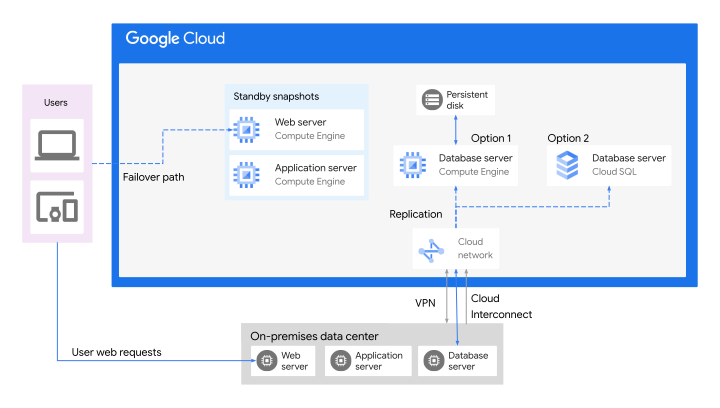
To have the application operational in the cloud, you need to provision the web
and application VMs. Depending on the targeted RTO level and company policies,
the entire process to invoke a DR, provision the workload in the cloud, and
reroute the traffic, can be completed manually or automatically.
To speed up and automate the provisioning of the infrastructure, consider
managing the infrastructure as code. You can use Cloud Build, which is a
continuous integration service, to automatically apply Terraform manifests to
your environment. For more information, see
[Managing infrastructure as code with Terraform, Cloud Build, and GitOps](https://docs.cloud.google.com/docs/terraform/resource-management/managing-infrastructure-as-code).
## Best practices
When you're using the business continuity pattern, consider the following best
practices:
- Create a [disaster recovery plan](https://docs.cloud.google.com/architecture/dr-scenarios-planning-guide) that documents your infrastructure along with failover and recovery procedures.
- Consider the following actions based on your business impact analysis and the identified required RPO and RTO targets:
- Decide whether backing up data to Google Cloud is sufficient, or whether you need to consider another DR strategy (cold, warm, or hot standby systems).
- Define the services and products that you can use as [building blocks](https://docs.cloud.google.com/architecture/dr-scenarios-building-blocks) for your DR plan.
- Frame the applicable DR scenarios for your [applications](https://docs.cloud.google.com/architecture/dr-scenarios-for-applications) and [data](https://docs.cloud.google.com/architecture/dr-scenarios-for-data) as part of your selected DR strategy.
- Consider using the [*handover* pattern](https://docs.cloud.google.com/architecture/hybrid-multicloud-secure-networking-patterns/handover-pattern) when you're only backing up data. Otherwise, the [*meshed* pattern](https://docs.cloud.google.com/architecture/hybrid-multicloud-secure-networking-patterns/meshed-pattern) might be a good option to replicate the existing environment network architecture.
- Minimize dependencies between systems that are running in different environments, particularly when communication is handled synchronously. These dependencies can slow performance and decrease overall availability.
- Avoid the spilt-brain problem. If you replicate data bidirectionally across
environments, you might be
exposed to the split-brain problem. The split-brain problem occurs when two
environments that replicate data bidirectionally lose communication with
each other. This split can cause systems in both environments to conclude
that the other environment is unavailable and that they have exclusive
access to the data. This can lead to conflicting modifications of the data.
There are two common ways to avoid the split-brain problem:
- Use a third computing environment. This environment allows systems to check for a quorum before modifying data.
- Allow conflicting data modifications to be reconciled after connectivity
is restored.
With SQL databases, you can avoid the split-brain problem by
making the original primary instance inaccessible before clients start
using the new primary instance. For more information, see
[Cloud SQL database disaster recovery](https://docs.cloud.google.com/sql/docs/sqlserver/intro-to-cloud-sql-disaster-recovery#avoiding_a_split-brain_state).
- Ensure that CI/CD systems and artifact repositories don't become a
single point of failure. When one environment is unavailable, you must
still be able to deploy new releases or apply configuration changes.
- Make all workloads portable when using standby systems. All workloads should
be portable (where supported by the applications and feasible) so that
systems remain consistent across environments. You can achieve this approach
by considering containers and Kubernetes. By using
Google Kubernetes Engine (GKE), you can simplify
the build and operations.
- Integrate the deployment of standby systems into your CI/CD pipeline.
This integration helps ensure that application versions and configurations
are consistent across environments.
- Ensure that DNS changes are propagated quickly by configuring your DNS
with a reasonably short
[time to live value](https://docs.cloud.google.com/dns/docs/overview#propagation_of_changes)
so that you can reroute users to standby systems when a disaster occurs.
- Select the
[DNS policy and routing policy](https://docs.cloud.google.com/dns/docs/policies-overview) that
align with your architecture and solution behavior. Also, you can combine
multiple
regional load balancers with DNS routing policies to
create global load-balancing architectures for different use cases,
including hybrid setup.
- Use multiple DNS providers. When using multiple DNS providers, you can:
- Improve the availability and resiliency of your applications and services.
- Simplify the deployment or migration of hybrid applications that
have dependencies across on-premises and cloud environments with a
multi-provider DNS configuration.
Google Cloud offers an open source solution based on octoDNS to
help you set up and operate an environment with multiple DNS providers.
For more information, see
[Multi-provider public DNS using Cloud DNS](https://docs.cloud.google.com/dns/docs/best-practices#multi-provider-dns).
- Use load balancers when using standby systems to create an
automatic failover. Keep in mind that load balancer hardware can fail.
- Use
[Cloud Load Balancing](https://docs.cloud.google.com/load-balancing/docs/negs/hybrid-neg-concepts#use-case_routing_traffic_to_an_on-premises_location_or_another_cloud)
instead of hardware load balancers to power some scenarios that
occur when using this architecture pattern.
[Internal client requests](https://docs.cloud.google.com/load-balancing/docs/l7-internal#load_balancing_with_hybrid_connectivity)
or
[external client requests](https://docs.cloud.google.com/load-balancing/docs/https/setting-up-ext-global-https-hybrid)
can be redirected to the primary environment or the DR environment
based on different metrics, such as
[weight-based traffic splitting](https://docs.cloud.google.com/load-balancing/docs/https/traffic-management-global#traffic_actions_weight-based_traffic_splitting).
For more information, see
[Traffic management overview for global external Application Load Balancer](https://docs.cloud.google.com/load-balancing/docs/https/traffic-management-global).
- Consider using Cloud Interconnect or
Cross-Cloud Interconnect if the outbound data transfer volume
from Google Cloud toward the other environment is high.
Cloud Interconnect can help to optimize the connectivity performance and
might reduce outbound data transfer charges for traffic that meets certain
conditions. For more information, see
[Cloud Interconnect pricing](https://cloud.google.com/network-connectivity/docs/interconnect/pricing).
- Consider using your preferred partner solution on
[Google Cloud Marketplace](https://docs.cloud.google.com/marketplace)
to help facilitate the data backups, replications, and other tasks that
meet your requirements, including your RPO and RTO targets.
- Test and evaluate DR invocation scenarios to understand how readily the
application can recover from a disaster event when compared to the target
RTO value.
- Encrypt communications in transit. To protect sensitive information, we
recommend encrypting all communications in transit. If encryption is required
at the connectivity layer, various options are available based on the
selected hybrid connectivity solution. These options include VPN tunnels,
HA VPN over Cloud Interconnect, and MACsec for Cloud Interconnect.
# Cloud bursting pattern
Internet applications can experience extreme fluctuations in usage. While most
enterprise applications don't face this challenge, many enterprises must deal
with a different kind of bursty workload: batch or CI/CD jobs.
This architecture pattern relies on a redundant deployment of applications
across multiple computing environments. The goal is to increase capacity,
resiliency, or both.
While you can accommodate bursty workloads in a data-center-based computing
environment by overprovisioning resources, this approach might not be cost
effective. With batch jobs, you can optimize use by stretching their execution
over longer time periods, although delaying jobs isn't practical if they're time
sensitive.
The idea of the *cloud bursting* pattern is to use a private computing
environment for the baseline load and burst to the cloud temporarily when you
need extra capacity.
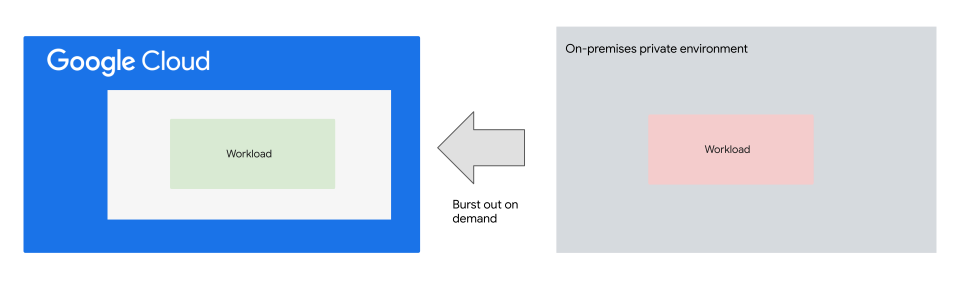
In the preceding diagram, when data capacity is at its limit in an on-premises
private environment, the system can gain extra capacity from a
Google Cloud environment when needed.
The key drivers of this pattern are saving money and reducing the time and
effort needed to respond to scale requirement changes. With this approach, you
only pay for the resources used when handling extra loads. That means you don't
need to overprovision your infrastructure. Instead you can take advantage of
on-demand cloud resources and scale them to fit the demand, and any predefined
metrics. As a result, your company might avoid service interruptions during peak
demand times.
A potential requirement for cloud bursting scenarios is workload portability.
When you allow workloads to be deployed to multiple environments, you must
abstract away the differences between the environments. For example, Kubernetes
gives you the ability to achieve consistency at the workload level across
diverse environments that use different infrastructures. For more
information, see
[Google Kubernetes Engine (GKE) hybrid environment reference architecture](https://docs.cloud.google.com/anthos/docs/architecture/anthos-hybrid-environment).
## Design considerations
The cloud bursting pattern applies to interactive and batch workloads. When
you're dealing with interactive workloads, however, you must determine how to
distribute requests across environments:
- You can route incoming user requests to a load balancer that runs in
the existing data center, and then have the load balancer distribute
requests across the local and cloud resources.
This approach requires the load balancer or another system that is
running in the existing data center to also track the resources that are
allocated in the cloud. The load balancer or another system must also
initiate the automatic upscaling or downscaling of resources. Using this
approach you can decommission all cloud resources during times of low
activity. However, implementing mechanisms to track resources might exceed
the capabilities of your load balancer solutions, and therefore increase
overall complexity.
- Instead of implementing mechanisms to track resources, you can use
Cloud Load Balancing with a hybrid connectivity
[network endpoint group (NEG)](https://docs.cloud.google.com/load-balancing/docs/negs/hybrid-neg-concepts)
backend. You use this load balancer to route
[internal client requests](https://docs.cloud.google.com/load-balancing/docs/l7-internal#load_balancing_with_hybrid_connectivity)
or
[external client requests](https://docs.cloud.google.com/load-balancing/docs/negs/hybrid-neg-concepts#public_clients)
to backends that are located both on-premises and in
Google Cloud and that are based on different metrics, like
[weight-based traffic splitting](https://docs.cloud.google.com/load-balancing/docs/https/traffic-management-global#traffic_actions_weight-based_traffic_splitting).
Also you can scale backends based on
[load balancing serving capacity](https://docs.cloud.google.com/compute/docs/autoscaler/scaling-load-balancing#scaling_based_on_https_load_balancing_serving_capacity)
for workloads in Google Cloud. For more information, see
[Traffic management overview for global external Application Load Balancer](https://docs.cloud.google.com/load-balancing/docs/https/traffic-management-global).
This approach has several additional benefits, such as taking advantage
of
Google Cloud Armor [DDoS protection capabilities](https://docs.cloud.google.com/armor/docs/advanced-network-ddos),
WAF, and caching content at the cloud edge using
[Cloud CDN](https://docs.cloud.google.com/cdn/docs/overview).
However, you need to size the hybrid network connectivity to handle the
additional traffic.
- As highlighted in
[Workload portability](https://docs.cloud.google.com/architecture/hybrid-multicloud-patterns/other-considerations#workload_portability),
an application might be
portable to a different environment with minimal changes to achieve
workload consistency, but that doesn't mean that the application performs
equally the same in both environments. Differences in underlying compute,
infrastructure security capabilities, or networking infrastructure, along
with proximity to dependent services, typically determine performance.
Through testing, you can have more accurate visibility and understand the
performance expectations.
- You can use cloud infrastructure services to build an environment to
host your applications without portability. Use the following approaches to
handle client requests when traffic is redirected during peak demand times:
- Use consistent tooling to monitor and manage these two environments.
- Ensure consistent workload versioning and that your data sources are current.
- You might need to add automation to provision the cloud environment and reroute traffic when demand increases and the cloud workload is expected to accept client requests for your application.
- If you intend to shut down all Google Cloud resources during
times of low demand, using DNS routing policies primarily
for traffic load balancing might not always be optimal. This is mainly
because:
- Resources can require some time to initialize before they can serve users.
- DNS updates tend to propagate slowly over the internet.
As a result:
- Users might be routed to the Cloud environment even when no resources are available to process their requests.
- Users might keep being routed to the on-premises environment temporarily while DNS updates propagate across the internet.
With Cloud DNS, you can choose the
[DNS policy and routing policy](https://docs.cloud.google.com/dns/docs/policies-overview)
that align with your solution architecture and behavior, such as
geolocation DNS routing policies.
Cloud DNS also supports health checks for internal passthrough Network Load Balancer, and
internal Application Load Balancer. In which case, you could incorporate it with your overall
hybrid DNS setup that's based on this pattern.
In some scenarios, you can use Cloud DNS to distribute client
requests with health checks on Google Cloud, like when using
internal Application Load Balancers or
[cross-region internal Application Load Balancers](https://docs.cloud.google.com/load-balancing/docs/l7-internal#high_availability_and_cross-region_failover).
In this scenario, Cloud DNS checks the overall health of the
internal Application Load Balancer, which itself checks the health of the backend instances.
For more information, see
[Manage DNS routing policies and health checks](https://docs.cloud.google.com/dns/docs/zones/manage-routing-policies).
You can also use
[Cloud DNS split horizon](https://docs.cloud.google.com/dns/docs/zones/zones-overview#split-horizon).
Cloud DNS split horizon is an approach for setting up DNS
responses or records to the specific location or network of the DNS query
originator for the same domain name. This approach is commonly used to
address requirements where an application is designed to offer both a
private and a public experience, each with unique features. The approach
also helps to distribute traffic load across environments.
Given these considerations, cloud bursting generally lends itself better to
batch workloads than to interactive workloads.
## Advantages
Key advantages of the cloud bursting architecture pattern include:
- Cloud bursting lets you reuse existing investments in data centers and private computing environments. This reuse can either be permanent or in effect until existing equipment becomes due for replacement, at which point you might consider a full migration.
- Because you no longer have to maintain excess capacity to satisfy peak demands, you might be able to increase the use and cost effectiveness of your private computing environments.
- Cloud bursting lets you run batch jobs in a timely fashion without the need for overprovisioning compute resources.
## Best practices
When implementing cloud bursting, consider the following best practices:
- To ensure that workloads running in the cloud can access resources in the same fashion as workloads running in an on-premises environment, use the [*meshed* pattern](https://docs.cloud.google.com/architecture/hybrid-multicloud-secure-networking-patterns/meshed-pattern) with the least privileged security access principle. If the workload design permits it, you can allow access only from the cloud to the on-premises computing environment, not the other way round.
- To minimize latency for communication between environments, pick a [Google Cloud region](https://cloud.google.com/about/locations) that is geographically close to your private computing environment. For more information, see [Best practices for Compute Engine regions selection](https://docs.cloud.google.com/solutions/best-practices-compute-engine-region-selection).
- When using cloud bursting for batch workloads only, reduce the security attack surface by keeping all Google Cloud resources private. Disallow any direct access from the internet to these resources, even if you're using Google Cloud external load balancing to provide the entry point to the workload.
- Select the
[DNS policy and routing policy](https://docs.cloud.google.com/dns/docs/policies-overview) that
aligns with your architecture pattern and the targeted solution behavior.
- As part of this pattern, you can apply the design of your DNS policies permanently or when you need extra capacity using another environment during peak demand times.
- You can use geolocation DNS routing policies to have a global DNS endpoint for your regional load balancers. This tactic has many use cases for geolocation DNS routing policies, including hybrid applications that use Google Cloud alongside an on-premises deployment where Google Cloud region exists.
- If you need to provide different records for the same DNS
queries, you can use split horizon DNS---for example, queries from
internal and external clients.
For more information, see
[reference architectures for hybrid DNS](https://docs.cloud.google.com/dns/docs/best-practices#reference_architectures_for_hybrid_dns)
- To ensure that DNS changes are propagated quickly, configure your DNS
with a reasonably short
[time to live value](https://docs.cloud.google.com/dns/docs/overview#propagation_of_changes)
so that you can reroute users to standby systems when you need extra
capacity using cloud environments.
- For jobs that aren't highly time critical, and don't store data locally,
consider using
[Spot VM instances](https://docs.cloud.google.com/compute/docs/instances/spot),
which are substantially cheaper than regular VM instances. A prerequisite,
however, is that if the VM job is preempted, the system must be able to
automatically restart the job.
- Use containers to achieve workload portability where applicable. Also,
GKE can be a key enabling technology for that
design. For more information, see
[GKE hybrid environment reference architecture](https://docs.cloud.google.com/anthos/docs/architecture/anthos-hybrid-environment).
- Monitor any traffic sent from Google Cloud to a different
computing environment. This traffic is subject to
[outbound data transfer charges](https://cloud.google.com/vpc/network-pricing#internet_egress).
- If you plan to use this architecture long term with high outbound data
transfer volume, consider using Cloud Interconnect.
Cloud Interconnect can help to optimize the connectivity performance and
might reduce outbound data transfer charges for traffic that meets certain
conditions. For more information, see
[Cloud Interconnect pricing](https://cloud.google.com/network-connectivity/docs/interconnect/pricing).
- When Cloud Load Balancing is used, you should use its
[application capacity optimizations abilities](https://docs.cloud.google.com/load-balancing/docs/tutorials/about-capacity-optimization-with-global-lb)where
applicable. Doing so can help you address some of the capacity challenges
that can occur in globally distributed applications.
- Authenticate the people who use your systems by
[establishing common identity](https://docs.cloud.google.com/architecture/authenticating-corporate-users-in-a-hybrid-environment)
between environments so that systems can securely authenticate across
environment boundaries.
- To protect sensitive information, encrypting all communications in
transit is highly recommended. If encryption is required at the
connectivity layer, various options are available based on the selected
hybrid connectivity solution. These options include VPN tunnels,
HA VPN over Cloud Interconnect, and MACsec for Cloud Interconnect.
# Hybrid and multicloud architecture patterns: What's next
- Learn how to approach [hybrid and multicloud architecture](https://docs.cloud.google.com/architecture/hybrid-multicloud-patterns-and-practices) and how to choose suitable workloads.
- Find out more about the [networking architecture patterns](https://docs.cloud.google.com/architecture/hybrid-multicloud-secure-networking-patterns) suitable for the selected hybrid and multicloud architecture patterns.
- Learn more about [Deployment Archetypes for Cloud Applications](https://dl.acm.org/doi/10.1145/3498336).
- Learn how to [design and deploy an ecommerce web application](https://docs.cloud.google.com/solutions#section-3) using different architectures, including a [microservice-based ecommerce web application](https://cloud.google.com/solutions/ecommerce-web-app#section-1) using GKE, and a dynamic web application that's [Serverless API based](https://cloud.google.com/solutions/ecommerce-web-app#section-2).
*** ** * ** ***
1.
For more information about region-specific considerations, see
[Geography and regions](https://docs.cloud.google.com/docs/geography-and-regions#regions_and_zones).
[↩](https://docs.cloud.google.com/architecture/hybrid-multicloud-patterns-and-practices/one-page-view#fnref1)