This document provides a reference architecture to help you design
infrastructure for GraphRAG generative AI applications in Google Cloud. The
intended audience includes architects, developers, and administrators who build
and manage intelligent information retrieval systems. The document assumes a
foundational understanding of AI, graph data management, and knowledge graph
concepts. This document doesn't provide specific guidance for designing and
developing GraphRAG applications.
GraphRAG is a graph-based approach to retrieval augmented generation (RAG).
RAG helps to ground AI-generated responses by augmenting prompts with
contextually relevant data that's retrieved using vector search. GraphRAG
combines vector search with a knowledge-graph query to retrieve contextual data
that better reflects the interconnectedness of data from diverse sources.
Prompts that are augmented using GraphRAG can generate more detailed and
relevant AI responses.
## Architecture
The following diagram shows an architecture for a GraphRAG-capable generative
AI application in Google Cloud:
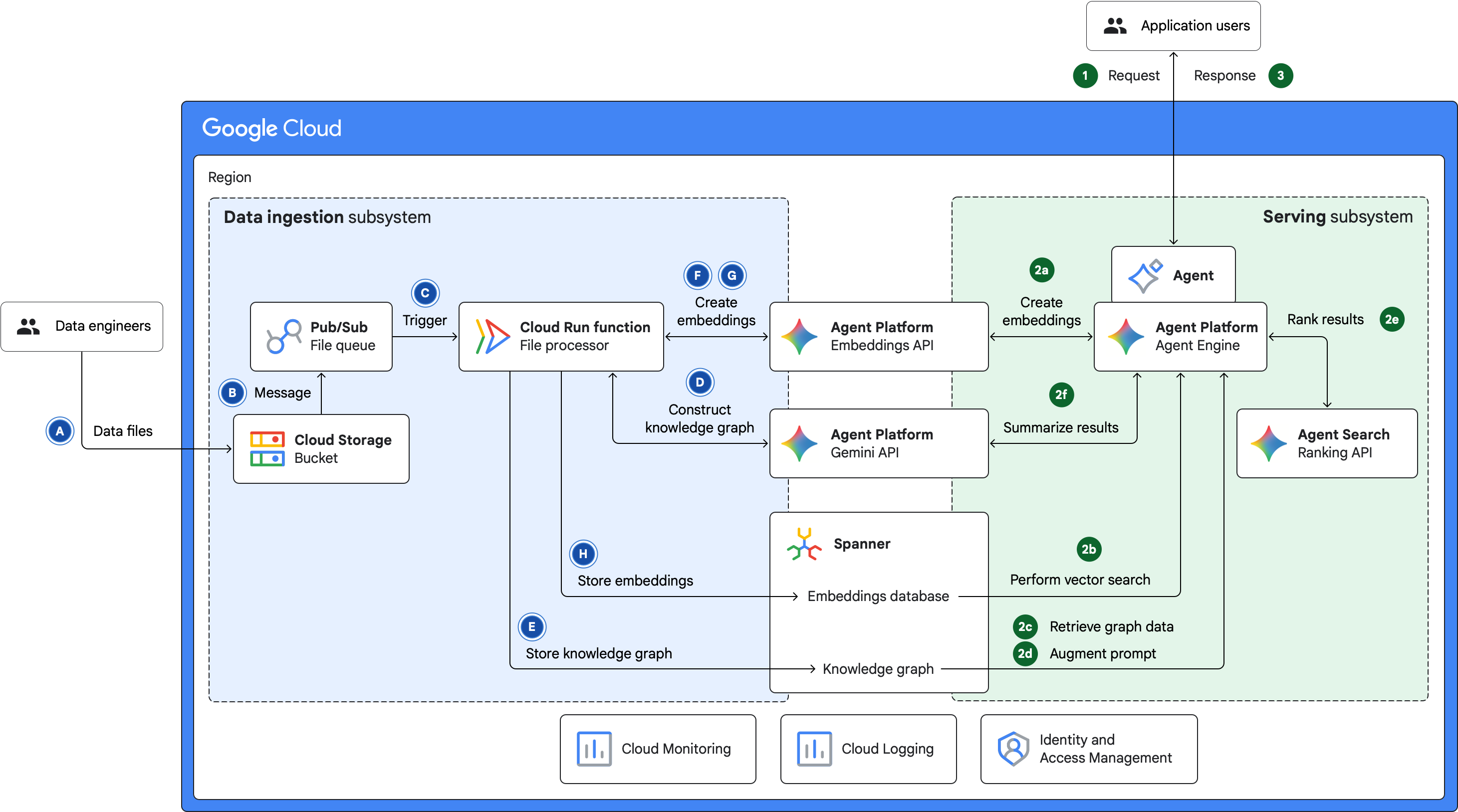

The architecture in the preceding diagram consists of two subsystems: data
ingestion and serving. The following sections describe the purpose of the
subsystems and the data flow within and across the subsystems.
### Data ingestion subsystem
The data ingestion subsystem ingests data from external sources and then it
prepares the data for GraphRAG. The data ingestion and preparation flow involves
the following steps:
1. Data is ingested into a [Cloud Storage bucket](https://docs.cloud.google.com/storage/docs/buckets). This data can be uploaded by a data analyst, ingested from a database, or streamed from any source.
2. When data is ingested, a message is sent to a [Pub/Sub topic](https://docs.cloud.google.com/pubsub/docs/publish-message-overview#about-topics).
3. Pub/Sub triggers a [Cloud Run function](https://docs.cloud.google.com/run/docs/tutorials/pubsub-eventdriven) to process the uploaded data.
4. The Cloud Run function builds a knowledge graph from the input files by using Gemini API and tools like LangChain's [`LLMGraphTransformer`](https://python.langchain.com/v0.1/docs/use_cases/graph/constructing/#llm-graph-transformer).
5. The function stores the knowledge graph in a [Spanner Graph database](https://docs.cloud.google.com/spanner/docs/graph/overview).
6. The function segments the textual content of the data files into granular units by using tools like LangChain's [`RecursiveCharacterTextSplitter`](https://api.python.langchain.com/en/latest/character/langchain_text_splitters.character.RecursiveCharacterTextSplitter.html) or Document AI's [Layout Parser](https://docs.cloud.google.com/document-ai/docs/layout-parse-chunk).
7. The function creates vector embeddings of the text segments by using the [Gemini Enterprise Agent Platform Embeddings APIs](https://docs.cloud.google.com/gemini-enterprise-agent-platform/models/embeddings).
8. The function stores the vector embeddings and associated graph nodes in Spanner Graph.
The vector embeddings serve as the basis for semantic retrieval. The knowledge
graph nodes enable traversal and analysis of intricate data relationships and
patterns.
### Serving subsystem
The serving subsystem manages the query-response lifecycle between the
generative AI application and its users. The serving flow involves the following
steps:
1. A user submits a natural-language query to an AI agent, which is deployed on [Agent Runtime on Gemini Enterprise Agent Platform](https://docs.cloud.google.com/gemini-enterprise-agent-platform/build/runtime).
2. The agent processes the query as follows:
1. Converts the query to vector embeddings by using the [Agent Platform Embeddings APIs](https://docs.cloud.google.com/gemini-enterprise-agent-platform/models/embeddings).
2. Retrieves graph nodes that are related to the query by performing a [vector-similarity search](https://docs.cloud.google.com/spanner/docs/graph/perform-vector-similarity-search) in the embeddings database.
3. Retrieves data that's related to the query by traversing the knowledge graph.
4. Augments the prompt by combining the original query with the retrieved graph data.
5. Uses the [Agent Search ranking API](https://docs.cloud.google.com/generative-ai-app-builder/docs/ranking) to rank the results, which consists of [nodes and edges](https://docs.cloud.google.com/spanner/docs/graph/schema-overview) that are retrieved from the graph database. The ranking is based on semantic relevance to the query.
6. Summarizes the results by calling Gemini API.
3. The agent then sends the summarized result to the user.
You can store and view query-response activity logs in Cloud Logging and set
up logs-based monitoring by using Cloud Monitoring.
## Products used
This reference architecture uses the following Google products and
tools:
- [Spanner Graph](https://docs.cloud.google.com/spanner/docs/graph/overview): A graph database that provides the scalability, availability, and consistency features of Spanner.
- [Gemini Enterprise Agent Platform](https://docs.cloud.google.com/gemini-enterprise-agent-platform/overview): A comprehensive platform that lets you build, scale, govern, and optimize enterprise‑grade AI agents.
- [Cloud Run functions](https://cloud.google.com/functions): A serverless compute platform that lets you run single-purpose functions directly in Google Cloud.
- [Cloud Storage](https://cloud.google.com/storage): A low-cost, no-limit object store for diverse data types. Data can be accessed from within and outside Google Cloud, and it's replicated across locations for redundancy.
- [Pub/Sub](https://cloud.google.com/pubsub): An asynchronous and scalable messaging service that decouples services that produce messages from services that process those messages.
- [Cloud Logging](https://cloud.google.com/logging): A real-time log management system with storage, search, analysis, and alerting.
- [Cloud Monitoring](https://cloud.google.com/monitoring): A service that provides visibility into the performance, availability, and health of your applications and infrastructure.
## Use cases
GraphRAG facilitates intelligent data retrieval for use cases in various
industries. This section describes a few use cases in healthcare, finance,
legal services, and manufacturing.
### Healthcare and pharmaceuticals: Clinical decision support
In clinical decision-support systems, GraphRAG integrates vast amounts of data
from medical literature, patient electronic health records, drug interaction
databases, and clinical trial results into a unified knowledge graph. When
clinicians and researchers query a patient's symptoms and current medications,
GraphRAG traverses the knowledge graph to identify relevant conditions and
potential drug interactions. It can also generate personalized treatment
recommendations based on other data such as the patient's genetic profile. This
type of information retrieval provides answers that are more contextually rich
and evidence-based than keyword matching.
### Financial services: Unifying financial data
Financial services firms use knowledge graphs to give their analysts a unified,
structured view of data from disparate sources like analyst reports, earnings
calls, and risk assessments. Knowledge graphs identify key data entities like
companies and executives, and they map the crucial relationships between the
entities. This approach provides a rich, interconnected web of data, which
enables deeper and more efficient financial analysis. Analysts can discover
previously hidden insights, such as intricate supply chain dependencies, board
memberships that overlap across competitors, and exposure to complex
geopolitical risks.
### Legal services: Case research and precedent analysis
In the legal sector, GraphRAG can be used to generate personalized legal
recommendations based on precedents, statutes, case law, regulatory updates, and
internal documents. When lawyers prepare for cases, they can ask nuanced
questions about specific legal arguments, prior rulings on similar cases, or the
implications of new legislation. GraphRAG leverages the interconnectedness of
the available legal knowledge to identify relevant precedents and explain their
applicability. It can also suggest counter arguments by tracing the
relationships between legal concepts, statutes, and judicial interpretations.
With this approach, legal practitioners can gain more thorough and precise
insights than conventional knowledge-retrieval methods.
### Manufacturing and supply chain: Unlocking institutional knowledge
Manufacturing and supply chain operations require a high degree of precision.
The knowledge that's necessary to maintain the required level of precision is
often buried in thousands of dense, static Standard Operating Procedure (SOP)
documents. When a production line or machine in a factory fails, or if a
logistical issue occurs, engineers and technicians often waste critical time
searching through disconnected PDF documents to diagnose and troubleshoot the
issue. Knowledge graphs and conversational AI can be combined to turn buried
institutional knowledge into an interactive diagnostic partner.
## Design alternatives
The architecture that this document describes is modular. You can adapt certain
components of the architecture to use alternative products, tools, and
technologies depending on your requirements.
### Building the knowledge graph
You can use LangChain's `LLMGraphTransformer` tool to build a knowledge graph
from scratch. By specifying the graph schema with `LLMGraphTransformer`
parameters like `allowed_nodes`, `allowed_relationships`, `node_properties`, and
`relationship_properties`, you can improve the quality of the resulting
knowledge graph. However, `LLMGraphTransformer` might extract entities from
generic domains, so it might not be suitable for niche domains like healthcare
or pharmaceuticals. Also, if your organization already has a robust process to
build knowledge graphs, then the data ingestion subsystem that's shown in this
reference architecture is optional.
### Storing the knowledge graph and vector embeddings
The architecture in this document uses Spanner as the datastore for the
knowledge graph *and* the vector embeddings. If your enterprise knowledge graphs
already exist elsewhere (such as on a platform like
[Neo4j](https://neo4j.com/)),
then you might consider using a vector database for the embeddings. However,
this approach requires additional management effort and it might cost more.
Spanner provides a consolidated, globally consistent datastore
for both graph structures and vector embeddings. Such a datastore enables
unified data management, which helps to optimize cost, performance, security
governance, and operational efficiency.
### Agent runtime
In this reference architecture, the agent is deployed on
Agent Runtime, which provides a managed runtime for AI
agents. Other options that you can consider include
[Cloud Run](https://docs.cloud.google.com/run/docs/ai-agents#ai-agents)
and
[Google Kubernetes Engine (GKE)](https://cloud.google.com/kubernetes-engine). A discussion of those options is outside the
scope of this document.
### Grounding using RAG
As discussed in the [Use cases](https://docs.cloud.google.com/architecture/gen-ai-graphrag-spanner#use_cases) section, GraphRAG
enables intelligent data retrieval for grounding in many scenarios. However, if
the source data that you use for augmenting prompts doesn't have complex
inter-relationships, then RAG might be an appropriate choice for your generative
AI application.
The following reference architectures show how you can build the infrastructure
required for RAG in Google Cloud by using vector-enabled managed databases
or specialized vector search products:
- [RAG infrastructure for generative AI using Agent Platform and Vector Search](https://docs.cloud.google.com/architecture/gen-ai-rag-vertex-ai-vector-search)
- [RAG infrastructure for generative AI using Agent Platform and AlloyDB for PostgreSQL](https://docs.cloud.google.com/architecture/rag-capable-gen-ai-app-using-vertex-ai)
- [RAG infrastructure for generative AI using GKE and Cloud SQL](https://docs.cloud.google.com/architecture/rag-capable-gen-ai-app-using-gke)
- [RAG infrastructure for generative AI using Gemini Enterprise and Agent Platform](https://docs.cloud.google.com/architecture/rag-genai-agentspace-vertexai).
## Design considerations
This section describes design factors, best practices, and recommendations to
consider when you use this reference architecture to develop a topology that
meets your specific requirements for security, reliability, cost, and
performance.
The guidance in this section is not exhaustive. Depending on your workload's
requirements and the Google Cloud and third-party products and features
that you use, there might be additional design factors and trade-offs that you
should consider.
### Security, privacy, and compliance
This section describes design considerations and recommendations to design a
topology in Google Cloud that meets your workload's security and
compliance requirements.
| Product | Design considerations and recommendations |
|---|---|
| Agent Platform | Agent Platform supports Google Cloud security controls that you can use to meet your requirements for data residency, data encryption, network security, and access transparency. For more information, see the following documentation: - [Security controls for Agent Platform machine learning services](https://docs.cloud.google.com/gemini-enterprise-agent-platform/machine-learning/security-controls) - [Security controls for Generative AI](https://docs.cloud.google.com/gemini-enterprise-agent-platform/models/security-controls) - [Agent Platform and zero data retention](https://docs.cloud.google.com/gemini-enterprise-agent-platform/resources/zero-data-retention) Generative AI models might produce harmful responses, especially when they are explicitly prompted for such responses. To enhance safety and mitigate potential misuse, you can configure content filters to act as barriers to harmful responses. For more information, see [Safety and content filters](https://docs.cloud.google.com/gemini-enterprise-agent-platform/models/capabilities/configure-safety-filters). |
| Spanner Graph | By default, data that's stored in Spanner Graph is encrypted using Google-owned and Google-managed encryption keys. If you need to use encryption keys that you control and manage, you can use customer-managed encryption keys (CMEKs). For more information, see [About CMEK](https://docs.cloud.google.com/spanner/docs/cmek). |
| Cloud Run functions | By default, Cloud Run encrypts data by using Google-owned and Google-managed encryption keys. To protect your containers by using keys that you control, you can use CMEKs. For more information, see [Using customer managed encryption keys](https://docs.cloud.google.com/run/docs/securing/using-cmek). To ensure that only authorized container images are deployed to Cloud Run, you can use [Binary Authorization](https://docs.cloud.google.com/binary-authorization/docs/overview). Cloud Run helps you meet data residency requirements. Your Cloud Run functions run within the selected [region](https://docs.cloud.google.com/docs/geography-and-regions#regions_and_zones). |
| Cloud Storage | By default, the data that's stored in Cloud Storage is encrypted using Google-owned and Google-managed encryption keys. If required, you can use CMEKs or your own keys that you manage by using an external management method like customer-supplied encryption keys (CSEKs). For more information, see [Data encryption options](https://docs.cloud.google.com/storage/docs/encryption). Cloud Storage supports two methods for granting users access to your buckets and objects: Identity and Access Management (IAM) and access control lists (ACLs). In most cases, we recommend using IAM, which lets you grant permissions at the bucket and project levels. For more information, see [Overview of access control](https://docs.cloud.google.com/storage/docs/access-control). The data that you load into the data ingestion subsystem through Cloud Storage might include sensitive data. You can use Sensitive Data Protection to discover, classify, and de-identify sensitive data. For more information, see [Using Sensitive Data Protection with Cloud Storage](https://docs.cloud.google.com/sensitive-data-protection/docs/dlp-gcs). Cloud Storage helps you meet data residency requirements. Data is stored or replicated within the region that you specify. |
| Pub/Sub | By default, Pub/Sub encrypts all messages, both at rest and in transit, by using Google-owned and Google-managed encryption keys. Pub/Sub supports the use of CMEKs for message encryption at the application layer. For more information, see [Configure message encryption](https://docs.cloud.google.com/pubsub/docs/encryption). If you have data residency requirements, to ensure that message data is stored in specific locations, you can [configure message storage policies](https://docs.cloud.google.com/pubsub/docs/resource-location-restriction). |
| Cloud Logging | [Admin Activity audit logs](https://docs.cloud.google.com/logging/docs/audit#admin-activity) are enabled by default for all the Google Cloud services that are used in this reference architecture. These logs record API calls or other actions that modify the configuration or metadata of Google Cloud resources. For the Google Cloud services that are used in this architecture, you can enable [Data Access audit logs](https://docs.cloud.google.com/logging/docs/audit#data-access). These logs let you track API calls that read the configuration or metadata of resources or user requests to create, modify, or read user-provided resource data. To help meet data residency requirements, you can configure Cloud Logging to store log data in the region that you specify. For more information, see [Regionalize your logs](https://docs.cloud.google.com/logging/docs/regionalized-logs). |
For security principles and recommendations that are specific to AI and ML
workloads, see
[AI and ML perspective: Security](https://docs.cloud.google.com/architecture/framework/perspectives/ai-ml/security)
in the Google Cloud Well-Architected Framework.
### Reliability
This section describes design considerations and recommendations to build and
operate reliable infrastructure for your deployment in Google Cloud.
| Product | Design considerations and recommendations |
|---|---|
| Agent Platform | If the number of your requests exceeds the allocated capacity, then [error code 429](https://docs.cloud.google.com/gemini-enterprise-agent-platform/models/standard-paygo#resource-exhausted-429-errors) is returned. For workloads that are business critical and consistently require high throughput, you can reserve throughput by using [Provisioned Throughput](https://docs.cloud.google.com/gemini-enterprise-agent-platform/models/provisioned-throughput). If data can be shared across multiple regions or countries, you can use a [global endpoint](https://docs.cloud.google.com/gemini-enterprise-agent-platform/resources/locations#global-endpoint). |
| Spanner Graph | Spanner is designed for high data availability and global scalability. To help ensure availability even during a region outage, Spanner offers [multi-region configurations](https://docs.cloud.google.com/spanner/docs/instance-configurations#multi-region-configurations), which replicate data in multiple zones across multiple regions. In addition to these in-built resilience capabilities, Spanner provides the following features to support comprehensive disaster recovery strategies: - Database deletion protection - Robust backup and restore capabilities, including scheduled and cross-region copies - Point-in-time recovery (PITR) for protection against logical data corruption, operator errors, or accidental writes for up to seven days For more information, see [Disaster recovery overview](https://docs.cloud.google.com/spanner/docs/backup/disaster-recovery-overview). |
| Cloud Run functions | Cloud Run is a regional service. Data is stored synchronously across multiple zones within a region. Traffic is automatically load-balanced across the zones. If a zone outage occurs, Cloud Run continues to run and data isn't lost. If a region outage occurs, the service stops running until Google resolves the outage. |
| Cloud Storage | You can create Cloud Storage buckets in one of three [location types](https://docs.cloud.google.com/storage/docs/locations): regional, dual-region, or multi-region. Data that's stored in regional buckets is replicated synchronously across multiple zones within a region. For higher availability, you can use dual-region or multi-region buckets, where data is replicated asynchronously across regions. |
| Pub/Sub | To avoid errors during periods of transient spikes in message traffic, you can limit the rate of publish requests by configuring [flow control](https://docs.cloud.google.com/pubsub/docs/flow-control-messages) in the publisher settings. To handle failed publish attempts, adjust the retry-request variables as necessary. For more information, see [Retry requests](https://docs.cloud.google.com/pubsub/docs/retry-requests). |
| All of the products in the architecture | After you deploy your workload in Google Cloud, use [Active Assist](https://docs.cloud.google.com/recommender/docs/whatis-activeassist) to get recommendations to further optimize the reliability of your cloud resources. Review the recommendations and apply them as appropriate for your environment. For more information, see [Find recommendations in Active Assist](https://docs.cloud.google.com/recommender/docs/recommendation-hub/find-recommendations). |
For reliability principles and recommendations that are specific to AI and ML
workloads, see
[AI and ML perspective: Reliability](https://docs.cloud.google.com/architecture/framework/perspectives/ai-ml/reliability)
in the Well-Architected Framework.
### Cost optimization
This section provides guidance to optimize the cost of setting up and operating
a Google Cloud topology that you build by using this reference
architecture.
| Product | Design considerations and recommendations |
|---|---|
| Agent Platform | To analyze and manage Agent Platform costs, we recommend that you create a baseline of queries per second (QPS) and tokens per second (TPS) and monitor these metrics after deployment. The baseline also helps with capacity planning. For example, the baseline helps you determine when [Provisioned Throughput](https://docs.cloud.google.com/gemini-enterprise-agent-platform/models/provisioned-throughput) is necessary. Selecting the [appropriate model](https://docs.cloud.google.com/gemini-enterprise-agent-platform/models/google-models) for your generative AI application is a critical decision that directly affects both costs and performance. To identify the model that provides an optimal balance between performance and cost for your specific use case, test models iteratively. We recommend that you start with the most cost-efficient model and progress gradually to more powerful options. The length of your prompts (input) and the generated responses (output) directly affect performance and cost. Write prompts that are short, direct, and provide sufficient context. Design your prompts to get concise responses from the model. For example, include phrases such as "summarize in 2 sentences" or "list 3 key points". For more information, see the [best practices for prompt design](https://docs.cloud.google.com/gemini-enterprise-agent-platform/models/prompts/prompt-design-strategies#best-practices). To reduce the cost of requests that contain repeated content with high input token counts, use [context caching](https://docs.cloud.google.com/gemini-enterprise-agent-platform/models/context-cache/context-cache-overview). When relevant, consider [batch prediction](https://docs.cloud.google.com/gemini-enterprise-agent-platform/models/capabilities/batch-inference). Batched requests are billed at a lower price than standard requests. |
| Spanner Graph | Use the [managed autoscaler](https://docs.cloud.google.com/spanner/docs/managed-autoscaler) to dynamically adjust the compute capacity for Spanner Graph databases based on CPU utilization and storage needs. A minimum capacity is often required, even for small workloads. For predictable, stable, or baseline compute capacity, purchase [committed use discounts (CUDs)](https://docs.cloud.google.com/spanner/docs/cuds). CUDs offer significant discounts in exchange for committing to a certain hourly spend on compute capacity. When you copy backups to different regions for disaster recovery or compliance, consider network egress costs. To help reduce costs, copy only essential backups. |
| Cloud Run functions | When you create Cloud Run functions, you can specify the amount of memory and CPU to be allocated. To control costs, start with the default (minimum) CPU and memory allocations. To improve performance, you can increase the allocation by configuring the CPU limit and memory limit. For more information, see the following documentation: - [Configure memory limits for services](https://docs.cloud.google.com/run/docs/configuring/services/memory-limits) - [Configure CPU limits for services](https://docs.cloud.google.com/run/docs/configuring/services/cpu) If you can predict the CPU and memory requirements, you can save money with [CUDs](https://docs.cloud.google.com/run/cud). |
| Cloud Storage | For the Cloud Storage bucket in the data ingestion subsystem, choose an appropriate [storage class](https://docs.cloud.google.com/storage/docs/storage-classes) based on your workload's requirements for data retention and access frequency. For example, to control storage costs, you can choose the Standard class and use [Object Lifecycle Management](https://docs.cloud.google.com/storage/docs/lifecycle). This approach enables automatic downgrade of objects to a lower-cost storage class or automatic deletion of objects based on specified conditions. |
| Cloud Logging | To control the cost of storing logs, you can do the following: - Reduce the volume of logs by excluding or filtering unnecessary log entries. For more information, see [Exclusion filters](https://docs.cloud.google.com/logging/docs/exclusions). - Reduce the log-retention period. For more information, see [Configure custom retention](https://docs.cloud.google.com/logging/docs/buckets#custom-retention). |
| All of the products in the architecture | After you deploy your workload in Google Cloud, use [Active Assist](https://docs.cloud.google.com/recommender/docs/whatis-activeassist) to get recommendations to further optimize the cost of your cloud resources. Review the recommendations and apply them as appropriate for your environment. For more information, see [Find recommendations in Active Assist](https://docs.cloud.google.com/recommender/docs/recommendation-hub/find-recommendations). |
To estimate the cost of your Google Cloud resources, use the
[Google Cloud Pricing Calculator](https://cloud.google.com/products/calculator).
For cost optimization principles and recommendations that are specific to AI and
ML workloads, see
[AI and ML perspective: Cost optimization](https://docs.cloud.google.com/architecture/framework/perspectives/ai-ml/cost-optimization)
in the Well-Architected Framework.
### Performance optimization
This section describes design considerations and recommendations to design a
topology in Google Cloud that meets the performance requirements of your
workloads.
| Product | Design considerations and recommendations |
|---|---|
| Agent Platform | Selecting the [appropriate model](https://docs.cloud.google.com/gemini-enterprise-agent-platform/models/google-models) for your generative AI application is a critical decision that directly affects both costs and performance. To identify the model that provides an optimal balance between performance and cost for your specific use case, test models iteratively. We recommend that you start with the most cost-efficient model and progress gradually to more powerful options. The length of your prompts (input) and the generated responses (output) directly affect performance and cost. Write prompts that are short, direct, and provide sufficient context. Design your prompts to get concise responses from the model. For example, include phrases such as "summarize in 2 sentences" or "list 3 key points". For more information, see the [best practices for prompt design](https://docs.cloud.google.com/gemini-enterprise-agent-platform/models/prompts/prompt-design-strategies#best-practices). The [Agent Platform prompt optimizer](https://docs.cloud.google.com/gemini-enterprise-agent-platform/models/prompts/prompt-optimizer) lets you rapidly improve and optimize prompt performance at scale and eliminates the need for manual rewriting. The optimizer helps you efficiently adapt prompts across different models. |
| Spanner Graph | For recommendations to optimize Spanner Graph performance, see the following documentation: - [Best practices for designing a Spanner Graph schema](https://docs.cloud.google.com/spanner/docs/graph/best-practices-designing-schema) - [Best practices for tuning Spanner Graph queries](https://docs.cloud.google.com/spanner/docs/graph/best-practices-tuning-queries) |
| Cloud Run functions | By default, each Cloud Run function instance is allocated one CPU and 256 MiB of memory. Depending on your performance requirements, you can configure CPU and memory limits. For more information, see the following documentation: - [Configure memory limits for services](https://docs.cloud.google.com/run/docs/configuring/services/memory-limits) - [Configure CPU limits for services](https://docs.cloud.google.com/run/docs/configuring/services/cpu) For more performance optimization guidance, see [General Cloud Run development tips](https://docs.cloud.google.com/run/docs/tips/general#optimize_performance). |
| Cloud Storage | To upload large files, you can use parallel composite uploads. With this strategy, the large file is split into chunks. The chunks are uploaded to Cloud Storage in parallel and then the data is recomposed in the cloud. When network bandwidth and disk speed aren't limiting factors, then parallel composite uploads can be faster than regular upload operations. However, this strategy has some limitations and cost implications. For more information, see [Parallel composite uploads](https://docs.cloud.google.com/storage/docs/parallel-composite-uploads). |
| All of the products in the architecture | After you deploy your workload in Google Cloud, use [Active Assist](https://docs.cloud.google.com/recommender/docs/whatis-activeassist) to get recommendations to further optimize the performance of your cloud resources. Review the recommendations and apply them as appropriate for your environment. For more information, see [Find recommendations in Active Assist](https://docs.cloud.google.com/recommender/docs/recommendation-hub/find-recommendations). |
For performance optimization principles and recommendations that are specific
to AI and ML workloads, see
[AI and ML perspective: Performance optimization](https://docs.cloud.google.com/architecture/framework/perspectives/ai-ml/performance-optimization)
in the Well-Architected Framework.
## Deployment
To explore how GraphRAG works in Google Cloud, download and run the following
Jupyter notebook from GitHub:
[GraphRAG on Google Cloud With Spanner Graph and Agent Runtime on Gemini Enterprise Agent Platform](https://github.com/GoogleCloudPlatform/generative-ai/blob/main/gemini/use-cases/graphrag/graph_rag_spanner_sdk_adk.ipynb).
## What's next
- [Build GraphRAG applications using Spanner Graph and LangChain](https://cloud.google.com/blog/products/databases/using-spanner-graph-with-langchain-for-graphrag?e=48754805)
- [Choose models and infrastructure for your generative AI applications](https://docs.cloud.google.com/docs/generative-ai/choose-models-infra-for-ai)
- [RAG infrastructure for generative AI using Agent Platform and Vector Search](https://docs.cloud.google.com/architecture/gen-ai-rag-vertex-ai-vector-search)
- [RAG infrastructure for generative AI using Agent Platform and AlloyDB for PostgreSQL](https://docs.cloud.google.com/architecture/rag-capable-gen-ai-app-using-vertex-ai)
- [RAG infrastructure for generative AI using GKE and Cloud SQL](https://docs.cloud.google.com/architecture/rag-capable-gen-ai-app-using-gke)
- [RAG infrastructure for generative AI using Gemini Enterprise and Agent Platform](https://docs.cloud.google.com/architecture/rag-genai-agentspace-vertexai)
- To learn about architectural principles and recommendations for AI workloads in Google Cloud, review the [Well-Architected Framework: AI and ML perspective](https://docs.cloud.google.com/architecture/framework/perspectives/ai-ml).
- For more reference architectures, diagrams, and best practices, explore the [Cloud Architecture Center](https://docs.cloud.google.com/architecture).
## Contributors
Authors:
- [Tristan Li](https://www.linkedin.com/in/tristan-li-9842b44) \| Principal Architect, AI/ML
- [Kumar Dhanagopal](https://www.linkedin.com/in/kumardhanagopal) \| Cross-Product Solution Developer
Other contributors:
- [Ahsif Sheikh](https://www.linkedin.com/in/ahsifsheikh) \| AI Customer Engineer
- [Ashish Chauhan](https://www.linkedin.com/in/a69171115) \| AI Customer Engineer
- [Greg Brosman](https://www.linkedin.com/in/greg-brosman-532b0823) \| Product Manager
- [Lukas Bruderer](https://www.linkedin.com/in/lukas-bruderer) \| Product Manager, Cloud AI
- [Nanditha Embar](https://www.linkedin.com/in/nanditha-e-9b21a7a1) \| AI Customer Engineer
- [Piyush Mathur](https://www.linkedin.com/in/mathurpiyush) \| Product Manager, Spanner
- [Smitha Venkat](https://www.linkedin.com/in/smitha-venkat) \| AI Customer Engineer