> [!IMPORTANT]
> This page provides a one-page view of all of the pages in the performance optimization pillar of the [Well-Architected Framework](https://docs.cloud.google.com/architecture/framework). You can print this page or save it in PDF format by using your browser's print function.
>
> This page doesn't have a table of contents. You can't use the links on this
> page to navigate within the page.
This pillar in the
[Google Cloud Well-Architected Framework](https://docs.cloud.google.com/architecture/framework)
provides recommendations to optimize the performance of workloads in
Google Cloud.
This document is intended for architects, developers, and administrators who
plan, design, deploy, and manage workloads in Google Cloud.
The recommendations in this pillar can help your organization to operate
efficiently, improve customer satisfaction, increase revenue, and reduce cost.
For example, when the backend processing time of an application decreases, users
experience faster response times, which can lead to higher user retention and
more revenue.
The performance optimization process can involve a trade-off between
performance and cost. However, optimizing performance can sometimes help you
reduce costs. For example, when the load increases, autoscaling can help to
provide predictable performance by ensuring that the system resources aren't
overloaded. Autoscaling also helps you to reduce costs by removing unused
resources during periods of low load.
Performance optimization is a continuous process, not a one-time activity. The
following diagram shows the stages in the performance optimization process:
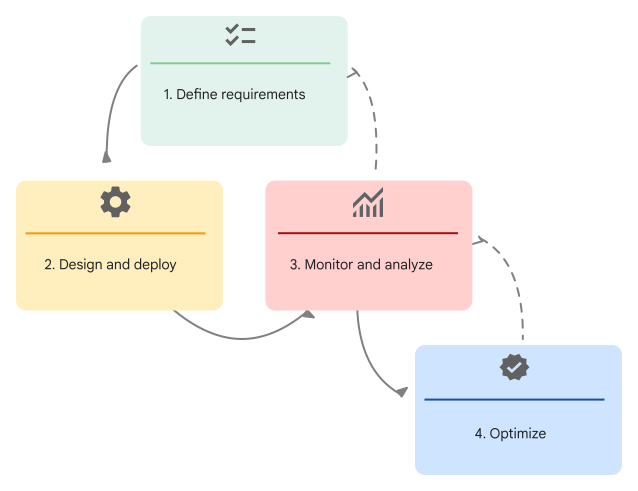
The performance optimization process is an ongoing cycle that includes the
following stages:
1. **Define requirements**: Define granular performance requirements for each layer of the application stack before you design and develop your applications. To plan resource allocation, consider the key workload characteristics and performance expectations.
2. **Design and deploy**: Use elastic and scalable design patterns that can help you meet your performance requirements.
3. **Monitor and analyze**: Monitor performance continually by using logs, tracing, metrics, and alerts.
4. **Optimize**: Consider potential redesigns as your applications evolve.
Rightsize cloud resources and use new features to meet changing performance
requirements.
As shown in the preceding diagram, continue the cycle of monitoring,
re-assessing requirements, and adjusting the cloud resources.
For performance optimization principles and recommendations that are specific to AI and ML workloads, see
[AI and ML perspective: Performance optimization](https://docs.cloud.google.com/architecture/framework/perspectives/ai-ml/performance-optimization)
in the Well-Architected Framework.
## Core principles
The recommendations in the performance optimization pillar of the Well-Architected Framework
are mapped to the following core principles:
- [Plan resource allocation](https://docs.cloud.google.com/architecture/framework/performance-optimization/plan-resource-allocation)
- [Take advantage of elasticity](https://docs.cloud.google.com/architecture/framework/performance-optimization/elasticity)
- [Promote modular design](https://docs.cloud.google.com/architecture/framework/performance-optimization/promote-modular-design)
- [Continuously monitor and improve performance](https://docs.cloud.google.com/architecture/framework/performance-optimization/continuously-monitor-and-improve-performance)
## Contributors
Authors:
- [Daniel Lees](https://www.linkedin.com/in/daniellees) \| Cloud Security Architect
- [Gary Harmson](https://www.linkedin.com/in/garyharmson) \| Principal Architect
- [Luis Urena](https://www.linkedin.com/in/urena-luis) \| Developer Relations Engineer
- [Zach Seils](https://www.linkedin.com/in/zachseils) \| Networking Specialist
Other contributors:
- [Filipe Gracio, PhD](https://www.linkedin.com/in/filipegracio) \| Customer Engineer, AI/ML Specialist
- [Jose Andrade](https://www.linkedin.com/in/jmandrade) \| Customer Engineer, SRE Specialist
- [Kumar Dhanagopal](https://www.linkedin.com/in/kumardhanagopal) \| Cross-Product Solution Developer
- [Marwan Al Shawi](https://www.linkedin.com/in/marwanalshawi) \| Partner Customer Engineer
- [Nicolas Pintaux](https://www.linkedin.com/in/nicolaspintaux) \| Customer Engineer, Application Modernization Specialist
- [Ryan Cox](https://www.linkedin.com/in/ryanlcox) \| Principal Architect
- [Radhika Kanakam](https://www.linkedin.com/in/radhika-kanakam-18ab876) \| Program Lead, Google Cloud Well-Architected Framework
- [Samantha He](https://www.linkedin.com/in/samantha-he-05a98173) \| Technical Writer
- [Wade Holmes](https://www.linkedin.com/in/wholmes) \| Global Solutions Director
# Plan resource allocation
This principle in the performance optimization pillar of the
[Google Cloud Well-Architected Framework](https://docs.cloud.google.com/architecture/framework)
provides recommendations to help you plan resources for your workloads in
Google Cloud. It emphasizes the importance of defining granular
requirements before you design and develop applications for cloud deployment or
migration.
## Principle overview
To meet your business requirements, it's important that you define the performance
requirements for your applications, before design and development. Define these
requirements as granularly as possible for the application as a whole and for
each layer of the application stack. For example, in the storage layer, you
must consider the throughput and I/O operations per second (IOPS) that the
applications need.
From the beginning, plan application designs with performance and scalability in
mind. Consider factors such as the number of users, data volume, and potential
growth over time.
Performance requirements for each workload vary and depend on the type of
workload. Each workload can contain a mix of component systems and services that
have unique sets of performance characteristics. For example, a system that's
responsible for periodic batch processing of large datasets has different
performance demands than an interactive virtual desktop solution.
Your optimization strategies must address the specific needs of each workload.
Select services and features that align with the performance goals of each
workload. For performance optimization, there's no one-size-fits-all solution. When you
optimize each workload, the entire system can achieve optimal performance and
efficiency.
Consider the following workload characteristics that can influence your
performance requirements:
- **Deployment archetype** : The [deployment archetype](https://docs.cloud.google.com/architecture/deployment-archetypes) that you select for an application can influence your choice of products and features, which then determine the performance that you can expect from your application.
- **Resource placement** : When you select a Google Cloud [region](https://docs.cloud.google.com/docs/geography-and-regions) for your application resources, we recommend that you prioritize low latency for end users, adhere to data-locality regulations, and ensure the availability of required Google Cloud products and services.
- **Network connectivity**: Choose networking services that optimize data access and content delivery. Take advantage of Google Cloud's global network, high-speed backbones, interconnect locations, and caching services.
- **Application hosting options**: When you select a hosting platform, you must evaluate the performance advantages and disadvantages of each option. For example, consider bare metal, virtual machines, containers, and serverless platforms.
- **Storage strategy** : Choose an [optimal storage strategy](https://docs.cloud.google.com/architecture/storage-advisor) that's based on your performance requirements.
- **Resource configurations**: The machine type, IOPS, and throughput can have a significant impact on performance. Additionally, early in the design phase, you must consider appropriate security capabilities and their impact on resources. When you plan security features, be prepared to accommodate the necessary performance trade-offs to avoid any unforeseen effects.
## Recommendations
To ensure optimal resource allocation, consider the recommendations in the
following sections.
### Configure and manage quotas
Ensure that your application uses only the necessary resources, such as memory,
storage, and processing power. Over-allocation can lead to unnecessary expenses,
while under-allocation might result in performance degradation.
To accommodate elastic scaling and to ensure that adequate resources are
available, regularly monitor the capacity of your quotas. Additionally, track
quota usage to identify potential scaling constraints or over-allocation issues,
and then make informed decisions about resource allocation.
### Educate and promote awareness
Inform your users about the performance requirements and provide
[educational resources](https://www.cloudskillsboost.google/course_templates/734)
about effective performance management techniques.
To evaluate progress and to identify areas for improvement, regularly document the
target performance and the actual performance. Load test your application to find
potential breakpoints and to understand how you can scale the application.
### Monitor performance metrics
Use
[Cloud Monitoring](https://docs.cloud.google.com/monitoring/docs/monitoring-overview)
to analyze trends in performance metrics, to analyze the effects of experiments,
to define alerts for critical metrics, and to perform retrospective analyses.
[Active Assist](https://docs.cloud.google.com/recommender/docs/whatis-activeassist)
is a set of tools that can provide insights and recommendations to help optimize
resource utilization. These recommendations can help you to adjust resource
allocation and improve performance.
# Take advantage of elasticity
This principle in the performance optimization pillar of the
[Google Cloud Well-Architected Framework](https://docs.cloud.google.com/architecture/framework)
provides recommendations to help you incorporate elasticity, which is the ability
to adjust resources dynamically based on changes in workload requirements.
Elasticity allows different components of
a system to scale independently. This targeted scaling can help improve performance and
cost efficiency by allocating resources precisely where they're needed, without
over provisioning or under provisioning your resources.
## Principle overview
The performance requirements of a system directly influence when and how the
system scales vertically or scales horizontally. You need to evaluate the system's
capacity and determine the load that the system is expected to handle at baseline.
Then, you need to determine how you want the system to respond to increases and decreases
in the load.
When the load increases, the system must scale out horizontally, scale up
vertically, or both. For horizontal scaling, add replica nodes to ensure that
the system has sufficient overall capacity to fulfill the increased demand. For
vertical scaling, replace the application's existing components with components
that contain more capacity, more memory, and more storage.
When the load decreases, the system must scale down (horizontally, vertically,
or both).
Define the *circumstances* in which the system scales up or scales down. Plan to
manually scale up systems for known periods of high traffic. Use tools like
autoscaling, which responds to increases or decreases in the load.
## Recommendations
To take advantage of elasticity, consider the recommendations in the following
sections.
### Plan for peak load periods
You need to plan an efficient scaling path for known events, such as expected
periods of increased customer demand.
Consider scaling up your system ahead of known periods of high traffic. For
example, if you're a retail organization, you expect demand to increase during
seasonal sales. We recommend that you manually scale up or scale out your systems before
those sales to ensure that your system can immediately handle the increased load
or immediately adjust existing limits. Otherwise, the system might take several minutes to
add resources in response to real-time changes. Your application's capacity
might not increase quickly enough and cause some users to experience delays.
For unknown or unexpected events, such as a sudden surge in demand or traffic,
you can use autoscaling features to trigger elastic scaling that's based on
metrics. These metrics can include CPU utilization, load balancer serving
capacity, latency, and even custom metrics that you define in
[Cloud Monitoring](https://docs.cloud.google.com/monitoring/docs/monitoring-overview).
For example, consider an application that runs on a
[Compute Engine](https://docs.cloud.google.com/compute/docs/overview)
managed instance group (MIG). This application has a requirement that each instance performs
optimally until the average CPU utilization reaches 75%. In this example, you
might define an
[autoscaling policy](https://docs.cloud.google.com/compute/docs/autoscaler#autoscaling_policy)
that creates more instances when the CPU utilization reaches the threshold.
These newly-created instances help absorb the load, which helps ensure that the average
CPU utilization remains at an optimal rate until the maximum number of instances
that you've configured for the MIG is reached. When the demand decreases, the
autoscaling policy removes the instances that are no longer needed.
Plan
[resource slot reservations in BigQuery](https://docs.cloud.google.com/bigquery/docs/reservations-intro#reservations)
or adjust the limits for autoscaling configurations in Spanner by using the
[managed autoscaler](https://docs.cloud.google.com/spanner/docs/managed-autoscaler).
### Use predictive scaling
If your system components include Compute Engine, you must evaluate whether
[predictive autoscaling](https://docs.cloud.google.com/compute/docs/autoscaler#predictive_mode)
is suitable for your workload. Predictive autoscaling forecasts the future load
based on your metrics' historical trends---for example, CPU utilization.
Forecasts are recomputed every few minutes, so the autoscaler rapidly adapts its
forecast to very recent changes in load. Without predictive autoscaling, an
autoscaler can only scale a group reactively, based on observed real-time changes
in load. Predictive autoscaling works with both real-time data and
historical data to respond to both the current and the forecasted load.
### Implement serverless architectures
Consider implementing a serverless architecture with serverless services that
are inherently elastic, such as the following:
- [Cloud Run](https://docs.cloud.google.com/run/docs)
- [Cloud Run functions](https://docs.cloud.google.com/functions/docs)
- [BigQuery](https://docs.cloud.google.com/bigquery/docs)
- [Spanner](https://docs.cloud.google.com/spanner/docs)
- [Eventarc](https://docs.cloud.google.com/eventarc/docs)
- [Workflows](https://docs.cloud.google.com/workflows/docs)
- [Pub/Sub](https://docs.cloud.google.com/pubsub/docs)
Unlike autoscaling in other services that require fine-tuning rules (for
example, Compute Engine), serverless autoscaling is instant and can
scale down to zero resources.
### Use Autopilot mode for Kubernetes
For complex applications that require greater control over Kubernetes, consider
[Autopilot mode in Google Kubernetes Engine (GKE)](https://docs.cloud.google.com/kubernetes-engine/docs/concepts/autopilot-overview).
Autopilot mode provides automation and scalability by default.
GKE automatically scales nodes and resources based on
traffic. GKE manages nodes, creates new nodes for your applications, and
configures automatic upgrades and repairs.
# Promote modular design
This principle in the performance optimization pillar of the
[Google Cloud Well-Architected Framework](https://docs.cloud.google.com/architecture/framework)
provides recommendations to help you promote a modular design.
Modular components and clear interfaces can enable flexible scaling,
independent updates, and future component separation.
## Principle overview
Understand the dependencies between the application components and the system
components to design a scalable system.
Modular design enables flexibility and resilience, regardless of whether a
monolithic or microservices architecture was initially deployed. By decomposing
the system into well-defined, independent modules with clear interfaces, you can
scale individual components to meet specific demands.
Targeted scaling can help optimize resource utilization and reduce costs in the
following ways:
- Provisions only the necessary resources to each component, and allocates fewer resources to less-demanding components.
- Adds more resources during high-traffic periods to maintain the user experience.
- Removes under-utilized resources without compromising performance.
Modularity also enhances maintainability. Smaller, self-contained units are
easier to understand, debug, and update, which can lead to faster development
cycles and reduced risk.
While modularity offers significant advantages, you must evaluate the potential
performance trade-offs. The increased communication between modules can
introduce latency and overhead. Strive for a balance between modularity and
performance. A highly modular design might not be universally suitable. When
performance is critical, a more tightly coupled approach might be appropriate.
System design is an
[iterative process](https://docs.cloud.google.com/architecture/framework/performance-optimization),
in which you continuously review and refine your modular design.
## Recommendations
To promote modular designs, consider the recommendations in the following
sections.
### Design for loose coupling
Design a
[loosely coupled architecture](https://docs.cloud.google.com/architecture/microservices-architecture-refactoring-monoliths).
Independent components with minimal dependencies can help you build
[scalable and resilient applications](https://docs.cloud.google.com/architecture/scalable-and-resilient-apps).
As you plan the boundaries for your services, you must consider the availability
and scalability requirements. For example, if one component has requirements that
are different from your other components, you can design the component as a standalone
service. Implement a plan for graceful failures for less-important subprocesses
or services that don't impact the response time of the primary services.
### Design for concurrency and parallelism
Design your application to support multiple tasks concurrently, like processing
multiple user requests or running background jobs while users interact with your
system. Break large tasks into smaller chunks that can be processed at the same
time by multiple service instances. Task concurrency lets you use features like
autoscaling to increase the resource allocation in products like the following:
- [Compute Engine](https://docs.cloud.google.com/compute/docs/autoscaler)
- [GKE](https://docs.cloud.google.com/spanner/docs/autoscaling-overview)
- [BigQuery](https://docs.cloud.google.com/bigquery/docs/slots-autoscaling-intro)
- [Spanner](https://docs.cloud.google.com/spanner/docs/autoscaling-overview)
### Balance modularity for flexible resource allocation
Where possible, ensure that each component uses only the necessary resources
(like memory, storage, and processing power) for specific operations. Resource
over-allocation can result in unnecessary costs, while resource under-allocation can
compromise performance.
### Use well-defined interfaces
Ensure modular components communicate effectively through clear, standardized
interfaces (like APIs and message queues) to reduce overhead from translation
layers or from extraneous traffic.
### Use stateless models
A stateless model can help ensure that you can handle each request or interaction with
the service independently from previous requests. This model facilitates
scalability and recoverability, because you can grow, shrink, or restart the
service without losing the data necessary for in-progress requests or
processes.
### Choose complementary technologies
Choose technologies that complement the modular design. Evaluate programming
languages, frameworks, and databases for their modularity support.
For more information, see the following resources:
- [Re-architecting to cloud native](https://cloud.google.com/resources/rearchitecting-to-cloud-native)
- [Introduction to microservices](https://docs.cloud.google.com/architecture/microservices-architecture-introduction)
# Continuously monitor and improve performance
This principle in the performance optimization pillar of the
[Google Cloud Well-Architected Framework](https://docs.cloud.google.com/architecture/framework)
provides recommendations to help you continuously monitor and improve performance.
After you deploy applications, continuously monitor their performance by using
logs, tracing, metrics, and alerts. As your applications grow and evolve, you
can use the trends in these data points to re-assess your performance
requirements. You might eventually need to redesign parts of your applications
to maintain or improve their performance.
## Principle overview
The process of continuous performance improvement requires robust monitoring
tools and strategies. Cloud observability tools can help you to collect key
performance indicators (KPIs) such as latency, throughput, error rates, and
resource utilization. Cloud environments offer a variety of methods to conduct
granular performance assessments across the application, the network, and the
end-user experience.
Improving performance is an ongoing effort that requires a multi-faceted
approach. The following key mechanisms and processes can help you to boost
performance:
- To provide clear direction and help track progress, define performance objectives that align with your business goals. Set SMART goals: specific, measurable, achievable, relevant, and time-bound.
- To measure performance and identify areas for improvement, gather KPI metrics.
- To continuously monitor your systems for issues, use visualized workflows in monitoring tools. Use architecture process mapping techniques to identify redundancies and inefficiencies.
- To create a culture of ongoing improvement, provide training and programs that support your employees' growth.
- To encourage proactive and continuous improvement, incentivize your employees and customers to provide ongoing feedback about your application's performance.
## Recommendations
To promote modular designs, consider the recommendations in the following
sections.
### Define clear performance goals and metrics
Define clear performance objectives that align with your business goals. This
requires a deep understanding of your application's architecture and the
performance requirements of each application component.
As a priority, optimize the most critical components that directly influence your
core business functions and user experience. To help ensure that these components
continue to run efficiently and meet your business needs, set specific and
measurable performance targets. These targets can include response times, error
rates, and resource utilization thresholds.
This proactive approach can help you to identify and address potential bottlenecks,
optimize resource allocation, and ultimately deliver a seamless and
high-performing experience for your users.
### Monitor performance
Continuously monitor your cloud systems for performance issues and set up
alerts for any potential problems. Monitoring and alerts can help you to catch
and fix issues before they affect users. Application profiling can help to
identify bottlenecks and can help to optimize resource use.
You can use tools that facilitate effective troubleshooting and network
optimization. Use [Google Cloud Observability](https://docs.cloud.google.com/stackdriver/docs) to identify areas that have
high CPU consumption, memory consumption, or network consumption. These
capabilities can help developers improve efficiency,
reduce costs, and enhance the user experience.
[Network Intelligence Center](https://docs.cloud.google.com/network-intelligence-center/docs/overview) shows
visualizations of the topology of your network infrastructure, and can help you
to identify high-latency paths.
### Incentivize continuous improvement
Create a culture of ongoing improvement that can benefit both the application and
the user experience.
Provide your employees with training and development opportunities that enhance
their skills and knowledge in performance techniques across cloud services.
Establish a community of practice (CoP) and offer mentorship and coaching
programs to support employee growth.
To prevent *reactive* performance management and encourage proactive performance
management, encourage ongoing feedback from your employees, your customers, and
your stakeholders. You can consider gamifying the process by tracking KPIs on
performance and presenting those metrics to teams on a frequent basis in the
form of a league table.
To understand your performance and user happiness over time, we recommend that
you measure user feedback quantitatively and qualitatively. The
[HEART](https://dl.acm.org/doi/10.1145/1753326.1753687)
framework can help you capture user feedback across five categories:
- Happiness
- Engagement
- Adoption
- Retention
- Task success
By using such a framework, you can incentivize engineers with data-driven
feedback, user-centered metrics, actionable insights, and a clear understanding
of goals.