This document provides a reference architecture for a highly available
enterprise application that is hosted on Compute Engine virtual machines
(VMs) with low-latency connectivity to Oracle Cloud Infrastructure (OCI) Exadata
databases that run in Google Cloud. The intended audience for this
document is cloud architects and Oracle database administrators. The document
assumes that you're familiar with Compute Engine and Oracle Exadata
Database Service.
If you use Oracle Exadata or Oracle Real Application Clusters (Oracle RAC) to
run Oracle databases on-premises, you can efficiently migrate your applications
to Google Cloud and run your databases on
[Oracle Database@Google Cloud](https://docs.cloud.google.com/oracle/database/docs).
Oracle Database@Google Cloud is a Google Cloud Marketplace offering that lets you run
[Oracle Exadata Database Service](https://www.oracle.com/engineered-systems/exadata/database-service/)
and
[Oracle Autonomous Database](https://www.oracle.com/autonomous-database/)
directly inside Google Cloud.
If you don't need the Oracle RAC capability or if you need an Oracle Database
version other than 19c and 23ai, then you can run self-managed Oracle databases
on Compute Engine VMs. For more information, see
[Enterprise application with Oracle Database on Compute Engine](https://docs.cloud.google.com/architecture/enterprise-app-oracle-database-compute-engine).
## Architecture
The following diagram shows a high-level view of the architecture:
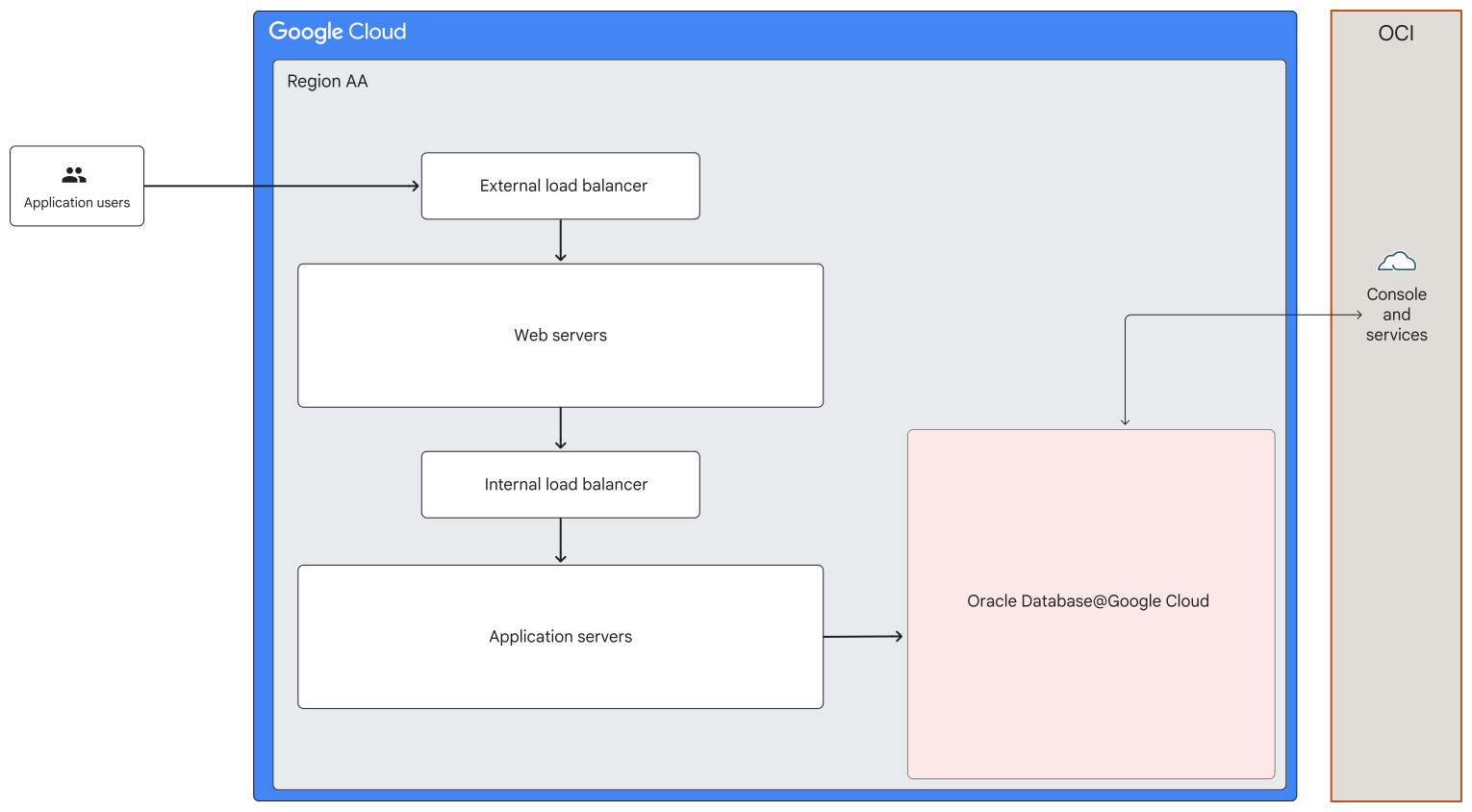

In the preceding diagram, an external load balancer receives requests from
users of a public-facing application and it distributes the requests to frontend
web servers. The web servers forward the user requests through an internal load
balancer to application servers. The application servers read data from and
write to databases in Oracle Database@Google Cloud. Administrators and OCI services
can connect and interact with the Oracle databases.
The following diagram shows a detailed view of the architecture:
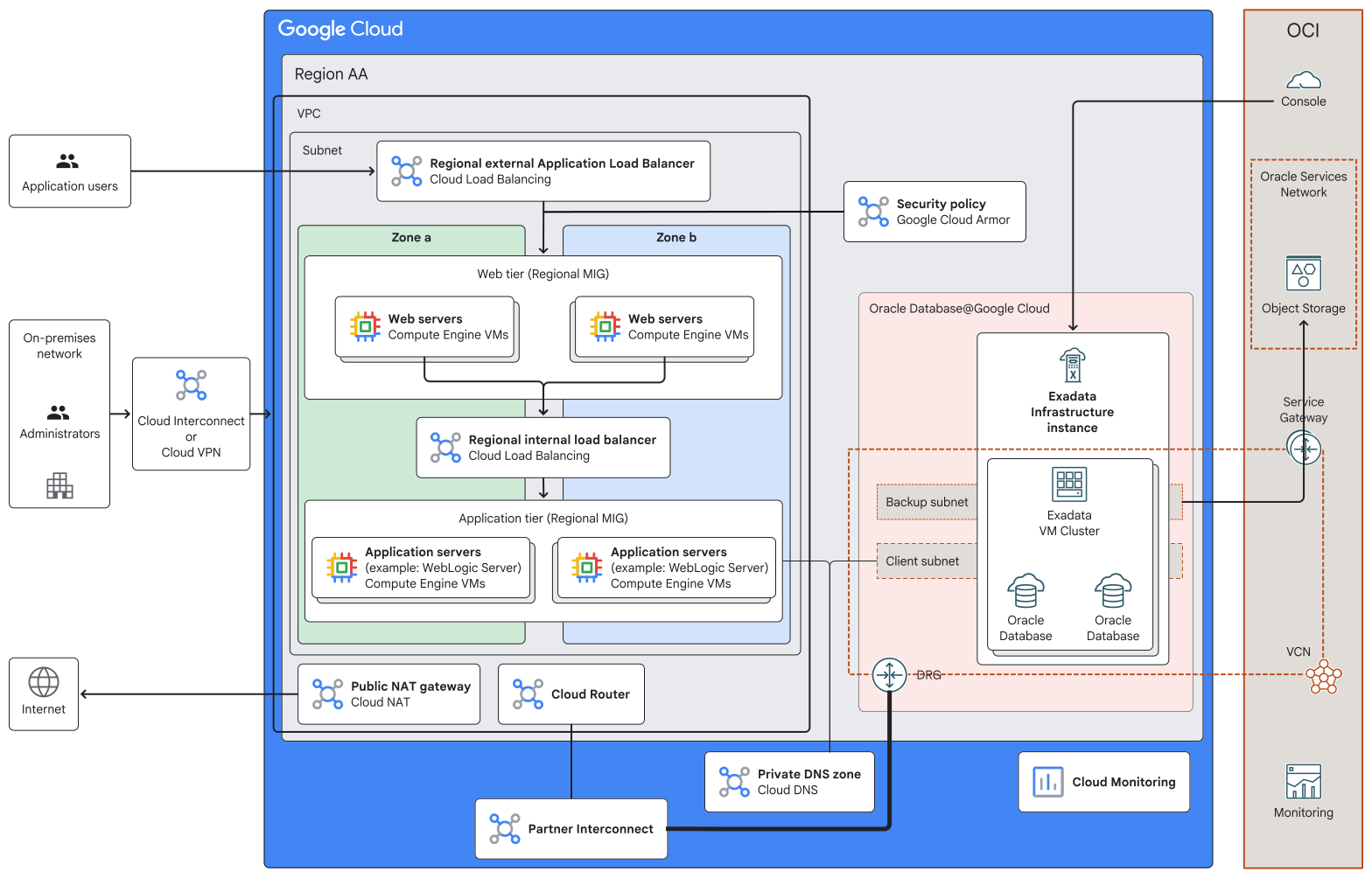

In this architecture, the web tier and application tier run in active-active
mode on Compute Engine VMs that are distributed across two zones within
a Google Cloud
[region](https://docs.cloud.google.com/docs/geography-and-regions#regions_and_zones).
The application uses Oracle Exadata databases in the same Google Cloud
region.
All the components in the architecture are in a single Google Cloud
region. This architecture is aligned with the
[regional deployment archetype](https://docs.cloud.google.com/architecture/deployment-archetypes/regional).
You can adapt this architecture to build a topology that is robust against
regional outages by using the multi-regional deployment archetype. For more
information, see
[Multi-regional deployment on Compute Engine](https://docs.cloud.google.com/architecture/multiregional-vms)
and also the guidance in the
[Reliability](https://docs.cloud.google.com/architecture/enterprise-app-oracle-exadata-database-compute-engine#reliability)
section later in this document.
The architecture that's shown in the preceding diagram includes the following
components:
| **Component** | **Purpose** |
|---|---|
| [Regional external Application Load Balancer](https://docs.cloud.google.com/load-balancing/docs/https) | The regional external Application Load Balancer receives user requests and distributes them to the web tier VMs. |
| [Google Cloud Armor security policy](https://docs.cloud.google.com/armor/docs/security-policy-overview) | The Cloud Armor security policy helps to protect your application stack against threats like distributed denial-of-service (DDoS) attacks and cross-site scripting (XSS). |
| Regional [managed instance group (MIG)](https://docs.cloud.google.com/compute/docs/instance-groups) for the web tier | The web tier of the application is deployed on Compute Engine VMs that are part of a regional MIG. This MIG is the backend for the external Application Load Balancer. The MIG contains Compute Engine VMs in two zones. Each of these VMs hosts an independent instance of the web tier of the application. |
| Regional internal Application Load Balancer | The regional internal Application Load Balancer distributes traffic from the web tier VMs to the application tier VMs. |
| Regional MIG for the application tier | The application tier, such as an Oracle WebLogic Server cluster, is deployed on Compute Engine VMs that are part of a regional MIG. This MIG is the backend for the internal Application Load Balancer. The MIG contains Compute Engine VMs in two zones. Each VM hosts an independent instance of the application server. |
| [Virtual Private Cloud (VPC) network](https://docs.cloud.google.com/vpc/docs/vpc) and [subnet](https://docs.cloud.google.com/vpc/docs/subnets) | All of the Google Cloud resources in the architecture use a single VPC network. Depending on your requirements, you can choose to build an architecture that uses multiple networks. For more information, see [Deciding whether to create multiple VPC networks](https://docs.cloud.google.com/architecture/best-practices-vpc-design#decide-whether-to-create-multiple-vpcs). |
| [Oracle Database@Google Cloud](https://docs.cloud.google.com/oracle/database/docs) | The application servers read data from and write to Oracle databases in Oracle Exadata Database Service. You provision Oracle Exadata Database Service by using [Oracle Database@Google Cloud](https://console.cloud.google.com/marketplace/product/oracle/oracle-database-at-google-cloud), a Cloud Marketplace offering that lets you run Oracle databases on Oracle-managed hardware within a Google Cloud data center. You use Google Cloud interfaces like the Google Cloud console, Google Cloud CLI, and APIs to create Exadata Infrastructure instances. Oracle sets up and manages the required compute, storage, and networking infrastructure in a data center within a Google Cloud region on hardware that's dedicated for your project. |
| [Exadata Infrastructure instances](https://docs.cloud.google.com/oracle/database/docs/create-instances) | Each Exadata Infrastructure instance contains two or more physical database servers and three or more storage servers. These servers, which aren't shown in the diagram, are interconnected using a low-latency network fabric. When you create an Exadata Infrastructure instance, you specify the number of database servers and storage servers that must be provisioned. |
| [Exadata VM Clusters](https://docs.cloud.google.com/oracle/database/docs/create-clusters) | Within an Exadata Infrastructure instance, you create one or more Exadata VM Clusters. For example, you can choose to create and use a separate Exadata VM Cluster to host the databases that are required for each of your business units. Each Exadata VM Cluster contains one or more Oracle Linux VMs that host Oracle Database instances. When you create an Exadata VM Cluster, you specify the following: - The number of database servers. - The compute, memory, and storage capacity to be allocated to each VM in the cluster. - The VPC network that the cluster must connect to. - IP address ranges of the backup and client subnets for the cluster. The VMs within Exadata VM Clusters are *not* Compute Engine VMs. |
| [Oracle Database](https://www.oracle.com/database/) instances | You create and manage Oracle databases through the OCI console and other OCI interfaces. Oracle Database software runs on the VMs within the Exadata VM Cluster. When you create the Exadata VM Cluster, you specify the Oracle Grid Infrastructure version. You also choose the license type: either bring your own licenses (BYOL) or opt for the license-included model. |
| [OCI VCN](https://www.oracle.com/cloud/networking/virtual-cloud-network/) and subnets | When you create an Exadata VM Cluster, an OCI virtual cloud network (VCN) is created automatically. The VCN has a client subnet and a backup subnet with IP address ranges that you specify. The client subnet is used for connectivity from your VPC network to the Oracle databases. The backup subnet is used to send database backups to OCI Object Storage. |
| [Cloud Router](https://docs.cloud.google.com/network-connectivity/docs/router/concepts/overview), [Partner Interconnect](https://docs.cloud.google.com/network-connectivity/docs/interconnect/concepts/partner-overview), and [OCI DRG](https://docs.oracle.com/en-us/iaas/Content/Network/Tasks/managingDRGs.htm) | Traffic between your VPC network and the VCN is routed by a Cloud Router that's attached to the VPC network and through a dynamic routing gateway (DRG) that's attached to the VCN. The traffic flows through a low-latency connection that Google sets up using Partner Interconnect. |
| Private [Cloud DNS](https://docs.cloud.google.com/dns/docs/overview) zone | When you create an Exadata VM Cluster, a Cloud DNS private zone is created automatically. When your application servers send read and write requests to the Oracle databases, Cloud DNS resolves the database hostnames to the corresponding IP addresses. |
| [OCI Object Storage](https://www.oracle.com/cloud/storage/object-storage/) and [OCI Service Gateway](https://docs.oracle.com/en-us/iaas/Content/Network/Tasks/servicegateway.htm) | By default, backups of the Oracle Exadata databases are stored in OCI Object Storage. Database backups are routed to OCI Object Storage through a Service Gateway. |
| Public [Cloud NAT](https://docs.cloud.google.com/nat/docs/overview) gateway | The architecture includes a public Cloud NAT gateway to enable secure outbound connections from the Compute Engine VMs, which have only internal IP addresses. |
| [Cloud Interconnect](https://docs.cloud.google.com/network-connectivity/docs/interconnect/concepts/overview) and [Cloud VPN](https://docs.cloud.google.com/network-connectivity/docs/vpn/concepts/overview) | To connect your on-premises network to the VPC network in Google Cloud, you can use Cloud Interconnect or Cloud VPN. For information about the relative advantages of each approach, see [Choosing a Network Connectivity product](https://docs.cloud.google.com/network-connectivity/docs/how-to/choose-product). |
| [Cloud Monitoring](https://docs.cloud.google.com/monitoring/docs/monitoring-overview) | You can use Cloud Monitoring to observe the behavior, health, and performance of your application and Google Cloud resources, including the Oracle Exadata resources. You can also monitor the resources in Oracle Exadata resources by using the OCI Monitoring service. |
## Products used
This reference architecture uses the following Google Cloud products:
- [Compute Engine](https://cloud.google.com/compute): A secure and customizable compute service that lets you create and run VMs on Google's infrastructure.
- [Cloud Load Balancing](https://cloud.google.com/load-balancing): A portfolio of high performance, scalable, global and regional load balancers.
- [Virtual Private Cloud (VPC)](https://cloud.google.com/vpc): A virtual system that provides global, scalable networking functionality for your Google Cloud workloads. VPC includes VPC Network Peering, Private Service Connect, private services access, and Shared VPC.
- [Google Cloud Armor](https://cloud.google.com/security/products/armor): A network security service that offers web application firewall (WAF) rules and helps to protect against DDoS and application attacks.
- [Cloud NAT](https://cloud.google.com/nat): A service that provides Google Cloud-managed high-performance network address translation.
- [Cloud Monitoring](https://cloud.google.com/monitoring): A service that provides visibility into the performance, availability, and health of your applications and infrastructure.
- [Cloud Interconnect](https://cloud.google.com/network-connectivity/docs/interconnect/concepts/overview): A service that extends your external network to the Google network through a high-availability, low-latency connection.
- [Partner Interconnect](https://docs.cloud.google.com/network-connectivity/docs/interconnect/concepts/partner-overview): A service that provides connectivity between your on-premises network and your Virtual Private Cloud networks and other networks through a supported service provider.
- [Cloud VPN](https://docs.cloud.google.com/network-connectivity/docs/vpn): A service that securely extends your peer network to Google's network through an IPsec VPN tunnel.
This reference architecture uses the following OCI products:
- Exadata Database Service on Dedicated Infrastructure: A service that lets you run Oracle Database instances on Exadata hardware that's dedicated for you.
- Object Storage: A service for storing large amounts of structured and unstructured data as objects.
- VCN and subnets: A VCN is a virtual and private network for resources in an OCI region. A subnet is a contiguous range of IP addresses with a VCN.
- Dynamic Routing Gateway: A virtual router for traffic between a VCN and external networks.
- Service Gateway: A gateway to let resources in a VCN access specific Oracle services privately.
## Design considerations
This section describes design factors, best practices, and design
recommendations that you should consider when you use this reference
architecture to develop a topology that meets your specific requirements for
security, reliability, operational efficiency, cost, and performance.
The guidance in this section isn't exhaustive. Depending on the specific
requirements of your application and the Google Cloud and third-party
products and features that you use, there might be additional design factors and
trade-offs that you should consider.
### System design
This section provides guidance to help you to choose Google Cloud regions
for your deployment and to select appropriate Google Cloud services.
#### Region selection
When you choose the Google Cloud regions where your applications must be
deployed, consider the following factors and requirements:
- Availability of Google Cloud services in each region. For more information, see [Products available by location](https://cloud.google.com/about/locations#products-available-by-location).
- Availability of Compute Engine machine types in each region. For more information, see [Regions and zones](https://docs.cloud.google.com/compute/docs/regions-zones#available).
- End-user [latency](https://docs.cloud.google.com/network-intelligence-center/docs/performance-dashboard/how-to/view-google-cloud-latency#global-latency) requirements.
- [Cost](https://cloud.google.com/products/calculator) of Google Cloud resources.
- Cross-regional data transfer costs.
- Regulatory requirements.
- [Sustainability requirements](https://docs.cloud.google.com/architecture/framework/sustainability/low-carbon-regions).
Some of these factors and requirements might involve trade-offs. For
example, the most cost-efficient region might not have the lowest
carbon footprint. For more information, see
[Best practices for Compute Engine regions selection](https://docs.cloud.google.com/solutions/best-practices-compute-engine-region-selection).
#### Compute infrastructure
The reference architecture in this document uses Compute Engine VMs for
certain tiers of the application. Depending on the requirements of your
application, you can choose from other Google Cloud compute services:
- **Containers** : You can run [containerized](https://cloud.google.com/discover/what-are-containerized-applications) applications in [Google Kubernetes Engine (GKE)](https://docs.cloud.google.com/kubernetes-engine/docs/concepts/kubernetes-engine-overview) clusters. GKE is a container-orchestration engine that automates deploying, scaling, and managing containerized applications.
- **Serverless** : If you prefer to focus your IT efforts on your data and applications instead of setting up and operating infrastructure resources, then you can use [serverless](https://cloud.google.com/discover/what-is-serverless-computing) services like [Cloud Run](https://docs.cloud.google.com/run/docs/overview/what-is-cloud-run).
The decision of whether to use VMs, containers, or serverless services involves
a trade-off between configuration flexibility and management effort. VMs and
containers provide more configuration flexibility, but you're responsible for
managing the resources. In a serverless architecture, you deploy workloads to a
preconfigured platform that requires minimal management effort. For more
information about choosing appropriate compute services for your workloads in
Google Cloud, see
[Hosting Applications on Google Cloud](https://cloud.google.com/hosting-options).
#### Storage options
For the Compute Engine VMs in the architecture, you can use
[Hyperdisk](https://docs.cloud.google.com/compute/docs/disks/hyperdisks)
or
[Persistent Disk](https://docs.cloud.google.com/compute/docs/disks/persistent-disks)
boot volumes. Hyperdisk volumes provide better performance,
flexibility, and efficiency than Persistent Disk. With
[Hyperdisk Balanced](https://docs.cloud.google.com/compute/docs/disks/hd-types/hyperdisk-balanced),
you can provision IOPS and throughput separately and dynamically, which lets you
tune the volume to a wide variety of workloads.
To store application binaries, use
[Filestore](https://docs.cloud.google.com/filestore/docs/overview).
Files that you store in a
[Filestore Regional](https://docs.cloud.google.com/filestore/docs/service-tiers#regional)
instance are replicated synchronously across three zones within the
[region](https://docs.cloud.google.com/docs/geography-and-regions#regions_and_zones).
This replication helps to ensure
[high availability](https://cloud.google.com/filestore/sla)
and robustness against zone outages. For robustness against region outages, you
can replicate a Filestore instance to a different region. For
more information, see
[Instance replication](https://docs.cloud.google.com/filestore/docs/instance-replication#instance-replication).
When you design storage for your workloads, consider the functional
characteristics of the workloads, resilience requirements, performance
expectations, and cost goals. For more information, see
[Design an optimal storage strategy for your cloud workload](https://docs.cloud.google.com/architecture/storage-advisor).
#### Oracle Database@Google Cloud network design
Choose a network design that meets your business and technical requirements. For
example, you can use a single VPC network or multiple VPC networks. For more
information, see
[Learn about selecting network topologies for Oracle Database@Google Cloud](https://docs.oracle.com/en/solutions/network-topology-oracle-database-at-google-cloud/learn-network-topologies-oracle-databasegoogle-cloud.html).
When you assign IP address ranges for the client and backup subnets to be used
for the Exadata VM Clusters, consider the minimum subnet size requirements. For
more information, see
[Plan for IP Address Space in Oracle Database@Google Cloud](https://docs.oracle.com/en-us/iaas/Content/database-at-gcp/oagcp-ip.htm#oagcp_ip_address_requirements).
#### Database migration
When you plan to migrate on-premises databases to Oracle Database@Google Cloud,
assess your current database environment and get configuration and sizing
recommendations by using the
[Database Migration Assessment (DMA)](https://googlecloudplatform.github.io/database-assessment/)
tool.
For information about the procedure and tools that you can use to migrate Oracle
databases to Google Cloud, see the
[Oracle Migration Methods Advisor](https://apexadb.oracle.com/ords/r/dbexpert/migration-methods).
Before you use the migrated databases in a production environment, verify
connectivity from your applications to the databases.
### Security, privacy, and compliance
This section describes factors to consider when you use this reference
architecture to design a topology in Google Cloud that meets the security, privacy,
and compliance requirements of your workloads.
#### Protection against external threats
To protect your application against threats like distributed-denial-of-service
(DDoS) attacks and cross-site scripting (XSS), you can use Google Cloud Armor
security policies. Each policy is a set of rules that specifies certain
conditions that should be evaluated and actions to take when the conditions are
met. For example, a rule could specify that if the source IP
address of the incoming traffic matches a specific IP address or CIDR range,
then the traffic must be denied. You can also apply preconfigured web
application firewall (WAF) rules. For more information, see
[Security policy overview](https://docs.cloud.google.com/armor/docs/security-policy-overview).
#### External access for VMs
In the reference architecture that this document describes, the
Compute Engine VMs don't need inbound access from the internet. Don't
assign
[external IP addresses](https://docs.cloud.google.com/load-balancing/docs/backend-service#backend_vms_and_external_ip_addresses)
to the VMs. Google Cloud resources that have only a private, internal IP
address can still access certain Google APIs and services by using
Private Service Connect or Private Google Access. For more
information, see
[Private access options for services](https://docs.cloud.google.com/vpc/docs/private-access-options).
To enable secure outbound connections from Google Cloud resources that
have only private IP addresses, like the Compute Engine VMs in this
reference architecture, you can use [Secure Web Proxy](https://docs.cloud.google.com/secure-web-proxy/docs/overview#benefits) or [Cloud NAT](https://docs.cloud.google.com/nat/docs/overview#benefits).
For the subnets that are used by the Exadata VMs, Oracle recommends that you
[assign private IP address ranges](https://docs.oracle.com/en-us/iaas/exadatacloud/exacs/ecs-network-setup.html#ECSCM-GUID-51C3EC2C-20DA-4EE5-B882-CD500FA6F7C6).
#### Service account privileges
For the Compute Engine VMs in the architecture, instead of using the
default service accounts, we recommend that you create dedicated service
accounts and specify the resources that the service account can access. The
default service account has a broad range of permissions, including some that
might not be necessary. You can tailor dedicated service accounts to
have only the essential permissions. For more information, see
[Limit service account privileges](https://docs.cloud.google.com/iam/docs/best-practices-service-accounts#limit-service-account-privileges).
#### SSH security
To enhance the security of SSH connections to the Compute Engine VMs in
your architecture, implement
[Identity-Aware Proxy (IAP)](https://docs.cloud.google.com/iap/docs/concepts-overview)
and
[Cloud OS Login API](https://docs.cloud.google.com/compute/docs/oslogin).
IAP lets you control network access based on user identity and
Identity and Access Management (IAM) policies. Cloud OS Login API lets you control
Linux SSH access based on user identity and IAM policies. For
more information about managing network access, see
[Best practices for controlling SSH login access](https://docs.cloud.google.com/compute/docs/connect/ssh-best-practices/login-access).
#### Data encryption
By default, the data that's stored in Hyperdisk,
Persistent Disk, and Filestore is encrypted using
Google-owned and Google-managed encryption keys. As an additional layer of protection,
you can choose to encrypt the Google-owned and managed key by using
keys that you own and manage in Cloud Key Management Service (Cloud KMS). For more
information, see
[About disk encryption](https://docs.cloud.google.com/compute/docs/disks/disk-encryption)
for Hyperdisk and Persistent Disk volumes and
[Encrypt data with customer-managed encryption keys](https://docs.cloud.google.com/filestore/docs/cmek)
for Filestore.
By default, Exadata databases use
[Transparent Data Encryption (TDE)](http://docs.oracle.com/en/database/oracle/oracle-database/18/asoag/introduction-to-transparent-data-encryption.html#GUID-769EC29B-0107-40FE-9A9D-BF81A4BBD0E9),
which lets you encrypt sensitive data that's stored in tables and tablespaces.
#### Network security
To control network traffic between the resources in the architecture, you must
configure appropriate
[Cloud Next Generation Firewall (NGFW) policies](https://docs.cloud.google.com/firewall/docs/about-firewalls).
#### Oracle Exadata security and compliance
Oracle Exadata Database Service includes Oracle Data Safe, which helps you
manage security and compliance requirements for Oracle databases. You can use
Oracle Data Safe to evaluate security controls, monitor user activity, and mask
sensitive data. For more information, see
[Manage Database Security with Oracle Data Safe](https://docs.oracle.com/en/engineered-systems/exadata-cloud-service/ecscm/manage-database-security-with-oracle-data-safe.html).
#### More security considerations
When you build the architecture for your workload, consider the platform-level
security best practices and recommendations that are provided in the
[Enterprise foundations blueprint](https://docs.cloud.google.com/architecture/blueprints/security-foundations) and [Google Cloud Well-Architected Framework: Security, privacy, and compliance](https://docs.cloud.google.com/architecture/framework/security).
### Reliability
This section describes design factors to consider when you use this reference
architecture to build and operate reliable infrastructure for your deployment in
Google Cloud.
#### Robustness against VM failures
In the architecture that's shown in this document, if a Compute Engine
VM in the web tier or application tier crashes, the relevant
[MIG recreates the VM automatically](https://docs.cloud.google.com/compute/docs/instance-groups/about-repair#automatic_repair).
The load balancers forward requests to only the available web server
instances and application server instances.
#### VM autohealing
Sometimes the VMs that host your application might be running and available, but
there might be issues with the application itself. The application might freeze,
crash, or not have sufficient memory. To verify whether an application is
responding as expected, you can configure application-based health checks as
part of the autohealing policy of your MIGs. If the application on a particular
VM isn't responding, the MIG autoheals (repairs) the VM. For more information
about configuring autohealing, see
[About repairing VMs for high availability](https://docs.cloud.google.com/compute/docs/instance-groups/about-repair).
#### Robustness against region outages
If a region outage occurs, then the application is unavailable. To reduce the
downtime caused by region outages, you can implement the following approach:
- Maintain a passive (failover) replica of the web tier and application tier in another Google Cloud region.
- Create a standby Exadata Infrastructure instance with the required Exadata VM Clusters in the same region that has the passive replica of the application stack. Use [Oracle Data Guard](https://docs.oracle.com/en-us/iaas/exadatacloud/doc/using-data-guard-with-exacc.html) for data replication and automatic failover to the standby Exadata databases. If your application needs a lower recovery point objective (RPO), you can backup and recover the databases by using [Oracle Autonomous Recovery Service](https://docs.oracle.com/en-us/iaas/exadatacloud/exacs/ecs-managing-db-backup-and-recovery.html#GUID-B51CDEEC-BA27-4D6C-969B-E529F7C79F16).
- If an outage occurs in the primary region, use the database replica or backup to restore the database to production and to activate the application in the failover region.
- Use [DNS routing policies](https://docs.cloud.google.com/dns/docs/policies-overview#routing_policies) to route traffic to an external load balancer in the failover region.
For business-critical applications that must continue to be available even when
a region outage occurs, consider using the
[multi-regional deployment archetype](https://docs.cloud.google.com/architecture/multiregional-vms).
You can use Oracle Active Data Guard to provide a read-only standby database in
the failover region.
Oracle manages the infrastructure in Oracle Database@Google Cloud. For information
about the service level objectives (SLOs) for Oracle Exadata Database Service on
Dedicated Infrastructure, see
[Service Level Objectives for Oracle PaaS and IaaS Public Cloud Services](https://docs.oracle.com/en-us/iaas/Content/General/Reference/servicelevelobjectives.htm).
#### MIG autoscaling
The architecture in this document uses regional MIGs for the web tier and
application tier. The autoscaling capability of stateless MIGs ensures that the
Compute Engine VMs that host the web tier and application tier aren't
affected by single-zone outages.
To control the autoscaling
behavior of your stateless MIGs, you can specify target utilization metrics,
such as average CPU utilization. You can also configure schedule-based
autoscaling for stateless MIGs.
[Stateful MIGs](https://docs.cloud.google.com/compute/docs/instance-groups/stateful-migs)
can't be autoscaled. For more information, see
[Autoscaling groups of instances](https://docs.cloud.google.com/compute/docs/autoscaler).
#### MIG size limit
When you decide the size of your MIGs, consider the default and maximum limits
on the number of VMs that can be created in a MIG. For more information, see
[Add and remove VMs from a MIG](https://docs.cloud.google.com/compute/docs/instance-groups/add-remove-vms-in-mig#increase_the_groups_size_limit).
#### VM placement
In the architecture that this document describes, the application tier and web
tier run on Compute Engine VMs that are distributed across multiple
zones. This distribution helps to ensure that your web tier and your application
tier are robust against single-zone outages.
To improve the robustness of the architecture, you can create a
[spread placement policy](https://docs.cloud.google.com/compute/docs/instances/placement-policies-overview#about-spread-policies)
and apply it to the MIG template. When the MIG creates VMs, it places the VMs
within each zone on different physical servers (called *hosts* ), so your VMs are
robust against failures of individual hosts. For more information, see
[Create and apply spread placement policies to VMs](https://docs.cloud.google.com/compute/docs/instances/use-spread-placement-policies).
#### VM capacity planning
To make sure that capacity for Compute Engine VMs is available when VMs
need to be provisioned, you can create *reservations* . A reservation provides
assured capacity in a specific zone for a specified number of VMs of a machine
type that you choose. A reservation can be specific to a project, or shared
across multiple projects. For more information about reservations, see
[Choose a reservation type](https://docs.cloud.google.com/compute/docs/instances/choose-reservation-type).
#### Stateful storage
A best practice in application design is to avoid the need for stateful local
disks. But if the requirement exists, you can configure your persistent disks to
be stateful to ensure that the data is preserved when the VMs are repaired or
recreated. However, we recommend that you keep the boot disks stateless, so that
you can update them to the latest images with new versions and security
patches. For more information, see
[Configuring stateful persistent disks in MIGs](https://docs.cloud.google.com/compute/docs/instance-groups/configuring-stateful-disks-in-migs).
#### Oracle Exadata capacity
You can scale Exadata Infrastructure by adding database servers and storage
servers as needed. After you add the required database servers or storage
servers to Exadata Infrastructure, to be able to use the additional CPU or
storage resources, you must add the capacity to the associated Exadata VM
cluster. For more information, see
[Scaling Exadata Compute and Storage](https://docs.oracle.com/en-us/iaas/exadatacloud/exacs/ecs-manage-infrastructure.html#GUID-AC30050B-005F-4249-956D-C63F245DB99C).
#### Data durability
You can use Backup and DR Service to create, store, and manage backups of
Compute Engine VMs. Backup and DR stores backup data in its
original, application-readable format. When required, you can restore workloads
to production by directly using data from long-term backup storage without
time-consuming data-movement or preparation activities. For more information,
see
[Backup and DR for Compute Engine instance backups](https://docs.cloud.google.com/backup-disaster-recovery/docs/concepts/backupdr-for-compute-engine).
To ensure the durability of data in your Filestore instances, you
can create
[backups and snapshots](https://docs.cloud.google.com/filestore/docs/compare-snapshots-and-backups)
of the instance or use
[Backup and DR for Filestore and file systems](https://docs.cloud.google.com/backup-disaster-recovery/docs/concepts/backupdr-for-filesystems).
By default, backups of databases in Oracle Exadata Database Service on
Dedicated Infrastructure are stored in OCI Object Storage. To achieve a lower
RPO, you can backup and recover the databases by using
[Oracle Autonomous Recovery Service](https://docs.oracle.com/en-us/iaas/recovery-service/doc/recovery-service-architecture.html).
#### More reliability considerations
When you build the cloud architecture for your workload, review the
reliability-related best practices and recommendations that are provided in the
following documentation:
- [Google Cloud infrastructure reliability guide](https://docs.cloud.google.com/architecture/infra-reliability-guide)
- [Patterns for scalable and resilient apps](https://docs.cloud.google.com/architecture/scalable-and-resilient-apps)
- [Designing resilient systems](https://docs.cloud.google.com/compute/docs/tutorials/robustsystems)
- [Google Cloud Well-Architected Framework: Reliability](https://docs.cloud.google.com/architecture/framework/reliability)
### Cost optimization
This section provides guidance to optimize the cost of setting up and operating
a Google Cloud topology that you build by using this reference
architecture.
#### VM machine types
To help you optimize the resource utilization of your VM instances,
Compute Engine provides
[machine type recommendations](https://docs.cloud.google.com/compute/docs/instances/apply-machine-type-recommendations-for-instances).
Use the recommendations to choose machine types that match your workload's
compute requirements. For workloads with predictable resource requirements, you
can customize the machine type to your needs and save money by using
[custom machine types](https://docs.cloud.google.com/compute/docs/instances/creating-instance-with-custom-machine-type#specifications).
#### VM provisioning model
If your application is fault tolerant, then
[Spot VMs](https://docs.cloud.google.com/compute/docs/instances/spot)
can help to reduce your Compute Engine costs for the VMs in the
application and web tiers. The cost of Spot VMs is significantly lower
than regular VMs. However, Compute Engine might preemptively stop or
delete Spot VMs to reclaim capacity.
Spot VMs are suitable for
batch jobs that can tolerate preemption and don't have high availability
requirements. Spot VMs offer the same machine types, options, and
performance as regular VMs. However, when the resource capacity in a zone is
limited, MIGs might not be able to scale out (that is, create VMs) automatically
to the specified target size until the required capacity becomes available
again.
#### VM resource utilization
The
[autoscaling](https://docs.cloud.google.com/compute/docs/autoscaler)
capability of stateless MIGs enables your application to handle increases in
traffic gracefully, and it helps you to reduce cost when the need for resources
is low.
[Stateful MIGs](https://docs.cloud.google.com/compute/docs/instance-groups/stateful-migs)
can't be autoscaled.
#### Oracle product licenses
You're responsible for procuring licenses for the Oracle products that you
deploy on Compute Engine, and you're responsible for complying with the
terms and conditions of the Oracle licenses. For more information, see
[Licensing Oracle Software in the Cloud Computing Environment](https://www.oracle.com/a/ocom/docs/cloud-licensing-070579.pdf).
#### Oracle Exadata database licenses
When you create an Exadata VM Cluster, you can either bring your own license
(BYOL) or use a license that you purchased as part of your
[Google Cloud Marketplace order](https://console.cloud.google.com/marketplace/product/oracle/oracle-database-at-google-cloud)
for Oracle Database@Google Cloud.
Networking charges for data transfer between your applications and Oracle
Exadata databases that are within the same region are included in the price of
the Oracle Database@Google Cloud offering.
#### More cost considerations
When you build the architecture for your workload, also consider the general
best practices and recommendations that are provided in
[Google Cloud Well-Architected Framework: Cost optimization](https://docs.cloud.google.com/architecture/framework/cost-optimization).
### Operational efficiency
This section describes the factors to consider when you use this reference
architecture to design a Google Cloud topology that you can operate
efficiently.
#### VM configuration updates
To update the configuration of the VMs in a MIG (such as the machine type or
boot-disk image), you create a new instance template with the required
configuration and then apply the new template to the MIG. The MIG updates the
VMs by using the update method that you choose: automatic or selective. Choose
an appropriate method based on your requirements for availability and
operational efficiency. For more information about these MIG update methods, see
[Apply new VM configurations in a MIG](https://docs.cloud.google.com/compute/docs/instance-groups/updating-migs).
#### Oracle Linux images
For your VMs, you can use
[Oracle Linux images](https://docs.cloud.google.com/compute/docs/images/os-details#oracle_linux)
that are available in Compute Engine or you can
[import Oracle Linux images](https://docs.cloud.google.com/compute/docs/images#oracle_linux)
that you build and maintain.
You can also create and use
[custom OS images](https://docs.cloud.google.com/compute/docs/images#custom_images)
that include the configurations and software that your applications require.
Group your custom images into a custom image family. An image family always
points to the most recent image in that family, so your instance templates and
scripts can use that image without you having to update references to a specific
image version. Regularly update your custom images to include the security
updates and patches that are provided by the OS vendor.
#### Deterministic instance templates
If the instance templates that you use for your MIGs include startup scripts to
install third-party software, make sure that the scripts explicitly specify
software-installation parameters such as the software version. Otherwise, when
the MIG creates the VMs, the software that's installed on the VMs might not be
consistent. For example, if your instance template includes a startup script to
install Apache HTTP Server 2.0 (the `apache2` package), then make sure that the
script specifies the exact `apache2` version that should be installed, such as
version `2.4.53`. For more information, see
[Deterministic instance templates](https://docs.cloud.google.com/compute/docs/instance-templates/deterministic-instance-templates).
#### Oracle Exadata database administration
Oracle manages the physical database servers, storage servers, and networking
hardware in Oracle Exadata Database Service on Dedicated Infrastructure. You can
manage the Exadata Infrastructure instances and the Exadata VM Clusters through
the OCI or Google Cloud interfaces. You create and manage databases
through the OCI interfaces. The Google Cloud console pages for
Oracle Database@Google Cloud include links that you can use to go directly to the
relevant pages in the OCI console. To avoid the need to sign in again to OCI,
you can configure
[identity federation](https://docs.oracle.com/en-us/iaas/Content/Identity/federating/federating_section.htm)
between OCI and Google Cloud.
#### Observability for Oracle applications
To implement observability for Oracle workloads deployed in Google Cloud,
you can use
[Google Cloud Observability](https://docs.cloud.google.com/stackdriver/docs)
services or
[Oracle Enterprise Manager](https://docs.oracle.com/en/enterprise-manager/).
Choose an appropriate monitoring strategy depending on your requirements and
constraints. For example, if you run other workloads in Google Cloud in
addition to Oracle workloads, then you can use Google Cloud Observability services to
build a unified monitoring dashboard for all of the workloads.
#### Oracle documentation and support
Oracle products that run on Compute Engine VMs have similar operational
concerns as Oracle products that run on-premises. However, you don't need to
manage the underlying compute, networking, and storage infrastructure. For
guidance about operating and managing Oracle products, see the relevant Oracle
documentation.
For information about Oracle's support policy for Oracle Database instances
that you deploy in Google Cloud, see
[Oracle Database Support for Non-Oracle Public Cloud Environments (Doc ID 2688277.1)](https://support.oracle.com/knowledge/Oracle%20Database%20Products/2688277_1.html).
#### More operational considerations
When you build the architecture for your workload, consider the general best
practices and recommendations for operational efficiency that are described in
[Google Cloud Well-Architected Framework: Operational excellence](https://docs.cloud.google.com/architecture/framework/operational-excellence).
### Performance optimization
This section describes the factors to consider when you use this reference
architecture to design a topology in Google Cloud that meets the
performance requirements of your workloads.
#### Compute performance
Compute Engine offers a wide range of predefined and customizable
machine types for the workloads that you run on VMs. Choose an appropriate
machine type based on your performance requirements. For more information, see
[Machine families resource and comparison guide](https://docs.cloud.google.com/compute/docs/machine-resource).
#### VM multithreading
Each virtual CPU (vCPU) that you allocate to a Compute Engine VM is
implemented as a single hardware multithread. By default, two vCPUs share a
physical CPU core. For applications that involve highly parallel operations or that perform
floating point calculations (such as genetic sequence analysis, and financial
risk modeling), you can improve performance by reducing the number of threads
that run on each physical CPU core. For more information, see
[Set the number of threads per core](https://docs.cloud.google.com/compute/docs/instances/set-threads-per-core).
VM multithreading might have licensing implications for some third-party
software, like databases. For more information, read the licensing documentation
for the third-party software.
#### Network performance
Compute Engine has a per-VM limit for egress
[network bandwidth](https://docs.cloud.google.com/compute/docs/network-bandwidth).
This limit depends on the VM's machine type and whether traffic is routed
through the same VPC network as the source VM. For VMs with
certain machine types, you can get a higher maximum egress bandwidth by enabling
Tier_1 networking. For more information, see
[Configure per VM Tier_1 networking performance](https://docs.cloud.google.com/compute/docs/networking/configure-vm-with-high-bandwidth-configuration).
Network traffic between the application VMs and the Oracle Exadata
network is routed through a low-latency Partner Interconnect
connection that Google sets up.
Exadata Infrastructure uses
[RDMA over Converged Ethernet (RoCE)](https://www.oracle.com/database/technologies/exadata/hardware/rdmanetwork/)
for high bandwidth and low latency networking among its database servers and
storage servers. The servers exchange data directly in main memory without
involving the processor, cache, or operating system.
#### More performance considerations
When you build the architecture for your workload, consider the general best
practices and recommendations that are provided in
[Google Cloud Well-Architected Framework: Performance optimization](https://docs.cloud.google.com/architecture/framework/performance-optimization).
## What's next
- [Accelerating cloud transformation with Google Cloud and Oracle](http://cloud.google.com/blog/products/databases/accelerating-cloud-transformation-with-google-cloud-and-oracle?e=48754805)
- Oracle documentation
- [Overview of Oracle Database@Google Cloud](https://docs.oracle.com/en-us/iaas/Content/database-at-gcp/oagcp.htm)
- [Plan for IP Address Space in Oracle Database@Google Cloud](https://docs.oracle.com/en-us/iaas/Content/database-at-gcp/oagcp-ip.htm#oagcp_ip_address_requirements)
- [Learn about selecting network topologies for Oracle Database@Google Cloud](https://docs.oracle.com/en/solutions/network-topology-oracle-database-at-google-cloud/index.html)
- [Deploy Oracle Database@Google Cloud](https://docs.oracle.com/en/solutions/deploy-oracle-database-at-google-cloud/index.html)
- Google documentation
- [Oracle Database@Google Cloud overview](https://docs.cloud.google.com/oracle/database/docs/overview)
- [Available configurations for Oracle Database@Google Cloud](https://docs.cloud.google.com/oracle/database/docs/available-configurations)
- For more reference architectures, diagrams, and best practices, explore the [Cloud Architecture Center](https://docs.cloud.google.com/architecture).
## Contributors
Authors:
- [Kumar Dhanagopal](https://www.linkedin.com/in/kumardhanagopal) \| Cross-Product Solution Developer
- [Samantha He](https://www.linkedin.com/in/samantha-he-05a98173) \| Technical Writer
Other contributors:
- [Andy Colvin](https://www.linkedin.com/in/andycolvin) \| Database Black Belt Engineer, Oracle on Google Cloud
- [Jeff Welsch](https://www.linkedin.com/in/jeffwelsch) \| Director, Product Management
- [Lee Gates](https://www.linkedin.com/in/gatesl) \| Group Product Manager
- [Marc Fielding](https://www.linkedin.com/in/mfielding) \| Data Infrastructure Architect
- [Mark Schlagenhauf](https://www.linkedin.com/in/mark-schlagenhauf-63b98) \| Technical Writer, Networking
- [Michelle Burtoft](https://www.linkedin.com/in/michellecburtoft) \| Senior Product Manager
- [Rajesh Kasanagottu](https://www.linkedin.com/in/rajesh-kasanagottu-8bb870) \| Engineering Manager
- [Roberto Mendez](https://www.linkedin.com/in/ramendezjr) \| Staff Network Implementation Engineer
- [Samantha He](https://www.linkedin.com/in/samantha-he-05a98173) \| Technical Writer
- [Sekou Page](https://www.linkedin.com/in/sekoupage) \| Outbound Product Manager
- [Souji Madhurapantula](https://www.linkedin.com/in/soujanyamadhurapantula) \| Group Product Manager
- [Victor Moreno](https://www.linkedin.com/in/vimoreno) \| Product Manager, Cloud Networking