This document provides a reference architecture for a web application that's
hosted on Google Cloud. The architecture uses a [global front end](https://docs.cloud.google.com/solutions/cross-cloud-network#deliver-internet-facing-apps-and-content)
which incorporates Google Cloud best practices to help scale, secure, and
accelerate the delivery of your internet-facing applications. The architecture
includes [support](https://github.com/GoogleCloudPlatform/terraform-google-waap/tree/main/examples/web_app_protection_example/build)
for Cloud Build, as well as third-party continuous integration (CI) and
continuous delivery (CD) tools like Jenkins and GitLab. This architecture is
intended for developers and app owners who want to scale their application with
a load balancer, and protect their applications from distributed denial-of-service
(DDoS) and web-based attacks with a web application firewall (WAF).
## Architecture
The following diagram shows the architecture that this document describes.
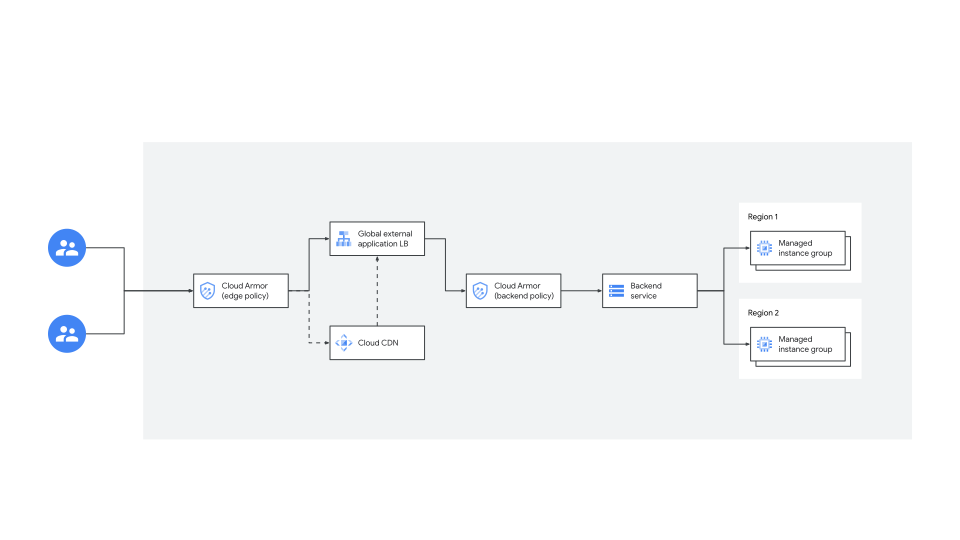

In this architecture, the application is load balanced with [global external Application Load Balancers](https://docs.cloud.google.com/load-balancing/docs), which distribute HTTP and HTTPS traffic across
multiple backend instances, across multiple
[regions](https://docs.cloud.google.com/docs/geography-and-regions#regions_and_zones). Cloud CDN accelerates
internet-facing applications by using Google's [edge points of presence (PoPs)](https://docs.cloud.google.com/cdn/docs/locations) and works with the [global external Application Load Balancer](https://docs.cloud.google.com/load-balancing/docs/https) to deliver content to users. The backends are
protected by [Google Cloud Armor security policies](https://docs.cloud.google.com/armor/docs/security-policy-overview) that provide Layer 7 filtering by scrubbing
incoming requests for common web attacks or other Layer 7 attributes, helping to
block traffic before it reaches the load-balanced backend services. Protection
against volumetric DDoS attacks is enabled by default.
When a user requests content from your service, that request is sent to the
[global front end for internet-facing applications](https://docs.cloud.google.com/solutions/cross-cloud-network#deliver-internet-facing-apps-and-content), which is provided by
the [Cross-Cloud Network](https://docs.cloud.google.com/solutions/cross-cloud-network).
The request is evaluated by Cloud Armor security policies, starting
with Cloud Armor edge security policies. If the request is allowed and
can be fulfilled by Cloud CDN, the content is retrieved from the
Cloud Armor cache and sent back to the user. If the request results in
a cache miss, it's evaluated by backend policies and then, according to the
policy's rules, denied or fulfilled by your backend server.
## Architecture components
The preceding diagram includes the following components:
- **Global external Application Load Balancer**: This Application Load Balancer is
a proxy-based Layer 7 load balancer that lets you run and scale your
services. The Application Load Balancer distributes HTTP and HTTPS traffic to
backends that are hosted on a variety of Google Cloud platforms. The
Application Load Balancer has the following features:
- **Configurable backend** : This architecture uses two [Managed Instance Groups (MIGs)](https://docs.cloud.google.com/load-balancing/docs/https/setup-global-ext-https-compute) in different regions, but you can configure any backend that the global external Application Load Balancer supports. You can use the same load balancer for GKE, Cloud Run, Cloud Run functions, and App Engine applications, as well as those hosted on-premises and on other clouds using a different backend configuration. To learn more, see [Application Load Balancer overview](https://docs.cloud.google.com/load-balancing/docs/application-load-balancer#ext-applb).
- [**Traffic splitting**](https://docs.cloud.google.com/load-balancing/docs/https/traffic-management-global): You can use the Application Load Balancer for traffic management, including the management of software versions by sending different users to different backend servers. In the architecture described in this document, there is a 60/40 simple traffic split. However, you can change this split to create more complex traffic management schemes. To learn about additional configuration options, see the configurable [timeouts and retries](https://docs.cloud.google.com/load-balancing/docs/https#timeouts_and_retries) and determine your preferred [balancing mode](https://docs.cloud.google.com/load-balancing/docs/https/http-load-balancing-best-practices#balancing_mode_selection_criteria).
- **Cloud CDN** : The Cloud CDN platform acts as a cache. It's
deployed with the origin server to provide the full suite of Cloud CDN features,
including QUIC and HTTP/2, as well as routing and caching controls. This
approach allows your application to scale globally without compromising
performance, and also reduce bandwidth and front-end compute costs. The
default configuration that the global front end uses is based on
Cloud CDN [content delivery best practices](https://docs.cloud.google.com/cdn/docs/best-practices) and [web security best practices](https://docs.cloud.google.com/cdn/docs/web-security-best-practices).
- **Cloud Armor**: This component includes DDoS Protection
and WAF rules. The architecture has the following basic Cloud Armor
configuration, which helps to mitigate against common threat vectors:
- [Default protection against volumetric DDoS attacks (Layer 3 and Layer 4)](https://docs.cloud.google.com/armor/docs/advanced-network-ddos).
- [Preconfigured WAF rules based on ModSecurity Core Rule Set CRS 3.3](https://docs.cloud.google.com/armor/docs/waf-rules). These rules enable Cloud Armor to
evaluate dozens of distinct traffic signatures by referring to pre-named rules,
rather than requiring you to define each signature manually.
- A basic configuration of [Cloud Armor edge security policy](https://docs.cloud.google.com/armor/docs/security-policy-overview#edge-policies) to filter
incoming requests and control access to protected backend services and
Cloud Storage buckets.
## Products used
This reference architecture uses the following Google Cloud products:
- [Cloud Load Balancing](https://cloud.google.com/load-balancing)
- [Cloud CDN](https://cloud.google.com/cdn)
- [Cloud Armor](https://cloud.google.com/security/products/armor)
## Design considerations
This section provides guidance to help you use this document as a starting point
to develop an architecture that meets your specific requirements for security,
reliability, operational efficiency, cost, and performance.
### Security, privacy, and compliance
This section describes additional factors that you should consider when you use
this reference architecture to deploy the web application.
#### Establish a security baseline
To help to further enhance your security, the architecture described in this
document is also compatible with the [Enterprise foundations blueprint](https://docs.cloud.google.com/architecture/blueprints/security-foundations). The blueprint helps organizations that are using
Google Cloud to establish a secure baseline for all future workloads,
including the setup of [Identity and Access Management (IAM)](https://docs.cloud.google.com/architecture/identity), [Cloud Key Management Service](https://docs.cloud.google.com/architecture/blueprints/security-foundations/keys-secret-management),
and [Security Command Center](https://docs.cloud.google.com/architecture/blueprints/security-foundations/detective-controls#10-1-security-command-center).
#### Protect user data with Cloud CDN
In this architecture, we recommend that you don't cache user-specific content.
For caching [HTML (`text/html`) and JSON (`application/json`) content types](https://docs.cloud.google.com/cdn/docs/caching#static), set explicit cache-control headers in the
Cloud CDN response. Make sure that you don't cache one user's data and
serve it to all users.
#### Control access to your application with IAP
The architecture is also compatible with Identity-Aware Proxy (IAP).
IAP verifies a user's identity and then determines whether that
user should be permitted to access an application. To enable IAP
for the [Application Load Balancer for both the global external mode or the classic mode](https://docs.cloud.google.com/load-balancing/docs/application-load-balancer), you enable it on the
backend services of the load balancer. Inbound HTTP/HTTPS requests are evaluated
by Cloud Armor before they are sent for load balancing by the Application Load Balancer.
If Cloud Armor blocks a request, IAP doesn't evaluate the
request. If Cloud Armor allows a request, IAP then evaluates
that request. The request is blocked if IAP doesn't authenticate the
request. To learn more, see [Integrating Cloud Armor with other Google products](https://docs.cloud.google.com/armor/docs/integrating-cloud-armor#https-iap).
### Cost optimization
As a general guideline, using Cloud CDN together with
Cloud Armor can help to minimize the effect of [data transfer out charges](https://docs.cloud.google.com/vpc/network-pricing#outbound-charge).
#### Cloud CDN
Static objects that are served to the client from the cache don't transit
through the load balancer. An effective caching strategy can reduce the amount
of outbound data being processed by the load balancer and lower your costs.
#### Google Cloud Armor
Cloud Armor helps you to lower costs by preventing your account from
being charged for unwanted traffic. Requests that are blocked by
Cloud Armor don't generate a response from your app, effectively
reducing the amount of outbound data processed by the load balancer. The effect
on your costs depends on the percentage of undesirable traffic blocked by the
[Cloud Armor security policies](https://docs.cloud.google.com/armor/docs/security-policy-overview) that you implement.
Final costs can also vary, depending on how many services or applications you
want to protect, the number of Cloud Armor policies and rules that you
have, cache fill and egress, and data volume. To learn more, see the following:
- [Cloud Armor pricing](https://cloud.google.com/armor/pricing)
- [Cloud Load Balancing pricing](https://docs.cloud.google.com/vpc/network-pricing#lb)
- [Cloud CDN pricing](https://cloud.google.com/cdn/pricing)
- To find the price for your specific deployment scenario, see the [Google Cloud pricing calculator](https://cloud.google.com/products/calculator)
## Deployment
To deploy this reference architecture, use the
[Terraform example](https://github.com/GoogleCloudPlatform/terraform-google-waap/tree/main/examples/web_app_protection_example).
To learn more, see the [`README` file](https://github.com/GoogleCloudPlatform/terraform-google-waap/blob/main/examples/web_app_protection_example/README.md).
The `web_app_protection_example` folder includes the
([`main.tf`](https://github.com/GoogleCloudPlatform/terraform-google-waap/blob/main/examples/web_app_protection_example/main.tf))
file. The code in this file creates the architecture described in this document,
and provides additional support for automatic deployment.
The folder structure in the Terraform folder is as follows:
- Source code repository: [The Web Application Protection Example](https://github.com/GoogleCloudPlatform/terraform-google-waap/tree/main/examples/web_app_protection_example) is part of the [Web Application and API Protection (WAAP)](https://docs.cloud.google.com/solutions/web-app-and-api-protection) repository.
- CD and CI: [The build folder](https://github.com/GoogleCloudPlatform/terraform-google-waap/tree/main/examples/web_app_protection_example/build) contains the following descriptive files for Jenkins, GitLab, and Cloud Build:
- Jenkins: This repository includes the [Jenkins file](https://github.com/GoogleCloudPlatform/terraform-google-waap/blob/main/examples/web_app_protection_example/build/Jenkinsfile) that contains the rules that the pipeline executes.
- GitLab: This repository includes a [.gitlab-ci YAML file](https://github.com/GoogleCloudPlatform/terraform-google-waap/blob/main/examples/web_app_protection_example/build/.gitlab-ci.yml) that contains the rules that the GitLab pipeline executes.
- Cloud Build: This repository includes the [Cloud Build file](https://github.com/GoogleCloudPlatform/terraform-google-waap/blob/main/examples/web_app_protection_example/build/cloudbuild.yaml) that contains the rules based on branch names.
- The repository includes an option for multi-environment (production and development) deployment. For more information, see the [`README` file](https://github.com/GoogleCloudPlatform/terraform-google-waap/tree/main/examples/web_app_protection_example/environments).
When you commit a change to any branch that your pipeline is based on, those
changes trigger a pipeline run and the changes are integrated into a new release
once it completes. When you pull the toolkit for the first time, the solution
will be loaded to your chosen Google Cloud project.
## What's next
Learn more about the best practices for the Google Cloud products used in
this reference architecture:
- [Web security best practices](https://docs.cloud.google.com/cdn/docs/web-security-best-practices)
- [External Application Load Balancer performance best practices](https://docs.cloud.google.com/load-balancing/docs/https/http-load-balancing-best-practices)
- [Content delivery best practices](https://docs.cloud.google.com/cdn/docs/best-practices)
- [Best practices for tuning Cloud Armor WAF rules](https://docs.cloud.google.com/armor/docs/rule-tuning)
- [Cloud Armor Enterprise](https://docs.cloud.google.com/armor/docs/managed-protection-overview):
The Cloud Armor capabilities in this architecture are available
under the Cloud Armor Standard tier. Enrolling your project to
Cloud Armor Enterprise lets you use additional features such as
the following:
- [Threat Intelligence](https://docs.cloud.google.com/armor/docs/threat-intelligence), which lets you allow or block traffic to external Application Load Balancers based on several categories of threat intelligence data.
- [Adaptive Protection](https://docs.cloud.google.com/armor/docs/adaptive-protection-overview), which helps to protect your Google Cloud applications, websites, and services against Layer 7 DDoS attacks such as HTTP floods, as well as other high-frequency Layer 7 (application-level) malicious activities. Adaptive Protection builds machine learning models that detect and alert on anomalous activity, generate a signature describing the potential attack, and generate a custom Cloud Armor WAF rule to block the signature.
- [DDoS attack visibility](https://docs.cloud.google.com/armor/docs/ddos-visibility), which provides visibility through metrics, as well as logging of events such as Layer 3 Layer 4 volumetric attack attempts.
- Additional services such as DDoS response support and DDoS bill protection. To learn more, see [Cloud Armor Enterprise overview](https://docs.cloud.google.com/armor/docs/managed-protection-overview)
-
For more reference architectures, diagrams, and best practices, explore the
[Cloud Architecture Center](https://docs.cloud.google.com/architecture).
## Contributors
Authors:
- [Lihi Shadmi](https://www.linkedin.com/in/lihishadmi) \| Product Manager
- [David Tu](https://www.linkedin.com/in/davidatu) \| Customer Engineer
Other contributors:
- [Alex Maclinovsky](https://www.linkedin.com/in/maclinovsky) \| Enterprise Architect
- [Anderson Duboc](https://www.linkedin.com/in/duboc) \| Customer Engineer
- [Grant Sorbo](https://www.linkedin.com/in/grantsorbo) \| Solutions Architect
- [Michele Chubirka](https://www.linkedin.com/in/mchubirka) \| Cloud Security Advocate
- [Rob Harman](https://www.linkedin.com/in/rob-harman-sre) \| Technical Solutions Engineer Manager
- [Susan Wu](https://www.linkedin.com/in/susanwu88) \| Outbound Product Manager