This document describes two reference architectures that help you create a
[federated learning](https://ai.googleblog.com/2017/04/federated-learning-collaborative.html)
platform on Google Cloud using Google Kubernetes Engine (GKE). The reference
architectures and associated resources that are described in this document
support the following:
- Cross-silo federated learning
- Cross-device federated learning, building upon the cross-silo architecture
The intended audiences for this document are cloud architects and AI and ML
engineers who want to implement federated learning use cases on
Google Cloud. It's also intended for decision-makers who are evaluating
whether to implement federated learning on Google Cloud.
## Architecture
The diagrams in this section show a cross-silo architecture and a cross-device
architecture for federated learning. To learn about the different applications
for these architectures, see [Use cases](https://docs.cloud.google.com/architecture/cross-silo-cross-device-federated-learning-google-cloud#use_cases).
### Cross-silo architecture
The following diagram shows an architecture that supports cross-silo federated
learning:
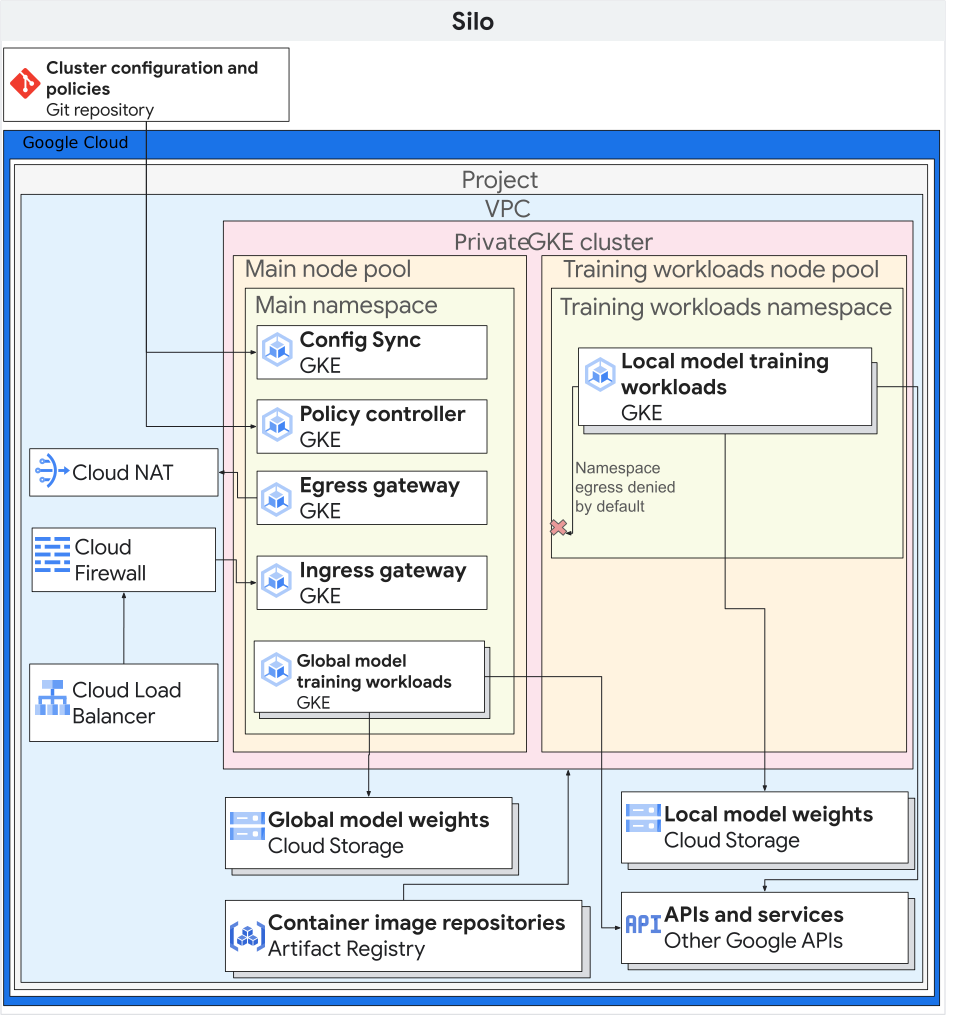
The preceding diagram shows a simplistic example of a cross-silo architecture.
In the diagram, all of the resources are in the same project in a Google Cloud
organization. These resources include the *local* client model, the *global*
client model, and their associated federated learning workloads.
This reference architecture can be modified to support several configurations
for data silos. Members of the consortium can host their data silos in the
following ways:
- On Google Cloud, in the same Google Cloud organization, and same Google Cloud project.
- On Google Cloud, in the same Google Cloud organization, in different Google Cloud projects.
- On Google Cloud, in different Google Cloud organizations.
- In private, on-premises environments, or in other public clouds.
For participating members to collaborate, they need to establish secure
communication channels between their environments. For more information about
the role of participating members in the federated learning effort, how they
collaborate, and what they share with each other, see
[Use cases](https://docs.cloud.google.com/architecture/cross-silo-cross-device-federated-learning-google-cloud#use_cases).
The architecture includes the following components:
- A [Virtual Private Cloud (VPC) network](https://docs.cloud.google.com/vpc/docs/vpc) and subnet.
- A [private GKE cluster](https://docs.cloud.google.com/kubernetes-engine/docs/concepts/private-cluster-concept) that helps you to do the following:
- Isolate cluster nodes from the internet.
- Limit exposure of your cluster nodes and control plane to the internet by creating a private GKE cluster with [authorized networks](https://docs.cloud.google.com/kubernetes-engine/docs/concepts/private-cluster-concept#overview).
- Use shielded cluster nodes that use a hardened operating system image.
- Enable [Dataplane V2](https://docs.cloud.google.com/kubernetes-engine/docs/concepts/dataplane-v2) for optimized Kubernetes networking.
- Dedicated GKE [node pools](https://docs.cloud.google.com/kubernetes-engine/docs/concepts/node-pools): You create a dedicated node pool to exclusively host tenant apps and resources. The nodes have taints to ensure that only tenant workloads are scheduled onto the tenant nodes. Other cluster resources are hosted in the main node pool.
- Data encryption (enabled by default):
- Data [at rest](https://docs.cloud.google.com/docs/security/encryption/default-encryption).
- Data [in transit](https://docs.cloud.google.com/service-mesh/docs/overview#security_benefits).
- [Cluster secrets](https://docs.cloud.google.com/kubernetes-engine/docs/how-to/encrypting-secrets) at the application layer.
- In-use data encryption, by optionally enabling [Confidential Google Kubernetes Engine Nodes](https://docs.cloud.google.com/kubernetes-engine/docs/how-to/confidential-gke-nodes).
- [VPC Firewall rules](https://docs.cloud.google.com/vpc/docs/firewalls)
which apply the following:
- Baseline rules that apply to all nodes in the cluster.
- Additional rules that only apply to nodes in the tenant node pool. These firewall rules limit ingress to and egress from tenant nodes.
- [Cloud NAT](https://docs.cloud.google.com/nat/docs/overview)
to allow egress to the internet.
- [Cloud DNS](https://docs.cloud.google.com/dns/docs/overview)
records to enable
[Private Google Access](https://docs.cloud.google.com/vpc/docs/private-google-access)
such that apps within the cluster can access Google APIs without going over
the internet.
- [Service accounts](https://docs.cloud.google.com/iam/docs/understanding-service-accounts)
which are as follows:
- A dedicated service account for the nodes in the tenant node pool.
- A dedicated service account for tenant apps to use with Workload Identity Federation.
- Support for using
[Google Groups for Kubernetes role-based access control (RBAC)](https://docs.cloud.google.com/kubernetes-engine/docs/how-to/google-groups-rbac).
- A Git repository to store configuration descriptors.
- An
[Artifact Registry](https://docs.cloud.google.com/artifact-registry/docs)
repository to store container images.
- [Config Sync](https://docs.cloud.google.com/kubernetes-engine/config-sync/docs/overview)
and
[Policy Controller](https://docs.cloud.google.com/kubernetes-engine/policy-controller/docs/overview)
to deploy configuration and policies.
- [Cloud Service Mesh gateways](https://docs.cloud.google.com/service-mesh/v1.20/docs/gateways)
to selectively allow cluster ingress and egress traffic.
- [Cloud Storage buckets](https://docs.cloud.google.com/storage/docs/buckets)
to store global and local model weights.
- Access to other Google and Google Cloud APIs. For example, a training
workload might need to access training data that's stored in
Cloud Storage, BigQuery, or Cloud SQL.
### Cross-device architecture
The following diagram shows an architecture that supports cross-device
federated learning:
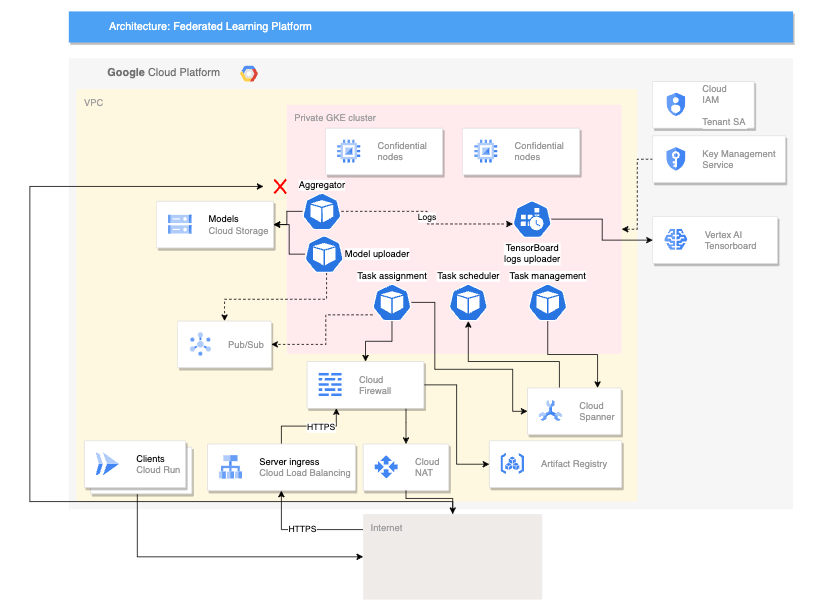
The preceding cross-device architecture builds upon the cross-silo architecture
with the addition of the following components:
- A Cloud Run service that simulates devices connecting to the server
- A Certificate Authority Service that creates private certificates for the server and clients to run
- A Vertex AI TensorBoard to visualize the result of the training
- A Cloud Storage bucket to store the consolidated model
- The private GKE cluster that uses [confidential nodes](https://docs.cloud.google.com/kubernetes-engine/docs/how-to/confidential-gke-nodes) as its primary pool to help secure the data in use
The cross-device architecture uses components from the open source
[Federated Compute Platform (FCP) project](https://github.com/google/federated-compute).
This project includes the following:
- Client code for communicating with a server and executing tasks on the devices
- A protocol for client-server communication
- Connection points with TensorFlow Federated to make it easier to define your federated computations
The FCP components shown in the preceding diagram can be deployed as a set of
microservices. These components do the following:
- Aggregator: This job reads device gradients and calculates aggregated result with Differential Privacy.
- Collector: This job runs periodically to query active tasks and encrypted gradients. This information determines when aggregation starts.
- Model uploader: This job listens to events and publishes results so that devices can download updated models.
- Task-assignment: This frontend service distributes training tasks to devices.
- Task-management: This job manages tasks.
- Task-scheduler: This job either runs periodically or is triggered by specific events.
## Products used
The reference architectures for both federated learning use cases use the
following Google Cloud components:
- [Google Cloud Kubernetes engine (GKE)](https://docs.cloud.google.com/kubernetes-engine): GKE provides the foundational platform for federated learning.
- [TensorFlow Federated (TFF)](https://www.tensorflow.org/federated): TFF provides an open-source framework for machine learning and other computations on decentralized data.
GKE also provides the following capabilities to your
federated learning platform:
- Hosting the federated learning coordinator: The federated learning coordinator is responsible for managing the federated learning process. This management includes tasks such as distributing the global model to participants, aggregating updates from participants, and updating the global model. GKE can be used to host the federated learning coordinator in a highly available and scalable way.
- Hosting federated learning participants: Federated learning participants are responsible for training the global model on their local data. GKE can be used to host federated learning participants in a secure and isolated way. This approach can help ensure that participants' data is kept local.
- Providing a secure and scalable communication channel: Federated learning participants need to be able to communicate with the federated learning coordinator in a secure and scalable way. GKE can be used to provide a secure and scalable communication channel between participants and the coordinator.
- Managing the lifecycle of federated learning deployments: GKE can be used to manage the lifecycle of federated learning deployments. This management includes tasks such as provisioning resources, deploying the federated learning platform, and monitoring the performance of the federated learning platform.
In addition to these benefits, GKE also provides a number
of features that can be useful for federated learning deployments, such as the
following:
- Regional clusters: GKE lets you create regional clusters, helping you to improve the performance of federated learning deployments by reducing latency between participants and the coordinator.
- Network policies: GKE lets you create network policies, helping to improve the security of federated learning deployments by controlling the flow of traffic between participants and the coordinator.
- Load balancing: GKE provides a number of load balancing options, helping to improve the scalability of federated learning deployments by distributing traffic between participants and the coordinator.
TFF provides the following features to facilitate the implementation of
federated learning use cases:
- The ability to declaratively express federated computations, which are a set of processing steps that run on a server and set of clients. These computations can be deployed to diverse runtime environments.
- Custom aggregators can be built using TFF open source.
- Support for a variety of federated learning algorithms, including the following algorithms:
- [Federated averaging:](https://github.com/tensorflow/federated/tree/main/tensorflow_federated/examples/simple_fedavg) An algorithm that averages the model parameters of participating clients. It's particularly well-suited for use cases where the data is relatively homogeneous and the model is not too complex. Typical use cases are as follows:
- Personalized recommendations: A company can use federated averaging to train a model that recommends products to users based on their purchase history.
- Fraud detection: A consortium of banks can use federated averaging to train a model that detects fraudulent transactions.
- Medical diagnosis: A group of hospitals can use federated averaging to train a model that diagnoses cancer.
- [Federated stochastic gradient descent (FedSGD)](https://www.tensorflow.org/federated/api_docs/python/tff/learning/algorithms/build_fed_sgd): An algorithm that uses stochastic gradient descent to update the model parameters. It's well-suited for use cases where the data is heterogeneous and the model is complex. Typical use cases are as follows:
- Natural language processing: A company can use FedSGD to train a model that improves the accuracy of speech recognition.
- Image recognition: A company can use FedSGD to train a model that can identify objects in images.
- Predictive maintenance: A company can use FedSGD to train a model that predicts when a machine is likely to fail.
- [Federated Adam](https://www.tensorflow.org/federated/api_docs/python/tff/learning/optimizers/build_adam): An algorithm that uses the Adam optimizer to update the model parameters. Typical use cases are as follows:
- Recommender systems: A company can use federated Adam to train a model that recommends products to users based on their purchase history.
- Ranking: A company can use federated Adam to train a model that ranks search results.
- Click-through rate prediction: A company can use federated Adam to train a model that predicts the likelihood that a user clicks an advertisement.
## Use cases
This section describes use cases for which the cross-silo and cross-device
architectures are appropriate choices for your federated learning platform.
Federated learning is a machine learning setting where many clients
collaboratively train a model. This process is led by a central coordinator, and
the training data remains decentralized.
In the federated learning paradigm, clients download a global model and improve
the model by training locally on their data. Then, each client sends its
calculated model updates back to the central server where the model updates are
aggregated and a new iteration of the global model is generated. In these
reference architectures, the model training workloads run on
GKE.
Federated learning
[embodies the privacy principle of data minimization](https://dl.acm.org/doi/pdf/10.1145/3500240),
by restricting what data is collected at each stage of computation, limiting
access to data, and processing then discarding data as early as possible.
Additionally, the problem setting of federated learning is compatible with
additional privacy preserving techniques, such as using differential privacy
(DP) to
[improve the model anonymization](https://blog.research.google/2022/02/federated-learning-with-formal.html?m=1)
to ensure the final model does not memorize individual user's data.
Depending on the use case, training models with federated learning can have
additional benefits:
- Compliance: In some cases, regulations might constrain how data can be used or shared. Federated learning might be used to comply with these regulations.
- Communication efficiency: In some cases, it's more efficient to train a model on distributed data than to centralize the data. For example, the datasets that the model needs to be trained on are too large to move centrally.
- Making data accessible: Federated learning allows organizations to keep the training data decentralized in per-user or per-organization data silos.
- Higher model accuracy: By training on real user data (while ensuring privacy) rather than synthetic data (sometimes referred to as proxy data), it often results in higher model accuracy.
There are different kinds of federated learning, which are characterized by
where the data originates and where the local computations occur. The
architectures in this document focus on two types of federated learning:
cross-silo and cross-device. Other types of federated learning are out of scope
for this document.
Federated learning is further categorized by how the datasets are partitioned,
which can be as follows:
- Horizontal federated learning (HFL): Datasets with the same features (columns) but different samples (rows). For example, multiple hospitals might have patient records with the same medical parameters but different patient populations.
- Vertical federated learning (VFL): Datasets with the same samples (rows) but different features (columns). For example, a bank and an ecommerce company might have customer data with overlapping individuals but different financial and purchasing information.
- Federated Transfer Learning (FTL): Partial overlap in both samples and features among the datasets. For example, two hospitals might have patient records with some overlapping individuals and some shared medical parameters, but also unique features in each dataset.
Cross-silo federated computation is where the participating members are
organizations or companies. In practice, the number of members is usually small
(for example, within one hundred members). Cross-silo computation is typically
used in scenarios where the participating organizations have different datasets,
but they want to train a shared model or analyze aggregated results
without sharing their raw data with each other. For example, participating
members can have their environments in different Google Cloud organizations,
such as when they represent different legal entities, or in the same
Google Cloud organization, such as when they represent different departments of
the same legal entity.
Participating members might not be able to consider each other's workloads as
trusted entities. For example, a participating member might not have access to
the source code of a training workload that they receive from a third party,
such as the coordinator. Because they can't access this source code, the
participating member can't ensure that the workload can be fully trusted.
To help you prevent an untrusted workload from accessing your data or resources
without authorization, we recommend that you do the following:
- Deploy untrusted workloads in an isolated environment.
- Grant untrusted workloads only the strictly necessary access rights and permissions to complete the training rounds assigned to the workload.
To help you isolate potentially untrusted workloads, these reference
architectures implement security controls, such as configuring isolated
Kubernetes namespaces, where each namespace has a dedicated
GKE node pool. Cross-namespace communication and cluster
inbound and outbound traffic are forbidden by default, unless you explicitly
override this setting.
Example use cases for cross-silo federated learning are as follows:
- Fraud detection: Federated learning can be used to train a fraud detection model on data that is distributed across multiple organizations. For example, a consortium of banks could use federated learning to train a model that detects fraudulent transactions.
- Medical diagnosis: Federated learning can be used to train a medical diagnosis model on data that is distributed across multiple hospitals. For example, a group of hospitals could use federated learning to train a model that diagnoses cancer.
[Cross-device federated learning](https://federated.withgoogle.com/)
is a type of federated computation where the participating members are end-user
devices such as mobile phones, vehicles, or IoT devices. The number of members
can reach up to a scale of millions or even tens of millions.
The process for cross-device federated learning is similar to that of
cross-silo federated learning. However, it also requires you to adapt the reference
architecture to accommodate some of the extra factors that you must consider
when you are dealing with thousands to millions of devices. You must deploy
administrative workloads to handle scenarios that are encountered in
cross-device federated learning use cases. For example, the need to
[coordinate a subset of clients](https://www.tensorflow.org/federated/federated_learning#client_selection)
that will take place in the round of training. The cross-device architecture
provides this ability by letting you deploy the FCP services. These services
have workloads that have connection points with TFF. TFF is used to write the
code that manages this coordination.
Example use cases for cross-device federated learning are as follows:
- Personalized recommendations: You can use cross-device federated learning to train a personalized recommendation model on data that's distributed across multiple devices. For example, a company could use federated learning to train a model that recommends products to users based on their purchase history.
- Natural language processing: Federated learning can be used to train a natural language processing model on data that is distributed across multiple devices. For example, a company could use federated learning to train a model that improves the accuracy of speech recognition.
- Predicting vehicle maintenance needs: Federated learning can be used to train a model that predicts when a vehicle is likely to need maintenance. This model could be trained on data that is collected from multiple vehicles. This approach lets the model learn from the experiences of all the vehicles, without compromising the privacy of any individual vehicle.
The following table summarizes the features of the cross-silo and cross-device
architectures, and shows you how to categorize the type of federated learning
scenario that is applicable for your use case.
| Feature | Cross-silo federated computations | Cross-device federated computations |
|---|---|---|
| Population size | Usually small (for example, within one hundred devices) | Scalable to thousands, millions, or hundreds of millions of devices |
| Participating members | Organizations or companies | Mobile devices, edge devices, vehicles |
| Most common data partitioning | HFL, VFL, FTL | HFL |
| Data sensitivity | Sensitive data that participants don't want to share with each other in raw format | Data that's too sensitive to be shared with a central server |
| Data availability | Participants are almost always available | Only a fraction of participants are available at any time |
| Example use cases | Fraud detection, medical diagnosis, financial forecasting | Fitness tracking, voice recognition, image classification |
## Design considerations
This section provides guidance to help you use this reference architecture to
develop one or more architectures that meet your specific requirements for
security, reliability, operational efficiency, cost, and performance.
### Cross-silo architecture design considerations
To implement a cross-silo federated learning architecture in
Google Cloud, you must implement the following minimum prerequisites,
which are explained in more detail in the following sections:
1. [Establish a federated learning consortium](https://docs.cloud.google.com/architecture/cross-silo-cross-device-federated-learning-google-cloud#establish_a_federated_learning_consortium).
2. [Determine the collaboration model](https://docs.cloud.google.com/architecture/cross-silo-cross-device-federated-learning-google-cloud#determine_a_collaboration_model_for_the_federated_learning_consortium) for the federated learning consortium to implement.
3. [Determine the responsibilities of the participant organizations](https://docs.cloud.google.com/architecture/cross-silo-cross-device-federated-learning-google-cloud#determine_the_responsibilities_of_the_participant_organizations).
In addition to these prerequisites, there are other actions that the federation
owner must take which are outside the scope of this document, such as the
following:
- Manage the federated learning consortium.
- Design and implement a collaboration model.
- Prepare, manage, and operate the model training data and the model that the federation owner intends to train.
- Create, containerize, and orchestrate federated learning workflows.
- Deploy and manage federated learning workloads.
- Set up the communication channels for the participant organizations to securely transfer data.
#### Establish a federated learning consortium
A federated learning consortium is the group of organizations that participate
in a cross-silo federated learning effort. Organizations in the consortium only
share the parameters of the ML models, and you can encrypt these parameters to
increase privacy. If the federated learning consortium allows the practice,
organizations can also aggregate data that don't contain personally identifiable
information (PII).
#### Determine a collaboration model for the federated learning consortium
The federated learning consortium can implement different collaboration models,
such as the following:
- A *centralized model* that consists of a single coordinating organization, called the *federation owner* or *orchestrator* , and a set of *participant organizations* or *data owners*.
- A *decentralized model* that consists of organizations that coordinate as a group.
- A *heterogeneous model* that consists of a consortium of diverse participating organizations, all of which bring different resources to the consortium.
This document assumes that the collaboration model is a centralized
model.
#### Determine the responsibilities of the participant organizations
After choosing a collaboration model for the federated learning consortium, the
federation owner must determine the responsibilities for the participant
organizations.
The federation owner must also do the following when they begin to build a
federated learning consortium:
- Coordinate the federated learning effort.
- Design and implement the global ML model and the ML models to share with the participant organizations.
- Define the *federated learning rounds*---the approach for the iteration of the ML training process.
- Select the participant organizations that contribute to any given federated learning round. This selection is called a *cohort*.
- Design and implement a consortium membership verification procedure for the participant organizations.
- Update the global ML model and the ML models to share with the participant organizations.
- Provide the participant organizations with the tools to validate that the federated learning consortium meets their privacy, security, and regulatory requirements.
- Provide the participant organizations with secure and encrypted communication channels.
- Provide the participant organizations with all the necessary non-confidential, aggregated data that they need to complete each federated learning round.
The participant organizations have the following responsibilities:
- Provide and maintain a secure, isolated environment (a *silo*). The silo is where participant organizations store their own data, and where ML model training is implemented. Participant organizations don't share their own data with other organizations.
- Train the models supplied by the federation owner using their own computing infrastructure and their own local data.
- Share model training results with the federation owner in the form of aggregated data, after removing any PII.
The federation owner and the participant organizations can use Cloud Storage
to share updated models and training results.
The federation owner and the participant organizations refine the ML model
training until the model meets their requirements.
### Implement federated learning on Google Cloud
After establishing the federated learning consortium and determining how the
federated learning consortium will collaborate, we recommend that participant
organizations do the following:
1. [Provision and configure the necessary infrastructure for the federated
learning consortium](https://docs.cloud.google.com/architecture/cross-silo-cross-device-federated-learning-google-cloud#provision_and_configure_the_infrastructure_for_the_federated_learning_consortium).
2. [Implement the collaboration model](https://docs.cloud.google.com/architecture/cross-silo-cross-device-federated-learning-google-cloud#implement_the_collaboration_model).
3. [Start the federated learning effort](https://docs.cloud.google.com/architecture/cross-silo-cross-device-federated-learning-google-cloud#start_the_federated_learning_effort).
#### Provision and configure the infrastructure for the federated learning consortium
When provisioning and configuring the infrastructure for the federated learning
consortium, it's the responsibility of the federation owner to create and
distribute the workloads that train the federated ML models to the participant
organizations. Because a third party (the federation owner) created and provided
the workloads, the participant organizations must take precautions when
deploying those workloads in their runtime environments.
Participant organizations must configure their environments according to their
individual security best practices, and apply controls that limit the scope and
the permissions granted to each workload. In addition to following their
individual security best practices, we recommend that the federation owner and
the participant organizations consider
[threat vectors that are specific to federated learning](https://docs.cloud.google.com/architecture/cross-silo-cross-device-federated-learning-google-cloud#federated_learning_security_considerations).
#### Implement the collaboration model
After the federated learning consortium infrastructure is prepared, the
federation owner designs and implements the mechanisms that let the participant
organizations interact with each other. The approach follows the collaboration
model that the federation owner chose for the federated learning consortium.
#### Start the federated learning effort
After implementing the collaboration model, the federation owner implements the
global ML model to train, and the ML models to share with the participant
organization. After those ML models are ready, the federation owner starts the
first round of the federated learning effort.
During each round of the federated learning effort, the federation owner does
the following:
1. Distributes the ML models to share with the participant organizations.
2. Waits for the participant organizations to deliver the results of the training of the ML models that the federation owner shared.
3. Collects and processes the training results that the participant organizations produced.
4. Updates the global ML model when they receive appropriate training results from participating organizations.
5. Updates the ML models to share with the other members of the consortium when applicable.
6. Prepares the training data for the next round of federated learning.
7. Starts the next round of federated learning.
## Security, privacy, and compliance
This section describes factors that you should consider when you use this
reference architecture to design and build a federated learning platform on
Google Cloud. This guidance applies to both of the architectures that
this document describes.
The federated learning workloads that you deploy in your environments might
expose you, your data, your federated learning models, and your infrastructure
to threats that might impact your business.
To help you increase the security of your federated learning environments,
these reference architectures configure
[GKE security controls](https://docs.cloud.google.com/architecture/cross-silo-cross-device-federated-learning-google-cloud#gke-security-controls)
that focus on the infrastructure of your environments. These controls
might not be enough to protect you from threats that are specific to your
federated learning workloads and use cases. Given the specificity of each
federated learning workload and use case, security controls aimed at securing
your federated learning implementation are out of the scope of this document.
For more information and examples about these threats, see
[Federated Learning security considerations](https://docs.cloud.google.com/architecture/cross-silo-cross-device-federated-learning-google-cloud#federated_learning_security_considerations).
### GKE security controls
This section discusses the controls that you apply with these architectures to
help you secure your GKE cluster.
#### Enhanced security of GKE clusters
These reference architectures help you create a GKE cluster which
implements the following security settings:
- Limit exposure of your cluster nodes and control plane to the internet by creating a [private GKE cluster](https://docs.cloud.google.com/kubernetes-engine/docs/concepts/private-cluster-concept) with [authorized networks](https://docs.cloud.google.com/kubernetes-engine/docs/concepts/private-cluster-concept#overview).
- Use [shielded nodes](https://docs.cloud.google.com/kubernetes-engine/docs/how-to/shielded-gke-nodes) that use a hardened node image with the [`containerd`](https://docs.cloud.google.com/kubernetes-engine/docs/concepts/using-containerd) runtime.
- Increased isolation of tenant workloads using [GKE Sandbox](https://docs.cloud.google.com/kubernetes-engine/docs/concepts/sandbox-pods).
- [Encrypt data at rest by default](https://docs.cloud.google.com/docs/security/encryption/default-encryption).
- [Encrypt data in transit by default](https://docs.cloud.google.com/service-mesh/docs/overview#security_benefits).
- [Encrypt cluster secrets](https://docs.cloud.google.com/kubernetes-engine/docs/how-to/encrypting-secrets) at the application layer.
- Optionally encrypt data in-use by enabling [Confidential Google Kubernetes Engine Nodes](https://docs.cloud.google.com/kubernetes-engine/docs/how-to/confidential-gke-nodes).
For more information about GKE security settings, see
[Harden your cluster's security](https://docs.cloud.google.com/kubernetes-engine/docs/how-to/hardening-your-cluster)
and
[About the security posture dashboard](https://docs.cloud.google.com/kubernetes-engine/docs/concepts/about-security-posture-dashboard).
#### VPC firewall rules
[Virtual Private Cloud (VPC) firewall rules](https://docs.cloud.google.com/vpc/docs/firewalls)
govern which traffic is allowed to or from Compute Engine VMs. The rules let
you filter traffic at VM granularity, depending on
[Layer 4](https://wikipedia.org/wiki/Transport_layer) attributes.
You create a GKE cluster with the
[default GKE cluster firewall rules](https://docs.cloud.google.com/kubernetes-engine/docs/concepts/firewall-rules#cluster-fws).
These firewall rules enable communication between the cluster nodes and
GKE control plane, and between nodes and Pods in the
cluster.
You apply additional firewall rules to the nodes in the tenant node pool. These
firewall rules restrict egress traffic from the tenant nodes. This approach can
increase isolation of tenant nodes. By default, all egress traffic from the
tenant nodes is denied. Any required egress must be explicitly configured. For
example, you create firewall rules to allow egress from the tenant nodes to the
GKE control plane, and to Google APIs using
[Private Google Access](https://docs.cloud.google.com/vpc/docs/private-google-access).
The firewall rules are targeted to the tenant nodes by using the
[service account](https://docs.cloud.google.com/vpc/docs/firewalls#service-accounts-vs-tags) for the tenant node pool.
#### Namespaces
Namespaces let you provide a scope for related resources within a cluster---for
example, Pods, Services, and replication controllers. By using namespaces, you
can delegate administration responsibility for the related resources as a unit.
Therefore, namespaces are integral to most security patterns.
Namespaces are an important feature for control plane isolation. However, they
don't provide node isolation, data plane isolation, or network isolation.
A common approach is to create namespaces for individual applications. For
example, you might create the namespace `myapp-frontend` for the UI component of
an application.
These reference architectures help you create a dedicated namespace to host the
third-party apps. The namespace and its resources are treated as a tenant within
your cluster. You apply policies and controls to the namespace to limit the
scope of resources in the namespace.
#### Network policies
[Network policies](https://kubernetes.io/docs/concepts/services-networking/network-policies/)
enforce Layer 4 network traffic flows by using Pod-level firewall rules. Network
policies are
scoped to a namespace.
In the reference architectures that this document describes, you apply network
policies to the tenant namespace that hosts the third-party apps. By default,
the network policy denies all traffic to and from pods in the namespace. Any
required traffic must be explicitly added to an allowlist. For example, the
network policies in these reference architectures explicitly allow traffic to
required cluster services, such as the cluster internal DNS and the Cloud Service Mesh
control plane.
#### Config Sync
[Config Sync](https://docs.cloud.google.com/kubernetes-engine/config-sync/docs/overview)
keeps your GKE clusters in sync with configs stored in a
[source of truth](https://docs.cloud.google.com/kubernetes-engine/config-sync/docs/concepts/sources-of-truth).
The Git repository acts as the single source of truth for your cluster
configuration and policies. Config Sync is declarative. It continuously
checks cluster state and applies the state declared in the configuration file to
enforce policies, which helps to prevent configuration drift.
You install Config Sync into your GKE cluster. You configure
Config Sync to sync cluster configurations and policies from a
[source of truth](https://docs.cloud.google.com/kubernetes-engine/config-sync/docs/concepts/sources-of-truth).
The synced resources include the following:
- Cluster-level Cloud Service Mesh configuration
- Cluster-level security policies
- Tenant namespace-level configuration and policy including network policies, service accounts, RBAC rules, and Cloud Service Mesh configuration
#### Policy Controller
[Policy Controller](https://docs.cloud.google.com/kubernetes-engine/policy-controller/docs/overview)
is a
[dynamic admission controller](https://kubernetes.io/docs/reference/access-authn-authz/extensible-admission-controllers/)
for Kubernetes that enforces
[CustomResourceDefinition-based (CRD-based)](https://kubernetes.io/docs/tasks/access-kubernetes-api/custom-resources/custom-resource-definitions/)
policies that are executed by the
[Open Policy Agent (OPA)](https://www.openpolicyagent.org/).
[Admission controllers](https://kubernetes.io/blog/2019/03/21/a-guide-to-kubernetes-admission-controllers/)
are Kubernetes plugins that intercept requests to the Kubernetes API server
before an object is persisted, but after the request is authenticated and
authorized. You can use admission controllers to limit how a cluster is used.
You install Policy Controller into your GKE cluster. These
reference architectures include example policies to help secure your cluster.
You automatically apply the policies to your cluster using Config Sync. You
apply the following policies:
- Selected policies to help [enforce Pod security](https://docs.cloud.google.com/kubernetes-engine/policy-controller/docs/how-to/using-constraints-to-enforce-pod-security). For example, you apply policies that prevent pods from running privileged containers and that require a read-only root file system.
- Policies from the Policy Controller [template library](https://docs.cloud.google.com/kubernetes-engine/policy-controller/docs/latest/reference/constraint-template-library). For example, you apply a policy that [disallows services with type NodePort](https://docs.cloud.google.com/kubernetes-engine/policy-controller/docs/latest/reference/constraint-template-library#k8sblocknodeport).
#### Cloud Service Mesh
[Cloud Service Mesh](https://docs.cloud.google.com/service-mesh/docs/overview)
is a service mesh that helps you simplify the management of secure
communications across services. These reference architectures configure
Cloud Service Mesh so that it does the following:
- [Automatically injects sidecar proxies](https://docs.cloud.google.com/service-mesh/docs/proxy-injection).
- Enforces [mTLS communication](https://docs.cloud.google.com/service-mesh/docs/security/configuring-mtls#enforcing_mesh-wide_mtls) between services in the mesh.
- Limits outbound mesh traffic to only known hosts.
- Limits inbound traffic only from certain clients.
- Lets you configure network security policies based on service identity rather than based on the IP address of peers on the network.
- Limits [authorized communication](https://docs.cloud.google.com/service-mesh/docs/security/authorization-policy-overview) between services in the mesh. For example, apps in the tenant namespace are only allowed to communicate with apps in the same namespace, or with a set of known external hosts.
- Routes all inbound and outbound traffic through [mesh gateways](https://docs.cloud.google.com/service-mesh/docs/gateways) where you can apply further traffic controls.
- Supports secure communication between clusters.
#### Node taints and affinities
[Node taints](https://kubernetes.io/docs/concepts/scheduling-eviction/taint-and-toleration/)
and
[node affinity](https://kubernetes.io/docs/concepts/scheduling-eviction/assign-pod-node/#affinity-and-anti-affinity)
are Kubernetes mechanisms that let you influence how pods are scheduled onto
cluster nodes.
Tainted nodes repel pods. Kubernetes won't schedule a Pod onto a tainted node
unless the Pod has a *toleration* for the taint. You can use node taints to
reserve nodes for use only by certain workloads or tenants. Taints and
tolerations are often used in multi-tenant clusters. For more information, see the
[dedicated nodes with taints and tolerations](https://docs.cloud.google.com/kubernetes-engine/docs/concepts/multitenancy-overview#dedicated_nodes_with_taints_and_tolerations)
documentation.
Node affinity lets you constrain pods to nodes with particular labels. If a pod
has a node affinity requirement, Kubernetes doesn't schedule the Pod onto a
node unless the node has a label that matches the affinity requirement. You can
use node affinity to ensure that pods are scheduled onto appropriate nodes.
You can use node taints and node affinity together to ensure tenant workload
pods are scheduled exclusively onto nodes reserved for the tenant.
These reference architectures help you control the scheduling of the tenant apps
in the following ways:
- Creating a GKE node pool dedicated to the tenant. Each node in the pool has a taint related to the tenant name.
- Automatically applying the appropriate toleration and node affinity to any Pod targeting the tenant namespace. You apply the toleration and affinity using [PolicyController mutations](https://docs.cloud.google.com/kubernetes-engine/policy-controller/docs/how-to/mutation).
#### Least privilege
It's a security best practice to adopt a principle of least privilege for your
Google Cloud projects and resources like GKE clusters. By using this approach, the
apps that run inside your cluster, and the developers and operators that use the
cluster, have only the minimum set of permissions required.
These reference architectures help you use least privilege service accounts in
the following ways:
- Each GKE node pool receives its own service account. For example, the nodes in the tenant node pool use a service account dedicated to those nodes. The node service accounts are configured with the [minimum required permissions](https://docs.cloud.google.com/kubernetes-engine/docs/how-to/hardening-your-cluster#use_least_privilege_sa).
- The cluster uses [Workload Identity Federation for GKE](https://docs.cloud.google.com/kubernetes-engine/docs/how-to/workload-identity) to associate Kubernetes service accounts with Google service accounts. This way, the tenant apps can be granted limited access to any required Google APIs without downloading and storing a service account key. For example, you can grant the service account permissions to read data from a Cloud Storage bucket.
These reference architectures help you
[restrict access to cluster resources](https://docs.cloud.google.com/kubernetes-engine/docs/how-to/hardening-your-cluster#use_namespaces_and_rbac_to_restrict_access_to_cluster_resources)
in the following ways:
- You create a sample Kubernetes RBAC role with limited permissions to manage apps. You can grant this role to the users and groups who operate the apps in the tenant namespace. By applying this limited role of users and groups, those users only have permissions to modify app resources in the tenant namespace. They don't have permissions to modify cluster-level resources or sensitive security settings like Cloud Service Mesh policies.
#### Binary Authorization
[Binary Authorization](https://docs.cloud.google.com/binary-authorization/docs/overview)
lets you enforce policies that you define about the container images that are
being deployed in your GKE environment. Binary Authorization allows
only container images that conform with your defined policies to be deployed. It
disallows the deployment of any other container images.
In this reference architecture, Binary Authorization is enabled with its default
configuration. To inspect the Binary Authorization default
configuration,
see [Export the policy YAML file](https://docs.cloud.google.com/binary-authorization/docs/configuring-policy-cli#export_the_policy_yaml_file).
For more information about how to configure policies, see the following specific
guidance:
- [Google Cloud CLI](https://docs.cloud.google.com/binary-authorization/docs/configuring-policy-cli)
- [Google Cloud console](https://docs.cloud.google.com/binary-authorization/docs/configuring-policy-console)
- [The REST API](https://docs.cloud.google.com/binary-authorization/docs/configuring-policy-rest)
- [The `google_binary_authorization_policy` Terraform resource](https://registry.terraform.io/providers/hashicorp/google/latest/docs/resources/binary_authorization_policy)
##### Cross-organization attestation verification
You can use Binary Authorization to verify attestations generated by a third-party
signer. For example, in a cross-silo federated learning
use case, you can verify attestations that another participant organization
created.
To verify the attestations that a third party created, you do the following:
1. Receive the public keys that the third party used to create the attestations that you need to verify.
2. Create the attestors to verify the attestations.
3. Add the public keys that you received from the third party to the attestors you created.
For more information about creating attestors, see the following specific
guidance:
- [Google Cloud CLI](https://docs.cloud.google.com/binary-authorization/docs/creating-attestors-cli)
- [Google Cloud console](https://docs.cloud.google.com/binary-authorization/docs/creating-attestors-console)
- [the REST API](https://docs.cloud.google.com/binary-authorization/docs/creating-attestors-rest)
- [the `google_binary_authorization_attestor` Terraform resource](https://registry.terraform.io/providers/hashicorp/google/latest/docs/resources/binary_authorization_attestor)
### Federated learning security considerations
Despite its strict data sharing model, federated learning isn't inherently
secure against all targeted attacks, and you should take these risks into
account when you deploy either of the architectures described in this document.
There's also the risk of unintended information leaks about ML models or model
training data. For example, an attacker might intentionally compromise the
global ML model or rounds of the federated learning effort, or they might
execute a
[timing attack (a type of side-channel attack)](https://wikipedia.org/wiki/Timing_attack)
to gather information about the size of the training datasets.
The most common threats against a federated learning implementation are as
follows:
- Intentional or unintentional training data memorization. Your federated learning implementation or an attacker might intentionally or unintentionally store data in ways that might be difficult to work with. An attacker might be able to gather information about the global ML model or past rounds of the federated learning effort by reverse engineering the stored data.
- Extract information from updates to the global ML model. During the federated learning effort, an attacker might reverse engineer the updates to the global ML model that the federation owner collects from participant organizations and devices.
- The federation owner might compromise rounds. A compromised federation owner might control a rogue silo or device and start a round of the federated learning effort. At the end of the round, the compromised federation owner might be able to gather information about the updates that it collects from legitimate participant organizations and devices by comparing those updates to the one that the rogue silo produced.
- Participant organizations and devices might compromise the global ML model. During the federated learning effort, an attacker might attempt to maliciously affect the performance, the quality, or the integrity of the global ML model by producing rogue or inconsequential updates.
To help mitigate the impact of the threats described in this section, we
recommend the following best practices:
- Tune the model to reduce the memorization of training data to a minimum.
- Implement privacy-preserving mechanisms.
- Regularly audit the global ML model, the ML models that you intend to share, the training data, and infrastructure that you implemented to achieve your federated learning goals.
- Implement a [secure aggregation](https://research.google/pubs/pub45808/) algorithm to process the training results that participant organizations produce.
- Securely generate and distribute data encryption keys using a [public key infrastructure](https://wikipedia.org/wiki/Public_key_infrastructure).
- Deploy infrastructure to a [confidential computing platform](https://docs.cloud.google.com/confidential-computing).
Federation owners must also take the following additional steps:
- Verify the identity of each participant organization and the integrity of each silo in case of cross-silo architectures, and the identity and integrity of each device in case of cross-device architectures.
- Limit the scope of the updates to the global ML model that participant organizations and devices can produce.
## Reliability
This section describes design factors that you should consider when you use
either of the references architectures in this document to design
and build a federated learning platform on Google Cloud.
When designing your federated learning architecture on Google Cloud, we
recommend that you follow the guidance in this section to improve the
availability and scalability of the workload, and help make your architecture
resilient to outages and disasters.
**GKE** : GKE supports several
different cluster types that you can tailor to the availability requirements of
your workloads and to your budget. For example, you can create regional clusters
that distribute the control plane and nodes across several zones within a
region, or zonal clusters that have the control plane and nodes in a single
zone. Both cross-silo and cross-device reference architectures rely on regional
GKE clusters. For more information on the aspects to consider when creating
GKE clusters, see
[cluster configuration choices](https://docs.cloud.google.com/kubernetes-engine/docs/concepts/types-of-clusters#availability).
Depending on the cluster type and how the control plane and cluster nodes are
distributed across regions and zones, GKE offers different
disaster recovery capabilities to protect your workloads against zonal and
regional outages. For more information on GKE's disaster
recovery capabilities, see
[Architecting disaster recovery for cloud infrastructure outages: Google Kubernetes Engine](https://docs.cloud.google.com/architecture/disaster-recovery#google_kubernetes_engine).
**Google Cloud Load Balancing** : GKE supports several
ways of load balancing traffic to your workloads. The GKE
implementations of the
[Kubernetes Gateway](https://docs.cloud.google.com/kubernetes-engine/docs/concepts/gateway-api)
and
[Kubernetes Service](https://docs.cloud.google.com/kubernetes-engine/docs/concepts/service-load-balancer)
APIs let you automatically provision and configure
[Cloud Load Balancing](https://docs.cloud.google.com/load-balancing/docs/load-balancing-overview)
to securely and reliably expose the workloads running in your
GKE clusters.
In these reference architectures, all the ingress and egress traffic goes through
Cloud Service Mesh gateways. These gateways mean that you can tightly control
how traffic flows inside and outside your GKE clusters.
### Reliability challenges for cross-device federated learning
Cross-device federated learning has a number of reliability challenges that are
not encountered in cross-silo scenarios. These include the following:
- Unreliable or intermittent device connectivity
- Limited device storage
- Limited compute and memory
Unreliable connectivity can lead to issues such as the following:
- Stale updates and model divergence: When devices experience intermittent connectivity, their local model updates might become stale, representing outdated information compared to the current state of the global model. Aggregating stale updates can lead to model divergence, where the global model deviates from the optimal solution due to inconsistencies in the training process.
- Imbalanced contributions and biased models: Intermittent communication can result in an uneven distribution of contributions from participating devices. Devices with poor connectivity might contribute fewer updates, leading to an imbalanced representation of the underlying data distribution. This imbalance can bias the global model towards the data from devices with more reliable connections.
- Increased communication overhead and energy consumption: Intermittent communication can lead to increased communication overhead, as devices might need to resend lost or corrupted updates. This issue can also increase the energy consumption on devices, especially for those with limited battery life, as they might need to maintain active connections for longer periods to ensure successful transmission of updates.
To help mitigate some of the effects caused by intermittent communication, the
reference architectures in this document can be used with the FCP.
A system architecture that executes the FCP protocol can be designed to meet
the following requirements:
- Handle long running rounds.
- Enable speculative execution (rounds can start before the required number of clients is assembled in anticipation of more checking in soon enough).
- Enable devices to choose which tasks they want to participate in. This approach can enable features like *sampling without replacement*, which is a sampling strategy where each sample unit of a population has only one chance to be selected. This approach helps to mitigate against unbalanced contributions and biased models
- Extensible for anonymization techniques like differential privacy (DP) and trusted aggregation (TAG).
To help mitigate limited device storage and compute capabilities, the following
techniques can help:
- Understand what is the maximum capacity available to run the federated learning computation
- Understand how much data can be held at any particular time
- Design the client-side federated learning code to operate within the available compute and RAM available on the clients
- Understand the implications of running out of storage and implement process to manage this
## Cost optimization
This section provides guidance to optimize the cost of creating and running the
federated learning platform on Google Cloud that you establish by using
this reference architecture. This guidance applies for both of the architectures
that this document describes.
Running workloads on GKE can help you make your
environment more cost-optimized by provisioning and configuring your clusters
according to your workloads' resource requirements. It also enables features
that dynamically reconfigure your clusters and cluster nodes, such as
automatically scaling cluster nodes and Pods, and by right-sizing your
clusters.
For more information about optimizing the cost of your GKE
environments, see
[Best practices for running cost-optimized Kubernetes applications on GKE](https://docs.cloud.google.com/architecture/best-practices-for-running-cost-effective-kubernetes-applications-on-gke).
## Operational efficiency
This section describes the factors that you should consider to optimize
efficiency when you use this reference architecture to create and run a
federated learning platform on Google Cloud. This guidance applies for
both of the architectures that this document describes.
To increase the automation and monitoring of your federated learning
architecture, we recommend that you adopt *MLOps principles* , which are DevOps
principles in the context of machine learning systems. Practicing MLOps means
that you advocate for automation and monitoring at all steps of ML system
construction, including integration, testing, releasing, deployment and
infrastructure management. For more information about MLOps, see
[MLOps: Continuous delivery and automation pipelines in machine learning](https://docs.cloud.google.com/architecture/mlops-continuous-delivery-and-automation-pipelines-in-machine-learning).
## Performance optimization
This section describes the factors that you should consider to optimize performance
of your workloads when you use this reference architecture to create and run a
federated learning platform on Google Cloud. This guidance applies for
both of the architectures that this document describes.
GKE supports several features to automatically and
manually right-size and scale your GKE environment to meet
the demands of your workloads, and help you avoid over-provisioning resources.
For example, you can
[use Recommender to generate insights and recommendations to optimize your GKE resource usage](https://docs.cloud.google.com/kubernetes-engine/docs/how-to/optimize-with-recommenders).
When thinking about how to scale your GKE environment, we
recommend that you design short, medium, and long term plans for how you intend
to scale your environments and workloads. For example, how do you intend to grow
your GKE footprint in a few weeks, months, and years?
Having a plan ready helps you take the most advantage of the scalability
features that GKE provides, optimize your
GKE environments, and reduce costs. For more information
about planning for cluster and workload scalability, see
[About GKE Scalability](https://docs.cloud.google.com/kubernetes-engine/docs/best-practices/scalability).
To increase the performance of your ML workloads, you can adopt
[Cloud Tensor Processing Units](https://docs.cloud.google.com/tpu)
(Cloud TPUs), Google-designed AI accelerators that are optimized for training
and inference of large AI models.
## Deployment
To deploy the cross-silo and cross-device reference architectures that this
document describes, see the
[Federated Learning on Google Cloud](https://github.com/GoogleCloudPlatform/federated-learning)
GitHub repository.
## What's next
- Explore how you can implement your federated learning algorithms on the [TensorFlow Federated platform](https://www.tensorflow.org/federated/get_started).
- Learn about [Advances and Open Problems in Federated Learning](https://arxiv.org/abs/1912.04977).
- Read about [federated learning on the Google AI Blog](https://ai.googleblog.com/2017/04/federated-learning-collaborative.html).
- Watch how [Google uses keeps privacy intact when using federated learning with de-identified, aggregated information to improve ML models](https://www.youtube.com/watch?v=gbRJPa9d-VU).
- Read [Towards Federated learning at scale](https://arxiv.org/abs/1902.01046).
- Explore how you can implement an [MLOps pipeline](https://docs.cloud.google.com/architecture/mlops-continuous-delivery-and-automation-pipelines-in-machine-learning) to manage the lifecycle of the machine learning models.
- For an overview of architectural principles and recommendations that are specific to AI and ML workloads in Google Cloud, see the [AI and ML perspective](https://docs.cloud.google.com/architecture/framework/perspectives/ai-ml) in the Well-Architected Framework.
- For more reference architectures, diagrams, and best practices, explore the [Cloud Architecture Center](https://docs.cloud.google.com/architecture).
## Contributors
Authors:
- [Grace Mollison](https://www.linkedin.com/in/grace-mollison-6296614) \| Solutions Lead
- [Marco Ferrari](https://www.linkedin.com/in/ferrarimark) \| Cloud Solutions Architect
Other contributors:
- [Chloé Kiddon](https://www.linkedin.com/in/chlo%C3%A9-kiddon-775868239) \| Staff Software Engineer and Manager
- [Laurent Grangeau](https://www.linkedin.com/in/laurentgrangeau) \| Solutions Architect
- [Lilian Felix](https://www.linkedin.com/in/lilian-felix) \| Cloud Engineer
- [Christiane Peters](https://www.linkedin.com/in/christianepeters) \| Cloud Security Architect