This document provides a reference architecture that you can use to deploy a
[Cross-Cloud Network](https://docs.cloud.google.com/architecture/ccn-distributed-apps-design)
hub-and-spoke network topology in Google Cloud. This network design enables the
deployment of software services across Google Cloud and external networks,
like on-premises data centers or other Cloud Service Providers (CSPs).
This design supports multiple external connections, multiple services-access
Virtual Private Cloud (VPC) networks, and multiple workload VPC
networks.
The intended audience for this document is network administrators who build
network connectivity and cloud architects who plan how workloads are deployed.
The document assumes that you have a basic understanding of routing and internet
connectivity.
## Architecture
The following diagram shows a high-level view of the architecture of the
networks and the four packet flows that this architecture supports.
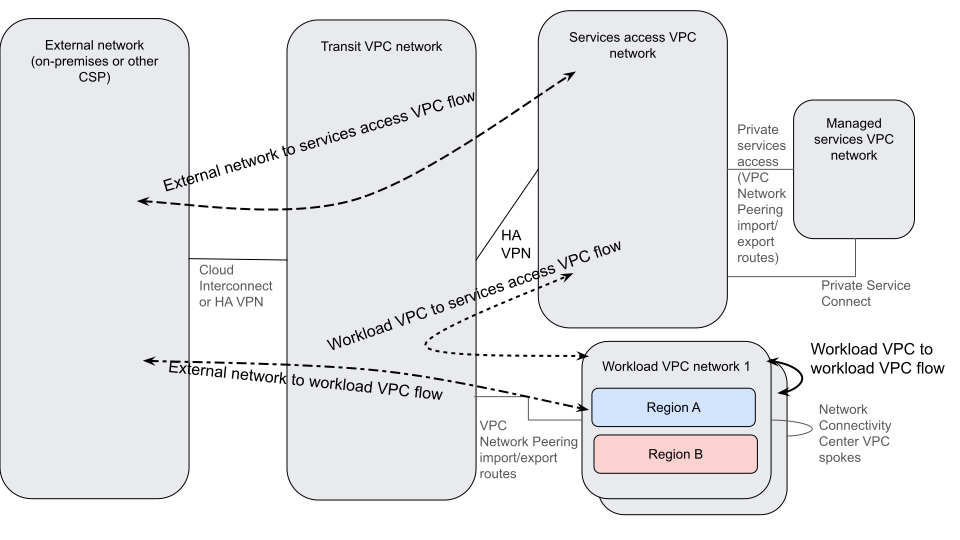
The architecture contains the following high-level elements:
| Component | Purpose | Interactions |
|---|---|---|
| External networks (On-premises or other CSP network) | Hosts the clients of workloads that run in the workload VPCs and in the services-access VPCs. External networks can also host services. | Exchanges data with Google Cloud's Virtual Private Cloud networks through the transit network. Connects to the transit network by using Cloud Interconnect or HA VPN. Terminates one end of the following flows: - External-to-services-access - External-to-workload |
| Transit VPC network | Acts as a hub for the external network, the services-access VPC network, and the workload VPC networks. | Connects the external network, the services-access VPC network, and the workload VPC networks together through a combination of Cloud Interconnect, HA VPN, and VPC Network Peering. |
| Services-access VPC network | Provides access to services that are needed by workloads that are running in the workload VPC networks or external networks. Also provides access points to managed services that are hosted in other networks. | Exchanges data with the external and workload networks through the transit network. Connects to the transit VPC by using HA VPN. Transitive routing provided by HA VPN allows external traffic to reach managed services VPCs through the services-access VPC network. Terminates one end of the following flows: - External-to-services-access - Workload-to-services-access |
| Managed services VPC network | Hosts managed services that are needed by clients in other networks. | Exchanges data with the external, services-access, and workload networks. Connects to the services-access VPC network by using [private services access](https://docs.cloud.google.com/vpc/docs/private-services-access), which uses VPC Network Peering, or by using Private Service Connect. Terminates one end of flows from all other networks. |
| Workload VPC networks | Hosts workloads that are needed by clients in other networks. | Exchanges data with the external and services-access VPC networks through the transit VPC network. Connects to the transit network by using VPC Network Peering. Connects to other workload VPC networks by using [Network Connectivity Center VPC spokes](https://docs.cloud.google.com/network-connectivity/docs/network-connectivity-center/concepts/vpc-spokes-overview). Terminates one end of the following flows: - External-to-workload - Workload-to-services-access - Workload-to-workload |
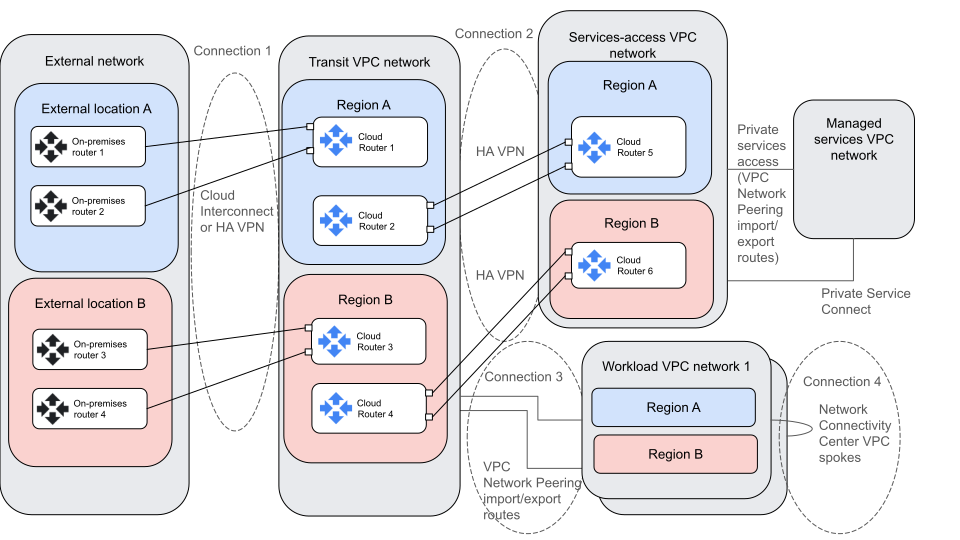
The following diagram shows a detailed view of the architecture that highlights
the four connections among the networks:
### Connections descriptions
This section describes the four connections that are shown in the preceding
diagram.
#### Connection 1: Between external networks and the transit VPC network
This connection between external networks and transit VPC
networks happens over Cloud Interconnect or
HA VPN. Routes are exchanged by using BGP between the
Cloud Routers in the transit VPC network and the external
routers in the external network.
- Routers in external networks announce the routes for external subnets to the transit VPC Cloud Routers. In general, external routers in a given location announce routes from the same external location as more preferred than routes for other external locations. The preference of the routes can be expressed by using BGP metrics and attributes.
- Cloud Routers in the transit VPC network advertise routes for prefixes in Google Cloud's VPCs to the external networks. These routes must be announced by using Cloud Router custom route announcements.
#### Connection 2: Between transit VPC networks and services-access VPC networks
This connection between transit VPC networks and services-access
VPC networks happens over HA VPN with
separate tunnels for each region. Routes are exchanged by using BGP between the
regional Cloud Routers in the transit VPC networks and
the services-access VPC networks.
- Transit VPC HA VPN Cloud Routers announce routes for external network prefixes, workload VPCs, and other services-access VPCs to the services-access VPC Cloud Router. These routes must be announced by using Cloud Router custom route announcements.
- The services-access VPC network announces its subnets and the subnets of any attached managed services VPC networks to the transit VPC network. Managed services VPC routes and the services-access VPC subnet routes must be announced by using Cloud Router custom route announcements.
#### Connection 3: Between transit VPC networks and workload VPC networks
This connection between transit VPC networks and workload
VPC networks is implemented over VPC peering.
Subnets and prefix routes are exchanged by using VPC peering
mechanisms. This connection allows communication between the workload
VPC networks and the other networks that are connected to the transit
VPC network, including the external networks and the
services-access VPC networks.
- The transit VPC network uses VPC Network Peering to export custom routes. These custom routes include all of the dynamic routes that have been learned by the transit VPC network. The workload VPC networks import those custom routes.
- The workload VPC network automatically exports subnets to the transit VPC network. No custom routes are exported from the workload VPCs to the transit VPC.
#### Connection 4: Between workload VPC networks
- Workload VPC networks can be connected together by using NCC VPC spokes. This is an optional configuration. You can omit it if you don't want workload VPC networks to communicate with each other.
### Traffic flows
The following diagram shows the four flows that are enabled by this reference
architecture.
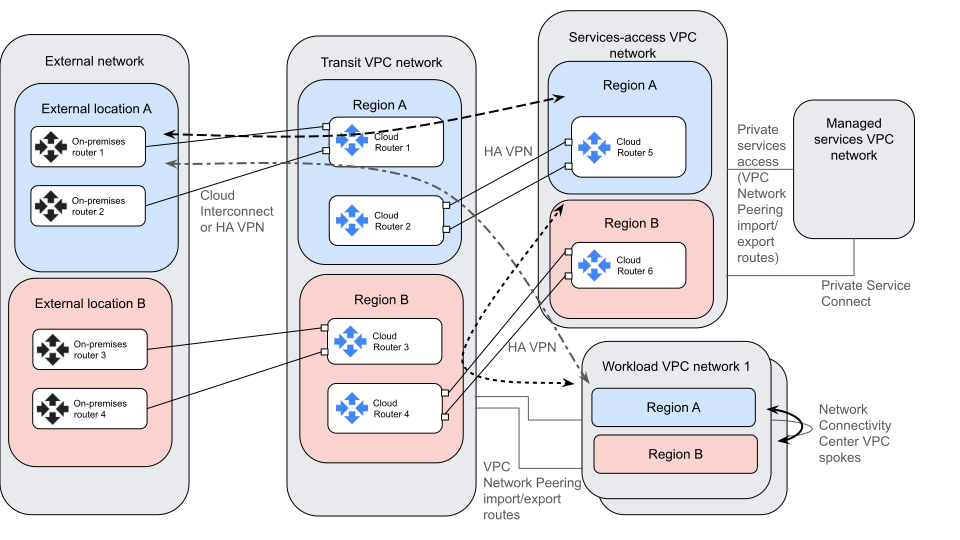
The following table describes the flows in the diagram:
| Source | Destination | Description |
|---|---|---|
| External network | Services-access VPC network | 1. Traffic follows routes over the Cloud Interconnect connections to the transit network. The routes are announced by the external-facing Cloud Router. 2. Traffic follows the custom route to the services-access VPC network. The route is announced across the HA VPN connection. If the destination is in a managed services VPC network that's connected to the services-access VPC network by private services access, then the traffic follows VPC Network Peering custom routes to the managed services network. |
| Services-access VPC network | External network | 1. Traffic follows a custom route across the HA VPN tunnels to the transit network. 2. Traffic follows routes across the external connections back to the external network. The routes are learned from the external routers over BGP. |
| External network | Workload VPC network | 1. Traffic follows routes over the external connections to the transit network. The routes are announced by the external-facing Cloud Router. 2. Traffic follows the subnet route to the relevant workload VPC network. The route is learned through VPC Network Peering. |
| Workload VPC network | External network | 1. Traffic follows a route back to the transit network. The route is learned through a VPC Network Peering custom route export. 2. Traffic follows routes across the external connections back to the external network. The routes are learned from the external routers over BGP. |
| Workload VPC network | Services-access VPC network | 1. Traffic follows routes to the transit VPC. The routes are learned through a VPC Network Peering custom route export. 2. Traffic follows a route through one of the HA VPN tunnels to the services-access VPC network. The route is learned from BGP custom route announcements. |
| Services-access VPC network | Workload VPC network | 1. Traffic follows a custom route to the transit network. The route is announced across the HA VPN tunnels. 2. Traffic follows the subnet route to the relevant workload VPC network. The route is learned through VPC Network Peering. |
| Workload VPC network | Workload VPC network | Traffic that leaves one workload VPC follows the more specific route to the other workload VPC through NCC. Return traffic reverses this path. |
## Products used
This reference architecture uses the following Google Cloud products:
- [Virtual Private Cloud (VPC)](https://cloud.google.com/vpc): A virtual system that provides global, scalable networking functionality for your Google Cloud workloads. VPC includes VPC Network Peering, Private Service Connect, private services access, and Shared VPC.
- [Network Connectivity Center](https://cloud.google.com/network-connectivity-center): An orchestration framework that simplifies network connectivity among spoke resources that are connected to a central management resource called a *hub*.
- [Cloud Interconnect](https://cloud.google.com/network-connectivity/docs/interconnect/concepts/overview): A service that extends your external network to the Google network through a high-availability, low-latency connection.
- [Cloud VPN](https://docs.cloud.google.com/network-connectivity/docs/vpn): A service that securely extends your peer network to Google's network through an IPsec VPN tunnel.
- [Cloud Router](https://docs.cloud.google.com/network-connectivity/docs/router/concepts/overview): A distributed and fully managed offering that provides Border Gateway Protocol (BGP) speaker and responder capabilities. Cloud Router works with Cloud Interconnect, Cloud VPN, and Router appliances to create dynamic routes in VPC networks based on BGP-received and custom learned routes.
## Design Considerations
This section describes design factors, best practices, and design recommendations that you should consider when you use this reference architecture to develop a topology that meets your specific requirements for security, reliability, and performance.
### Security and compliance
The following list describes the security and compliance considerations for this
reference architecture:
- For compliance reasons, you might want to deploy workloads in a single region only. If you want to keep all traffic in a single region, you can use a 99.9% topology. For more information, see [Establish 99.9% availability for
Dedicated Interconnect](https://docs.cloud.google.com/network-connectivity/docs/interconnect/tutorials/dedicated-creating-999-availability) and [Establish 99.9% availability for
Partner Interconnect](https://docs.cloud.google.com/network-connectivity/docs/interconnect/tutorials/partner-creating-999-availability).
- Use Cloud Next Generation Firewall to secure traffic that enters and leaves the services-access and workload VPC networks. To secure traffic that passes between external networks and the transit network, you need to use external firewalls or NVA firewalls.
- Enable logging and monitoring as appropriate for your traffic and compliance needs. You can use [VPC Flow Logs](https://docs.cloud.google.com/vpc/docs/flow-logs) to gain insights into your traffic patterns.
- Use [Cloud IDS](https://docs.cloud.google.com/intrusion-detection-system/docs/overview) to gather additional insight into your traffic.
### Reliability
The following list describes the reliability considerations for this reference
architecture:
- To get 99.99% availability for Cloud Interconnect, you must connect to two different Google Cloud regions.
- To improve reliability and minimize exposure to regional failures, you can distribute workloads and other cloud resources across regions.
- To handle your expected traffic, create a sufficient number of VPN tunnels. Individual VPN tunnels have [bandwidth
limits](https://docs.cloud.google.com/network-connectivity/docs/vpn/quotas#limits).
### Performance optimization
The following list describes the performance considerations for this reference
architecture:
- You might be able to improve network performance by increasing the maximum transmission unit (MTU) of your networks and connections. For more information, see [Maximum transmission unit](https://docs.cloud.google.com/vpc/docs/mtu).
- Communication between the transit VPC and workload resources is over VPC Network Peering, which provides full-line-rate throughput for all VMs in the network at no additional cost. Consider [VPC Network Peering quotas and limits](https://docs.cloud.google.com/vpc/docs/quota#per_network) when you plan your deployment. You have several choices in connecting your external network to the transit network. For more information about balancing cost and performance considerations, see [Choosing a
Network Connectivity
product](https://docs.cloud.google.com/network-connectivity/docs/how-to/choose-product).
## Deployment
The architecture in this document creates three sets of connections to a central transit
VPC network plus a different connection among workload
VPC networks. After all of the connections are fully configured,
all of the networks in the deployment can communicate with all other networks.
This deployment assumes that you are creating connections between the external and
transit networks in two regions. Workload subnets can be in any region, however.
If you are placing workloads in one region only, you only need to create subnets
in that region.
To deploy this reference architecture, complete the following tasks:
1. [Identify regions to place connectivity and workloads](https://docs.cloud.google.com/architecture/ccn-distributed-apps-design/ccn-vnp-vpn-ra#identify-regions-to-place-connectivity-and-workloads)
2. [Create your VPC networks and subnets](https://docs.cloud.google.com/architecture/ccn-distributed-apps-design/ccn-vnp-vpn-ra#create-your-vpc-networks-and-subnets)
3. [Create connections between external networks and your transit VPC network](https://docs.cloud.google.com/architecture/ccn-distributed-apps-design/ccn-vnp-vpn-ra#create-connections-between-external-networks-and-your-transit-vpc-network)
4. [Create connections between your transit VPC network and services-access VPC networks](https://docs.cloud.google.com/architecture/ccn-distributed-apps-design/ccn-vnp-vpn-ra#create-connections-between-your-transit-vpc-network-and-services-access-vpc-networks)
5. [Create connections between your transit VPC network and workload VPC networks](https://docs.cloud.google.com/architecture/ccn-distributed-apps-design/ccn-vnp-vpn-ra#create-connections-between-your-transit-vpc-network-and-workload-vpc-networks)
6. [Connect your workload VPC networks](https://docs.cloud.google.com/architecture/ccn-distributed-apps-design/ccn-vnp-vpn-ra#connect-your-workload-vpc-networks)
7. [Test connectivity to workloads](https://docs.cloud.google.com/architecture/ccn-distributed-apps-design/ccn-vnp-vpn-ra#test-connectivity-to-workloads)
### Identify regions to place connectivity and workloads
In general, you want to place connectivity and Google Cloud workloads in
close proximity to your on-premises networks or other cloud clients. For more
information about placing workloads, see [Google Cloud Region
Picker](https://cloud.withgoogle.com/region-picker/) and [Best practices for
Compute Engine regions
selection](https://docs.cloud.google.com/solutions/best-practices-compute-engine-region-selection).
### Create your VPC networks and subnets
To create your VPC networks and subnets, complete the following
tasks:
1. Create or identify the projects where you will create your VPC networks. For guidance, see [Network segmentation and project
structure](https://docs.cloud.google.com/architecture/ccn-distributed-apps-design/connectivity#network-segmentation-and-project-structure). If you intend to use [Shared VPC](https://docs.cloud.google.com/vpc/docs/shared-vpc) networks, [provision your projects as Shared VPC host
projects](https://docs.cloud.google.com/vpc/docs/provisioning-shared-vpc).
2. Plan your IP address allocations for your networks. You can preallocate and reserve your ranges by [creating internal
ranges](https://docs.cloud.google.com/vpc/docs/create-use-internal-ranges). Allocating address blocks that can be aggregated makes later configuration and operations more straightforward.
3. Create a transit network VPC with global routing enabled.
4. Create service VPC networks. If you will have workloads in multiple regions, enable global routing.
5. Create workload VPC networks. If you will have workloads in multiple regions, enable global routing.
### Create connections between external networks and your transit VPC network
This section assumes connectivity in two regions and assumes that the external
locations are connected and can fail over to each other. It also assumes that
there is a preference for clients in external location A to reach services in
region A, and so on.
1. Set up the connectivity between the external networks and your transit network. For an understanding of how to think about this, see [External and
hybrid
connectivity](https://docs.cloud.google.com/architecture/ccn-distributed-apps-design/connectivity#external-and-hybrid-connectivity). For guidance on choosing a connectivity product, see [Choosing a
Network Connectivity
product](https://docs.cloud.google.com/network-connectivity/docs/how-to/choose-product).
2. [Configure BGP](https://docs.cloud.google.com/network-connectivity/docs/router/how-to/configuring-bgp) in each connected region as follows:
- Configure the router in the given external location as follows:
- Announce all subnets for that external location by using the same BGP MED on both interfaces, such as 100. If both interfaces announce the same MED, then Google Cloud can use ECMP to load balance traffic across both connections.
- Announce all subnets from the other external location by using a lower-priority MED than that of the first region, such as 200. Announce the same MED from both interfaces.
- Configure the external-facing Cloud Router in the transit VPC of the connected region as follows:
- Set your Cloud Router ASN to be 16550.
- Using [custom route
advertisements](https://docs.cloud.google.com/network-connectivity/docs/router/how-to/configure-custom-learned-routes), announce all subnet ranges from all regions over both external-facing Cloud Router interfaces. Aggregate them if possible. Use the same MED on both interfaces, such as 100.
### Create connections between your transit VPC network and services-access VPC networks
To provide transitive routing between external networks and the services-access
VPC and between workload VPCs and the
services-access VPC, the services-access VPC uses
HA VPN for connectivity.
1. Estimate how much traffic needs to travel between the transit and services-access VPCs in each region. Scale your expected number of tunnels accordingly.
2. Configure HA VPN between the transit VPC and the services-access VPC in region A by using the instructions in [Create HA VPN gateways to connect
VPC
networks](https://docs.cloud.google.com/network-connectivity/docs/vpn/how-to/creating-ha-vpn2). Create a dedicated HA VPN Cloud Router in the transit network. Leave the external-network-facing router for external network connections.
- Transit VPC Cloud Router configuration:
- To announce external-network and workload VPC subnets to the services-access VPC, use [custom route
advertisements](https://docs.cloud.google.com/network-connectivity/docs/router/how-to/configure-custom-learned-routes) on the Cloud Router in the transit VPC.
- Services-access VPC Cloud Router configuration:
- To announce services-access VPC subnets to the transit VPC, use custom route advertisements on the services-access VPC Cloud Router.
- If you use [private services
access](https://docs.cloud.google.com/vpc/docs/private-services-access) to connect a managed services VPC to the services-access VPC, use custom routes to announce those subnets as well.
3. If you connect a managed services VPC to the services-access VPC by using [private services
access](https://docs.cloud.google.com/vpc/docs/private-services-access), after the VPC Network Peering connection is established, update the services-access VPC side of the VPC Network Peering connection to export custom routes.
### Create connections between your transit VPC network and workload VPC networks
[Create VPC Network Peering connections](https://docs.cloud.google.com/vpc/docs/using-vpc-peering)
between your transit VPC and each of your workload
VPCs:
- Enable **Export custom routes** for the transit VPC side of each connection.
- Enable **Import custom routes** for the workload VPC side of each connection.
- In the default scenario, only the workload VPC subnet routes are exported to the Transit VPC. You don't need to export custom routes from the workload VPCs.
### Connect your workload VPC networks
Connect the workload VPC networks together by using
[NCC VPC
spokes](https://docs.cloud.google.com/network-connectivity/docs/network-connectivity-center/concepts/vpc-spokes-overview).
Make all spokes part of the same NCC spoke peer group. Use a core
peer group to allow full mesh communication between the VPCs.
The NCC connection announces specific routes among the workload
VPC networks. Traffic between these networks follows those
routes.
### Test connectivity to workloads
If you have workloads already deployed in your VPC networks, test
access to them now. If you connected the networks before deploying workloads,
you can deploy them now and test.
## What's next
- Learn more about the Google Cloud products used in this design guide:
- [VPC networks](https://docs.cloud.google.com/vpc/docs/vpc)
- [VPC Network Peering](https://docs.cloud.google.com/vpc/docs/vpc-peering)
- [Cloud Interconnect](https://docs.cloud.google.com/network-connectivity/docs/interconnect/concepts/overview)
- [HA VPN](https://docs.cloud.google.com/network-connectivity/docs/vpn/concepts/overview)
- For more reference architectures, diagrams, and best practices, explore the [Cloud Architecture Center](https://docs.cloud.google.com/architecture).
## Contributors
Authors:
- Deepak Michael \| Networking Specialist Customer Engineer
- [Victor Moreno](https://www.linkedin.com/in/vimoreno) \| Product Manager, Cloud Networking
- [Osvaldo Costa](https://www.linkedin.com/in/osvaldocostajr) \| Networking Specialist Customer Engineer
Other contributors:
- [Mark Schlagenhauf](https://www.linkedin.com/in/mark-schlagenhauf-63b98) \| Technical Writer, Networking
- [Ammett Williams](https://www.linkedin.com/in/ammett) \| Developer Relations Engineer
- [Ghaleb Al-habian](https://www.linkedin.com/in/galhabian) \| Network Specialist