This document describes
[disaster recovery (DR)](https://cloud.google.com/architecture/dr-scenarios-planning-guide)
and
[business continuity planning](https://en.wikipedia.org/wiki/Business_continuity_planning)
in the context of
[continuous integration and continuous delivery (CI/CD)](https://en.wikipedia.org/wiki/CI/CD). It also provides guidance about how to identify and mitigate dependencies when you develop a comprehensive business continuity plan (BCP). The document includes best practices that you can apply to your BCP, regardless of the tools and processes that you use. The document assumes that you are familiar with the basics of the software delivery and operations cycle, CI/CD, and DR.
CI/CD pipelines are responsible for building and deploying your business critical applications. Thus, like your application infrastructure, your CI/CD process requires planning for DR and business continuity. When you think about DR and business continuity for CI/CD, it's important to understand each phase of the software delivery and operations cycle, and understand how they function together as a holistic process.
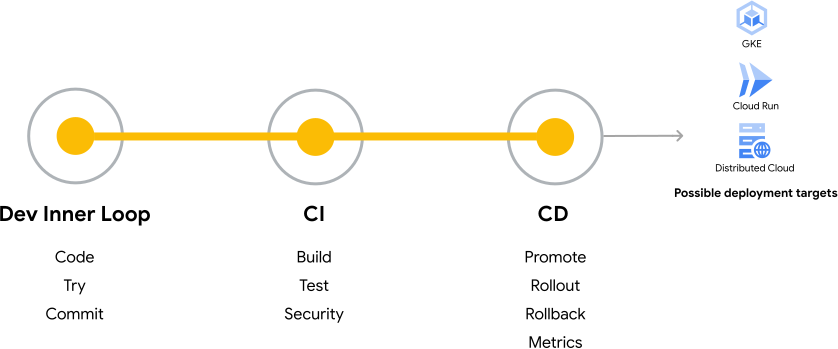
The following diagram is a simplified view of the
[software development and operations cycle](https://cloud.google.com/solutions/software-delivery),
which includes the following three phases:
- **Development inner loop**: code, try, and commit
- **Continuous integration**: build, test, and security
- **Continuous delivery**: promote, rollout, rollback, and metrics
This diagram also shows that Google Kubernetes Engine (GKE), Cloud Run, and Google Distributed Cloud are possible deployment targets of the software development and operations cycle.
Throughout the software development and operations cycle, you need to
consider the impact of a disaster on the ability of teams to operate and
maintain business-critical applications. Doing so will help you determine the
[Recovery Time Objective (RTO)](https://en.wikipedia.org/wiki/Recovery_time_objective)
and
[Recovery Point Objective (RPO)](https://en.wikipedia.org/wiki/Recovery_point_objective)
for the tools in your CI/CD toolchain.
In addition, most organizations have many different CI/CD pipelines for
different applications and sets of infrastructure, and each pipeline has unique
requirements for DR and business continuity planning. The recovery strategy that
you choose for a pipeline will vary based on the RTO and RPO of your tools. For
example, some pipelines are more critical than others, and they will have lower
RTO and RPO requirements. It's important to identify the business-critical
pipelines in your BCP, and they should also receive more attention when you
implement best practices for testing and running recovery procedures.
Because each CI/CD process and its toolchain are different, the goals of this
guide are to help you identify single points of failure in your CI/CD process
and develop a comprehensive BCP. The following sections help you do the
following:
- Understand what it takes to recover from a DR event that affects your CI/CD process.
- Determine the RTO and RPO for the tools in your CI/CD process.
- Understand the failure modes and dependencies of your CI/CD process.
- Choose an appropriate recovery strategy for the tools in your toolchain.
- Understand general best practices for implementing a DR recovery plan for your CI/CD process.
## Understand the business continuity process
Building a BCP is crucial for helping ensure that your organization can continue
its operations in the event of disruptions and emergencies. It helps your
organization quickly return to a state of normal operations for its CI/CD
process.
The following sections outline the high-level stages that include the steps that
are involved in creating an effective BCP. Although many of these steps apply
broadly to program management and DR, certain steps are more relevant to
planning business continuity for your CI/CD process. The steps that are
specifically relevant to planning business continuity for CI/CD are highlighted
in the following sections, and they also form the basis for the guidance in the
rest of this document.
### Initiation and planning
In this initial stage, both technical and business teams work together to
establish the foundation for the business continuity planning process and its
continued maintenance. The key steps for this stage include the following:
- **Leadership buy-in**: ensure that senior management supports and champions the development of the BCP. Assign a dedicated team or an individual that is responsible for overseeing the plan.
- **Resource allocation**: allocate the necessary budget, personnel, and resources for developing and implementing the BCP.
- **Scope and objectives**: define the scope of your BCP and its objectives. Determine which business processes are critical and need to be addressed in the plan.
- **Risk assessment**: identify potential risks and threats that could disrupt your business, such as natural disasters, cybersecurity breaches, or supply chain interruptions.
- **Impact analysis**: assess the potential consequences of these risk assessment findings on your business operations, finances, reputation, and customer satisfaction.
### Business impact analysis
In this stage, the business and technical teams analyze the business impact of
disruptions to your customers and organization, and prioritize the recovery of
critical business functions. These business functions are performed by different
tools during the different phases of a build and deployment process.
The business impact analysis is an important stage in the business continuity
planning process for CI/CD, especially the steps for identifying critical
business functions and tool dependencies. In addition, understanding your CI/CD
toolchain--including its dependencies and how it functions within your DevOps
lifecycle--is a foundational building block for developing a BCP for your CI/CD
process.
The key steps in the business impact analysis stage include the following:
- **Critical functions**: determine the key business functions and processes that must be prioritized for recovery. For example, if you determine that deploying applications is more critical than executing unit tests, you would prioritize recovery for application deployment processes and tools.
- **Dependencies**: identify internal and external dependencies that could affect the recovery of your critical functions. Dependencies are especially relevant for ensuring the continued operation of your CI/CD process through its toolchain.
- **RTO and RPO**: define acceptable limits for downtime and data-loss limits for each critical function. These RTO and RPO targets are linked to the importance of a business function for continued operations, and they involve specific tools that are needed for the business function to operate smoothly.
### Strategy development
In this stage, the technical team develops recovery strategies for critical
business functions, such as restoring operations and data, and communicating
with vendors and stakeholders. Strategy development is also a key part of
planning business continuity for your CI/CD process, especially the step of
selecting high-level recovery strategies for critical functions.
The key steps in the strategy development stage include the following:
- **Recovery strategies**: develop strategies for restoring critical functions. These strategies might involve alternate locations, remote work, or backup systems. These strategies are tied to the RTO and RPO targets for each critical function.
- **Vendor and supplier relationships**: establish communication and coordination plans with key vendors and suppliers to keep the supply chain running during disruptions.
- **Data and IT recovery**: create plans for data backup, IT system recovery, and cybersecurity measures.
- **Communication plan**: develop a clear communication plan for internal and external stakeholders during and after a disruption.
### Plan development
In this stage, the main step is to document the BCP. The technical team
documents the tools, processes, recovery strategies, rationale, and procedures
for each critical function. Plan development also includes writing step-by-step
instructions for employees to follow during a disruption. During implementation
and ongoing maintenance, changes might need to be introduced to the plan, and
the plan should be treated as a living document.
### Implementation
In this stage, you implement the plan for your organization by using the BCP
that the technical team created. Implementation includes employee training and
initial testing of the BCP. Implementation also includes using the plan if a
disruption occurs to recover regular operations. Key implementation steps
include the following:
- **Initial testing and training**: after the BPC is documented, test it through simulations and exercises to identify gaps and improve effectiveness. Train employees on their roles and responsibilities during a disruption.
- **Activation**: when a disruption occurs, initiate the BCP according to the predefined triggers and procedures.
- **Communication**: keep stakeholders informed about the situation and recovery efforts.
### Maintenance and review
This stage isn't a defined process that occurs only one time--instead, it
represents a continuous, ongoing effort that should become a normal part of your
CI/CD operations. It's important to regularly review, test, and update the BCP
within your organization so that it remains relevant and actionable if a
disruption occurs. The key steps of maintenance and review include the
following:
- **Regular updates**: review and update the BCP periodically so that it remains current and effective. Update it whenever there are changes in personnel, technology, or business processes.
- **Lessons learned**: after each disruption or test, conduct a debriefing to identify lessons learned and areas for improvement.
- **Regulatory compliance**: align your BCP with industry regulations and standards.
- **Employee awareness**: continuously educate employees about the BCP and their roles in its execution.
## Build a business continuity process for CI/CD
This section provides specific guidelines for building a BCP that's specifically
focused on restoring your CI/CD operations. The process of planning business
continuity for CI/CD starts with a thorough understanding of your CI/CD
toolchain, and how it ties into the software delivery and operations lifecycle.
With this understanding as the foundation, you can then plan how your
organization will recover its CI/CD operations from a disruption.
To build a robust business continuity process for your CI/CD process, you need
to take the following major steps:
- [Understand the toolchain](https://docs.cloud.google.com/architecture/business-continuity-with-cicd-on-google-cloud#understand-toolchain)
- [Identify data and dependencies](https://docs.cloud.google.com/architecture/business-continuity-with-cicd-on-google-cloud#identify-data)
- [Determine RTO and RPO targets](https://docs.cloud.google.com/architecture/business-continuity-with-cicd-on-google-cloud#determine-rto-rpo)
- [Choose a high-level strategy for business continuity](https://docs.cloud.google.com/architecture/business-continuity-with-cicd-on-google-cloud#choose-strategy)
- [Document your BCP and implement best practices](https://docs.cloud.google.com/architecture/business-continuity-with-cicd-on-google-cloud#document-bcp)
- [Test failure scenarios and maintain the plan](https://docs.cloud.google.com/architecture/business-continuity-with-cicd-on-google-cloud#test-failure)
The following sections provide more detail about each of these steps.
### Understand the toolchain
CI/CD toolchains are composed of many different individual tools and the
possible combinations of tools can seem endless. However, understanding your
CI/CD toolchain and its dependencies is key to business continuity planning for
CI/CD. The core mission of your CI/CD process is to deliver code to production
systems for end-user consumption. Throughout that process, many different
systems and data sources are used; knowing those data sources and dependencies
is critical to developing a BCP. To begin creating your DR strategy, you first
need to understand the different tools involved in your CI/CD process.
To help you understand how to evaluate your own toolchain and develop your BCP,
this document uses the example of an enterprise Java application that runs on
GKE. The following diagram shows the first layer of data
and systems in the toolchain. This first layer would be under your direct
control and includes the following:
- The source for your applications
- Tools in your CI/CD platform, such as Cloud Build or Cloud Deploy
- Basic interconnections of the different tools
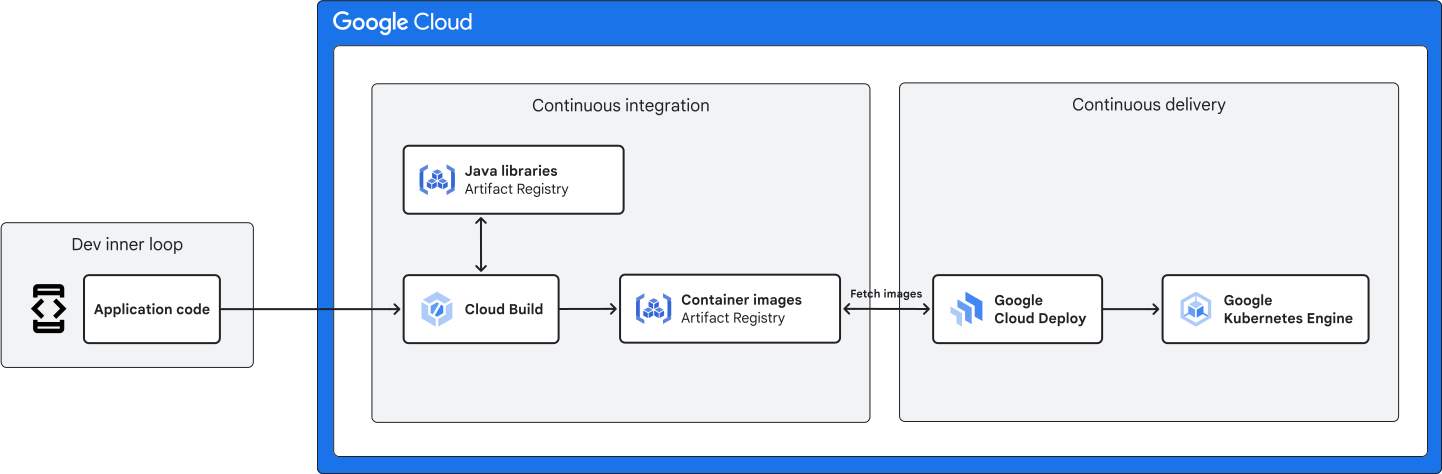
As shown in the diagram, the main flow for the example application is the
following:
1. Code development events in the dev inner loop trigger Cloud Build.
2. Cloud Build pulls the application source code from the source control repository.
3. Cloud Build identifies any necessary dependencies that are specified in build configuration files, such as third-party JAR files from the Java repository in Artifact Registry. Cloud Build then pulls these dependencies from their source locations.
4. Cloud Build runs the build and does the necessary validation, such as static analysis and unit testing.
5. If the build is successful, Cloud Build creates the container image and pushes it to the container repository in Artifact Registry.
6. A Cloud Deploy pipeline is triggered, and the pipeline pulls the container image from the repository and deploys it to a GKE environment.
To understand the tools that are used in your CI/CD process, we suggest creating
a diagram that shows your CI/CD process and the tools that are used in it,
similar to the example in this document. You can then use your diagram to create
a table that captures key information about your CI/CD toolchain, such as the
phase of the process, the purpose of the tool, the tool itself, and the teams
that are impacted by a failure of the tool. This table provides a mapping of the
tools in your toolchain and identifies the tools with specific phases of the
CI/CD process. Thus, the table can help you get an overall view of your
toolchain and how it operates.
The following tables map the previously mentioned example of an enterprise
application to each tool in the diagram. To provide a more complete example of
what a toolchain mapping might look like, these tables also include other tools
that aren't mentioned in the diagram, such as security tools or test tools.
The first table maps to tools that are used in the CI phase of the CI/CD
process:
| Continuous integration | Source | Tools used | Primary users | Usage |
| Phase: Source control | - Application code - Application configuration files - Secrets, passwords, and API keys | - [Git](https://git-scm.com/) repositories - [Secret Manager](https://cloud.google.com/secret-manager) - [Cloud Key Management Service](https://cloud.google.com/security-key-management) | - Developers - Site reliability engineers (SREs) | - Control the version of all sources, including code, configuration files, and documentation, in a distributed source control tool. - Perform backup and replication. - Store all secrets (including keys, certificates, and passwords) in a secrets management tool. |
| Phase: Build | - Container image build files - Build configuration files | - [Code analysis tools](https://owasp.org/www-community/Source_Code_Analysis_Tools) - [Cloud Build](https://cloud.google.com/build) - [Artifact Registry](https://cloud.google.com/artifact-registry) | Developers | - Execute repeatable builds in a consistent, on-demand platform. - Check and store build artifacts in a reliable and secure repository. |
| Phase: Test | - Test cases - Test code - Test configuration files | - [Cloud Build](https://cloud.google.com/build) | Developers | Run unit and integration tests in a consistent, on-demand platform. |
| Phase: Security | - Security rules - Security configuration files | [Security scanner](https://cloud.google.com/security-command-center/docs/concepts-web-security-scanner-overview) | - Platform administrators - SREs | Scan code for security issues. |
|---|---|---|---|---|
The second table focuses on tools that are used in the CD phase of the CI/CD
process:
| Continuous deployment | Source | Tools used | Primary users | Usage |
| Phase: Deployment | Deployment configuration files | [Cloud Deploy](https://cloud.google.com/deploy) | - Application operators - SREs | Automate deployments to promote, approve, and manage traffic in a secure and consistent platform. |
| Phase: Test | - Test cases - Test code - Test data - Configuration files | - [Cloud Build](https://cloud.google.com/build) - [Selenium](https://www.selenium.dev/) - Apache [JMeter](https://jmeter.apache.org/) - [Locust](https://locust.io/) | Developers | Test integration and performance for quality and usability. |
| Phase: Logging | - Log configuration files - Queries - Playbooks | - [Cloud Logging](https://cloud.google.com/logging) - [Log agents](https://cloud.google.com/logging/docs/agent) | - Application operators - SREs | Keep logs for observability and troubleshooting. |
| Phase: Monitoring | Monitoring of configuration files, including the following: - Queries - Playbooks - Dashboard sources | - [Cloud Monitoring](https://cloud.google.com/monitoring) - [Cloud Trace](https://cloud.google.com/trace) - [OpenTelemetry](https://opentelemetry.io/) - Twilio [Sendgrid](https://sendgrid.com/) | - Application operators - SREs | - Use metrics for monitoring, observability, and alerting. - Use distributed tracing. - Send notifications. |
|---|---|---|---|---|
As you continue to work on your BCP and your understanding of your CI/CD
toolchain grows, you can update your diagram and mapping table.
### Identify data and dependencies
After you complete your base inventory and map of your CI/CD toolchain, the next
step is to capture any dependencies on metadata or configurations. When you implement your BCP, it's critical that you have a clear understanding of the dependencies within your CI/CD toolchain. Dependencies typically fall into one of two categories: internal (first-order) dependencies and external (second-order or third-order) dependencies.
#### Internal dependencies
Internal dependencies are systems that your toolchain uses and that you're
directly in control of. Internal dependencies are also selected by your teams.
These systems include your CI tool, key management store, and source control
system. You can think of these systems as being in the next layer down from the
toolchain itself.
For example, the following diagram provides an example of how internal
dependencies fit within a toolchain. The diagram expands upon the previous
first-layer toolchain diagram for the example Java application to also include the
toolchain's internal dependencies: application credentials, the `deploy.yaml` file, and
the `cloudbuild.yaml` file.
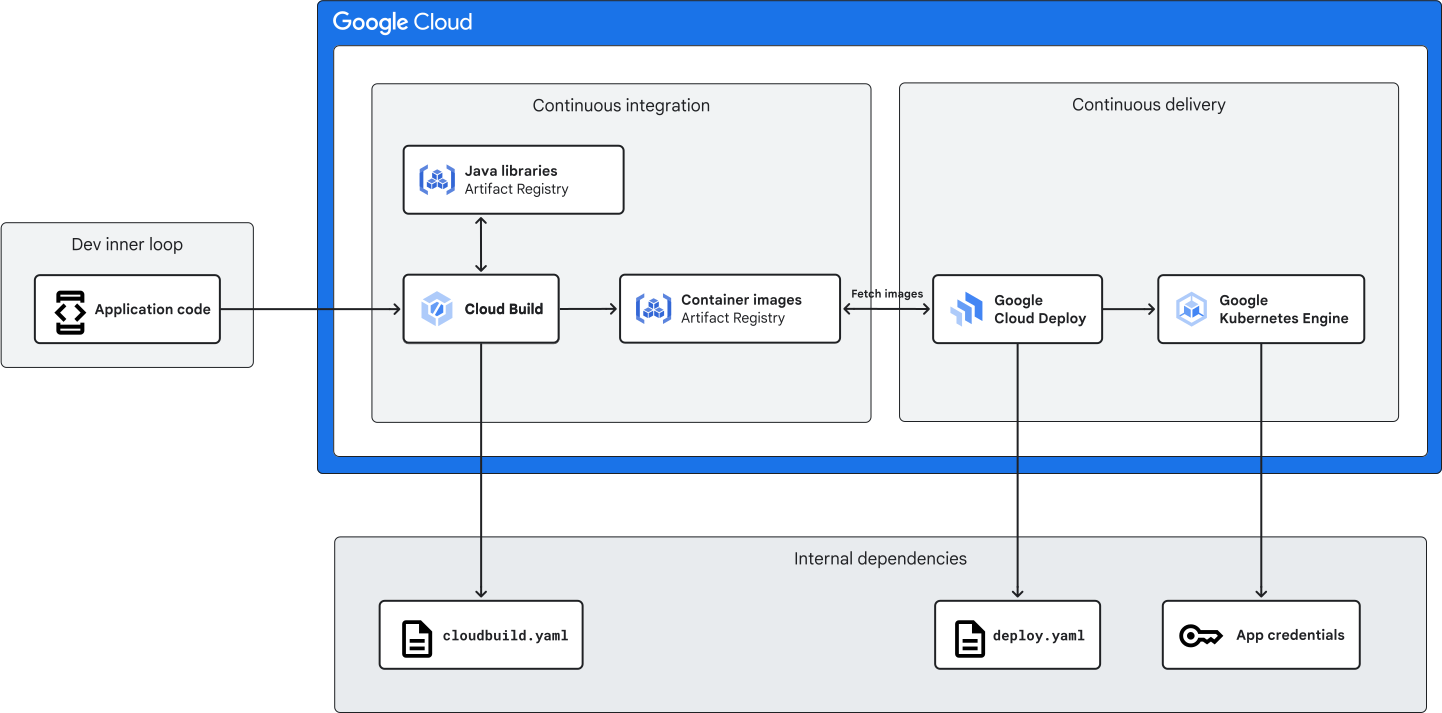
The diagram shows that in order to work successfully in the example Java application, tools like
Cloud Build, Cloud Deploy, and GKE need access to non-toolchain dependencies like `cloudbuild.yaml`,`deploy.yaml`, and application credentials. When you analyze your own CI/CD toolchain, you assess whether a tool can run on its own, or if it needs to call another resource.
Consider the documented internal dependencies for the example Java application.
Credentials are stored in Secret Manager, which isn't part of the
toolchain, but the credentials are required for the application to start up on
deployment. Thus, the application credentials are included as a dependency for
GKE. It's also important to include the `deploy.yaml` and
`cloudbuild.yaml` files as dependencies, even though they are stored in source
control with the application code, because they define the CI/CD pipeline for
that application.
The BCP for the example Java application should account for these dependencies
on the `deploy.yaml` and `cloudbuild.yaml` files because they re-create the
CI/CD pipeline after the tools are in place during the recovery process.
Additionally, if these dependencies are compromised, the overall function of the
pipeline would be impacted even if the tools themselves are still operational.
#### External dependencies
External dependencies are external systems that your toolchain relies on to
operate, and they aren't under your direct control. External dependencies result
from the tools and programming frameworks that you selected. You can think of
external dependencies as being another layer down from internal dependencies.
Examples of external dependencies include npm or Maven repositories, and
monitoring services.
Although external dependencies are outside your control, you can incorporate
them into your BCP. The following diagram updates the example Java application by
including external dependencies in addition to the internal ones: Java libraries
in Maven Central and Docker images in Docker Hub. The Java libraries are used by
Artifact Registry, and the Docker images are used by Cloud Build.
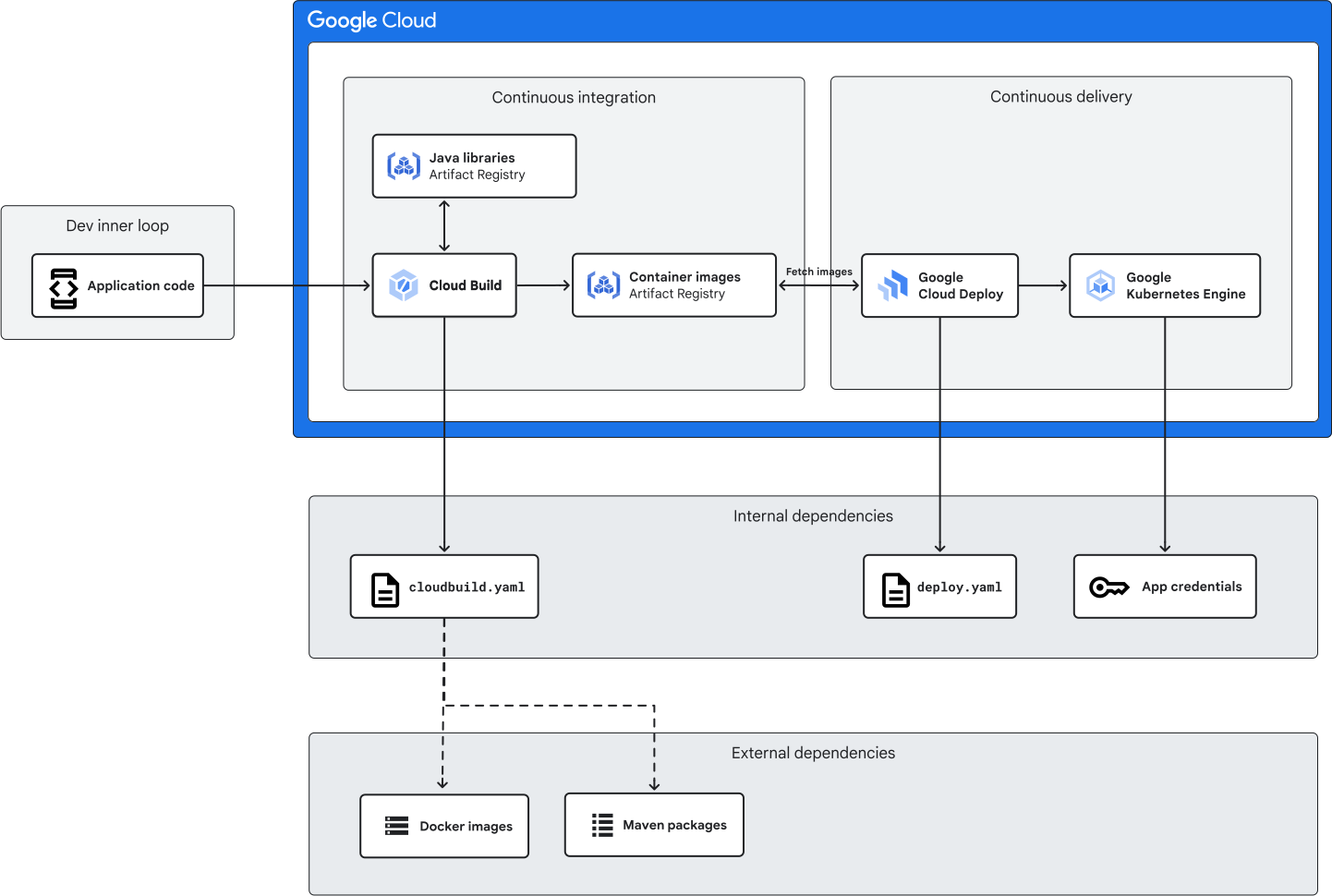
The diagram shows that external dependencies can be important for your CI/CD
process: both Cloud Build and GKE rely on two
external services (Maven and Docker) to work successfully. When you assess your
own toolchain, document both external dependencies that your tools need to
access and procedures for handling dependency outages.
In the example Java application, the Java libraries and Docker images can't be
controlled directly, but you could still include them and their recovery
procedures in the BCP. For example, consider the Java libraries in Maven.
Although the libraries are stored on an external source, you can establish a
process to periodically download and refresh Java libraries to a local Maven
repository or Artifact Registry. By doing so, your recovery process doesn't need
to rely on the availability of the third-party source.
In addition, it's important to understand that external dependencies can have
more than one layer. For example, you can think of the systems that are used by
your internal dependencies as *second-order dependencies* . These second-order
dependencies might have their own dependencies, which you can think of as
*third-order dependencies*. Be aware that you might need to document and account
for both second- and third-order external dependencies in your BCP in order to
recover operations during a disruption.
### Determine RTO and RPO targets
After you develop an understanding of your toolchain and dependencies, you
define the RTO and RPO targets for your tools. The tools in the CI/CD process
each perform a different action that can have a different impact on the
business. Therefore, it's important to match the priority of the business
function's RTO and RPO targets to its impact on the business. For example,
building new versions of applications through the CI stage could be less
impactful than deploying applications through the CD stage. Thus, deployment
tools could have longer RTO and RPO targets than other functions.
The following four-quadrant chart is a general example of how you might
determine your RTO and RPO targets for each component of the CI/CD toolchain.
The toolchain that is mapped in this chart includes tools like an IaC pipeline
and test data sources. The tools weren't mentioned in the previous diagrams for
the Java application, but they're included here to provide a more complete
example.
The chart shows quadrants that are based on the level of impact to
developers and operations. In the chart, components are positioned as follows:
- Moderate developer impact, low operations impact: test data sources
- Moderate developer impact, moderate operations impact: Cloud Key Management Service, Cloud KMS
- Moderate developer impact, high operations impact: deployment pipeline
- High developer impact, low operations impact: dev inner loop
- High developer impact, moderate operations impact: CI pipeline, infrastructure as code (IaC) pipeline
- High developer impact, high operations impact: source control management (SCM), Artifact Registry
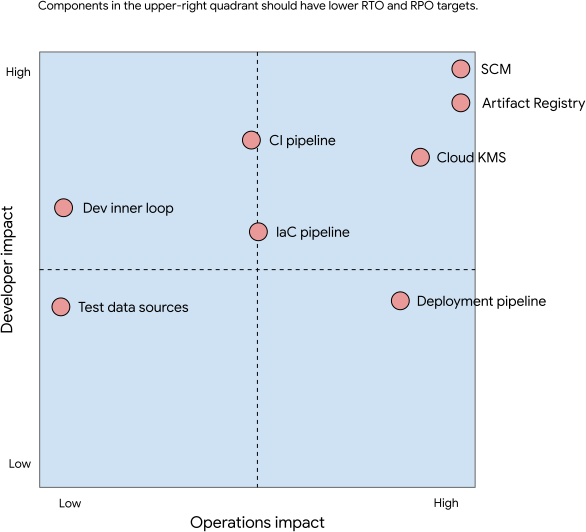
Components like source control management and Artifact Registry that are high on
developer impact and operations impact have the greatest impact on the business.
These components should have the lowest RTO and RPO objectives. The components
in the other quadrants have a lower priority, which means that the RTO and RPO
objectives will be higher. In general, the RTO and RPO objectives for your
toolchain components should be set according to how much data or configuration
loss can be tolerated compared to the amount of time it should take to restore
service for that component.
For example, consider the different locations of Artifact Registry and the IaC
pipeline in the graph. A comparison of these two tools shows that an
Artifact Registry outage has a larger impact on business operations than an
outage in the IaC pipeline. Because an Artifact Registry outage significantly
impacts your ability to deploy or autoscale your application, it would then have
*lower* RTO and RPO targets compared to other tools. In contrast, the graph
shows that an IaC pipeline outage has a smaller impact on business operations
than other tools. The IaC pipeline would then have *higher* RTO and RPO
objectives because you can use other methods to deploy or update infrastructure
during an outage.
### Choose a high-level strategy for business continuity
Business continuity processes for production applications often rely on one of
[three common DR strategies](https://cloud.google.com/architecture/dr-scenarios-for-applications#dr-and-ha-architectures-for-production-on-gcp).
However, for CI/CD, you can choose between two high-level strategies for
business continuity: active/passive or backup/restore. The strategy that you
choose will depend on your requirements and budget. Each strategy has trade-offs
with complexity and cost, and you have different considerations for your CI/CD
process. The following sections provide more details about each strategy and
their trade-offs.
In addition, when service-interrupting events happen, they might impact more
than your CI/CD implementation. You should also consider all the infrastructure
you need, including the network, computing, and storage. You should have a
[DR plan for those building blocks](https://cloud.google.com/architecture/dr-scenarios-building-blocks)
and test it regularly to ensure that it is effective.
#### Active/passive
With the active/passive (or warm standby) strategy, your applications and the
passive CI/CD pipeline are mirrors. However, the passive pipeline isn't actually
handling customer workload and any build or deployment, so it's in a scaled-down
state. This strategy is most appropriate for business-critical applications
where a small amount of downtime is tolerable.
The following diagram shows an active/passive configuration for the example Java
application that is used in this document. The passive pipeline fully duplicates
the application toolchain in a different region.
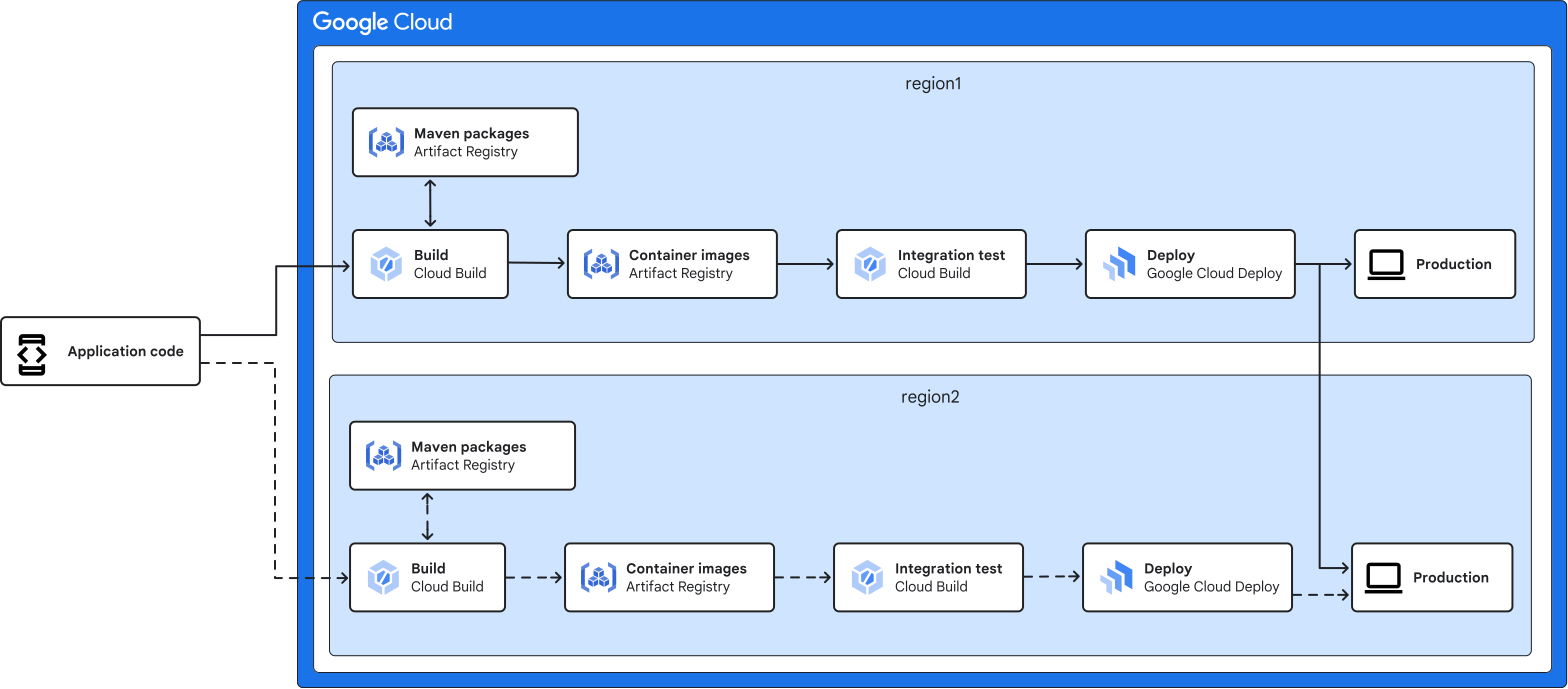
In this example, region1 hosts the active CI/CD pipeline and region2 has the
passive counterpart. The code is hosted on an external Git service provider,
such as GitHub or GitLab. A repository event (like a merge from a pull request)
can trigger the CI/CD pipeline in region1 to build, test, and deploy to the
multi-regional production environment.
If a critical issue for the region1 pipeline occurs, such as a regional outage
of a product, the result could be failed deployments or unsuccessful builds. To
quickly recover from the problem, you can update the trigger for the Git
repository and switch to the region2 pipeline, which then becomes the active
one. After the issue is resolved in region1, you can keep the pipeline in
region1 as passive.
Advantages of the active/passive strategy include the following:
- **Low downtime**: because the passive pipeline has been deployed but is scaled down, the amount of downtime is limited to the time that is required to scale the pipeline up.
- **Configurable tolerance for data loss**: with this strategy, the configuration and artifact must be periodically synchronized. However, the amount is configurable based on your requirements, which can reduce complexity.
Disadvantages of this strategy include the following:
- **Cost**: with duplicated infrastructure, this strategy increases the overall cost of your CI/CD infrastructure.
#### Backup/restore
With the backup/restore strategy, you create your failover pipeline only when
needed during incident recovery. This strategy is most appropriate for
lower-priority use cases. The following diagram shows a backup/restore
configuration for the example Java application. The backup configuration duplicates only
part of the application's CI/CD pipeline in a different region.
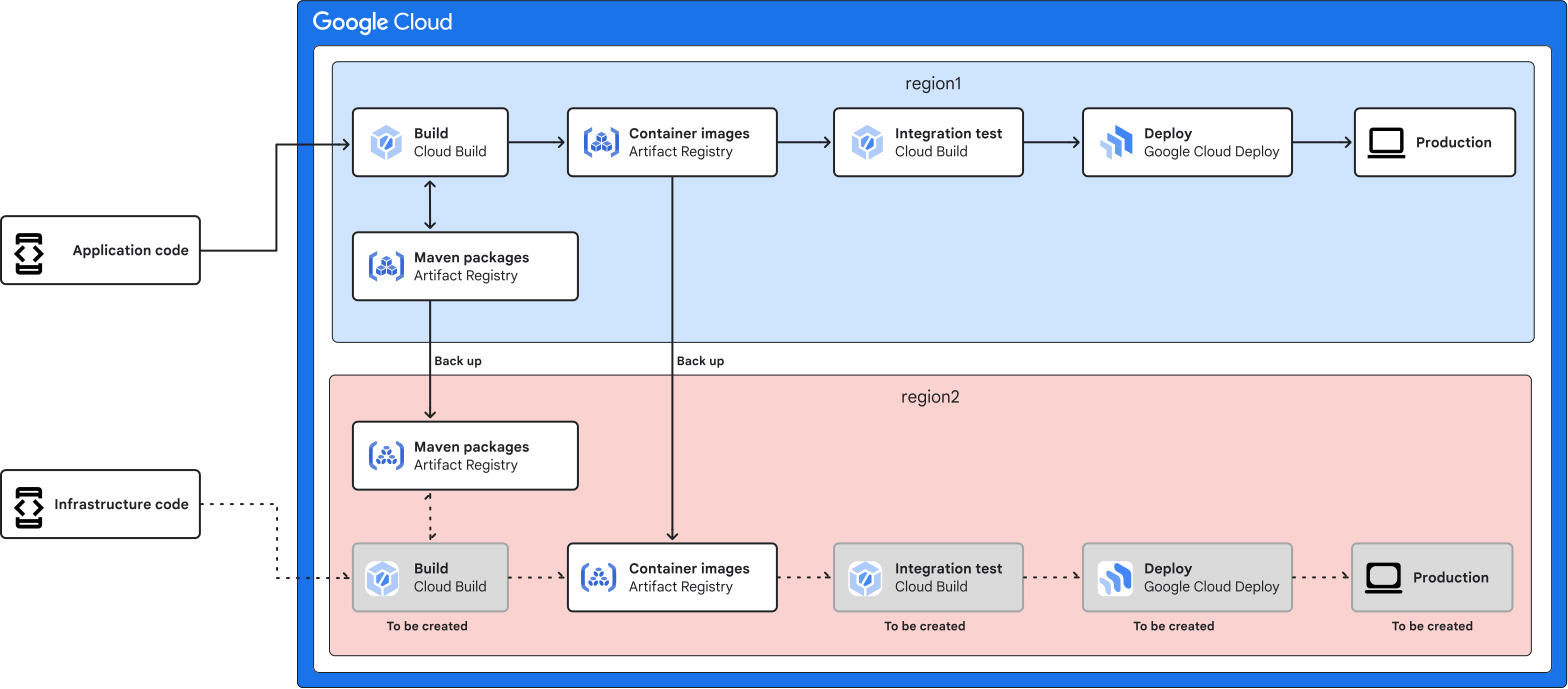
Similar to the previous example, region1 hosts the active CI/CD pipeline.
Instead of having a passive pipeline in region2, region2 only has backups of
necessary regional data, such as the Maven packages and container images. If you
host your source repositories in region1, you should also sync the data to your
DR locations.
Similarly, if a critical issue occurs in the region1 pipeline, such as a
regional product outage, you can restore your CI/CD implementation in region2.
If the infrastructure code is stored in the infrastructure code repository, you
can run your automation script from the repository and rebuild the CI/CD
pipeline in region2.
If the outage is a large-scale event, you might compete with other customers for
cloud resources. One way to mitigate this situation is to have multiple options
for the DR location. For example, if your region1 pipeline is in `us-east1`,
your failover region can be `us-east4`, `us-central1`, or `us-west1`.
Advantages of the backup/restore strategy include the following:
- **Cost**: this strategy incurs the lowest cost because you are deploying the backup pipeline only during DR scenarios.
Disadvantages of this strategy include the following:
- **Downtime**: this strategy takes more time to implement because you create the failover pipeline when you need it. Instead of having a prebuilt pipeline, the services need to be created and configured during incident recovery. Artifact build time and the time to retrieve external dependencies could be significantly longer as well.
### Document your BCP and implement best practices
After you map your CI/CD toolchain, identify its dependencies, and determine RTO
and RPO targets for critical functions, the next step is to document all the
relevant information in a written BCP. When you create your BCP, document the
strategies, processes, and procedures for restoring each critical function. This
documentation process includes writing step-by-step procedures for employees in
specific roles to follow during a disruption.
After you define your BCP, you deploy or update your CI/CD toolchain by using
best practices to achieve your RTO and RPO targets. Although CI/CD toolchains
can be very different, two key patterns for best practices are common regardless
of the toolchain: a comprehensive understanding of dependencies and implementing
automation.
With regard to dependencies, most BCPs address the systems directly within your
control. However, recall that second or third-order external dependencies might
be just as impactful, so it's important to implement best practices and
redundancy measures for those critical dependencies as well. The external Java
libraries in the example application are an example of third-order dependencies. If you
don't have a local repository or backup for those libraries, you might be unable
to build your application if the external source where you pull the libraries is
disconnected.
In terms of automation, the implementation of best practices should be
incorporated into your overall
[cloud IaC strategy](https://cloud.google.com/blog/products/devops-sre/want-repeatable-scale-adopt-infrastructure-as-code-on-gcp).
Your IaC solution should use tools such as Terraform to automatically provision
the necessary resources of your CI/CD implementation and to configure the
processes. IaC practices are highly effective recovery procedures because they
are incorporated into the day-to-day functioning of your CI/CD pipelines.
Additionally, IaC promotes the storage of your configuration files in source
control, which in turn promotes adoption of the best practices for backups.
After you implement your toolchain according to your BCP and the best practices
for dependencies and automation, your CI/CD process and recovery strategies
might change. Be sure to document any changes to recovery strategies, processes,
and procedures that result from reviewing the BCP and implementing best
practices.
### Test failure scenarios and maintain the plan
It's critical to regularly review, test, and update your BCP on an ongoing
basis. Testing the BCP and recovery procedures verifies that the plan is still
valid and that the documented RPO and RTO targets are acceptable. Most
importantly, however, regular testing, updating, and maintenance make executing
the BCP a part of normal operations. Using Google Cloud, you can test
recovery scenarios at minimal cost. We recommend that you do the following in
order to help with your testing:
- **Automate infrastructure provisioning with an IaC tool** : you can use tools such as [Terraform](https://www.terraform.io/) to automate the provisioning of CI/CD infrastructure.
- **Monitor and debug your tests with Cloud Logging and
Cloud Monitoring**: Google Cloud Observability provides logging and monitoring tools that you can access through API calls, which means you can automate the deployment of recovery scenarios by reacting to metrics. When you're designing tests, make sure that you have appropriate monitoring and alerting in place that can trigger appropriate recovery actions.
- **Perform the testing in your BCP**: for example, you can test whether permissions and user access work in the DR environment like they do in the production environment. You can conduct integration and functional testing on your DR environment. You can also perform a test in which your usual access path to Google Cloud doesn't work.
At Google, we regularly test our BCP through a process called
[DiRT (Disaster Recovery Testing)](https://www.oreilly.com/library/view/chaos-engineering/9781492043850/ch05.html).
This testing
[helps Google](https://cloud.google.com/blog/products/management-tools/shrinking-the-time-to-mitigate-production-incidents)
verify impacts, automation, and expose unaccounted for risks. Changes to the
automation and BCP that need to be implemented are an important output of DiRT.
## Best practices
In this section, you learn about some best practices that you can implement to
achieve your RTO and RPO objectives. These best practices apply broadly to DR
for CI/CD, and not to specific tools. Regardless of your implementation, you
should test your BCP regularly to ensure that high availability, RTO, and RPO
meet your requirements. If an incident or disaster happens, you should also do a
retrospective and analyze your process so that you can improve it.
### High availability
For each tool, you should work to implement best practices for
[high availability](https://en.wikipedia.org/wiki/High_availability).
Following best practices for high availability puts your CI/CD process in a
more proactive stance because these practices make the CI/CD process more
resilient to failures. These proactive strategies should be used with more
reactive controls and procedures for both recovery and backup.
The following are a few best practices to achieve high availability. However,
consult the detailed documentation for each tool in your CI/CD for more detailed
best practices:
- **Managed services**: using managed services shifts the operational responsibility to Google Cloud.
- **Autoscaling**: where possible, use autoscaling. A key aspect of autoscaling is that worker instances are created dynamically, so recovery of failed nodes is automatic.
- **Global and multi-region deployments**: where possible, use global and multi-region deployments instead of regional deployment. For example, you can configure Artifact Registry for multi-region storage.
- **Dependencies**: understand all the dependencies of your tooling and ensure that those dependencies are highly available. For example, you can cache all the third-party libraries in your artifact registry.
### Backup procedures
When you
[implement DR](https://cloud.google.com/architecture/dr-scenarios-planning-guide#basics_of_dr_planning)
for CI/CD, some tools and processes are more suited to backup/restore
strategies. A comprehensive backup strategy is the first step to effective
reactive controls. Backups let you recover your CI/CD pipeline with minimal
interruption in the case of bad actors or disaster scenarios.
As a starting point, you should implement the following three best practices.
However, for more detailed backup best practices, consult the documentation for
each tool in your CI/CD process.
- **Source control** : store configuration files and anything you codify, such as automation scripts and policies, in source control. Examples include `cloudbuild.yaml` and Kubernetes YAML files.
- **Redundancy**: ensure that there is no single point of failure regarding accessing secrets such as passwords, certificates, and API keys. Examples of practices to avoid include only one person knowing the password or storing the API key on only a single server in a particular region.
- **Backups** : frequently [verify](https://cloud.google.com/architecture/dr-scenarios-planning-guide#test_your_plan_regularly) the completeness and accuracy of your backups. Managed services such as [Backup for GKE](https://cloud.google.com/kubernetes-engine/docs/add-on/backup-for-gke/concepts/backup-for-gke) will help simplify your verification process.
### Recovery procedures
DR also requires recovery procedures to complement backup processes. Your
recovery procedures, combined with complete backups, will determine how quickly
you are able to respond to disaster scenarios.
### Dependency management
Your CI/CD pipeline can have many dependencies, which can also be sources for
failures. A full list of the dependencies should identified as described earlier
in this document in [Identify data and dependencies](https://docs.cloud.google.com/architecture/business-continuity-with-cicd-on-google-cloud#identify-data). However,
the two most common sources of dependencies are the following:
- **Application artifacts**: for example, packages, libraries, and images
- **External systems**: for example, ticketing and notification systems
One way to mitigate the risks of dependencies is to adopt the practice of
[vendoring](https://cloud.google.com/software-supply-chain-security/docs/dependencies#approaches).
Vendoring application packages or images is the process of creating and storing
copies of them in a private repository. Vendoring removes the dependency on
external sources for these packages or images, and it can also help prevent
malware from being inserted into the software supply chain.
Some of the benefits of vendoring application packages or images include the
following:
- **Security**: vendoring removes the dependency on external sources for application packages or images, which can help prevent malware insertion attacks.
- **Control**: by vendoring their own packages or images, organizations can have more control over the source of these packages and images.
- **Compliance** : vendoring can help organizations to comply with industry regulations, such as the [Cybersecurity Maturity Model Certification](https://dodcio.defense.gov/CMMC/About/).
If your team decides to vendor application packages or images, follow these main
steps:
1. Identify the application packages or images that need to be vendored.
2. Create a private repository for storing the vendored packages or images.
3. Download the packages or images from the original source and store them in the private repository.
4. Verify the integrity of the packages or images.
5. Update the vendored packages or images as needed.
CI/CD pipelines often call external-party systems to perform actions such as
running scans, logging tickets, or sending notifications. In most cases, these
external-party systems have their own DR strategies that should be implemented.
However, in some cases they might not have a suitable DR plan, and those
instances should be clearly documented in the BCP. You must then decide if those
stages in the pipeline can be skipped for availability reasons, or if it is
acceptable to cause downtime for the CI/CD pipeline.
### Monitoring and notifications
Your CI/CD is just like your application production systems, so you also need to
implement monitoring and notification techniques for your CI/CD tools. As a best
practice, we recommend that you implement dashboards and alerting notifications.
The GitHub
[sample repository](https://github.com/GoogleCloudPlatform/monitoring-dashboard-samples)
for Cloud Monitoring has many examples of dashboards and alerting policies.
You can also implement additional levels of monitoring, such as Service Level
Indicators (SLIs) and Service Level Objectives (SLOs). These monitoring levels
help track the overall health and performance of your CI/CD pipelines. For
example, SLOs can be implemented to track the latency of build and deployment
stages. These SLOs help teams build and release applications at the rate and
frequency that you want.
### Emergency access procedures
During a disaster, it might be necessary for operations teams to take action
outside of standard procedures and gain emergency access to systems and tools.
Such emergency actions are sometimes referred to as *breakglass procedures*. As
a starting point, you should implement these three best practices:
1. Have a clear escalation plan and procedure. A clear plan helps the operations team know when they need to use the emergency access procedures.
2. Ensure multiple people have access to critical information, such as configuration and secrets.
3. Develop automated auditing methods, so that you can track when emergency access procedures were used and who used them.
## What's next
- Learn more about the Google Cloud products used in this document:
- [Cloud Build](https://cloud.google.com/build)
- [Artifact Registry](https://cloud.google.com/artifact-registry)
- [Cloud Deploy](https://cloud.google.com/deploy)
- [GKE](https://cloud.google.com/kubernetes-engine)
- [Backup for GKE](https://cloud.google.com/kubernetes-engine/docs/add-on/backup-for-gke/concepts/backup-for-gke)
- [Google Cloud Backup and DR Service](https://cloud.google.com/backup-disaster-recovery)
- See the [Disaster recovery planning guide](https://cloud.google.com/architecture/dr-scenarios-planning-guide).
- Try other Google Cloud features by completing our [tutorials](https://cloud.google.com/docs/tutorials).
- For more reference architectures, diagrams, and best practices, explore the [Cloud Architecture Center](https://docs.cloud.google.com/architecture).
## Contributors
Authors:
- [Ben Good](https://www.linkedin.com/in/benjamingood) \| Solutions Architect
- [Xiang Shen](https://www.linkedin.com/in/xiangshen07) \| Solutions Architect
Other contributors:
- [Marco Ferrari](https://www.linkedin.com/in/ferrarimark) \| Cloud Solutions Architect
- [Anuradha Bajpai](https://www.linkedin.com/in/anuradhabajpai) \| Solutions Architect
- [Rodd Zurcher](https://www.linkedin.com/in/roddzurcher/) \| Solutions Architect