In this reference architecture, you'll learn about the use cases,
design alternatives, and design considerations when deploying a
[Dataflow](https://docs.cloud.google.com/dataflow)
pipeline to process image files with
[Cloud Vision](https://docs.cloud.google.com/vision/docs)
and to store processed results in BigQuery.
You can use those stored results for large scale data analysis and to train
[BigQuery ML models](https://docs.cloud.google.com/bigquery/docs/bqml-introduction).
This reference architecture document is intended for data engineers and data
scientists.
## Architecture
The following diagram illustrates the system flow for this reference
architecture.
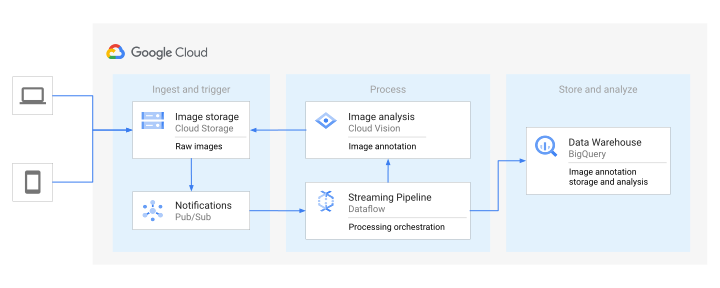
As shown in the preceding diagram, information flows as follows:
1. **Ingest and trigger**: This is the first stage of the system flow where
images first enter the system. During this stage, the following actions
occur:
1. Clients upload image files to a Cloud Storage bucket.
2. For each file upload, the Cloud Storage automatically sends an input notification by publishing a message to Pub/Sub.
2. **Process**: This stage immediately follows the ingest and trigger stage.
For each new input notification, the following actions occur:
1. The Dataflow pipeline listens for these file input notifications, extracts file metadata from the Pub/Sub message, and sends the file reference to Vision API for processing.
2. Vision API reads the image and creates annotations.
3. The Dataflow pipeline stores the annotations produced by Vision API in BigQuery tables.
3. **Store and analyze**: This is the final stage in the flow. At this stage,
you can do the following with the saved results:
1. Query BigQuery tables and analyze the stored annotations.
2. Use BigQuery ML or Gemini Enterprise Agent Platform to build models and execute predictions based on the stored annotations.
3. Perform additional analysis in the Dataflow pipeline (not shown on this diagram).
## Products used
This reference architecture uses the following Google Cloud products:
- [BigQuery](https://docs.cloud.google.com/bigquery/docs)
- [Cloud Storage](https://docs.cloud.google.com/storage/docs)
- [Vision API](https://docs.cloud.google.com/storage/docs)
- [Dataflow](https://docs.cloud.google.com/dataflow/docs)
- [Pub/Sub](https://docs.cloud.google.com/pubsub/docs)
## Use cases
Vision API supports
[multiple processing features](https://docs.cloud.google.com/vision/docs/features-list),
including image labeling, face and landmark detection, optical character
recognition, explicit content tagging, and others. Each of these features enable
several use cases that are applicable to different industries. This document
contains some simple examples of what's possible when using
Vision API, but the spectrum of possible applications is very broad.
Vision API also offers powerful pre-trained machine learning models
through REST and RPC APIs. You can assign labels to images and classify them
into millions of predefined categories. It helps you detect objects, read
printed and handwritten text, and build valuable metadata into your image
catalog.
This architecture doesn't require any model training before you can use it. If
you need a custom model trained on your specific data, Agent Platform
lets you train an AutoML or a custom model for computer vision
objectives, like image classification and object detection. Or, you can use
[Gemini Enterprise Agent Platform Vision](https://docs.cloud.google.com/vision-ai/docs/overview)
for an end-to-end application development environment that lets you
build, deploy, and manage computer vision applications.
## Design alternatives
Instead of storing images in a Google Cloud Storage bucket, the
process that produces the images can publish them directly to a messaging
system---Pub/Sub for example---and the Dataflow pipeline can
send the images directly to Vision API.
This design alternative can be a good solution
for latency-sensitive use cases where you need to analyze images of relatively
small sizes. Pub/Sub limits the maximum size of the message to
10 Mb.
If you need to batch process a large number of images, you can use a
specifically designed
[`asyncBatchAnnotate`](https://docs.cloud.google.com/vision/docs/reference/rest/v1/images/asyncBatchAnnotate)
API.
## Design considerations
This section describes the design considerations for this reference
architecture:
- [Security, privacy, and compliance](https://docs.cloud.google.com/architecture/building-a-vision-analytics-solution#security,_privacy,_and_compliance)
- [Cost optimization](https://docs.cloud.google.com/architecture/building-a-vision-analytics-solution#cost_optimization)
- [Performance optimization](https://docs.cloud.google.com/architecture/building-a-vision-analytics-solution#performance_optimization)
### Security, privacy, and compliance
Images received from untrusted sources can contain malware. Because
Vision API doesn't execute anything based on the images it analyzes,
image-based malware wouldn't affect the API. If you need to scan images, change
the Dataflow pipeline to add a scanning step. To achieve the same
result, you can also use a separate subscription to the Pub/Sub
topic and scan images in a separate process.
For more information, see
[Automate malware scanning for files uploaded to Cloud Storage](https://docs.cloud.google.com/architecture/automate-malware-scanning-for-documents-uploaded-to-cloud-storage).
Vision API uses
[Identity and Access Management (IAM)](https://docs.cloud.google.com/iam/docs/overview)
for authentication. To access the Vision API, the
security principal needs **Cloud Storage \> Storage object viewer**
(`roles/storage.objectViewer`) access to the bucket that contains the files that
you want to analyze.
For security principles and recommendations that are specific to AI and ML workloads, see
[AI and ML perspective: Security](https://docs.cloud.google.com/architecture/framework/perspectives/ai-ml/security)
in the Well-Architected Framework.
### Cost optimization
Compared to the other options discussed, like low-latency processing and
asynchronous batch processing, this reference architecture uses a cost-efficient
way to process the images in streaming pipelines by batching the API requests.
The lower latency direct image streaming mentioned in the
[Design alternatives](https://docs.cloud.google.com/architecture/building-a-vision-analytics-solution#design_alternatives)
section could be more expensive due to the additional Pub/Sub and
Dataflow costs. For image processing that doesn't need to happen
within seconds or minutes, you can run the Dataflow pipeline in
batch mode. Running the pipeline in batch mode can provide some savings when
compared to what it costs to run the streaming pipeline.
Vision API supports offline
[asynchronous batch](https://docs.cloud.google.com/vision/docs/batch)
image annotation for all features. The asynchronous request supports up to 2,000
images per batch. In response, Vision API returns JSON files that are
stored in a Cloud Storage bucket.
Vision API also provides a set of features for analyzing images.
[The pricing](https://cloud.google.com/vision/pricing)
is per image per feature. To reduce costs, only request the specific features
you need for your solution.
To generate a cost estimate based on your projected usage, use the
[pricing calculator](https://cloud.google.com/products/calculator).
For cost optimization principles and recommendations that are specific to AI and ML workloads, see
[AI and ML perspective: Cost optimization](https://docs.cloud.google.com/architecture/framework/perspectives/ai-ml/cost-optimization)
in the Well-Architected Framework.
### Performance optimization
Vision API is a resource intensive API. Because of that, processing
images at scale requires careful orchestration of the API calls. The
Dataflow pipeline takes care of batching the API requests,
gracefully handling of the exceptions related to reaching quotas, and producing
custom metrics of the API usage. These metrics can help you decide if an API
quota increase is warranted, or if the Dataflow pipeline
parameters should be adjusted to reduce the frequency of requests. For more
information about increasing quota requests for Vision API, see
[Quotas and limits](https://docs.cloud.google.com/vision/quotas).
The Dataflow pipeline has several parameters that can affect the
processing latencies. For more information about these parameters, see
[Deploy an ML vision analytics solution with Dataflow and Vision API](https://docs.cloud.google.com/architecture/building-a-vision-analytics-solution/deployment).
For performance optimization principles and recommendations that are specific to AI and ML workloads, see
[AI and ML perspective: Performance optimization](https://docs.cloud.google.com/architecture/framework/perspectives/ai-ml/performance-optimization)
in the Well-Architected Framework.
## Deployment
To deploy this architecture, see
[Deploy an ML vision analytics solution with Dataflow and Vision API](https://docs.cloud.google.com/architecture/building-a-vision-analytics-solution/deployment).
## What's next
- Learn more about [Dataflow](https://docs.cloud.google.com/dataflow/docs/overview).
- Learn more about [BigQuery ML](https://docs.cloud.google.com/bigquery/docs/bqml-introduction).
- Learn more about BigQuery reliability in the [Understand BigQuery reliability](https://docs.cloud.google.com/bigquery/docs/reliability-intro) guide.
- Review the [Vision API features list](https://docs.cloud.google.com/vision/docs/features-list).
- Learn how to [deploy an ML vision analytics solution with Dataflow and Vision API](https://docs.cloud.google.com/architecture/building-a-vision-analytics-solution/deployment).
- For an overview of architectural principles and recommendations that are specific to AI and ML workloads in Google Cloud, see the [AI and ML perspective](https://docs.cloud.google.com/architecture/framework/perspectives/ai-ml) in the Well-Architected Framework.
- For more reference architectures, diagrams, and best practices, explore the [Cloud Architecture Center](https://docs.cloud.google.com/architecture).
## Contributors
Authors:
- [Masud Hasan](https://www.linkedin.com/in/masudhasan1480) \| Site Reliability Engineering Manager
- [Sergei Lilichenko](https://www.linkedin.com/in/sergei-lilichenko) \| Solutions Architect
- [Lakshmanan Sethu](https://www.linkedin.com/in/lakshmanansethu) \| Technical Account Manager
Other contributors:
- [Jiyeon Kang](https://www.linkedin.com/in/jiyeon-kang) \| Customer Engineer
- [Sunil Kumar Jang Bahadur](https://www.linkedin.com/in/sunilkumar88) \| Customer Engineer