*This content was last updated in March 2023, and represents the status quo as of the time it was written. Google's security policies and systems may change going forward, as we continually improve protection for our customers.*
Serverless architectures let you develop software and services without
provisioning or maintaining servers. You can use serverless architectures to
build applications for a wide range of services.
This document provides opinionated guidance for DevOps engineers, security architects, and application
developers on how to help protect serverless applications that use
[Cloud Run](https://docs.cloud.google.com/run/docs/overview/what-is-cloud-run).
The document is part of a security blueprint that consists of the following:
- A [GitHub repository](https://github.com/GoogleCloudPlatform/terraform-google-cloud-run) that contains a set of Terraform configurations and scripts.
- A guide to the architecture, design, and security controls that you implement with the blueprint (this document).
Though you can deploy this blueprint without deploying the
[Google Cloud enterprise foundations blueprint](https://docs.cloud.google.com/architecture/blueprints/security-foundations)
first, this document assumes that you've already configured a foundational set
of security controls as described in the Google Cloud enterprise foundations
blueprint. The architecture that's described in this document helps you to layer
additional controls onto your foundation to help protect your serverless
applications.
To help define key security controls that are related to serverless
applications, the
[Cloud Security Alliance (CSA)](https://cloudsecurityalliance.org/)
published
[Top 12 Critical Risks for Serverless Applications](https://cloudsecurityalliance.org/blog/2019/02/11/critical-risks-serverless-applications/).
The security controls used in this blueprint are designed to address the risks
that are relevant to the various use cases described in this document.
## Serverless use cases
The blueprint supports the following use cases:
- Deploying a serverless architecture using Cloud Run (this document)
- [Deploying a serverless architecture using Cloud Run functions](https://docs.cloud.google.com/architecture/blueprints/serverless-functions-blueprint)
Differences between Cloud Run functions and Cloud Run
include the following:
- Cloud Run functions is triggered by events, such as changes to data in a database or the receipt of a message from a messaging system such as Pub/Sub. Cloud Run is triggered by requests, such as HTTP requests.
- Cloud Run functions is limited to a [set of supported runtimes](https://docs.cloud.google.com/functions/docs/concepts/execution-environment#runtimes). You can use Cloud Run with any programming language.
- Cloud Run functions manages containers and the infrastructure that controls the web server or language runtime so that you can focus on your code. Cloud Run provides the flexibility for you to run these services yourself, so that you have control of the container configuration.
For more information about differences between Cloud Run and
Cloud Run functions, see
[Choosing a Google Cloud compute option](https://cloud.google.com/blog/topics/developers-practitioners/where-should-i-run-my-stuff-choosing-google-cloud-compute-option).
## Architecture
This blueprint lets you run serverless applications on Cloud Run
with Shared VPC. We recommend that you use Shared VPC because it
centralizes network policy and control for all networking resources. In
addition, Shared VPC is deployed in the
[enterprise foundations blueprint](https://docs.cloud.google.com/architecture/blueprints/security-foundations/networking).
### Recommended architecture: Cloud Run with a Shared VPC network
The following image shows how you can run your serverless applications in a
Shared VPC network.
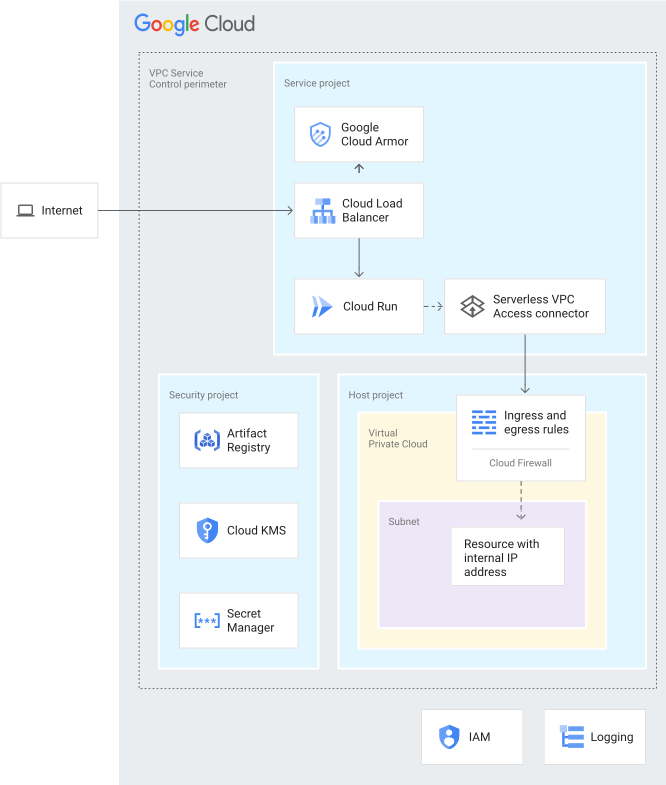
The architecture that's shown in the preceding diagram uses a combination of
the following Google Cloud services and features:
- An [external Application Load Balancer](https://docs.cloud.google.com/load-balancing/docs/https) receives the data that serverless applications require from the internet and forwards it to Cloud Run. The external Application Load Balancer is a Layer 7 load balancer.
- [Google Cloud Armor](https://docs.cloud.google.com/armor/docs/cloud-armor-overview) acts as the web application firewall to help protect your serverless applications against denial of service (DoS) and web attacks.
- [Cloud Run](https://docs.cloud.google.com/run/docs/overview/what-is-cloud-run) lets you run application code in containers and manages the infrastructure on your behalf. In this blueprint, the [Internal and Cloud Load Balancing ingress setting](https://docs.cloud.google.com/run/docs/securing/ingress) restricts access to Cloud Run so that Cloud Run will accept requests only from the external Application Load Balancer.
- The Serverless VPC Access connector connects your serverless
application to your VPC network using
[Serverless VPC Access](https://docs.cloud.google.com/vpc/docs/serverless-vpc-access).
Serverless VPC Access helps to ensure that requests from your
serverless application to the VPC network aren't exposed to the internet.
Serverless VPC Access lets Cloud Run communicate
with other services, storage systems, and resources that
[support VPC Service Controls](https://docs.cloud.google.com/vpc-service-controls/docs/supported-products).
By default, you create the Serverless VPC Access connector in the
service project. You can create the Serverless VPC Access
connector in the host project by specifying `true` for the
`connector_on_host_project` input variable when you run the
[Secure Cloud Run Network](https://github.com/GoogleCloudPlatform/terraform-google-cloud-run/tree/main/modules/secure-serverless-net)
module. For more information, see
[Comparison of configuration methods](https://docs.cloud.google.com/run/docs/configuring/connecting-shared-vpc#comparison_of_configuration_methods).
- [Virtual Private Cloud (VPC) firewall rules](https://docs.cloud.google.com/vpc/docs/firewalls)
control the flow of data into the subnet that hosts your resources, such as
a company server hosted on Compute Engine, or company data stored in
Cloud Storage.
- [VPC Service Controls](https://docs.cloud.google.com/vpc-service-controls)
creates a security perimeter that isolates your Cloud Run
services and resources by setting up authorization, access controls, and
[secure data exchange](https://docs.cloud.google.com/vpc-service-controls/docs/secure-data-exchange).
This perimeter is designed to protect incoming content, to isolate your
application by setting up additional access controls and monitoring, and to
separate your governance of Google Cloud from the application. Your
governance includes key management and logging.
- [Shared VPC](https://docs.cloud.google.com/vpc/docs/shared-vpc)
lets you connect the Serverless VPC Access connector in your
service project to the host project.
- [Cloud Key Management Service (Cloud KMS)](https://docs.cloud.google.com/kms)
stores the
[customer-managed encryption keys (CMEKs)](https://docs.cloud.google.com/kms/docs/cmek)
that are used by the services in this blueprint, including your serverless
application, Artifact Registry, and Cloud Run.
- [Identity and Access Management (IAM)](https://docs.cloud.google.com/iam)
and
[Resource Manager](https://docs.cloud.google.com/resource-manager)
help to restrict access and isolate resources. The access controls and
resource hierarchy follow the principle of least privilege.
### Alternative architecture: Cloud Run without a Shared VPC network
If you're not using a Shared VPC network, you can deploy
Cloud Run and your serverless application in a VPC
Service Control perimeter without a Shared VPC network. You might
implement this alternative architecture if you're using a
[hub-and-spoke topology](https://docs.cloud.google.com/architecture/blueprints/security-foundations/networking#hub-spoke-network-topology).
The following image shows how you can run your serverless applications without
Shared VPC.
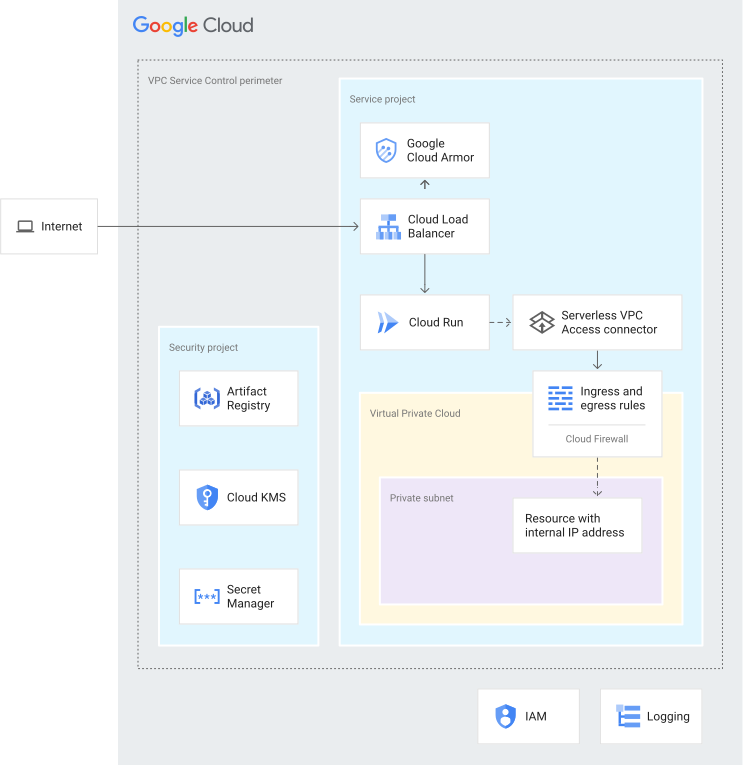
The architecture that's shown in the preceding diagram uses a combination of
Google Cloud services and features that's similar to those that are
described in the previous section,
[Recommended architecture: Cloud Run with a shared VPC](https://docs.cloud.google.com/architecture/blueprints/serverless-blueprint#recommended-architecture-cloud-run-with-a-shared-vpc-network).
## Organization structure
You group your resources so that you can manage them and separate your
development and testing environments from your production environment.
Resource Manager lets you logically group resources by project, folder, and
organization.
The following diagram shows a resource hierarchy with folders that represent
different environments such as bootstrap, common, production, non-production (or
testing), and development. This resource hierarchy is based on the hierarchy
that's described in the
[enterprise foundations blueprint](https://docs.cloud.google.com/architecture/blueprints/security-foundations/organization-structure).
You deploy the projects that the blueprint specifies into the following folders:
`Common`, `Production`, `Non-production`, and `Dev`.
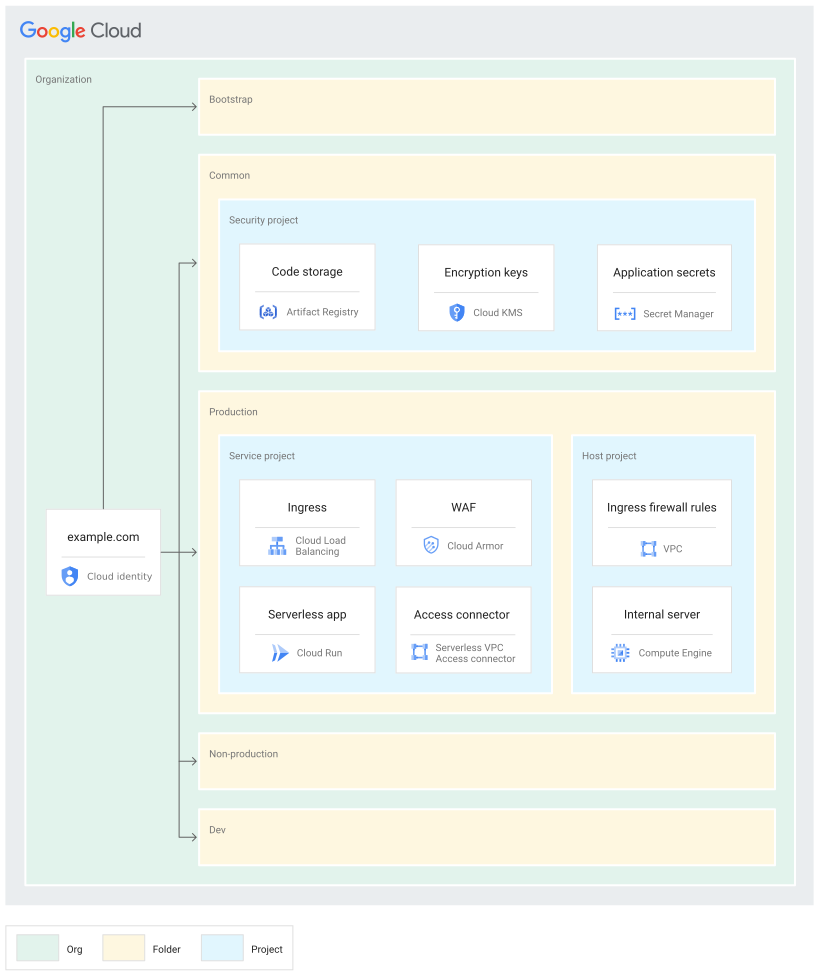
The following sections describe this diagram in more detail.
### Folders
You use folders to isolate your production environment and governance services
from your non-production and testing environments. The following table describes
the folders from the enterprise foundations blueprint that are used by this
blueprint.
| Folder | Description |
|---|---|
| ` Bootstrap ` | Contains resources required to deploy the enterprise foundations blueprint. |
| ` Common ` | Contains centralized services for the organization, such as the security project. |
| ` Production ` | Contains projects that have cloud resources that have been tested and are ready to use by customers. In this blueprint, the `Production` folder contains the service project and host project. |
| ` Non-production ` | Contains projects that have cloud resources that are currently being tested and staged for release. In this blueprint, the `Non-production` folder contains the service project and host project. |
| ` Dev ` | Contains projects that have cloud resources that are currently being developed. In this blueprint, the `Dev` folder contains the service project and host project. |
You can change the names of these folders to align with your organization's
folder structure, but we recommend that you maintain a similar structure. For
more information, see
[Organization structure](https://docs.cloud.google.com/architecture/blueprints/security-foundations/organization-structure).
For other folder structures, see
[Decide a resource hierarchy for your Google Cloud landing zone](https://docs.cloud.google.com/architecture/landing-zones/decide-resource-hierarchy).
### Projects
You isolate resources in your environment using
[projects](https://docs.cloud.google.com/resource-manager/docs/creating-managing-projects).
The following table describes the projects that are needed within the
organization. You can change the names of these projects, but we recommend that
you maintain a similar project structure.
| Project | Description |
|---|---|
| Host project | This project includes the firewall ingress rules and any resources that have internal IP addresses (as described in [Connect to a VPC network](https://docs.cloud.google.com/run/docs/configuring/connecting-vpc)). When you use Shared VPC, you designate a project as a host project and attach one or more other service projects to it.
When you apply the Terraform code, you specify the name of this project, and the blueprint deploys the services. |
| Service project | This project includes your serverless application, Cloud Run, and the Serverless VPC Access connector. You [attach](https://docs.cloud.google.com/vpc/docs/provisioning-shared-vpc#create-shared) the service project to the host project so that the service project can participate in the Shared VPC network.
When you apply the Terraform code, you specify the name of this project. The blueprint deploys Cloud Run, Cloud Armor, Serverless VPC Access connector, and the load balancer. |
| Security project | This project includes your security-specific services, such as Cloud KMS and Secret Manager.
When you apply the Terraform code, you specify the name of this project, and the blueprint deploys Cloud KMS. If you use the [Secure Cloud Run Harness](https://github.com/GoogleCloudPlatform/terraform-google-cloud-run/tree/main/modules/secure-serverless-harness) module, Artifact Registry is also deployed.
If you deploy this blueprint after you deploy the security foundations blueprint, this project is the secrets project created by the enterprise foundations blueprint. For more information about the enterprise foundations blueprint projects, see [Projects](https://docs.cloud.google.com/architecture/blueprints/security-foundations/organization-structure#projects).
If you deploy multiple instances of this blueprint without the enterprise foundations blueprint, each instance has its own security project. |
## Mapping roles and groups to projects
You must give different user groups in your organization access to the projects
that make up the serverless architecture. The following table describes the
blueprint recommendations for user groups and role assignments in the projects
that you create. You can customize the groups to match your organization's
existing structure, but we recommend that you maintain a similar segregation of
duties and role assignment.
| Group | Project | Roles |
|---|---|---|
| Serverless administrator
grp-gcp-serverless-admin@example.com | Service project | - `https://docs.cloud.google.com/run/docs/reference/iam/roles#standard-roles` - `https://docs.cloud.google.com/compute/docs/access/iam#compute.networkViewer` - `https://docs.cloud.google.com/compute/docs/access/iam#compute.networkUser` |
| Serverless security administrator
grp-gcp-serverless-security-admin@example.com | Security project | - `https://docs.cloud.google.com/run/docs/reference/iam/roles#standard-roles` - `https://docs.cloud.google.com/kms/docs/reference/permissions-and-roles#predefined` - `https://docs.cloud.google.com/artifact-registry/docs/access-control#roles` |
| Cloud Run developer
grp-gcp-secure-cloud-run-developer@example.com | Security project | - `https://docs.cloud.google.com/run/docs/reference/iam/roles#standard-roles` - `https://docs.cloud.google.com/artifact-registry/docs/access-control#roles` - `https://docs.cloud.google.com/kms/docs/reference/permissions-and-roles#predefined` |
| Cloud Run user
grp-gcp-secure-cloud-run-user@example.com | Service project | - `https://docs.cloud.google.com/run/docs/reference/iam/roles#standard-roles` |
## Security controls
This section discusses the security controls in Google Cloud that you use
to help secure your serverless architecture. The key security principles to
consider are as follows:
- Secure access according to the principle of least privilege, giving entities only the privileges required to perform their tasks.
- Secure network connections through segmentation design, organization policies, and firewall policies.
- Secure configuration for each of the services.
- Understand the risk levels and security requirements for the environment that hosts your serverless workloads.
- Configure sufficient monitoring and logging to allow detection, investigation, and response.
### Security controls for serverless applications
You can help to protect your serverless applications using controls that
protect traffic on the network, control access, and encrypt data.
#### Build system controls
When you deploy your serverless application, you use Artifact Registry to store
the container images and binaries. Artifact Registry supports CMEK so that you
can encrypt the repository using your own encryption keys.
#### SSL traffic
To support HTTPS traffic to your serverless application, you configure an SSL
certificate for your
[external Application Load Balancer](https://docs.cloud.google.com/load-balancing/docs/https).
By default, you use a self-signed certificate that you can change to a managed
certificate after you apply the Terraform code. For more information about
installing and using managed certificates, see
[Using Google-managed SSL certificates](https://docs.cloud.google.com/load-balancing/docs/ssl-certificates/google-managed-certs).
#### Network and firewall rules
[Virtual Private Cloud (VPC) firewall rules](https://docs.cloud.google.com/vpc/docs/firewalls)
control the flow of data into the perimeters. You create firewall rules that
deny all egress, except for specific TCP port 443 connections from
restricted.googleapis.com special domain names. Using the
restricted.googleapis.com domain has the following benefits:
- It helps reduce your network attack surface by using Private Google Access when workloads communicate with Google APIs and services.
- It ensures that you use only services that support VPC Service Controls.
For more information, see
[Configuring Private Google Access](https://docs.cloud.google.com/vpc/docs/configure-private-google-access).
#### Perimeter controls
As shown in the
[recommended-architecture diagram](https://docs.cloud.google.com/architecture/blueprints/serverless-blueprint#recommended-architecture-cloud-run-with-a-shared-vpc-network),
you place the resources for the serverless application in a separate perimeter.
This perimeter helps protect the serverless application from unintended access
and data exfiltration.
#### Access policy
To help ensure that only specific identities (users or services) can access
resources and data, you enable IAM groups and roles.
To help ensure that only specific resources can access your projects, you enable
an
[access policy](https://docs.cloud.google.com/access-context-manager/docs/overview)
for your Google organization. For more
information, see
[Access level attributes](https://docs.cloud.google.com/access-context-manager/docs/access-level-attributes).
#### Identity and Access Proxy
If your environment already includes Identity and Access Proxy
(IAP), you can configure the external Application Load Balancer to
use IAP to authorize traffic for your serverless application.
IAP lets you establish a central authorization layer for your
serverless application so that you can use application-level access controls
instead of relying on network-level firewalls.
To enable IAP for your application, in the
[`loadbalancer.tf`](https://github.com/GoogleCloudPlatform/terraform-google-cloud-run/blob/main/modules/secure-cloud-run-core/loadbalancer.tf)
file, set `iap_config.enable` to `true`.
For more information about IAP, see
[Identity-Aware Proxy overview](https://docs.cloud.google.com/iap/docs/concepts-overview).
#### Service accounts and access controls
Service accounts are identities that Google Cloud can use to run API
requests on your behalf. To implement separation of duties, you create service
accounts that have different roles for specific purposes. The service accounts
are as follows:
- A Cloud Run service account (`cloud_run_sa`) that has the
following roles:
- `roles/run.invoker`
- `roles/secretmanager.secretAccessor`
For more information, see
[Allow Cloud Run to access a secret](https://docs.cloud.google.com/run/docs/configuring/secrets#access-secret).
- A Serverless VPC Access connector account
(`gcp_sa_vpcaccess`) that has the `roles/compute.networkUser` role.
- A second Serverless VPC Access connector account
(`cloud_services`) that has the `roles/compute.networkUser` role.
These service accounts for the Serverless VPC Access
connector are required so that the connector can create the firewall ingress
and egress rules in the host project. For more information, see
[Grant permissions to service accounts in your service projects](https://docs.cloud.google.com/run/docs/configuring/shared-vpc-service-projects#grant-permissions).
- A service identity to run Cloud Run
(`run_identity_services`) that has the `roles/vpcaccess.user` role.
- A
[service agent for the Google APIs](https://docs.cloud.google.com/iam/docs/service-account-types#google-managed)
(`cloud_services_sa`) that has the `roles/editor` role. This service account
lets Cloud Run communicate with the
Serverless VPC Access connector.
- A
[service identity](https://docs.cloud.google.com/run/docs/securing/service-identity)
for Cloud Run (`serverless_sa`) that has the
`roles/artifactregistry.reader` role. This service account provides access
to Artifact Registry and CMEK encryption and decryption keys.
#### Key management
You use the CMEK keys to help protect your data in Artifact Registry and in
Cloud Run. You use the following encryption keys:
- A software key for Artifact Registry that attests the code for your serverless application.
- An [encryption key](https://docs.cloud.google.com/run/docs/securing/using-cmek) to encrypt the container images that Cloud Run deploys.
When you apply the Terraform configuration, you specify the
[CMEK location](https://docs.cloud.google.com/kms/docs/locations),
which determines the geographical location where the keys are stored. You must
ensure that your CMEK keys are in the same
[region](https://docs.cloud.google.com/docs/geography-and-regions#regions_and_zones)
as your resources. By default, CMEK keys are rotated every 30 days.
#### Secret management
Cloud Run supports
[Secret Manager](https://docs.cloud.google.com/secret-manager/docs/overview)
to store the secrets that your serverless application might require. These
secrets can include API keys and database usernames and passwords. To expose the
secret as a mounted volume, use the `volume_mounts` and `volumes` variables in
the
[main module](https://github.com/GoogleCloudPlatform/terraform-google-cloud-run/tree/3311307f2f77f2dc7a69d838f7e27f595a32d57c).
When you deploy this blueprint with the enterprise foundations blueprint, you
must add your secrets to the secrets project before you apply the Terraform
code. The blueprint will grant the Secret Manager Secret Accessor
role to the Cloud Run service account. For more information, see
[Use secrets](https://docs.cloud.google.com/run/docs/configuring/secrets#access-secret).
#### Organization policies
This blueprint adds constraints to the
[organization policy constraints](https://docs.cloud.google.com/resource-manager/docs/organization-policy/org-policy-constraints). For more information about the
constraints that the enterprise foundations blueprint uses, see
[Organization policy constraints](https://docs.cloud.google.com/architecture/blueprints/security-foundations/preventative-controls#organization-policy).
The following table describes the additional organization policy constraints
that are defined in the
[Secure Cloud Run Security](https://github.com/GoogleCloudPlatform/terraform-google-cloud-run/tree/main/modules/secure-cloud-run-security)
module of this blueprint.
| Policy constraint | Description | Recommended value |
|---|---|---|
| `https://docs.cloud.google.com/run/docs/securing/ingress` | Allow ingress traffic only from internal services or the external Application Load Balancer. | ` internal-and-cloud-load-balancing ` |
| `https://docs.cloud.google.com/resource-manager/docs/organization-policy/org-policy-constraints#constraints-for-specific-services` | Require a Cloud Run service's revisions to use a Serverless VPC Access connector, and ensure that the revisions' VPC egress settings are set to allow private ranges only. | ` private-ranges-only ` |
### Operational controls
You can enable logging and
[Security Command Center Premium tier features](https://cloud.google.com/security-command-center/pricing#premium-tier)
such as security health analytics and threat detection. These controls help you
to do the following:
- Monitor who is accessing your data.
- Ensure that proper auditing is in place.
- Support the ability of your incident management and operations teams to respond to issues that might occur.
#### Logging
To help you meet auditing requirements and get insight into your projects, you
configure the
[Google Cloud Observability](https://cloud.google.com/products/operations)
with data logs for the services that you want to track. Deploy
[Cloud Logging](https://docs.cloud.google.com/logging/docs/overview)
in the projects before you apply the Terraform code to ensure that the blueprint
can configure logging for the firewall, load balancer, and VPC network.
After you deploy the blueprint, we recommend that you configure the
following:
- [Create an aggregated log sink](https://docs.cloud.google.com/logging/docs/export/aggregated_sinks) across all projects.
- Select the appropriate region to store your logs.
- Add CMEK keys to your logging sink.
For all services within the projects, ensure that your logs include information
about data reads and writes, and ensure that they include information about what
administrators access. For more information about logging best practices, see
[Detective controls](https://docs.cloud.google.com/architecture/blueprints/security-foundations/detective-controls).
#### Monitoring and alerts
After you deploy the blueprint, you can set up alerts to notify your security
operations center (SOC) that a security incident might be occurring. For
example, you can use alerts to let your security analysts know when a permission
has changed in an IAM role. For more information about
configuring Security Command Center alerts, see
[Setting up finding notifications](https://docs.cloud.google.com/security-command-center/docs/how-to-notifications).
The Cloud Run Monitoring dashboard, which is part of the sample
dashboard library, provides you with the following information:
- Request count
- Request latency
- Billable instance time
- Container CPU allocation
- Container memory allocation
- Container CPU utilization
- Container memory utilization
For instructions on importing the dashboard, see
[Install sample dashboards](https://docs.cloud.google.com/monitoring/dashboards/dashboard-templates).
To export alerts, see the following documents:
- [Introduction to alerting](https://docs.cloud.google.com/monitoring/alerts)
- [Cloud Monitoring metric export](https://docs.cloud.google.com/architecture/monitoring-metric-export)
#### Debugging and troubleshooting
You can run [Connectivity Tests](https://docs.cloud.google.com/network-intelligence-center/docs/connectivity-tests/concepts/overview) to help you debug network configuration issues between Cloud Run and the resources within your subnet. Connectivity Tests simulates the expected path of a packet and provides details about the connectivity, including resource-to-resource connectivity analysis.
Connectivity Tests isn't enabled by the Terraform code; you must set it up separately. For more information, see
[Create and run Connectivity Tests](https://docs.cloud.google.com/network-intelligence-center/docs/connectivity-tests/how-to/running-connectivity-tests).
### Detective controls
This section describes the detective controls that are included in the
blueprint.
#### Cloud Armor and WAF
You use an external Application Load Balancer and Cloud Armor to provide
distributed denial of service (DDoS) protection for your serverless application.
Cloud Armor is the web application firewall (WAF) included with
Google Cloud.
You configure the Cloud Armor rules described in the following table
to help protect the serverless application. The rules are designed to help
mitigate against
[OWASP Top 10 risks](https://owasp.org/www-project-top-ten/).
| Cloud Armor rule name | ModSecurity rule name |
|---|---|
| Remote code execution | ` rce-v33-stable ` |
| Local file include | ` lfi-v33-stable ` |
| Protocol attack | ` protocolattack-v33-stable ` |
| Remote file inclusion | ` rfi-v33-stable ` |
| Scanner detection | ` scannerdetection-v33-stable ` |
| Session fixation attack | ` sessionfixation-v33-stable ` |
| SQL injection | ` sqli-v33-stable ` |
| Cross-site scripting | ` xss-v33-stable ` |
When these rules are enabled, Cloud Armor automatically denies any
traffic that matches the rule.
For more information about these rules, see
[Tune Google Cloud Armor preconfigured WAF rules](https://docs.cloud.google.com/armor/docs/rule-tuning).
#### Security issue detection in Cloud Run
You can detect potential security issues in Cloud Run using
[Recommender](https://docs.cloud.google.com/run/docs/recommender).
Recommender can detect security issues such as the following:
- API keys or passwords that are stored in environment variables instead of in Secret Manager.
- Containers that include hard-coded credentials instead of using [service identities](https://docs.cloud.google.com/run/docs/securing/service-identity#per-service-identity).
About a day after you deploy Cloud Run,
Recommender starts providing its findings and recommendations.
Recommender displays its findings and recommended corrective
actions in the
[Cloud Run service list](https://docs.cloud.google.com/run/docs/managing/services)
or the
[Active Assist](https://docs.cloud.google.com/recommender/docs/recommendation-hub/identify-configuration-problems).
## Terraform deployment modes
The following table describes the ways that you can deploy this blueprint, and
which Terraform modules apply for each deployment mode.
| Deployment mode | Terraform modules |
|---|---|
| Deploy this blueprint after deploying the enterprise foundations blueprint (recommended).
This option deploys the resources for this blueprint in the same VPC Service Controls perimeter that is used by the enterprise foundations blueprint. For more information, see [How to customize Foundation v2.3.1 for Secured Serverless deployment](https://github.com/GoogleCloudPlatform/terraform-google-cloud-run/blob/main/docs/secure-serverless-on-foundation-2-3-1.md).
This option also uses the secrets project that you created when you deployed the enterprise foundations blueprint. | Use these Terraform modules: - `https://github.com/GoogleCloudPlatform/terraform-google-cloud-run/tree/main/modules/secure-cloud-run-core` - `https://github.com/GoogleCloudPlatform/terraform-google-cloud-run/tree/main/modules/secure-serverless-net` - `https://github.com/GoogleCloudPlatform/terraform-google-cloud-run/tree/main/modules/secure-cloud-run-security` - `https://github.com/GoogleCloudPlatform/terraform-google-cloud-run/tree/main/modules/secure-cloud-run` |
| Install this blueprint without installing the enterprise foundations blueprint.
This option requires that you create a VPC Service Controls perimeter. | Use these Terraform modules: - `https://github.com/GoogleCloudPlatform/terraform-google-cloud-run/tree/main/modules/secure-cloud-run-core` - `https://github.com/GoogleCloudPlatform/terraform-google-cloud-run/tree/main/modules/secure-serverless-harness` - `https://github.com/GoogleCloudPlatform/terraform-google-cloud-run/tree/main/modules/secure-serverless-net` - `https://github.com/GoogleCloudPlatform/terraform-google-cloud-run/tree/main/modules/secure-cloud-run-security` - `https://github.com/GoogleCloudPlatform/terraform-google-cloud-run/tree/main/modules/secure-cloud-run` |
## Bringing it all together
To implement the architecture described in this document, do the following:
1. Review the [README](https://github.com/GoogleCloudPlatform/terraform-google-cloud-run) for the blueprint and ensure that you meet all the prerequisites.
2. Create an [SSL certificate](https://docs.cloud.google.com/load-balancing/docs/ssl-certificates/google-managed-certs) for use with the [external Application Load Balancer](https://docs.cloud.google.com/load-balancing/docs/https).
If you do not complete this step, the blueprint uses a self-signed certificate to deploy the load balancer, and your browser will display warnings about insecure connections when you attempt to access your serverless application.
3. In your testing environment, deploy the [Secure Cloud Run Example](https://github.com/GoogleCloudPlatform/terraform-google-cloud-run/tree/main/examples/secure_cloud_run) to see the blueprint in action. As part of your testing process, consider doing the following:
1. Use Security Command Center to scan the projects against common [compliance requirements](https://docs.cloud.google.com/security-command-center/docs/concepts-vulnerabilities-findings).
2. Replace the sample application with a real application and run through a typical deployment scenario.
3. Work with the application engineering and operations teams in your enterprise to test their access to the projects and to verify whether they can interact with the solution in the way that they would expect.
4. Deploy the blueprint into your environment.
## Compliance mappings
To help define key security controls that are related to serverless
applications, the
[Cloud Security Alliance (CSA)](https://cloudsecurityalliance.org/)
published
[Top 12 Critical Risks for Serverless Applications](https://cloudsecurityalliance.org/blog/2019/02/11/critical-risks-serverless-applications/).
The security controls used in this blueprint help you address most of these
risks, as described in the following table.
| Risk | Blueprint mitigation | Your responsibility |
|---|---|---|
| 1. Function event-data injection | Cloud Armor and external Application Load Balancers help protect against [OWASP Top 10](https://owasp.org/www-project-top-ten/), as described in [Mitigate OWASP Top 10:2025 on Google Cloud](https://docs.cloud.google.com/docs/security/owasp-top-ten-mitigation) | Secure coding practices such as exception handling, as described in the [OWASP Secure Coding Practices](https://owasp.org/www-project-secure-coding-practices-quick-reference-guide) and [Supply chain Levels for Software Artifacts (SLSA)](https://slsa.dev/) |
| 2. Broken authentication | None | IAP and Identity Platform to authenticate users to the service |
| 3. Insecure serverless deployment configuration | CMEK with Cloud KMS | Management of your own encryption keys |
| 4. Over-privileged function permissions and roles | - Custom service account for service authentication (not the default Compute Engine service account) - Tightly-scoped IAM roles on the Cloud Run service account - VPC Service Controls to limit scope of Google Cloud API access (as provided using the Google Cloud enterprise foundations blueprint) | None |
| 5. Inadequate function monitoring and logging | Cloud Logging | Cloud Monitoring dashboards and alerting structure |
| 6. Insecure third-party dependencies | None | Protect the [CI/CD pipeline](https://docs.cloud.google.com/docs/ci-cd) using code scanning and pre-deployment analysis |
| 7. Insecure application secrets storage | Secret Manager | Secret management in application code |
| 8. Denial of service and financial resource exhaustion | - Cloud Armor - Cloud Run service timeouts (default is 120 seconds) | None |
| 9. Serverless business logic manipulation | VPC Service Controls to limit scope of Google Cloud API access (provided using enterprise foundations blueprint) | None |
| 10. Improper exception handling and verbose error messages | None | Secure programming best practices |
| 11. Obsolete functions, cloud resources, and event triggers | Use [revisions](https://docs.cloud.google.com/run/docs/managing/revisions) to minimize the attack surface. Revisions help to reduce the likelihood of accidentally enabling a previous, obsolete iteration of a service. Revisions also help you test a new revision's security posture using [A/B testing](https://en.wikipedia.org/wiki/A/B_testing) along with monitoring and logging tools. | - Infrastructure as code (IaC) to manage cloud resources - Cloud resources monitoring using Security Command Center - Cloud Billing monitoring - Cleanup of unused cloud resources to minimize attack surface |
| 12. Cross-execution data persistency | None | None |
## What's next
- For a baseline secure environment, review the [Google Cloud enterprise foundations blueprint](https://docs.cloud.google.com/architecture/blueprints/security-foundations).
- To see the details of the blueprint that's described in this document, read the [Terraform configuration README file](https://github.com/GoogleCloudPlatform/terraform-google-cloud-run).
- To read about security and compliance best practices, see
[Google Cloud Well-Architected Framework: Security, privacy, and compliance](https://docs.cloud.google.com/architecture/framework/security).
- For more best practices and blueprints, see the
[security best practices center](https://cloud.google.com/security/best-practices).