This document describes a high-level architecture for a multi-agent AI system
that orchestrates complex investigation and triage processes in a
[security operations center (SOC)](https://cloud.google.com/discover/what-is-a-security-operations-center-framework).
The agent system orchestrates workflows across disparate security systems, such
as
[security information and event management (SIEM)](https://cloud.google.com/discover/what-is-siem#what-is-security-information-and-event-management-siem)
systems, threat intelligence feeds, cloud security posture management (CSPM)
platforms, and endpoint detection and response (EDR) solutions. The agent
system can perform these actions:
- Look up critical alerts from [Google Security Operations](https://docs.cloud.google.com/chronicle/docs/secops/secops-overview).
- Enrich alerts by using [Google Threat Intelligence](https://docs.cloud.google.com/threat-intelligence/guides/concepts).
- Look up asset misconfigurations from a third-party CSPM tool.
- Implement human-in-the-loop approval.
- Retrieve detailed endpoint telemetry and process execution history from a third-party EDR tool to investigate a compromised or suspicious endpoint.
This architecture helps to improve operator efficiency by reducing context
switching and by enabling operators to execute complex, multi-stage
investigations using a single interface.
The intended audience for this document includes architects and developers who
are responsible for designing, building, and implementing agentic AI
applications and for integrating those applications with existing security
systems in cloud environments. The intended audience also includes SOC analysts
and system administrators who oversee security operations, use threat
intelligence for proactive defense, and manage robust SecOps workflows for
incident detection, investigation, and response. The document assumes that you
have a foundational understanding of agentic AI concepts, including multi-agent
systems, agentic tool use, and agentic orchestration. The document also assumes
that you're familiar with threat intelligence use cases, security operations
workflows, and common security tools. For information about threat intelligence
and common security tools, see
[Threat intelligence use cases and examples](https://cloud.google.com/discover/threat-intelligence-examples-and-use-cases).
## Architecture
Depending on your requirements, you can choose the following deployment models:
- [Cloud Run deployment](https://docs.cloud.google.com/architecture/agentic-ai-orchestrate-security-ops-workflows#cloud-run-deployment): A fully managed, serverless platform that lets you deploy the entire agent application, individual components, or custom tools as scalable HTTP endpoints without the need to manage the underlying infrastructure.
- [Agent Runtime on Gemini Enterprise Agent Platform](https://docs.cloud.google.com/architecture/agentic-ai-orchestrate-security-ops-workflows#gemini-enterprise-deployment): A fully managed, opinionated runtime that you can use to deploy, operate, and scale agentic applications with minimal operational overhead.
For information about how to choose an agent runtime, see
[Choose your agentic AI architecture components](https://docs.cloud.google.com/architecture/choose-agentic-ai-architecture-components#agent_runtime).
The following tabs provide architecture diagrams that show a
Cloud Run deployment and a Agent Runtime
with Gemini Enterprise deployment.
### Cloud Run
The following diagram shows a detailed architecture for an SOC agent
system that's deployed on Cloud Run:
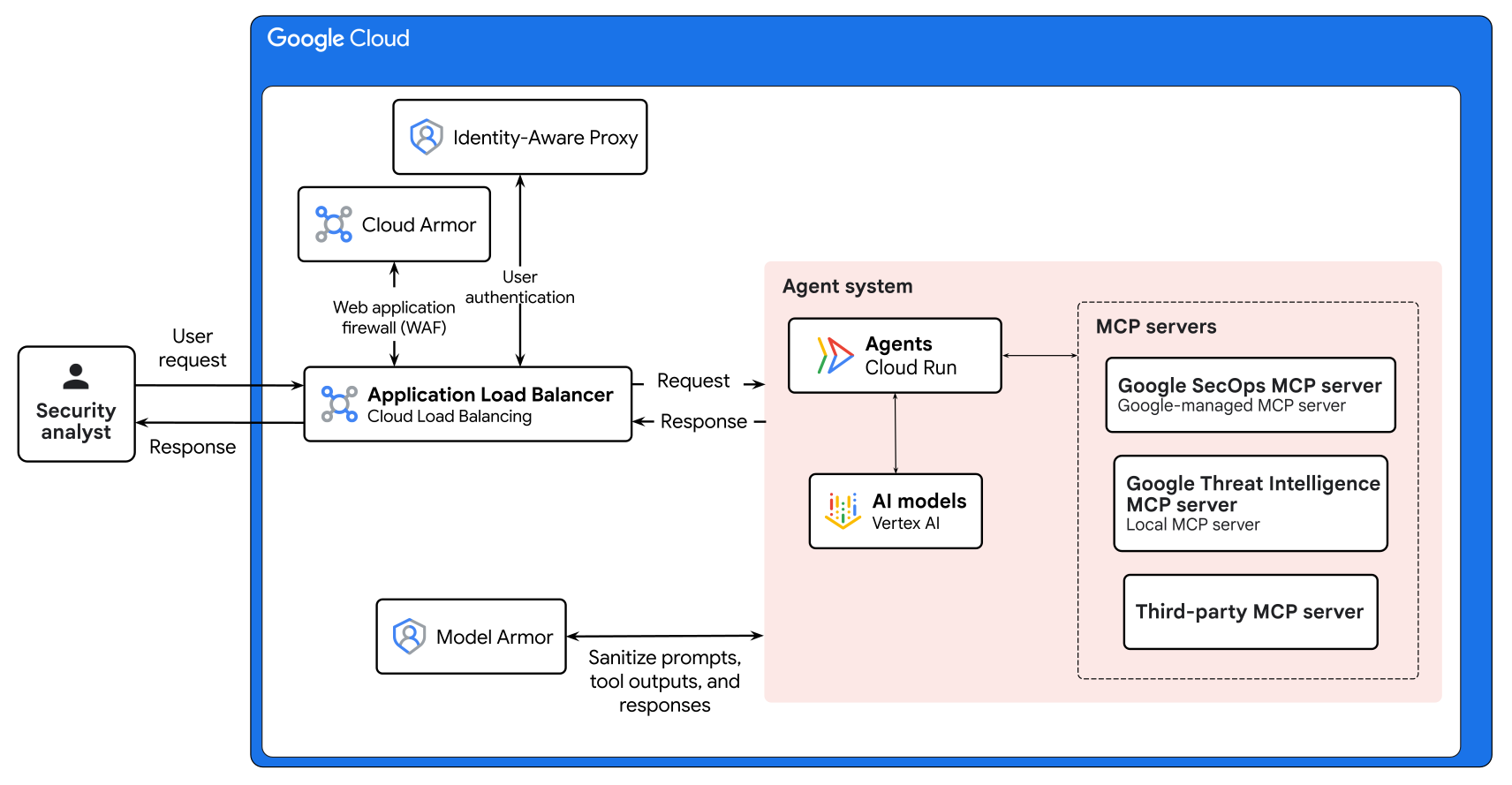 
The architecture shows the following components:
[Cloud Load Balancing](https://cloud.google.com/load-balancing)
:
An Application Load Balancer routes
incoming inference requests from the security analyst to the agent
system.
[Google Cloud Armor](https://cloud.google.com/armor)
:
Enforces security policies based on
configured web application firewall (WAF) rules.
[Identity-Aware Proxy (IAP)](https://docs.cloud.google.com/iap/docs/concepts-overview)
:
Enforces a zero-trust
security model and verifies user identity.
[Model Armor](https://docs.cloud.google.com/model-armor/overview)
:
Model Armor lets you inspect and sanitize prompts, tool
interactions, and responses. It provides flexible security controls to
any underlying AI model. For custom agents that run on
Cloud Run, integrate Model Armor by
using [Model Armor API](https://docs.cloud.google.com/model-armor/reference/rest).
Agent composition
:
[Agent Development Kit (ADK)](https://google.github.io/adk-docs/)
is an agent development framework that helps you build the agent and
deploy it as a [serverless
Cloud Run service](https://docs.cloud.google.com/run/docs/ai-agents). For details on the internal
architecture of this agent system, see the
[Agent system architecture](https://docs.cloud.google.com/architecture/agentic-ai-orchestrate-security-ops-workflows#agent-system-architecture)
section later in this document.
AI model
:
To serve inference, the agents in this
architecture use AI models on
[Gemini Enterprise Agent Platform](https://docs.cloud.google.com/gemini-enterprise-agent-platform/models/start).
MCP servers
: The
[Model
Context Protocol (MCP)](https://modelcontextprotocol.io/docs/getting-started/intro) facilitates access to tools and standardizes
the interaction between agents and tools. The agent system uses the
following MCP servers:
- [**Google SecOps
MCP server**](https://docs.cloud.google.com/chronicle/docs/reference/mcp): A Google-managed MCP server that provides access to [Google Security Operations SIEM](https://docs.cloud.google.com/chronicle/docs/reports/dashboards-overview) and [Google Security Operations SOAR](https://docs.cloud.google.com/chronicle/docs/soar/overview-and-introduction/soar-overview) data, including logs and case entities.
- [**Google Threat Intelligence MCP server**](https://docs.cloud.google.com/threat-intelligence/guides/concepts): A local MCP server that provides access to [Google Threat Intelligence](https://docs.cloud.google.com/threat-intelligence/guides/concepts). Google Threat Intelligence correlates internal environment alerts with global adversary data and it streamlines the identification of known malicious indicators within the SOC workflow.
- **Third-party MCP servers**: A connector that third-party vendors manage and that lets you interact with external security tools.
### Products used
This example architecture uses the following Google Cloud products and tools:
- [Cloud Run](https://cloud.google.com/run): A serverless compute platform that lets you run containers directly on top of Google's scalable infrastructure.
- [Cloud Load Balancing](https://cloud.google.com/load-balancing): A portfolio of high performance, scalable, global and regional load balancers.
- [Google Cloud Armor](https://cloud.google.com/security/products/armor): A network security service that offers web application firewall (WAF) rules and helps to protect against DDoS and application attacks.
- [Identity-Aware Proxy (IAP)](https://cloud.google.com/security/products/iap): A service that enables a zero-trust access model for your applications and virtual machines.
- [Google Security Operations](https://cloud.google.com/security/products/security-operations): A security operations platform that helps security teams detect, investigate, and respond to cyber threats.
- [Google Threat Intelligence](https://cloud.google.com/security/products/threat-intelligence): A security solution that provides a comprehensive and proactive approach to identifying, analyzing, and mitigating security threats.
- [Google Cloud MCP servers](https://docs.cloud.google.com/mcp/overview): Google-managed remote services that implement the [Model Context Protocol
(MCP)](https://cloud.google.com/discover/what-is-model-context-protocol) to provide AI applications access to Google and Google Cloud products and services.
- [Gemini](https://ai.google.dev/gemini-api/docs/models): A family of multimodal AI models developed by Google.
-
[Gemini Enterprise Agent Platform](https://docs.cloud.google.com/gemini-enterprise-agent-platform/overview): A comprehensive platform that lets you build, scale, govern, and optimize enterprise‑grade AI agents.
- [Agent Development Kit (ADK)](https://google.github.io/adk-docs/): A set of tools and libraries to develop, test, and deploy AI agents.
- [Model Armor](https://cloud.google.com/security/products/model-armor): A service that provides protection for your generative and agentic AI resources against prompt injection, sensitive data leaks, and harmful content.
### Agent Runtime with Gemini Enterprise
The following diagram shows a detailed architecture for an SOC agent AI system that's
deployed on Agent Runtime with Gemini Enterprise:
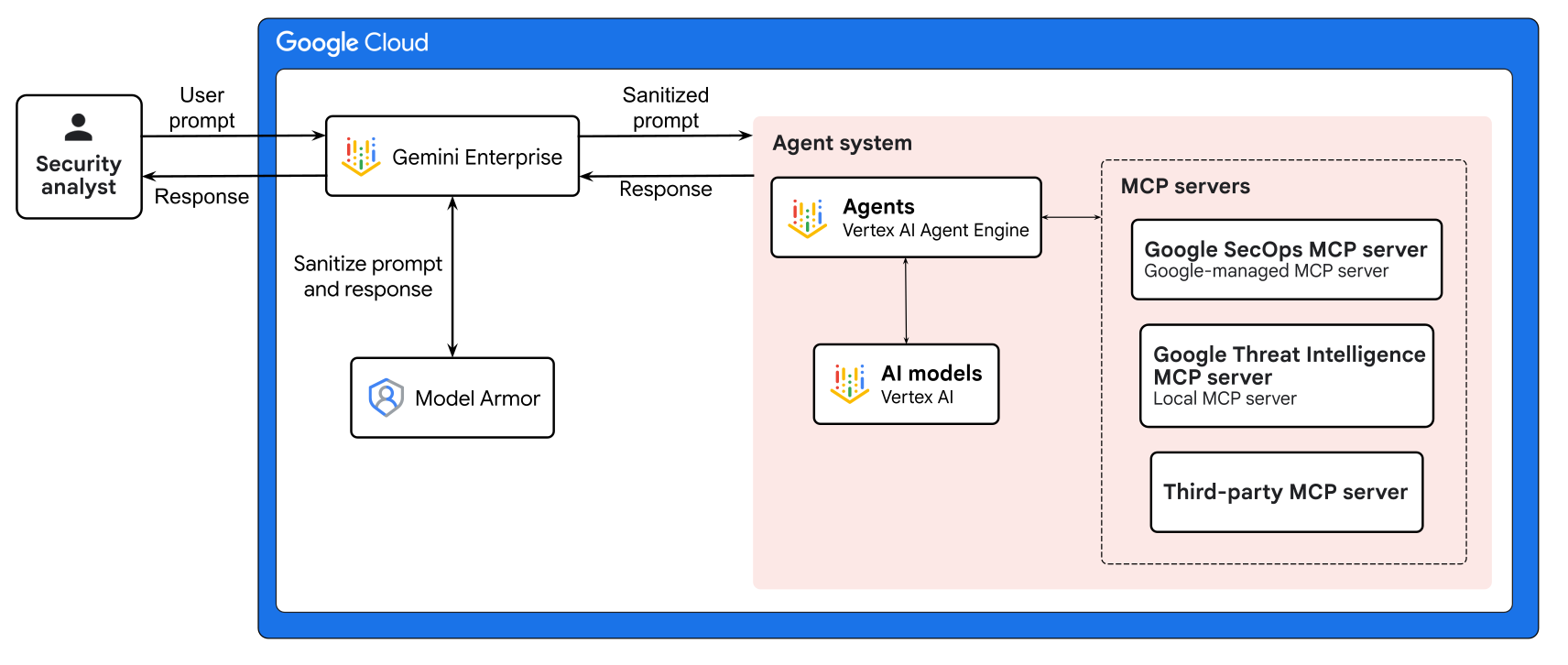 
The architecture diagram shows the following components:
[Gemini Enterprise](https://docs.cloud.google.com/gemini/enterprise/docs/get-started)
:
Users interact with the agent system through the
[chat assistant](https://docs.cloud.google.com/gemini/enterprise/docs/assistant-chat)
that Gemini Enterprise provides.
Agent composition
:
[Agent Development Kit (ADK)](https://google.github.io/adk-docs/)
is an agent development framework that helps you create a custom
agent, deploy the agent on
[Agent Runtime](https://docs.cloud.google.com/agent-builder/agent-engine/overview), and register the
agent with Gemini Enterprise. For details on the
internal architecture of this agent system, see the
[Agent system architecture](https://docs.cloud.google.com/architecture/agentic-ai-orchestrate-security-ops-workflows#agent-system-architecture)
section later in this document.
AI model
:
The agents in this architecture use AI models from the
[Agent Platform](https://docs.cloud.google.com/gemini-enterprise-agent-platform/models/model-garden/explore-models)
Model Garden to perform inference.
[Model Armor](https://docs.cloud.google.com/model-armor/overview)
:
To enforce enterprise safety and compliance policies, Model Armor
integrates directly with Google Cloud services to
provide inline inspection and sanitization of user prompts and model
responses. Through built-in integration with
Gemini Enterprise and
Agent Platform,
Model Armor automatically screens the interactions
between users and the managed agents. For more information, see [Model Armor integration with Google Cloud
services](https://docs.cloud.google.com/security-command-center/docs/model-armor-integrations).
MCP servers
: The
[Model
Context Protocol (MCP)](https://modelcontextprotocol.io/docs/getting-started/intro) facilitates access to tools and standardizes
the interaction between agents and tools. The agent system uses the
following MCP servers:
- [**Google SecOps
MCP server**](https://docs.cloud.google.com/chronicle/docs/reference/mcp): A Google-managed MCP server that provides access to [Google SecOps SIEM](https://docs.cloud.google.com/chronicle/docs/reports/dashboards-overview) and [Google SecOps SOAR](https://docs.cloud.google.com/chronicle/docs/soar/overview-and-introduction/soar-overview) data, including events, entities, raw logs, and case details.
- **Google Threat Intelligence MCP server** : A local MCP server that provides access to [Google Threat Intelligence](https://docs.cloud.google.com/threat-intelligence/guides/concepts). Google Threat Intelligence correlates internal alerts with global adversary data, and streamlines the identification of known malicious indicators within the SOC workflow.
- **Third-party MCP servers**: A connector that third-party vendors manage and that lets you interact with external security tools.
### Products used
This example architecture uses the following Google Cloud
products and tools:
- [Agent Runtime on Gemini Enterprise Agent Platform](https://docs.cloud.google.com/gemini-enterprise-agent-platform/build/runtime): A platform that lets you run, manage, and scale AI agents in production.
- [Gemini Enterprise](https://cloud.google.com/gemini-enterprise): A fully-managed secure platform to deploy and manage AI agents within an enterprise.
- [Google Security Operations](https://cloud.google.com/security/products/security-operations): A security operations platform that helps security teams detect, investigate, and respond to cyber threats.
- [Google Threat Intelligence](https://cloud.google.com/security/products/threat-intelligence): A security solution that provides a comprehensive and proactive approach to identifying, analyzing, and mitigating security threats.
- [Google Cloud MCP servers](https://docs.cloud.google.com/mcp/overview): Google-managed remote services that implement the [Model Context Protocol
(MCP)](https://cloud.google.com/discover/what-is-model-context-protocol) to provide AI applications access to Google and Google Cloud products and services.
- [Gemini](https://ai.google.dev/gemini-api/docs/models): A family of multimodal AI models developed by Google.
-
[Gemini Enterprise Agent Platform](https://docs.cloud.google.com/gemini-enterprise-agent-platform/overview): A comprehensive platform that lets you build, scale, govern, and optimize enterprise‑grade AI agents.
- [Agent Development Kit (ADK)](https://google.github.io/adk-docs/): A set of tools and libraries to develop, test, and deploy AI agents.
- [Model Armor](https://cloud.google.com/security/products/model-armor): A service that provides protection for your generative and agentic AI resources against prompt injection, sensitive data leaks, and harmful content.
### Agent system architecture
This section describes the architecture of the custom SOC agent system for the
preceding Cloud Run or Gemini Enterprise
deployments. To orchestrate complex security workflows, the agent uses a
[hierarchical task decomposition pattern](https://docs.cloud.google.com/architecture/choose-design-pattern-agentic-ai-system#hierarchical-task-decomposition-pattern).
The agent's composition remains consistent, regardless of the deployment method
that you choose.
The following diagram shows a detailed view of the agent system architecture:
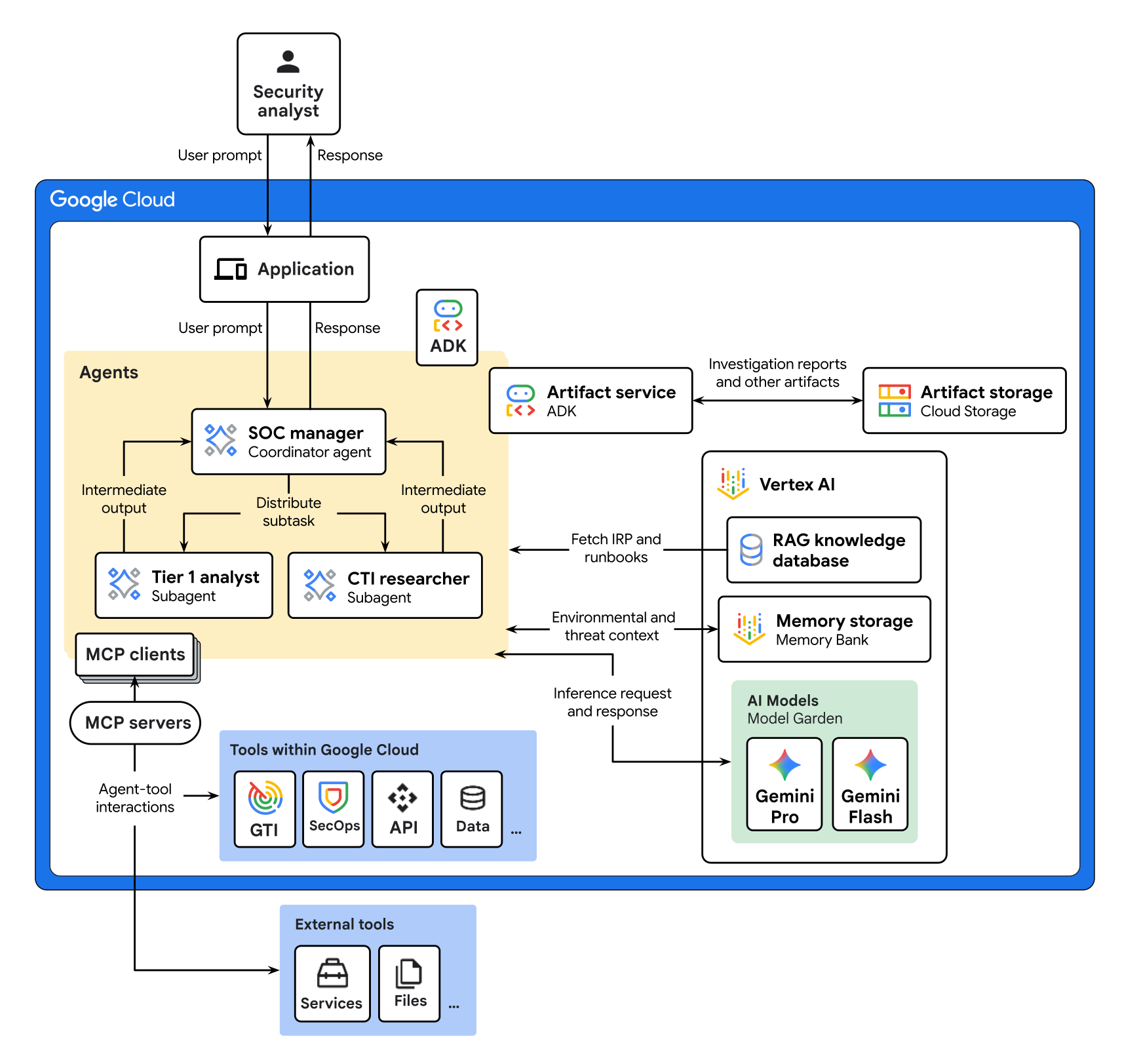

The architecture shows the following components:
Application
:
A frontend application, such as a chat interface, that
interacts with the user. You can choose to deploy your application with
Cloud Run or Agent Runtime
with Gemini Enterprise.
Agents
: This architecture uses the following agents:
- **Root agent** : A [coordinator
agent](https://docs.cloud.google.com/architecture/choose-design-pattern-agentic-ai-system#coordinator-pattern) that receives requests from the user. The root agent interprets the user's request and it attempts to resolve the request itself. If the task requires specialized tools, then the root agent delegates the request to the appropriate specialized agent.
- **Specialized agents** : The root agent invokes the following specialized agents:
- **Tier 1 analyst**: Retrieves alert details, identifies affected assets, and extracts user context when it queries Google SecOps and related telemetry sources.
- **Cyber Threat Intelligence (CTI) researcher** : Researches threat actor tactics that relate to the specific alert. This agent provides a risk assessment of the activity by querying threat intelligence platforms to correlate internal [indicators of compromise (IOCs)](https://en.wikipedia.org/wiki/Indicator_of_compromise) with known threat actor groups and documented [tactics, techniques, and procedures (TTPs)](https://en.wikipedia.org/wiki/Tactics_of_terrorism).
The agent system architecture diagram shows an example architecture that
uses two SOC personas. Depending on your specific use cases, you can deploy
other SOC personas or create your own custom personas. For a broader list
of SOC personas that can help make your security operations more robust, see
[SOC Personas](https://google.github.io/mcp-security/personas/).
RAG knowledge database
:
This database provides a grounding source for
retrieval-augmented generation (RAG). The database is used to provide the
agents with
[incident response plans](https://cloud.google.com/discover/incident-response-plan-template)
and [AI runbooks](https://www.youtube.com/embed/4JpnI7ud6Ao?si=w9GU1HoY8FtBoi4A).
AI runbooks are prescriptive workflows in the form of
[Agent Skills](https://agentskills.io/home).
Artifact service
:
A managed service that stores investigation reports
and evidence in Cloud Storage.
[Memory Bank](https://docs.cloud.google.com/agent-builder/agent-engine/memory-bank/overview)
:
A persistent state management system that stores custom memory topics and
lets agents maintain context about environmental and threat context across
sessions.
AI models
:
To serve inference, the agents in this architecture use the
latest [Gemini model](https://docs.cloud.google.com/gemini-enterprise-agent-platform/models/google-models)
on [Agent Platform](https://docs.cloud.google.com/gemini-enterprise-agent-platform/models/start).
MCP servers
:
The MCP servers facilitate access to tools and standardize
the interaction between agents and tools. For each agent-tool pair, an MCP
client sends requests to an MCP server through which the agent accesses a
tool, such as a database, a file system, or an API.
Agent tools
:
These tools enable agents to retrieve grounding data,
such as corresponding AI runbooks,
[incident response plans](https://cloud.google.com/discover/incident-response-plan-template),
previous reports, internal documentation, and playbooks.
ADK
:
[ADK](https://google.github.io/adk-docs/)
provides tools and a framework to develop, test, and deploy agents.
ADK abstracts the complexity of agent creation and it lets
AI developers focus on the agent's logic and capabilities.
The architecture shows the following data flow:
1. A security analyst submits a request to the [SOC manager](https://google.github.io/mcp-security/personas/soc_manager.html), which is a coordinator agent. For example, an analyst submits a request to investigate case #37.
2. The application that's deployed on Cloud Run or on Gemini Enterprise routes the request to the SOC manager.
3. The SOC manager uses Gemini to interpret the user's request.
4. The SOC manager performs the following tasks to gather context on the request:
1. Sends a query to the RAG knowledge database to fetch the corresponding AI runbooks, prescriptive workflows in the form of [AI Skills](https://agentskills.io/home), and the [incident response plan](https://cloud.google.com/discover/incident-response-plan-template).
2. Fetches previous [memories](https://google.github.io/adk-docs/sessions/memory/) to identify whether the agent system has analyzed similar incidents.
3. Checks the [Artifact Service](https://google.github.io/adk-docs/artifacts/#artifact-service-baseartifactservice) for existing reports or evidence that relates to the request.
5. The SOC manager uses Gemini and the context that it retrieved to break down the request into a sequence of subtasks and identify the appropriate tools.
6. The SOC manager dynamically directs subtasks to specialized subagents, such as the Tier 1 analyst and the Cyber Threat Intelligence (CTI) researcher.
7. Each subagent performs the following actions to execute their assigned subtasks:
1. Uses Gemini to interpret the task objectives.
2. Fetches relevant context from the RAG knowledge database, memories, and artifacts.
3. Uses MCP servers to gather the following additional context to ground responses:
- Knowledge documentation, such as previous reports, internal documentation, and playbooks.
- Security intelligence and telemetry that uses data from Google SecOps and Google Threat Intelligence.
4. Uses Gemini and the context that it retrieved to generate findings.
5. Packages its findings into a structured summary.
6. Forwards the intermediate response back to the SOC manager.
8. The SOC manager receives the intermediate responses from the subagents and it evaluates the findings against the AI runbook requirements.
1. If the findings don't meet the evaluation criteria, the SOC manager repeats its analysis of the user's request and it delegates subtasks to subagents to gather additional data. During this iterative loop, the SOC manager retains the previous context chain to inform and augment subsequent tool calls and subagent delegations. The SOC manager continues this loop until the findings meet the evaluation criteria.
2. If the findings meet the evaluation criteria or an exit condition, such as max iterations, then the SOC manager performs the following actions:
1. Uses Gemini to synthesize all of the subagent findings into an investigation report and saves the report to the [Artifact Service](https://google.github.io/adk-docs/artifacts/#artifact-service-baseartifactservice).
2. Uses the Google SecOps MCP server to post results to the [case wall](https://docs.cloud.google.com/chronicle/docs/soar/investigate/working-with-cases/cases-overview#case-wall-tab).
3. Saves new [memories](https://docs.cloud.google.com/agent-builder/agent-engine/memory-bank/generate-memories) to the [Agent Platform
Memory Bank](https://docs.cloud.google.com/agent-builder/agent-engine/memory-bank/overview).
9. The SOC manager sends the artifact link and report summary back to the security analyst.
## Products used
The agent system architecture in this document use the following Google Cloud
products and tools:
- [Google Security Operations](https://cloud.google.com/security/products/security-operations): A security operations platform that helps security teams detect, investigate, and respond to cyber threats.
- [Google Threat Intelligence](https://cloud.google.com/security/products/threat-intelligence): A security solution that provides a comprehensive and proactive approach to identifying, analyzing, and mitigating security threats.
- [Google Cloud MCP servers](https://docs.cloud.google.com/mcp/overview): Google-managed remote services that implement the [Model Context Protocol
(MCP)](https://cloud.google.com/discover/what-is-model-context-protocol) to provide AI applications access to Google and Google Cloud products and services.
- [Gemini](https://ai.google.dev/gemini-api/docs/models): A family of multimodal AI models developed by Google.
-
[Gemini Enterprise Agent Platform](https://docs.cloud.google.com/gemini-enterprise-agent-platform/overview): A comprehensive platform that lets you build, scale, govern, and optimize enterprise‑grade AI agents.
- [Agent Development Kit (ADK)](https://google.github.io/adk-docs/): A set of tools and libraries to develop, test, and deploy AI agents.
- [Model Armor](https://cloud.google.com/security/products/model-armor): A service that provides protection for your generative and agentic AI resources against prompt injection, sensitive data leaks, and harmful content.
- [Memory Bank](https://docs.cloud.google.com/gemini-enterprise-agent-platform/scale/memory-bank): A persistent storage service that generates, refines, manages, and retrieves long-term memories based on a user's conversations with an agent.
- [Cloud Storage](https://cloud.google.com/storage): A low-cost, no-limit object store for diverse data types. Data can be accessed from within and outside Google Cloud, and it's replicated across locations for redundancy.
For information about how to select alternative components for your agentic AI
system including framework, agent runtime, tools, memory, and design patterns,
see
[Choose your agentic AI architecture components](https://docs.cloud.google.com/architecture/choose-agentic-ai-architecture-components).
## Design Considerations
To implement this architecture for production, consider the following
recommendations:
- **Agent tool access** : To reduce token consumption and enforce the [principle of least privilege](https://en.wikipedia.org/wiki/Principle_of_least_privilege), provide subsets of tools to different agents as required.
- **Agent scoping**: To improve model accuracy, scope each agent's runbooks and system instructions.
- **Context window management**: To minimize token consumption, design prompts and tool outputs to be concise. Use RAG repositories, and use agent skills to pre-load context and summarize large tool responses.
- **Prompt caching**: To reduce input tokens costs, cache static agent content, such as system instructions, personas, runbooks, and tool schema.
- **Model selection** : The [model](https://docs.cloud.google.com/gemini-enterprise-agent-platform/models/google-models) that you select for your AI application directly affects both costs and performance. Select different models in your agentic system based on the different agent roles and task requirements. For complex reasoning and task decomposition, use a thinking model like Gemini Pro. For small and direct tasks, use a fast, low-cost model like Gemini Flash.
- **MCP schema compatibility** : To prevent the AI model from misinterpreting tool definitions and making incorrect tool calls, sanitize tool schemas. Create self-contained constructs for JSON Schema `$ref` and `$defs` and normalize uppercase type strings.
- **Authentication environments** : To ensure seamless authentication across environments, configure your deployment pipelines to manage the transition from development authentication strategies. For example, you might need to transition from [Application Default Credentials (ADC)](https://docs.cloud.google.com/docs/authentication/application-default-credentials) in local execution to service accounts that Identity and Access Management (IAM) manages for hosted remote MCP servers in production.
## Deployment
To deploy a sample implementation of this architecture that provides custom SOC
agents, use the
[Agentic SOC Gemini Enterprise code sample](https://github.com/google/mcp-security/tree/gement_submodule/external)
that's available in GitHub.
We recommend that you iterate on your agent in the following order:
1. **Deploy locally with [ADK web](https://github.com/google/adk-web)**: Accelerate prototyping and quickly iterate on agent logic.
2. **Deploy to a local container**: Ensure a portable and immutable environment with consistent dependencies.
3. **Deploy the container to Cloud Run or Agent Runtime**: Scale your agents for effective security operations and move your application from development to production.
## What's next
- Learn how to [host AI agents on Cloud Run](https://docs.cloud.google.com/run/docs/ai-agents)
- Learn about [security with generative AI](https://cloud.google.com/security/ai).
- Learn about [Gemini Enterprise security overview](https://docs.cloud.google.com/gemini/enterprise/docs/security-overview).
- Learn how to build a [multi-agent AI system in Google Cloud](https://docs.cloud.google.com/architecture/multiagent-ai-system).
- Connect agents to Google SecOps data using the [Google SecOps MCP Server](https://docs.cloud.google.com/chronicle/docs/secops/use-google-secops-mcp).
- Review the [Security perspective](https://cloud.google.com/architecture/framework/security) in the Google Cloud Well-Architected Framework.
- For more reference architectures, diagrams, and best practices, explore the [Cloud Architecture Center](https://docs.cloud.google.com/architecture).
## Contributors
Authors:
- [Ben Perel](https://www.linkedin.com/in/benperel/) \| Security Specialist
- [Daniel Dye](https://linkedin.com/in/dandye) \| SecOps AI Engineer
Other contributors:
- [Amr Abdelrazik](https://www.linkedin.com/in/amrhamedabdelrazik/) \| Group Product Manager
- [Kumar Dhanagopal](https://www.linkedin.com/in/kumardhanagopal) \| Cross-Product Solution Developer
- [Samantha He](https://www.linkedin.com/in/samantha-he-05a98173) \| Technical Writer