### Region ID
The `REGION_ID` is an abbreviated code that Google assigns
based on the region you select when you create your app. The code does not
correspond to a country or province, even though some region IDs may appear
similar to commonly used country and province codes. For apps created after
February 2020, `REGION_ID.r` is included in
App Engine URLs. For existing apps created before this date, the
region ID is optional in the URL.
Learn more
[about region IDs](https://docs.cloud.google.com/appengine/docs/standard/python/how-requests-are-routed#region-id).
> [!IMPORTANT]
> **Important:** [Cloud Run](https://docs.cloud.google.com/run/docs/overview/what-is-cloud-run.md.txt) is a fully managed, modern application hosting platform that provides access to advanced capabilities, such as GPUs, at lower prices. We recommend that you evaluate Cloud Run for your upcoming projects, or for modernizing your existing applications. For new Google Cloud users, we recommend using Cloud Run as the preferred alternative over App Engine.
This guide provides an introduction to [Cloud Run](https://docs.cloud.google.com/run/docs/overview/what-is-cloud-run.md.txt) for users who are familiar with
App Engine. It covers the key similarities and differences between the Serverless platforms to help prepare for migration from either
App Engine standard environment or App Engine flexible environment.
## Overview
Cloud Run is the latest evolution of Google Cloud Serverless, building on the experience of running App Engine for more than a decade. Cloud Run runs on much of the same infrastructure as App Engine standard environment, so there are many similarities between these two platforms.
Cloud Run is designed to improve upon the App Engine experience, incorporating many of the best features of both App Engine standard environment and App Engine flexible environment. Cloud Run services can handle the same workloads as App Engine services, but Cloud Run offers customers much more flexibility in implementing these services. This flexibility, along with improved integrations with both Google Cloud and third-party services, also enables Cloud Run to handle workloads that cannot run on App Engine.
## Comparison summary
While there are many similarities and differences between App Engine and Cloud Run, this overview focuses on the areas that are most relevant for App Engine customers getting started with Cloud Run.
App Engine standard environment App Engine flexible environment Cloud Run Terminology Application N/A Service Service Version Revision
### URL endpoints
App URL
(`default` service) `https://PROJECT_ID.REGION_ID.r.appspot.com` N/A Service URL `https://SERVICE_ID-dot-PROJECT_ID.REGION_ID.r.appspot.com`
- `https://SERVICE_NAME-PROJECT_NUMBER.REGION.run.app`
- `https://SERVICE_IDENTIFIER.run.app`
Version/Revision URL `https://VERSION-dot-SERVICE-dot-PROJECT_ID.REGION_ID.r.appspot.com`
- `https://TAG---SERVICE_NAME-PROJECT_NUMBER.REGION.run.app`
- `https://TAG---SERVICE_IDENTIFIER.run.app`
### Scaling
Automatic scaling Yes Yes Yes Manual scaling Yes Yes Yes Scale-to-zero Yes No Yes Warm-up requests [Configurable](https://docs.cloud.google.com/appengine/docs/standard/configuring-warmup-requests.md.txt?tab=python) No Automatic Idle instance timeout (after finishing last request) Up to 15 minutes Depends on [Billing](https://docs.cloud.google.com/appengine/migration-center/run/compare-gae-with-run.md.txt#idle-timeout) setting. Use *Instance-based billing* to emulate App Engine behavior Request timeout
- *Automatic scaling*: 10 minutes
- *Manual/Basic scaling*: 24 hours
60 minutes Configurable up to 60 minutes (default: 5 minutes)
### Deployment
From source Yes [Yes](https://docs.cloud.google.com/run/docs/deploying-source-code.md.txt) Container image No Yes ([custom runtimes](https://docs.cloud.google.com/appengine/docs/flexible/custom-runtimes/build.md.txt)) [Yes](https://docs.cloud.google.com/run/docs/deploying.md.txt#multicontainer-yaml) Sidecar containers No [Yes](https://docs.cloud.google.com/run/docs/deploying.md.txt#sidecars). Sidecars run alongside the main container, serving web requests. Health checks Automatic. App Engine performs readiness and liveness checks on your instances. [Configurable](https://docs.cloud.google.com/run/docs/configuring/healthchecks.md.txt). You define startup and liveness probes explicitly in your Cloud Run resource configuration, and specify details such as the probe type (TCP, HTTP and gRPC), path, port, initial delay, period, timeout, success threshold, and failure threshold.
### Compute resources
vCPU [Instance class](https://docs.cloud.google.com/appengine/docs/standard#instance_classes) vCPU\* Memory F/B1 .25 384MB F/B2 .5 768MB F/B4 1 1.5GB F/B4_1G 1 3GB B8 2 3GB *\* vCPU equivalents are approximate* Up to 80 vCPU Up to 8 vCPU Memory Up to 6.5GB per vCPU Up to 32GB GPUs No Yes. You can [configure](https://docs.cloud.google.com/run/docs/configuring/services/gpu.md.txt) one GPU per Cloud Run instance. Volume mounts No Yes. You can [mount a Cloud Storage bucket](https://docs.cloud.google.com/run/docs/configuring/services/cloud-storage-volume-mounts.md.txt) directly into the container's file system.
### Pricing model
Per-request fee No No, when using [instance-based billing](https://docs.cloud.google.com/run/docs/configuring/cpu-allocation).
Yes, when using [request-based billing](https://docs.cloud.google.com/run/docs/configuring/cpu-allocation). Idle minimum instances Same cost as active instances Lower cost for idle minimum instances *(see [Billable container instance time](https://docs.cloud.google.com/run/pricing#billable-time))* Committed use discounts (CUDs) No [Yes](https://docs.cloud.google.com/run/pricing#tables) Instance-based billing (cost-per-hour instance) F4/B4 instance: $0.2
- vCPU: $0.0526
- Memory: $0.0071
- vCPU: $0.0648
- Memory: $0.0072
### Security
Ingress settings [Yes](https://docs.cloud.google.com/appengine/docs/standard/ingress-settings.md.txt) [Yes](https://docs.cloud.google.com/appengine/docs/flexible/ingress-settings.md.txt) [Yes](https://docs.cloud.google.com/run/docs/securing/ingress.md.txt) Invoker role No [Yes](https://docs.cloud.google.com/appengine/migration-center/run/compare-gae-with-run.md.txt#invoker_role) IAP [Yes](https://docs.cloud.google.com/appengine/docs/standard/authenticating-users.md.txt#iap) [Yes](https://docs.cloud.google.com/appengine/docs/flexible/authenticating-users.md.txt#iap) [Yes](https://docs.cloud.google.com/run/docs/securing/identity-aware-proxy-cloud-run.md.txt) Firewalls [Yes](https://docs.cloud.google.com/appengine/docs/standard/understanding-firewalls.md.txt) [Yes](https://docs.cloud.google.com/appengine/docs/flexible/understanding-firewalls.md.txt) [Configure using Google Cloud Armor](https://docs.cloud.google.com/armor/docs/security-policy-overview.md.txt) Secret Manager Yes with Cloud Client Libraries. [Yes](https://docs.cloud.google.com/run/docs/configuring/services/secrets.md.txt). You can mount each secret as a volume or pass a secret using environment variables.
### Connectivity
Custom domains [Yes](https://docs.cloud.google.com/appengine/docs/standard/mapping-custom-domains.md.txt) [Yes](https://docs.cloud.google.com/appengine/docs/flexible/mapping-custom-domains.md.txt) [Yes](https://docs.cloud.google.com/run/docs/mapping-custom-domains.md.txt) VPC connectivity (including Shared VPC) [Yes](https://docs.cloud.google.com/appengine/docs/standard/connecting-vpc.md.txt) N/A [Yes](https://docs.cloud.google.com/run/docs/configuring/connecting-vpc.md.txt) VPC egress settings [Yes](https://docs.cloud.google.com/appengine/docs/standard/ingress-settings.md.txt) N/A [Yes](https://docs.cloud.google.com/run/docs/configuring/connecting-vpc.md.txt#egress) Multi-region load-balancing No [Yes](https://docs.cloud.google.com/run/docs/multiple-regions.md.txt) Server streaming No [Yes](https://docs.cloud.google.com/run/docs/triggering/grpc.md.txt)
### Connectivity - Direct VPC egress
Launch stage GA N/A GA Network tags Supported N/A Supported VPC Flow Logs Supported N/A Supported Public NAT Supported N/A Supported Private NAT Supported N/A Supported Dual-stack subnets Supported N/A Supported Configuration method YAML, Terraform N/A Google Cloud console, gcloud, YAML, Terraform Shared VPC support Supported N/A Supported
### Accessing Google Cloud services
Cloud SQL [Yes](https://docs.cloud.google.com/sql/docs/mysql/connect-app-engine) [Yes](https://docs.cloud.google.com/sql/docs/mysql/connect-app-engine-flexible.md.txt) [Yes](https://docs.cloud.google.com/sql/docs/mysql/connect-run.md.txt) Cloud Client Libraries If you are using [Cloud Client Libraries](https://docs.cloud.google.com/sdk/cloud-client-libraries) in App Engine, you don't need to change anything when migrating to Cloud Run. These client libraries work everywhere, which means that your application is more portable. App Engine legacy bundled services [Yes](https://docs.cloud.google.com/appengine/docs/standard/bundled-services-overview.md.txt) (Java, Python, Go, PHP only) No No
## Resource model
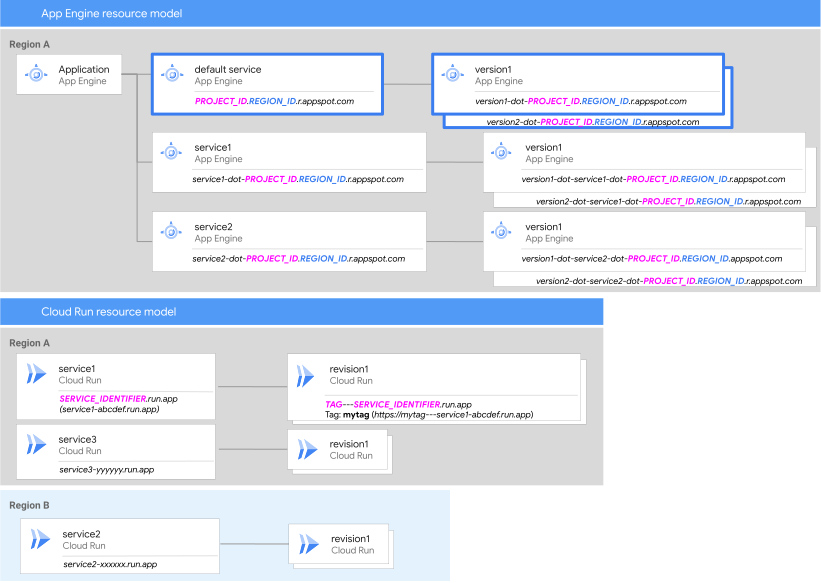
The [Cloud Run resource model](https://docs.cloud.google.com/run/docs/resource-model.md.txt) is very similar to [App Engine](https://docs.cloud.google.com/appengine/docs/an-overview-of-app-engine.md.txt#components_of_an_application), but there are some key differences:
- Cloud Run does not have a top-level *Application* resource, or the corresponding `default` service.
- Cloud Run services in the same project can be deployed to different regions. In App Engine, all services in the project are in the same region.
- Cloud Run uses the term *Revision*, instead of *Version*, to align with the [Knative resource model](https://knative.dev/docs/serving/revisions).
- Cloud Run revision names use the format: `SERVICE_NAME-REVISION_SUFFIX`, where `REVISION_SUFFIX` is either auto-generated, or set using the [`--revision-suffix=REVISION_SUFFIX`](https://docs.cloud.google.com/sdk/gcloud/reference/run/deploy.md.txt#--revision-suffix) deployment flag.
- Cloud Run revisions are immutable, meaning that you cannot reuse names like you can with App Engine versions (using the `--version=VERSION_ID` deployment flag).
- Cloud Run service URLs are based on a [Service identifier](https://docs.cloud.google.com/run/docs/triggering/https-request.md.txt#creating_public_services) that is automatically generated on the first deployment of the service. The Service identifiers use the format: `SERVICE_NAME-`. The Service Identifier is unique, and does not change during the lifetime of the service.
- In Cloud Run, only the service URLs (`SERVICE_IDENTIFIER.run.app` and `https://SERVICE_NAME-PROJECT_NUMBER.REGION.run.app`) are exposed by default. To address a specific revision, you must configure a [traffic tag](https://docs.cloud.google.com/run/docs/rollouts-rollbacks-traffic-migration.md.txt#tags). In App Engine, both the [service and version URLs](https://docs.cloud.google.com/appengine/docs/standard/how-requests-are-routed.md.txt?tab=python#urls_for_services_and_versions) are exposed automatically.
## Deployment and configuration
In App Engine, most configuration is done in the `app.yaml` that is included in every deployment. This simplicity comes at a cost, in that, while a few settings can be updated using the [Admin API](https://docs.cloud.google.com/appengine/docs/admin-api/reference/rest/v1/apps.services.versions/patch.md.txt), most changes require redeploying the service.
While Cloud Run has the [`service.yaml`](https://docs.cloud.google.com/run/docs/reference/yaml/v1.md.txt) configuration file, it is not used in the same way as the `app.yaml`. The Cloud Run `service.yaml` cannot be used when deploying from source, as one of the required elements is the path to the final container image. Also, the `service.yaml` conforms to the Knative spec, and can be difficult to read for those not familiar with Kubernetes-style configuration files. For more information on using the `service.yaml` to manage configuration, see the [Cloud Run documentation](https://docs.cloud.google.com/run/docs/deploying.md.txt#yaml).
For App Engine customers getting started with Cloud Run, using the gcloud CLI deployment flags aligns much more closely with the App Engine at-deployment configuration management.
To set the configuration when deploying new code in Cloud Run, use [`gcloud run deploy`](https://docs.cloud.google.com/sdk/gcloud/reference/run/deploy.md.txt) flags:
gcloud run deploy SERVICE_NAME \
--cpu CPU \
--memory MEMORY \
--concurrency CONCURRENCY
While it is not necessary to use the configuration flags with every deployment (*see [Managing configurations](https://docs.cloud.google.com/appengine/migration-center/run/compare-gae-with-run.md.txt#managing-configurations)*), you can do so to help simplify configuration management.
In Cloud Run, you can also update the configuration without redeploying the source code using [`gcloud run services update`](https://docs.cloud.google.com/sdk/gcloud/reference/run/services/update.md.txt):
gcloud run services update SERVICE_NAME \
--cpu CPU \
--memory MEMORY \
--concurrency CONCURRENCY
As Cloud Run revisions are immutable, this command will create a new revision with the updated configuration, but will use the same container image as the existing revision.
### Managing configurations
For App Engine deployments, *all* settings must be provided for *every* deployment, and any settings not provided are assigned default values. For example, take App Engine `service-a`, with versions using the `app.yaml` files in the following table:
| App Engine service-a version1 | App Engine service-a version2 |
|---|---|
| app.yaml ||
| ```yaml runtime: python39 service: service-a instance_class: F4 ``` | ```yaml runtime: python39 service: service-a ``` |
| Applied configuration ||
| ```sh runtime: python39 service: service-a instance_class: F4 default values: .. .. ``` | ```sh runtime: python39 service: service-a default values: instance_class: F1 .. .. ``` |
`version1` is configured with `instance_class: F4`, while `version2`, which provided no value for `instance_class`, is configured with the default `instance_class: F1`.
For Cloud Run, any configuration settings provided are applied, but any that are not provided *keep their existing values*. You only need to provide values for settings that you want to change. For example:
| Cloud Run service-a revision1 | Cloud Run service-a revision2 |
|---|---|
| Deployment command ||
| ```sh gcloud run deploy service-a \ --cpu=4 ``` | ```sh gcloud run deploy service-a ``` |
| Applied configuration ||
| ```sh service: service-a vCPUs: 4 default values: .. .. ``` | ```sh service: service-a vCPUs: 4 default values: .. .. ``` |
In App Engine, deploying with no configuration settings creates a version using *all default settings* . In Cloud Run, deploying with no configuration settings creates a revision using *the same configuration settings as the previous revision*. For the first revision of a Cloud Run service, deploying with no configuration settings creates a revision using all default settings.
### Configuration defaults
| Configuration setting | App Engine standard environment | App Engine flexible environment | Cloud Run |
|---|---|---|---|
| Compute resources | F1 | 1 vCPU, .6GB | 1 vCPU, 512MB |
| Maximum concurrency (requests) | 10 | None | 80 |
| Request timeout | - *Automatic scaling*: 10 minutes - *Manual/Basic scaling*: 24 hours | 60 minutes | 5 minutes |
| CPU utilization target | 60% | 50% | 60% |
| Maximum instances | None | 20 | 100 |
| Minimum instances | 0 | 2 | 0 |
### Entrypoint
When [deploying from source](https://docs.cloud.google.com/run/docs/deploying-source-code.md.txt), App Engine reads the entrypoint command from the `entrypoint` attribute in the `app.yaml`. If no entrypoint is provided, a runtime-specific default is used. Cloud Run uses [Google Cloud's buildpacks](https://docs.cloud.google.com/docs/buildpacks/overview.md.txt) when deploying from source, and some languages don't have a default entrypoint, meaning you must provide one or the build will fail. For example, [Python buildpacks](https://docs.cloud.google.com/docs/buildpacks/python.md.txt#application_entrypoint) require either a `Procfile`, or specifying the `GOOGLE_ENTRYPOINT` build environment variable.
Review the buildpacks documentation for any language-specific configuration requirements.
> [!IMPORTANT]
> **Important:** When deploying from source using `gcloud run deploy --source`, you can only use the `Procfile` method for configuring the entrypoint.
### Health checks
In App Engine, health checks are largely automatic and managed by the platform. App Engine performs both liveness and readiness checks to determine if an instance is operational and ready to serve traffic. If an instance consistently fails the automatic checks, App Engine terminates the instance, and replaces it with a new instance to ensure service continuity.
Cloud Run offers more granular control with configurable startup and liveness probes. These probes allow you to define a healthy instance, which is crucial for complex microservices.
In Cloud Run, you can configure the following probes:
- Startup probe to define when a container has started and is ready to serve traffic. When you configure a startup probe, it disables liveness checks until startup succeeds, making sure the liveness probes don't interfere with your application startup.
- Liveness probe to determine when to restart a container. For example, liveness probes could catch a deadlock when an application is running, but unable to make progress. Restarting a container in such a state makes sure that your application is available despite bugs.
For more information, see [Configure container health checks for services](https://docs.cloud.google.com/run/docs/configuring/healthchecks.md.txt).
## Scaling
While Cloud Run and App Engine standard environment share similar scaling
infrastructure, Cloud Run is streamlined for faster scaling and
scale-to-zero capabilities. This results in fewer configurable settings. This
streamlining limits the configurable settings to:
- [Maximum concurrency](https://docs.cloud.google.com/run/docs/configuring/concurrency.md.txt)
- [Maximum](https://docs.cloud.google.com/run/docs/configuring/max-instances.md.txt) and [minimum](https://docs.cloud.google.com/run/docs/configuring/min-instances.md.txt) instances
- [Custom scaling controls](https://docs.cloud.google.com/run/docs/configuring/scaling-controls.md.txt) for setting the target utilization for CPU and concurrency
By default, the target utilization for CPU and concurrency for a
Cloud Run service is 60%. To optimize
for cost and performance, you can customize these values. For more information, see
[Configure custom scaling controls for services](https://docs.cloud.google.com/run/docs/configuring/scaling-controls.md.txt).
App Engine flexible environment uses the Compute Engine
[Autoscaler](https://docs.cloud.google.com/compute/docs/autoscaler.md.txt), and therefore has very different
[scaling characteristics](https://docs.cloud.google.com/appengine/docs/flexible/flexible-for-standard-users.md.txt#scaling_characteristics)
than both App Engine standard environment and Cloud Run.
## Migrate scaling controls from App Engine to Cloud Run
This section describes how to map your existing App Engine scaling
configuration to Cloud Run.
### Minimum instances (warm-up)
Keep a minimum number of instances warm to handle baseline traffic and avoid
cold starts.
| Configuration environment | Settings |
|---|---|
| App Engine standard environment | `min_instances: N` |
| App Engine flexible environment | `automatic_scaling:` `min_num_instances: N` |
| Cloud Run | Service-level: `scaling.min_instance_count: N` Revision-level: `template.scaling.min_instance_count: N` |
**Migration strategy** : Set the [minimum number of
instances](https://docs.cloud.google.com/run/docs/configuring/min-instances) for warm-up at the
service-level. If you direct traffic to a specific revision, the revision-level
setting overrides the service-level default. Use this setting to test a new
revision with a different minimum instance count before promoting it to production.
### Maximum instances
Set a hard limit on the total number of instances for cost control and to
protect downstream dependencies.
| Configuration environment | Settings |
|---|---|
| App Engine standard environment | `max_instances: N` |
| App Engine flexible environment | `automatic_scaling:` `max_num_instances: N` |
| Cloud Run | Service-level: `scaling.max_instance_count: N` Revision-level: `template.scaling.max_instance_count: N` |
**Migration strategy** : Set a global limit at the service level.
Cloud Run enforces the lower of the service-level and revision-level
settings. For more information, see [Set maximum instances for
services](https://docs.cloud.google.com/run/docs/configuring/max-instances).
### Concurrency
Define the request capacity of a single instance.
| Configuration environment | Settings |
|---|---|
| App Engine standard environment | `max_concurrent_requests: N` |
| App Engine flexible environment | `automatic_scaling:` `target_concurrent_requests: N` |
| Cloud Run | `template.maxInstanceRequestConcurrency: N` |
**Migration strategy**: Follow one of two migration strategies:
- Start with the Cloud Run instance capacity default of
80, and perform load testing to find the
stable concurrency limit for your application on Cloud Run. Tuning
this value is an effective way to optimize for performance and cost on
Cloud Run. Adjust the value down from
80 based on your test results. For more
information, see [Set maximum concurrent requests per instance](https://docs.cloud.google.com/run/docs/configuring/concurrency.md.txt).
- Use your existing configuration value in App Engine standard environment, which is a
default of 10 concurrent requests per instance. This is a safe
option, because it is a known, working configuration for your application.
However, this might lead to significant under-utilization of your
Cloud Run instances and potentially higher costs, since the
autoscaler creates more instances than required to handle the load.
### CPU utilization
Scale when the CPU load exceeds a certain threshold.
| Configuration environment | Settings |
|---|---|
| App Engine standard environment | `target_cpu_utilization: 0.X` |
| App Engine flexible environment | `automatic_scaling:` `cpu_utilization:` `target_utilization: N` |
| Cloud Run | `template.scaling.cpuUtilization: 0.X` |
**Migration strategy** : Use the [`--scaling-cpu-target`](https://docs.cloud.google.com/sdk/gcloud/reference/run/services/update.md.txt#--scaling-cpu-target)
flag to set a custom CPU utilization threshold. By default, Cloud Run's
autoscaler maintains \~60% CPU utilization on
active instances. For more information, see [Configure custom scaling controls
for services](https://docs.cloud.google.com/run/docs/configuring/scaling-controls).
Unlike App Engine, Cloud Run only allocates CPU during request
processing and throttles to zero otherwise. In the App Engine standard environment, regardless
of the scaling type you configure, App Engine makes sure that CPU is
available continuously for your instance.
If your application performs any background work between requests, such as using
background threads in basic or manual scaling, configure [instance-based
billing](https://docs.cloud.google.com/run/docs/about-instance-autoscaling#instance-based-billing) in
Cloud Run to avoid suspension of your background processing tasks.
### Concurrency utilization
Scale based on concurrency utilization when your application reaches the
concurrency limit.
| Configuration environment | Settings |
|---|---|
| App Engine standard environment | `target_throughput_utilization: 0.X` |
| App Engine flexible environment | Not available |
| Cloud Run | `template.scaling.concurrencyUtilization: 0.X` |
**Migration strategy** : Use the [`--scaling-concurrency-target`](https://docs.cloud.google.com/sdk/gcloud/reference/run/services/update.md.txt#--scaling-concurrency-target)
flag to define the target utilization threshold for concurrency. By default, the
Cloud Run autoscaler tries to keep the number of concurrent requests
per instance at 60% of the
[maximum number of concurrent requests per instance](https://docs.cloud.google.com/run/docs/configuring/concurrency.md.txt) value.
For more information, see [Configure custom scaling controls
for services](https://docs.cloud.google.com/run/docs/configuring/scaling-controls).
When you set this value, you define the target throughput that triggers a
scale-up event.
### Latency
Define a user wait-time window that triggers scaling. App Engine is partly
reactive to request queueing.
| Configuration Environment | Settings |
|---|---|
| App Engine standard environment | `min_pending_latency` and `max_pending_latency` |
| App Engine flexible environment | Not available |
| Cloud Run | No direct equivalent |
**Migration strategy** : Cloud Run autoscales before requests start
queueing and latency spikes. If latency spikes occur, consider tuning
the [maximum number of concurrent requests per instance](https://docs.cloud.google.com/run/docs/configuring/concurrency.md.txt)
value to ensure faster scale-out.
### Idle instances
**Intent:** In App Engine, idle instance settings control a pool of pre-warmed,
idle instances that absorb traffic spikes and control costs.
| Configuration Environment | Settings |
|---|---|
| App Engine standard environment | `min_idle_instances: N` or `max_idle_instances: N` |
| App Engine flexible environment | Not available |
| Cloud Run | No direct equivalent |
**Migration strategy** : You can't configure a separate minimum or maximum
idle instances in Cloud Run. To keep instances warm and ready for
immediate traffic and mitigate cold starts in Cloud Run, use the `scaling.min_instance_count` setting, which ensures a specified minimum number of
containers are always running. For more information, see [About instance autoscaling in Cloud Run services](https://docs.cloud.google.com/run/docs/about-instance-autoscaling.md.txt).
#### Idle instance timeout
In App Engine, idle instances remain alive for approximately 15 minutes after
the last request. Cloud Run controls this behavior using its [Billing
setting](https://docs.cloud.google.com/run/docs/configuring/billing-settings).
To achieve similar billing behavior as App Engine where CPU is allocated
outside of request processing, use [instance-based billing](https://docs.cloud.google.com/run/docs/about-instance-autoscaling.md.txt#instance-based-billing) in Cloud Run.
Alternatively, use request-based billing to have CPU allocated only during
request processing. Under this setting, the instance will still remain alive for
up to 15 minutes after the last request, but the CPU will be throttled during
that idle time.
### Basic scaling
| Configuration Environment | Settings |
|---|---|
| App Engine standard environment | `basic_scaling: max_instances: N` |
| App Engine flexible environment | Not available |
| Cloud Run | Default Automatic Scaling. `scaling.min_instance_count: 0` `scaling.max_instance_count: N` |
When you configure the `basic_scaling` setting in the App Engine standard environment, it creates instances when it receives requests, and scales to zero after a period of inactivity. You can replicate this behavior in Cloud Run using automatic scaling by setting [`min-instances`](https://docs.cloud.google.com/run/docs/configuring/min-instances.md.txt) to `0`.
### Manual scaling
Run a fixed number of instances and disable autoscaling.
| Configuration Environment | Settings |
|---|---|
| App Engine standard environment | `manual_scaling: instances: N` |
| App Engine flexible environment | `manual_scaling: instances: N` |
| Cloud Run | `scalingMode: MANUAL` `manualInstanceCount: N` |
**Migration strategy** : There is a direct mapping in Cloud Run for
manual scaling. Set the scaling mode to `MANUAL` at the service level in
Cloud Run, and specify the exact number of instances to run using
`manualInstanceCount`. This has the same effect as completely disabling
autoscaling. For more information, see [Manual scaling](https://docs.cloud.google.com/run/docs/configuring/services/manual-scaling.md.txt) in Cloud Run.
### Cooldown period
Configure a cooldown period after a scale-up event before another event occurs.
| Configuration Environment | Settings |
|---|---|
| App Engine standard environment | Not available |
| App Engine flexible environment | `automatic_scaling:` `cool_down_period_sec: N` |
| Cloud Run | No direct equivalent |
**Migration strategy** : Not required. Cloud Run [autoscales](https://docs.cloud.google.com/run/docs/about-instance-autoscaling.md.txt) based on demand and utilization and is designed to
react efficiently without a manual cooldown period configuration.
### Warmup requests
Cloud Run automatically warms up instances using the [container
entrypoint
command](https://docs.cloud.google.com/run/docs/configuring/services/containers#configure-entrypoint-services),
so you don't need to manually enable warmup requests or configure an
`/_ah/warmup` handler. If you have code that you want to run at instance startup
before any requests are processed, you can either:
- [Configure your app to listen for requests](https://docs.cloud.google.com/run/docs/container-contract.md.txt#port)
- [Configure a custom startup probe](https://docs.cloud.google.com/run/docs/configuring/healthchecks.md.txt#configure-probes)
## Static content
In App Engine standard environment, you can serve static content without using compute resources by [serving from Cloud Storage](https://docs.cloud.google.com/storage/docs/hosting-static-website.md.txt), or by configuring [handlers](https://docs.cloud.google.com/appengine/docs/standard/serving-static-files.md.txt?tab=python#serving_from_your_application).Cloud Run does not have the handlers option for serving static content, so you can either serve the content from the Cloud Run service (same as dynamic content), or from Cloud Storage.
## Cloud Run Invoker role
Cloud Run also offers the ability to control access to a service with Identity and Access Management (IAM). The IAM policy bindings for a service can be [set using the gcloud CLI, Console, or Terraform](https://docs.cloud.google.com/run/docs/securing/managing-access.md.txt#console-ui).
To replicate App Engine behavior, you can [make the service public](https://docs.cloud.google.com/run/docs/securing/managing-access.md.txt#make-service-public) by allowing unauthenticated requests. This can be set at deployment, or by updating the IAM policy bindings on an existing Service.
### Deployment
Use the `--allow-unauthenticated` deployment flag:
```bash
gcloud run deploy SERVICE_NAME ... --allow-unauthenticated
```
### Existing service
Use the `gcloud run services add-iam-policy-binding` command:
```bash
gcloud run services add-iam-policy-binding SERVICE_NAME \
--member="allUsers" \
--role="roles/run.invoker"
```
where `SERVICE_NAME` is the Cloud Run service name.
Alternatively, you can choose to [control who has access](https://docs.cloud.google.com/run/docs/securing/managing-access.md.txt#add-principals) to the service by granting the [Cloud Run Invoker](https://docs.cloud.google.com/run/docs/reference/iam/roles.md.txt) IAM role which is configurable per-service.
### Deployment
```bash
gcloud run deploy SERVICE_NAME ... --no-allow-unauthenticated
gcloud run services add-iam-policy-binding SERVICE_NAME \
--member=MEMBER_TYPE \
--role="roles/run.invoker"
```
where `SERVICE_NAME` is the service name, and
`MEMBER_TYPE` is the principal type. For example, `user:email@domain.com`.
For a list of acceptable values for `MEMBER_TYPE`, see
[Principal identifiers](https://docs.cloud.google.com/iam/docs/principal-identifiers.md.txt).
### Existing service
```bash
gcloud run services add-iam-policy-binding SERVICE_NAME \
--member=MEMBER_TYPE \
--role="roles/run.invoker"
```
where `SERVICE_NAME` is the service name, and
`MEMBER_TYPE` is the principal type. For example, `user:email@domain.com`.
For a list of acceptable values for `MEMBER_TYPE`, see
[Principal identifiers](https://docs.cloud.google.com/iam/docs/principal-identifiers.md.txt).
## Environment variables and metadata
Both [App Engine](https://docs.cloud.google.com/appengine/docs/standard/python3/runtime.md.txt#environment_variables) and [Cloud Run](https://docs.cloud.google.com/run/docs/container-contract.md.txt#services-env-vars) have certain environment variables that are automatically set. The following table shows the App Engine environment variables, along with their Cloud Run equivalents. Cloud Run only implements a few environment variables, as compared to App Engine, but the data available from the metadata server is mostly equivalent.
#### Default environment variables
| App Engine Name | Cloud Run Name | Description |
|---|---|---|
| `GAE_SERVICE` | `K_SERVICE` | The name of the current service. In App Engine, this is set to \`default\` if not specified. |
| `GAE_VERSION` | `K_REVISION` | The current version label of your service. |
| `PORT` | `PORT` | The port that receives HTTP requests. |
| N/A | `K_CONFIGURATION` | The name of the Cloud Run configuration that created the revision. |
| `GOOGLE_CLOUD_PROJECT` | N/A | The Google Cloud project ID associated with your application. |
| `GAE_APPLICATION` | N/A | The ID of your App Engine application. This ID is prefixed with 'region code\~' such as 'e\~' for applications deployed in Europe. |
| `GAE_DEPLOYMENT_ID` | N/A | The ID of the current deployment. |
| `GAE_ENV` | N/A | The App Engine environment. Set to \`standard\` if in the standard environment. |
| `GAE_INSTANCE` | N/A | The ID of the instance on which your service is running. |
| `GAE_MEMORY_MB` | N/A | The amount of memory available to the application process, in MB. |
| `NODE_ENV` (Only available in the Node.js runtime) | N/A | Set to production when your service is deployed. |
| `GAE_RUNTIME` | N/A | The runtime specified in your app.yaml file. |
#### Common metadata server paths
| Path | Description | Example |
|---|---|---|
| `/computeMetadata/v1/project/project-id` | Project ID of the project the service belongs to | *test_project* |
| `/computeMetadata/v1/project/numeric-project-id` | Project number of the project the service belongs to | *12345678912* |
| `/computeMetadata/v1/instance/id` | Unique identifier of the container instance (also available in logs). | *16a61494692b7432806a16* *(string of alpha-numeric characters)* |
| `/computeMetadata/v1/instance/region` *\*\* Not available for App Engine flexible environment* | Region of this service, returns `projects/PROJECT_NUMBER/regions/REGION` | *projects/12345678912/regions/us-central1* |
| `/computeMetadata/v1/instance/service-accounts/default/email` | Email for the runtime service account of this service. | *service_account@test_project.iam.gserviceaccount.com* |
| `/computeMetadata/v1/instance/service-accounts/default/token` | Generates an OAuth2 access token for the service account of this service. This endpoint will return a JSON response with an `access_token` attribute. | *{ "access_token":"\", "expires_in":1799, "token_type":"Bearer" }* |
## What's next
- [Quickstart: Deploy a web service](https://docs.cloud.google.com/run/docs/quickstarts/deploy-container.md.txt) with Cloud Run
- [Is my app a good fit for Cloud Run?](https://docs.cloud.google.com/run/docs/fit-for-run.md.txt)
- [Migrate my App Engine custom domain to Cloud Load Balancing](https://docs.cloud.google.com/appengine/migration-center/run/custom-domain-to-cloud-load-balancing.md.txt)
- Other resources:
- Migrate from App Engine to Cloud Run with Docker (Python: [codelab](https://codelabs.developers.google.com/codelabs/cloud-gae-python-migrate-4-rundocker?utm_source=codelabs&utm_medium=et&utm_campaign=CDR_wes_aap-serverless_mgrcrdckr_sms_201017&utm_content=-#0), [video](https://youtu.be/uI1mzwtx4ZM), Java: [codelab](https://codelabs.developers.google.com/cloud-gae-java-migrate-docker#0))
- Migrate from App Engine to Cloud Run with buildpacks (Python: [codelab](https://codelabs.developers.google.com/codelabs/cloud-gae-python-migrate-5-runbldpks?utm_source=codelabs&utm_medium=et&utm_campaign=CDR_wes_aap-serverless_mgrcrbdpk_sms_201031&utm_content=-#0), [video](https://youtu.be/VP3g2OZYXPE), Java: [codelab](https://codelabs.developers.google.com/cloud-gae-java-migrate-buildpacks#0))