The Google Datastore NDB Client Library allows App Engine Python apps
to connect to Datastore. The NDB client library builds on the
older [DB Datastore library](https://docs.cloud.google.com/appengine/docs/standard/services/datastore/api-overview)
adding the following data store features:
- The `StructuredProperty` class, which allows entities to have nested structure.
- Integrated automatic caching, which typically gives fast and inexpensive reads via an in-context cache and Memcache.
- Supports both asynchronous APIs for concurrent actions in addition to synchronous APIs.
This page provides an introduction and overview of the App Engine NDB client library. For information about how to migrate to
Cloud NDB, which supports Python 3, please see [Migrating to Cloud NDB](https://docs.cloud.google.com/appengine/migration-center/standard/python/migrate-to-cloud-ndb).
## Defining Entities, Keys, and Properties
Datastore stores data objects, called *entities* .
An entity has one or more *properties*, named values of one of
several supported data types. For example, a property can be a string, an
integer, or a reference to another entity.
Each entity is identified by a *key* , an identifier unique within the
application's datastore. The key can have a *parent* , another key.
This parent can itself have a parent, and so on; at the top of this "chain"
of parents is a key with no parent, called the *root*.
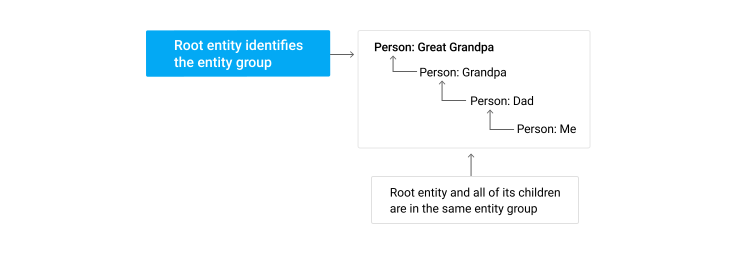
Entities whose keys have the same root form an *entity group* or
*group*. If entities are in different groups, then changes to those
entities might sometimes seem to occur "out of order". If the entities
are unrelated in your application's semantics, that's fine. But if some
entities' changes should be consistent, your application should make
them part of the same group when creating them.
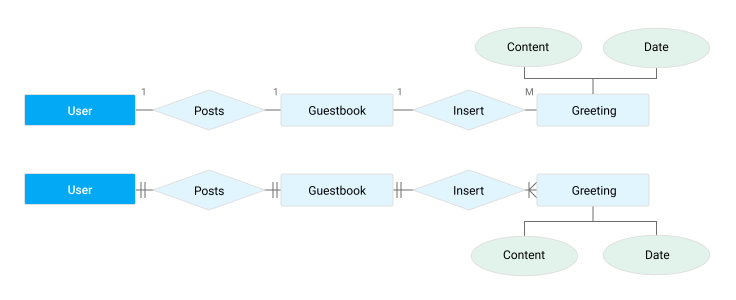
The following entity-relationship diagram and code sample show how a `Guestbook`
can have multiple `Greetings`, which each have `content` and `date` properties.
## Using Models for storing data
A model is a class that describes a type of entity, including the types and
configuration for its properties. It's roughly analogous to a table in SQL. An
entity can be created by calling the model's class constructor and then stored
by calling the `put()` method.
## Queries and Indexes
An application can query to find entities that match some filters.
A typical NDB query filters entities by kind. A query can also specify filters
on entity property values and keys, and sort order. If a given entity has
at least one (possibly null) value for every property in the filters and sort
orders and all the filter criteria are met by the property values, then that
entity is returned as a result.
Every query uses an *index*, a table that contains the results for the
query in the desired order. The underlying Datastore
automatically maintains simple indexes (indexes that use only one property).
It defines its complex indexes in a configuration file, `index.yaml`. The
development web server automatically adds suggestions to this file when it
encounters queries that do not yet have indexes configured.
You can tune indexes manually by editing the file before uploading the
application. You can update the indexes separately from uploading the
application by running `gcloud app deploy index.yaml`.
If your datastore has many entities, it takes a long time to create a new index
for them; in this case, it's wise to update the index definitions before
uploading code that uses the new index. You can use the Administration Console
to find out when the indexes have finished building.
This index mechanism supports a wide range of queries and is suitable for most
applications. However, it does not support some kinds of queries common in other
database technologies. In particular, joins aren't supported.
## Understanding NDB Writes: Commit, Invalidate Cache, and Apply
NDB writes data in steps:
- In the Commit phase, the underlying Datastore service records the changes.
- NDB invalidates its caches of the affected entity/entities. Thus, future reads will read from (and cache) the underlying Datastore instead of reading stale values from the cache.
- Finally, perhaps seconds later, the underlying Datastore *applies* the change. It makes the change visible to global queries and eventually- consistent reads.
The NDB function that writes the data (for example, `put()`)
returns after the cache invalidation; the Apply phase happens
asynchronously.
If there is a failure during the Commit phase, there are automatic retries, but
if failures continue, your application receives an exception. If the Commit
phase succeeds but the Apply fails, the Apply is rolled forward to completion
when one of the following occurs:
- Periodic Datastore "sweeps" check for uncompleted Commit jobs and apply them.
- The next write, transaction, or strongly-consistent read in the impacted entity group causes the not-yet-applied changes to be applied before the read, write, or transaction.
This behavior affects how and when data is visible to your application. The
change might not be completely applied to the underlying Datastore a few hundred
milliseconds or so after the NDB function returns. A non-ancestor query
performed while a change is being applied might see an inconsistent state, that
is, part but not all of the change.
## Transactions and caching data
The NDB Client Library can group multiple operations in a single
*transaction*. The transaction cannot succeed unless every operation in
the transaction succeeds; if any of the operations fail, the transaction is
automatically rolled back. This is especially useful for distributed web
applications, where multiple users might be accessing or manipulating the same
data at the same time.
NDB uses Memcache as a cache service for "hot spots" in the data. If the
application reads some entities often, NDB can read them quickly from cache.
## Using Django with NDB
To use NDB with the Django web framework, add
`google.appengine.ext.ndb.django_middleware.NdbDjangoMiddleware` to the
`MIDDLEWARE_CLASSES` entry in your Django `settings.py` file. It's best to
insert it in front of any other middleware classes, because some other
middleware might make datastore calls and those won't be handled properly if
that middleware is invoked before this middleware. You can learn more about
[Django middleware](http://docs.djangoproject.com/en/dev/topics/http/middleware/).
## What's Next?
Learn more about:
- Creating [entities in NDB](https://docs.cloud.google.com/appengine/docs/standard/services/ndb/creating-entities).
- How [transactions are processed in Datastore](https://docs.cloud.google.com/appengine/docs/standard/services/ndb/transactions).
- How to [create and format a query with the NDB Client Library](https://docs.cloud.google.com/appengine/docs/standard/services/ndb/queries).
- [Caching data using NDB and the underlying Memcache infrastructure](https://docs.cloud.google.com/appengine/docs/standard/services/ndb/cache).
- [Administrating and managing stored data in Datastore](https://docs.cloud.google.com/appengine/docs/standard/services/ndb/admin).