### Region ID
The `REGION_ID` is an abbreviated code that Google assigns
based on the region you select when you create your app. The code does not
correspond to a country or province, even though some region IDs may appear
similar to commonly used country and province codes. For apps created after
February 2020, `REGION_ID.r` is included in
App Engine URLs. For existing apps created before this date, the
region ID is optional in the URL.
Learn more
[about region IDs](https://docs.cloud.google.com/appengine/docs/standard/python/how-requests-are-routed#region-id).
This guide covers how to structure the services and related resources of your
App Engine app.
## Directory structure
Each version of your App Engine service is defined in an
[`app.yaml`](https://docs.cloud.google.com/appengine/docs/standard/reference/app-yaml)
configuration file. For simple apps, the minimum requirement for deployment is
to define the `app.yaml` file. The `app.yaml` file acts as a deployment
descriptor and defines the scaling type and the
runtime, handlers, and other resource
settings for a specific
version of a service. If you are deploying several versions of a service, you
can create multiple YAML files in the same directory to represent the
configuration for each of your versions.
> [!NOTE]
> **Note:** For the Java runtime, the file organization depends on which Java runtime you are using. You might need a WAR file or a JAR file, one for each service in your app. See the appropriate Java runtime developer guide for details.
For each service, you can create separate directories in the root of your app
when you are developing locally. If you host your app out of a version control
system (VCS), for example GitHub, you can also structure your app to use
separate directories in a repository, or use separate repositories for each
service. Each directory or repository should represent a single service and
contain that service's `app.yaml` file along with the associated source code.
You have the option of specifying a unique name for each of your service's
`app.yaml` file. For example, you can name a configuration file after your
service, or use unique names to represent each version of that particular
service, like `service1.yaml` or `app.standard.yaml`.
The other [optional configuration files](https://docs.cloud.google.com/appengine/docs/standard/configuration-files#optional_configuration_files) should
reside in the root directory or repository of the
[`default` service](https://docs.cloud.google.com/appengine/docs/standard/configuration-files#the_default_service) of your app. These optional
configuration files apply app-wide settings that are not specific to a
particular service, including the `dispatch.yaml`, `index.yaml`, and `cron.yaml`
files.
### Examples
A simple app only requires the `app.yaml` to be added in the same location as
the app's source files. For a single service app, that app will only include the
[`default` service](https://docs.cloud.google.com/appengine/docs/standard/configuration-files#the_default_service) and all the files can live in the same
directory, at the root of that app:

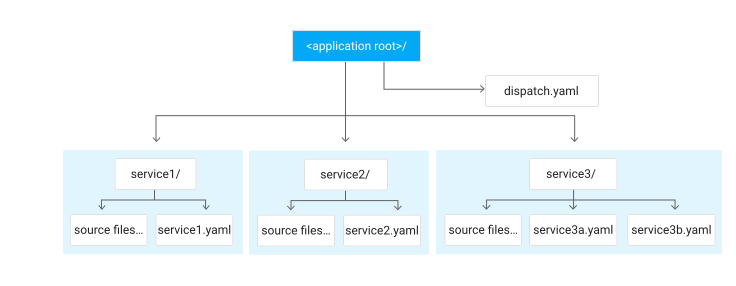
The following example demonstrates how to structure what an app with three services might look
like if you are developing your app locally. The optional `dispatch.yaml` file has
been added to that app in the root directory. Also in the root are three
directories for each of the app's services. The subdirectory for `service1`
includes the source and configuration files for that service. Similarly, both
`service2` and `service3` are in separate directories, which contain each
service's files, although `service3` includes two versions of the YAML
configuration file:
In the following example, a single service has the optional `dispatch.yaml` file
and two configuration files that represent different versions of that service,
`service1.yaml` and `service2.yaml`:

## Design considerations for instance uptime
Hardware or software failures that cause early termination or frequent instance
restarts can occur without warning and can take considerable time to resolve.
Your application should be able to handle such failures.
Here are some good strategies for avoiding downtime due to instance restarts:
- Reduce the amount of time it takes for your instances restart or for new ones to start.
- For long-running computations, periodically create checkpoints so that you can resume from that state.
- Your app should be "stateless" so that nothing is stored on the instance.
- Use queues for performing asynchronous task execution.
- If you configure your instances to manual scaling:
- Use load balancing across multiple instances.
- Configure more instances than required to handle normal traffic.
- Write fall-back logic that uses cached results when a manual scaling instance is unavailable.
Learn more about instances at [How instances are
managed](https://docs.cloud.google.com/appengine/docs/standard/how-instances-are-managed).
## The `default` service
Every App Engine application includes a `default` service. You must
deploy the initial version of your app to the `default` service before you can
create and deploy additional services to your app.
The default service can be optionally specified in the `app.yaml` with the setting
`service: default`.
If you use Java and the legacy bundled services, you can
specify the default service in the `appengine-web.xml` with the
setting `default`.
Requests sent to your app using your Google Cloud project are sent to the
`default` service, for example,
`https://PROJECT_ID.https://docs.cloud.google.com/appengine/docs/standard/configuration-files#appengine-urls.r.appspot.com`. To learn
more about targeting your other services, see [Communicating Between
Services](https://docs.cloud.google.com/appengine/docs/standard/communicating-between-services).
## Optional configuration files
The following configuration files control optional features that apply to all of
the services in an individual app. See the following topics for details about
each of the optional features:
- [`cron.yaml`](https://docs.cloud.google.com/appengine/docs/standard/scheduling-jobs-with-cron-yaml) configures regularly scheduled tasks that operate at defined times or regular intervals.
- [`dispatch.yaml`](https://docs.cloud.google.com/appengine/docs/standard/reference/dispatch-yaml) overrides routing default rules by sending incoming requests to a specific service based on the path or hostname in the URL.
- [`index.yaml`](https://docs.cloud.google.com/appengine/docs/standard/configuring-datastore-indexes-with-index-yaml) specifies which indexes your app needs if using Datastore queries.
## File names
App Engine runs apps in a container on an up-to-date Ubuntu Linux
distribution. The file names you use in the App Engine standard environment must be
UTF-8 compatible, either UTF-8 or something that can be safely auto-converted
to UTF-8. If your file names use different encodings, deploy your app from a machine
with UTF-8 compatible filename language settings.
Deployment fails if file names are not UTF-8 compatible. Note that
there's no restriction on the character
encoding you use within a file.
## Data and file storage considerations
From App Engine, you can easily access other Google Cloud
services such as [Datastore](https://docs.cloud.google.com/datastore), [Cloud SQL](https://docs.cloud.google.com/sql), and
[Cloud Storage](https://docs.cloud.google.com/storage).
You also have the option to use an external or third-party database if that
database is supported by your language and accessible from your
App Engine instance.
For details about storing files in Google Cloud or externally, see
[Understanding Data and File Storage](https://docs.cloud.google.com/appengine/docs/standard/storage-options).
You can also choose how you want to serve your static content. You can serve
your app's static content directly from that app in App Engine, host
your static content on a Google Cloud option like
Cloud Storage, or use a third-party content delivery network (CDN).
For more information about serving static content, see [Serving Static
Files](https://docs.cloud.google.com/appengine/docs/standard/serving-static-files).
## What's next
If you are working with multiple services and want to deploy them together, see the steps to [deploy multiple services](https://cloud.google.com/appengine/docs/standard/nodejs/testing-and-deploying-your-app#deploying_multiple_services).