> [!CAUTION]
> You are currently viewing version 1.5 of the Apigee hybrid documentation. **This version is end of life.** You should upgrade to a newer version. For more information, see [Supported versions](https://docs.cloud.google.com/apigee/docs/hybrid/supported-platforms.md.txt#supported-versions).
- Supported versions:
- [v1.17 (latest)](https://docs.cloud.google.com/apigee/docs/hybrid/v1.17/multi-region-aks.html)
- [v1.16](https://docs.cloud.google.com/apigee/docs/hybrid/v1.16/multi-region-aks.html)
- [v1.15](https://docs.cloud.google.com/apigee/docs/hybrid/v1.15/multi-region-aks.html)
- [v1.14](https://docs.cloud.google.com/apigee/docs/hybrid/v1.14/multi-region-aks.html)
- [List of supported versions](https://docs.cloud.google.com/apigee/docs/hybrid/supported-platforms.md.txt#supported-versions)
- Unsupported versions:
- [v1.13](https://docs.cloud.google.com/apigee/docs/hybrid/v1.13/multi-region-aks.html)
- [v1.12](https://docs.cloud.google.com/apigee/docs/hybrid/v1.12/multi-region-aks.html)
- [v1.11](https://docs.cloud.google.com/apigee/docs/hybrid/v1.11/multi-region-aks.html)
- [v1.10](https://docs.cloud.google.com/apigee/docs/hybrid/v1.10/multi-region-aks.html)
- [v1.9](https://docs.cloud.google.com/apigee/docs/hybrid/v1.9/multi-region-aks.html)
- [v1.8](https://docs.cloud.google.com/apigee/docs/hybrid/v1.8/multi-region-aks.html)
- [v1.7](https://docs.cloud.google.com/apigee/docs/hybrid/v1.7/multi-region-aks.html)
- [v1.6](https://docs.cloud.google.com/apigee/docs/hybrid/v1.6/multi-region-aks.html)
- [v1.5](https://docs.cloud.google.com/apigee/docs/hybrid/v1.5/multi-region-aks.md.txt)
- [v1.4](https://docs.cloud.google.com/apigee/docs/hybrid/v1.4/multi-region-aks.md.txt)
- [v1.3](https://docs.cloud.google.com/apigee/docs/hybrid/v1.3/multi-region-aks.md.txt)
- [v1.2](https://docs.cloud.google.com/apigee/docs/hybrid/v1.2/multi-region-aks.md.txt)
- [v1.1](https://docs.cloud.google.com/apigee/docs/hybrid/v1.1/multi-region-aks.md.txt)
This topic explains how to set up a multi-region deployment for Apigee hybrid on Microsoft®
Azure Kubernetes Service (AKS).
Topologies for multi-region deployment include the following:
- **Active-Active**: When you have applications deployed in multiple geographic locations and you require low latency API response for your deployments. You have the option to deploy hybrid in multiple geographic locations nearest to your clients. For example: US West Coast, US East Coast, Europe, APAC.
- **Active-Passive**: When you have a primary region and a failover or disaster recovery region.
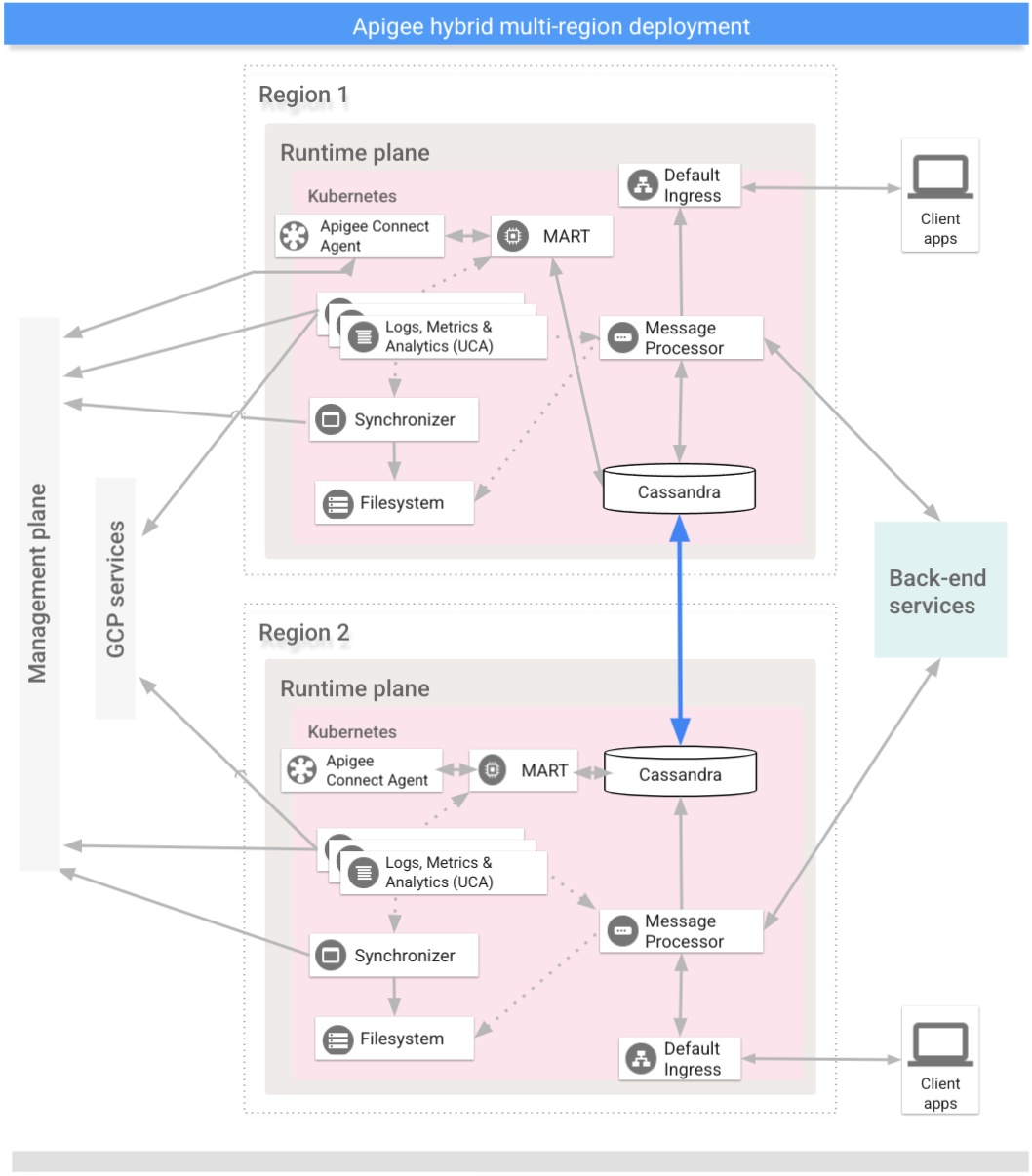
The regions in a multi-region hybrid deployment communicate via Cassandra, as the following image
shows:
## Prerequisites
Before configuring hybrid for multiple regions, you must complete the following prerequisites:
- Follow the [hybrid installation
guide](https://docs.cloud.google.com/apigee/docs/hybrid/v1.5/precog-overview) for any prerequisites like Google Cloud and org configuration before moving to cluster setup steps.
- Cassandra Multi Region requirements:
- If the pod network namespace does not have connectivity between pods in different clusters (the clusters are running in "island network mode", the default case in AKS installations), enable the Kubernetes `hostNetwork` feature by setting `cassandra.hostNetwork: true` in the overrides file for all of the regions in your Apigee hybrid multi-regions installation.
- Enable `hostNetwork` on existing clusters before expanding your multi-region configuration to new regions.
- When `hostNetwork` is enabled, make sure worker nodes can perform reverse DNS lookup. Apigee cassandra uses both forward and reverse DNS lookup to obtain the host IP while starting.
> [!TIP]
> **Tip:** If the DNS resolution is not working, try this workaround.
>
>
> Add a static host entry in `/etc/hosts` file of each cassandra worker node
> similar to the following:
>
> ```
> echo -e "\\n127.0.1.1 ${HOSTNAME}" >> "/etc/hosts"
> ```
>
>
> or
>
> ```
> "\\nWORKER-NODE-IP ${HOSTNAME}" >> "/etc/hosts"
> ```
- Open Cassandra ports 7000 and 7001 between Kubernetes clusters across all regions to enable worker nodes across regions and datacenters to communicate. See [Configure ports](https://docs.cloud.google.com/apigee/docs/hybrid/v1.5/ports.md.txt).
For detailed information, see [Kubernetes](https://kubernetes.io) documentation.
> [!NOTE]
> **NOTE:** Apigee recommends that you ensure that your servers' times are synchronized.
>
> Several features such as expiration and token revocation
> rely on accurate system times. If you host the runtime components in different datacenters,
> then be sure that the system times are synchronized.
>
> You can use a tool such as `ntpdate` to verify that server times are
> synchronized.
## Create a virtual network in each region
Follow the [Azure
Kubernetes Service (AKS)](https://docs.microsoft.com/en-us/azure/aks/) documentation to:
- Create a virtual network in each region.
- Establish network peering between the regions.
- Verify the network peering.
## Create multi-regional clusters
Set up Kubernetes clusters in multiple regions with different blocks. See
also the [Step 1: Create a cluster](https://docs.cloud.google.com/apigee/docs/hybrid/v1.5/install-create-cluster-aks). Use the
locations and virtual network names you created previously.
Open Cassandra ports 7000 and 7001 between Kubernetes clusters across all regions (7000
may be used as a backup option during troubleshooting)
## Configure the multi-region seed host
This section describes how to expand the existing Cassandra cluster to a new region.
This setup allows the new region to bootstrap the cluster and join the existing
data center. Without this configuration, the multi-region Kubernetes clusters
would not know about each other.
1. Set the kubectl context to the original cluster before retrieving the seed name:
```
kubectl config use-context original-cluster-name
```
2. Run the following [`kubectl`](https://kubernetes.io/docs/reference/kubectl/overview/) command to identify a seed host address for Cassandra in
the current region.
A *seed host address* allows a new regional instance to find the
original cluster on the very first startup to learn the topology of the cluster.
The seed host address is designated as the contact point in the cluster.
```
kubectl get pods -o wide -n apigee | grep apigee-cassandra
apigee-cassandra-default-0 1/1 Running 0 4d17h 120.38.1.9 aks-agentpool-21207753-vmss000000
```
3. Decide which of the IPs returned from the previous command will be the multi-region seed host. In this example, where only a single node cassandra cluster is running, the seed host is `120.38.1.9`.
4. In data center 2, copy your overrides file to a new file whose name includes the cluster name. For example, `overrides_your_cluster_name.yaml`.
5. In data center 2, configure `cassandra.multiRegionSeedHost` and `cassandra.datacenter` in `overrides_your_cluster_name.yaml`, where `multiRegionSeedHost` is one of the IPs returned by the previous command:
```
cassandra:
multiRegionSeedHost: seed_host_IP
datacenter: data_center_name
rack: rack_name
```
For example:
```
cassandra:
multiRegionSeedHost: 120.38.1.9
datacenter: "dc-1"
rack: "ra-1"
```
6. In the new data center/region, before you install hybrid, set the same TLS certificates and credentials in `overrides_your_cluster_name.yaml` as you set in the first region.
> [!NOTE]
> NOTE: Be sure to use the same Cassandra TLS certificates and credentials in the second data center as you provided in the original data center. The credentials you set in the overrides file in the first data center must match the ones you specify in the overrides file in the second data center. For details see [Configuring TLS for Cassandra](https://docs.cloud.google.com/apigee/docs/hybrid/v1.5/cassandra-tls.md.txt).
## Set up the new region
After you configure the seed host, you can set up the new region.
**To set up the new region:**
1. Copy your certificate from the existing cluster to the new cluster. The new CA root is used by Cassandra and other hybrid components for mTLS. Therefore, it is essential to have consistent certificates across the cluster.
1. Set the context to the original namespace:
```
kubectl config use-context original-cluster-name
```
2. Export the current namespace configuration to a file:
```
$ kubectl get namespace apigee -o yaml > apigee-namespace.yaml
```
apigee is the default namespace.
3. Export the `apigee-ca` secret to a file:
```
kubectl -n cert-manager get secret apigee-ca -o yaml > apigee-ca.yaml
```
4. Set the context to the new region's cluster name:
```
kubectl config use-context new-cluster-name
```
5. Import the namespace configuration to the new cluster. Be sure to update the "namespace" in the file if you're using a different namespace in the new region:
```
kubectl apply -f apigee-namespace.yaml
```
6. Import the secret to the new cluster:
```
kubectl -n cert-manager apply -f apigee-ca.yaml
```
2. Install hybrid in the new region. Be sure that the `overrides_your_cluster_name.yaml` file includes the same TLS certificates that are configured in the first region, as explained in the previous section.
Execute the following two commands to install hybrid in the new region:
```
apigeectl init -f overrides_your_cluster_name.yaml
```
```
apigeectl apply -f overrides_your_cluster_name.yaml
```
3. Run `nodetool rebuild` sequentially on all the nodes in the new data center. This may take a few minutes to a few hours depending on the data size.
```
kubectl exec apigee-cassandra-default-0 -n apigee -- nodetool -u JMX_user -pw JMX_password rebuild -- dc-1
```
Where JMX_user and JMX_password are the username and password for the
Cassandra JMX User.
4. Verify the rebuild processes from the logs. Also, verify the data size using the `nodetool status` command:
```
kubectl logs apigee-cassandra-default-0 -f -n apigee
```
```
kubectl exec apigee-cassandra-default-0 -n apigee -- nodetool -u JMX_user -pw JMX_password status
```
The following example shows example log entries:
```
INFO 01:42:24 rebuild from dc: dc-1, (All keyspaces), (All tokens)
INFO 01:42:24 [Stream #3a04e810-580d-11e9-a5aa-67071bf82889] Executing streaming plan for Rebuild
INFO 01:42:24 [Stream #3a04e810-580d-11e9-a5aa-67071bf82889] Starting streaming to /10.12.1.45
INFO 01:42:25 [Stream #3a04e810-580d-11e9-a5aa-67071bf82889, ID#0] Beginning stream session with /10.12.1.45
INFO 01:42:25 [Stream #3a04e810-580d-11e9-a5aa-67071bf82889] Starting streaming to /10.12.4.36
INFO 01:42:25 [Stream #3a04e810-580d-11e9-a5aa-67071bf82889 ID#0] Prepare completed. Receiving 1 files(0.432KiB), sending 0 files(0.000KiB)
INFO 01:42:25 [Stream #3a04e810-580d-11e9-a5aa-67071bf82889] Session with /10.12.1.45 is complete
INFO 01:42:25 [Stream #3a04e810-580d-11e9-a5aa-67071bf82889, ID#0] Beginning stream session with /10.12.4.36
INFO 01:42:25 [Stream #3a04e810-580d-11e9-a5aa-67071bf82889] Starting streaming to /10.12.5.22
INFO 01:42:26 [Stream #3a04e810-580d-11e9-a5aa-67071bf82889 ID#0] Prepare completed. Receiving 1 files(0.693KiB), sending 0 files(0.000KiB)
INFO 01:42:26 [Stream #3a04e810-580d-11e9-a5aa-67071bf82889] Session with /10.12.4.36 is complete
INFO 01:42:26 [Stream #3a04e810-580d-11e9-a5aa-67071bf82889, ID#0] Beginning stream session with /10.12.5.22
INFO 01:42:26 [Stream #3a04e810-580d-11e9-a5aa-67071bf82889 ID#0] Prepare completed. Receiving 3 files(0.720KiB), sending 0 files(0.000KiB)
INFO 01:42:26 [Stream #3a04e810-580d-11e9-a5aa-67071bf82889] Session with /10.12.5.22 is complete
INFO 01:42:26 [Stream #3a04e810-580d-11e9-a5aa-67071bf82889] All sessions completed
```
5. Update the seed hosts. Remove `multiRegionSeedHost: 10.0.0.11` from `overrides-DC_name.yaml` and reapply.
> [!NOTE]
> Seed hosts are local cluster members. To boot up a new region an external seed host is required. Once a region boots up you need to change the seed hosts back to their local clusters in `overrides.yaml` and then reapply the configuration.
```
apigeectl apply -f overrides-DC_name.yaml
```
*[CIDR]: Classless Inter-Domain Routing