> [!CAUTION]
> You are currently viewing version 1.4 of the Apigee hybrid documentation. **This version is end of life.** You should upgrade to a newer version. For more information, see [Supported versions](https://docs.cloud.google.com/apigee/docs/hybrid/supported-platforms.md.txt#supported-versions).
- Supported versions:
- [v1.17 (latest)](https://docs.cloud.google.com/apigee/docs/hybrid/v1.17/precog-gcpaccount.html)
- [v1.16](https://docs.cloud.google.com/apigee/docs/hybrid/v1.16/precog-gcpaccount.html)
- [v1.15](https://docs.cloud.google.com/apigee/docs/hybrid/v1.15/precog-gcpaccount.html)
- [v1.14](https://docs.cloud.google.com/apigee/docs/hybrid/v1.14/precog-gcpaccount.html)
- [List of supported versions](https://docs.cloud.google.com/apigee/docs/hybrid/supported-platforms.md.txt#supported-versions)
- Unsupported versions:
- [v1.13](https://docs.cloud.google.com/apigee/docs/hybrid/v1.13/precog-gcpaccount.html)
- [v1.12](https://docs.cloud.google.com/apigee/docs/hybrid/v1.12/precog-gcpaccount.html)
- [v1.11](https://docs.cloud.google.com/apigee/docs/hybrid/v1.11/precog-gcpaccount.html)
- [v1.10](https://docs.cloud.google.com/apigee/docs/hybrid/v1.10/precog-gcpaccount.html)
- [v1.9](https://docs.cloud.google.com/apigee/docs/hybrid/v1.9/precog-gcpaccount.html)
- [v1.8](https://docs.cloud.google.com/apigee/docs/hybrid/v1.8/precog-gcpaccount.html)
- [v1.7](https://docs.cloud.google.com/apigee/docs/hybrid/v1.7/precog-gcpaccount.md.txt)
- [v1.6](https://docs.cloud.google.com/apigee/docs/hybrid/v1.6/precog-gcpaccount.md.txt)
- [v1.5](https://docs.cloud.google.com/apigee/docs/hybrid/v1.5/precog-gcpaccount.md.txt)
- [v1.4](https://docs.cloud.google.com/apigee/docs/hybrid/v1.4/precog-gcpaccount.md.txt)
- [v1.3](https://docs.cloud.google.com/apigee/docs/hybrid/v1.3/precog-gcpaccount.md.txt)
- [v1.2](https://docs.cloud.google.com/apigee/docs/hybrid/v1.2/precog-gcpaccount.md.txt)
- [v1.1](https://docs.cloud.google.com/apigee/docs/hybrid/v1.1/precog-gcpaccount.md.txt)
The first step is to create a [Google Cloud console](https://console.cloud.google.com) account. This section
describes how to create a Google Cloud account. If you already have Cloud Identity or G Suite configured for
your organization, you can skip to the next step ([Step 2: Create a Google Cloud project](https://docs.cloud.google.com/apigee/docs/hybrid/v1.4/precog-gcpproject.md.txt)).
> [!NOTE]
> **Note:** These instructions involve creating a Google account with your corporate email address and enabling Google Cloud access for that account. If you'd prefer to set up Cloud Identity for your organization, please see [Set up Cloud
> Identity](https://docs.cloud.google.com/apigee/docs/hybrid/v1.4/precog-gcpaccount#cloud-identity).
If you choose to set up Cloud Identity, domain verification is required.
**To create a Google Cloud account:**
1. Open [Google Cloud console](https://console.cloud.google.com) in a browser.
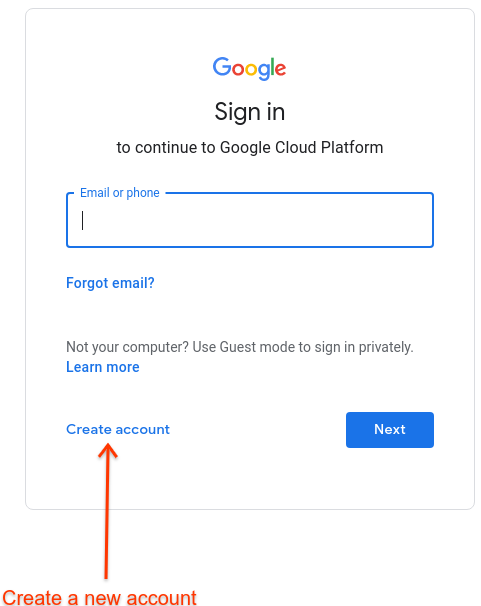
2. When prompted to sign in, create a new account by clicking **Create
account**:
3. Follow the instructions to register your corporate email address as a [Google account](https://support.google.com/accounts/answer/27441).
Alternatively, you can use a Gmail account or other Google account.
4. Continue to the [Google Cloud console](https://console.cloud.google.com) and accept the Google Cloud terms presented.
> [!NOTE]
> **Note:** You do not need to activate Google Cloud to use Apigee hybrid, but a free trial with a $300 credit is provided if you'd like to test out Google Cloud services.
## Set up Cloud Identity
If you'd prefer to use Cloud Identity to manage your organizational identity with Apigee, please
take note of the following:
- General information on Cloud Identity can be found in [What is Cloud Identity](https://support.google.com/cloudidentity/answer/7319251) or in the [Cloud
Identity Help Center](https://support.google.com/cloudidentity).
- Cloud Identity provides multiple ways to create users from your organization in bulk, including sync tools with your [LDAP
server](https://support.google.com/cloudidentity/answer/106368) and the ability to configure [SSO](https://support.google.com/cloudidentity/topic/7558768).
- Using Cloud Identity with Google Cloud provides you with a Google Cloud Organization: this allows for more advanced resource hierarchy configuration. Although not needed for Apigee hybrid, it might be useful if you plan to use other Google Cloud services or have multiple members of your organization access the product.
- To use Cloud Identity, you must [verify
ownership of the domain](https://support.google.com/cloudidentity/answer/7331243) that you plan to use.
[1](https://docs.cloud.google.com/apigee/docs/hybrid/v1.4/precog-gcpaccount.md.txt) [(NEXT) Step 2: Create a Google Cloud project](https://docs.cloud.google.com/apigee/docs/hybrid/v1.4/precog-gcpproject.md.txt) [3](https://docs.cloud.google.com/apigee/docs/hybrid/v1.4/precog-enableapi.md.txt) [4](https://docs.cloud.google.com/apigee/docs/hybrid/v1.4/precog-provision.md.txt) [5](https://docs.cloud.google.com/apigee/docs/hybrid/v1.4/precog-add-environment.md.txt)