> [!CAUTION]
> You are currently viewing version 1.15 of the Apigee hybrid documentation. For more information, see [Supported versions](https://docs.cloud.google.com/apigee/docs/hybrid/supported-platforms.md.txt#supported-versions).
- Supported versions:
- [v1.17 (latest)](https://docs.cloud.google.com/apigee/docs/hybrid/v1.17/what-is-hybrid.md.txt)
- [v1.16](https://docs.cloud.google.com/apigee/docs/hybrid/v1.16/what-is-hybrid.md.txt)
- [v1.15](https://docs.cloud.google.com/apigee/docs/hybrid/v1.15/what-is-hybrid.md.txt)
- [v1.14](https://docs.cloud.google.com/apigee/docs/hybrid/v1.14/what-is-hybrid.md.txt)
- [List of supported versions](https://docs.cloud.google.com/apigee/docs/hybrid/supported-platforms.md.txt#supported-versions)
- Unsupported versions:
- [v1.13](https://docs.cloud.google.com/apigee/docs/hybrid/v1.13/what-is-hybrid.md.txt)
- [v1.12](https://docs.cloud.google.com/apigee/docs/hybrid/v1.12/what-is-hybrid.md.txt)
- [v1.11](https://docs.cloud.google.com/apigee/docs/hybrid/v1.11/what-is-hybrid.md.txt)
- [v1.10](https://docs.cloud.google.com/apigee/docs/hybrid/v1.10/what-is-hybrid.md.txt)
- [v1.9](https://docs.cloud.google.com/apigee/docs/hybrid/v1.9/what-is-hybrid.md.txt)
- [v1.8](https://docs.cloud.google.com/apigee/docs/hybrid/v1.8/what-is-hybrid.md.txt)
- [v1.7](https://docs.cloud.google.com/apigee/docs/hybrid/v1.7/what-is-hybrid.md.txt)
- [v1.6](https://docs.cloud.google.com/apigee/docs/hybrid/v1.6/what-is-hybrid.md.txt)
- [v1.5](https://docs.cloud.google.com/apigee/docs/hybrid/v1.5/what-is-hybrid.md.txt)
- [v1.4](https://docs.cloud.google.com/apigee/docs/hybrid/v1.4/what-is-hybrid.md.txt)
- [v1.3](https://docs.cloud.google.com/apigee/docs/hybrid/v1.3/what-is-hybrid.md.txt)
- [v1.2](https://docs.cloud.google.com/apigee/docs/hybrid/v1.2/what-is-hybrid.md.txt)
- [v1.1](https://docs.cloud.google.com/apigee/docs/hybrid/v1.1/what-is-hybrid.md.txt)

Apigee hybrid is a platform for developing and managing API proxies that features a hybrid deployment model.
The hybrid model includes a management plane hosted by Apigee in the Cloud and a runtime plane that you install
and manage on one of the [supported Kubernetes platforms](https://docs.cloud.google.com/apigee/docs/hybrid/supported-platforms.md.txt).
|---|---|
| #### Manage all your APIs in one place | Apigee hybrid helps you manage internal and external APIs with Google Cloud. With unified API management, you can provide your developers, partners, and customers a consistent API program experience. |
| #### Address security and compliance | If your compliance and security considerations make on-premises deployment a must for your applications, with an enterprise-grade hybrid gateway, you can host and manage the Apigee hybrid runtime plane on your premises. You manage and control the runtime, enabling you to leverage your existing compliance, governance, and security infrastructure. |
| #### Support your multi‑cloud strategy | Balancing cost and performance may lead you to a hybrid strategy. Whether you are just exploring different cloud providers or have already chosen a hybrid strategy, your API management platform should give you the flexibility you need. Host and manage enterprise-grade hybrid gateways across your data center, Google Cloud, or both. |
|---|---|
| To **learn more** about hybrid: [Keep Reading](https://docs.cloud.google.com/apigee/docs/hybrid/v1.15/what-is-hybrid.md.txt#programs) | To **install** hybrid: [Let's go!](https://docs.cloud.google.com/apigee/docs/hybrid/v1.15/big-picture.md.txt) |
## API programs in a hybrid world
Apigee hybrid consists of a management plane maintained by Google and a runtime plane
that you install on a [supported Kubernetes platform](https://docs.cloud.google.com/apigee/docs/hybrid/v1.15/install-before-begin.md.txt#supported-platforms). Both planes use Google Cloud
Platform services, as the following image shows:

As you can see, hybrid consists of the following primary components:
- [Apigee-run **management plane**](https://docs.cloud.google.com/apigee/docs/hybrid/v1.15/what-is-hybrid.md.txt#about-the-management-plane): A set of services hosted in the cloud and maintained by Google. These services include the UI, management API, and analytics.
- [Customer-managed **runtime plane**](https://docs.cloud.google.com/apigee/docs/hybrid/v1.15/what-is-hybrid.md.txt#about-the-runtime-plane): A
set of containerized runtime services that you set up and maintain in your own Kubernetes
cluster. All API traffic passes through and is processed within the runtime plane.
You manage the containerized runtime on your Kubernetes cluster for greater agility with
staged rollouts, auto-scaling, and other operational benefits of containers.
- **[Google Cloud](https://docs.cloud.google.com/apigee/docs/hybrid/v1.15/what-is-hybrid.md.txt#about-gcp)**: A suite of Cloud services hosted by Google.
One key thing to know about hybrid is that all API traffic is processed within the boundaries of
your network and under your control, while management services such as the UI and API analytics run
in the cloud and are maintained by Google. For more information, see [Where is
your data stored?](https://docs.cloud.google.com/apigee/docs/hybrid/v1.15/where-data)
The following video provides a deep dive into the hybrid architecture:
## About the runtime plane
The runtime plane is a set of containerized runtime services that you set up and maintain in your
own Kubernetes cluster running on a [supported Kubernetes platform](https://docs.cloud.google.com/apigee/docs/hybrid/supported-platforms.md.txt).
All API traffic passes through and is processed within the runtime
plane. The runtime plane includes the following major components:
- [Message Processors](https://docs.cloud.google.com/apigee/docs/hybrid/v1.15/what-is-hybrid.md.txt#message-processor)
- [Synchronizer](https://docs.cloud.google.com/apigee/docs/hybrid/v1.15/what-is-hybrid.md.txt#synchronizer)
- [Cassandra](https://docs.cloud.google.com/apigee/docs/hybrid/v1.15/what-is-hybrid.md.txt#cassandra-datastore)
- [MART](https://docs.cloud.google.com/apigee/docs/hybrid/v1.15/what-is-hybrid.md.txt#mart)
- [UDCA](https://docs.cloud.google.com/apigee/docs/hybrid/v1.15/what-is-hybrid.md.txt#udca)
The runtime plane runs in a Kubernetes cluster running on a
[supported Kubernetes platform](https://docs.cloud.google.com/apigee/docs/hybrid/v1.15/install-before-begin.md.txt#supported-platforms) that you maintain.
The following image shows the primary services that execute on the runtime plane:
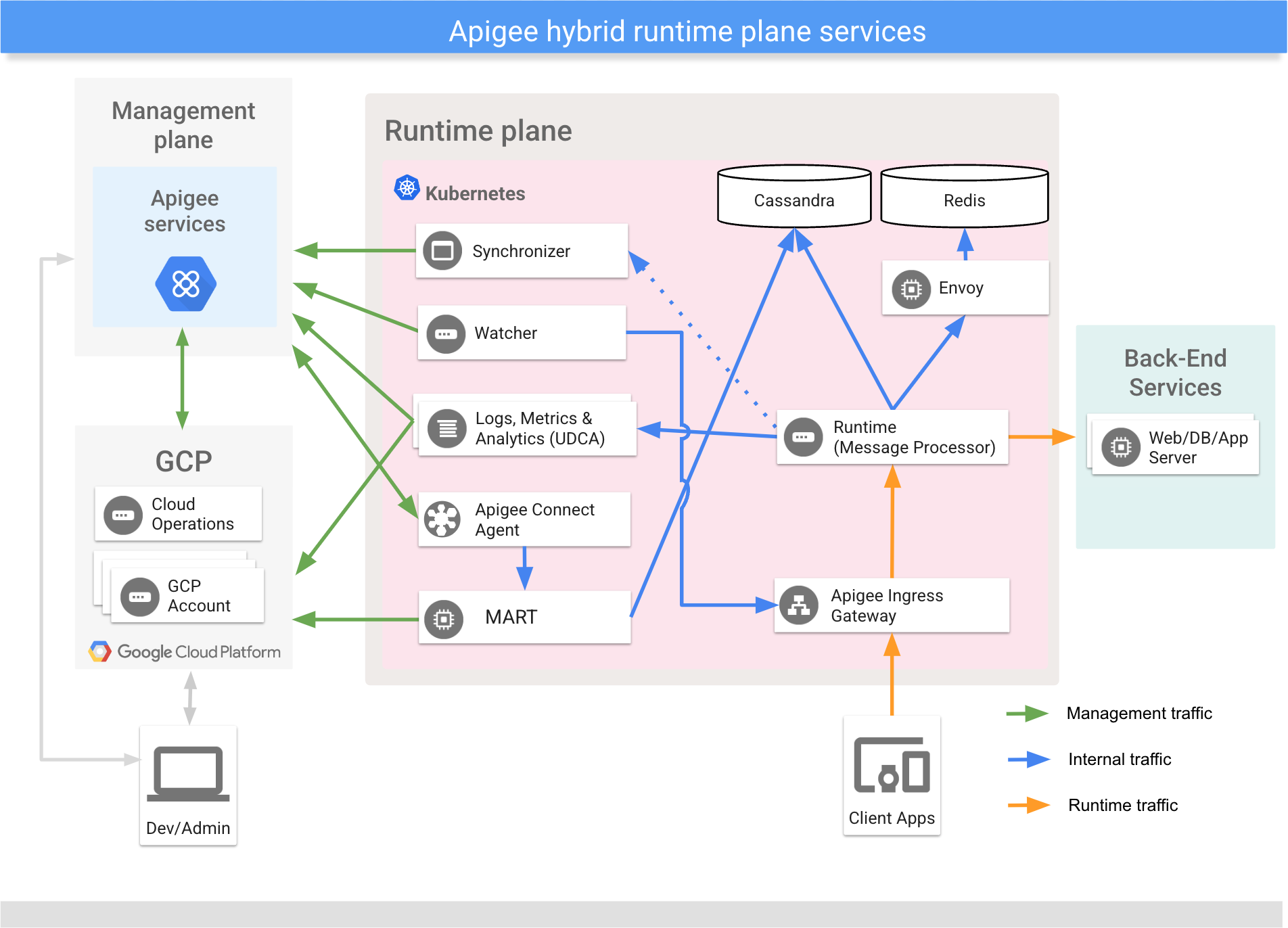
For general information about the runtime components, see the sections that follow. In addition,
see [Runtime service configuration overview](https://docs.cloud.google.com/apigee/docs/hybrid/v1.15/service-config.md.txt).
The following sections describe each of these primary runtime plane services in more detail.
### Message Processor
Hybrid Message Processors (MPs) provide API request processing and policy execution on the
runtime plane. MPs load all of the deployed proxies, resources, target servers, certificates, and
keystores from local storage. You configure an Apigee ingress gateway to expose the MPs to
requests that come from outside the cluster.
### Synchronizer
The Synchronizer fetches configuration data about an API environment from the management plane
and propagates it across the runtime plane. This downloaded data is also called the
*contract* and is stored on the local file system.
The Synchronizer periodically polls the Management Server for
changes and downloads a new configuration whenever changes are
detected. The configuration data is retrieved and stored locally as
a JSON file on the local file system, where the Message Processors can access it.
The downloaded configuration data allows the runtime plane to
function independently from the management plane. With the contract,
Message Processors on the runtime plane use the locally
stored data as their configuration. If the connection between the
management and runtime plane goes down, services on the runtime
plane continue to function.
The configuration data downloaded by the Synchronizer includes:
- Proxy bundles and shared flow deployments
- Flow hooks
- Environment information
- Shared API resources
- [Target server
definitions](https://docs.cloud.google.com/apigee/docs/api-platform/deploy/load-balancing-across-backend-servers)
- TLS settings
- Key Value Map (KVM) names
- [Data masks](https://docs.cloud.google.com/apigee/docs/api-platform/security/data-masking.md.txt)
### Cassandra datastore
[Apache Cassandra](http://cassandra.apache.org/) is the runtime datastore that provides data persistence for the runtime plane.
Cassandra is a distributed data system that provides data persistence on the runtime plane.
You deploy the Cassandra database as a [StatefulSet](https://kubernetes.io/docs/concepts/workloads/controllers/statefulset/) node pool on your Kubernetes cluster.
Locating these entities close to the runtime processing services helps support requirements
for security and high scalability.
The Cassandra database stores information about the following entities:
- Key management system (KMS)
- Key Value Map (KVM)
- OAuth
- Management API for RunTime data (MART)
- Monetization data
- Quotas
- Response cache
### Management API for Runtime data (MART)
Data that belongs to your organization and is accessed during runtime API calls are
stored by Cassandra in the runtime plane.
This data includes:
- Application configurations
- Key Management System (KMS) data
- Cache
- Key Value Maps (KVMs)
- API products
- Developer apps
To access and update that data---for example, to add a
new KVM or to remove an environment---you can use the Apigee hybrid UI or the [Apigee APIs](https://docs.cloud.google.com/apigee/docs/reference/apis/apigee/rest.md.txt). The MART
server (Management API for Runtime data) processes the API calls against the runtime
datastore.
This section describes the role that MART plays when you call the Apigee APIs to access the
runtime datastore.
| ||
|---|---|
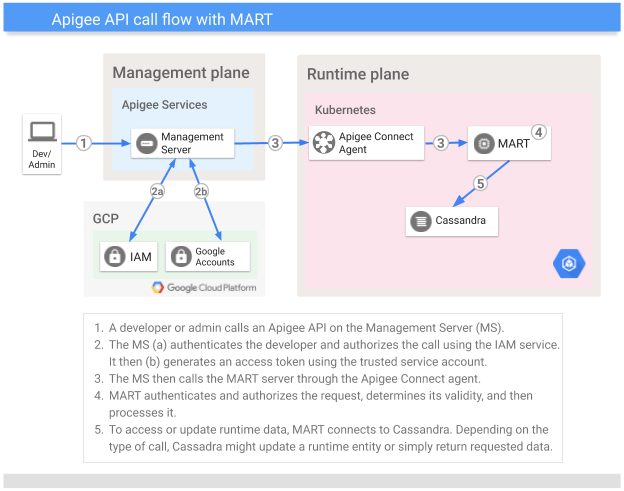
| **What MART is** | To call an Apigee API, you send an authenticated request to the Management Server (MS) on the management plane. The MS authenticates and authorizes the request, and then forwards the request to MART on the runtime plane. Attached to that request is a token that the MS generated using a pre-configured service account. MART receives the request, authenticates and authorizes it, and then performs business validation on it. (For example, if the app is part of an API product, MART ensures it's a valid request.) After determining that a request is valid, MART then processes it. Cassandra stores the runtime data that MART processes (it is, after all, a *runtime datastore*). MART might read data from the Cassandra or it might update that data, depending on the type of request. Like most hybrid services, MART is stateless: it does not persist its own state at runtime. |
| **What MART is not** | The Management plane communicates with MART via the Apigee Connect agent, which uses a service account with the Apigee Connect Agent role (the MART service account in most installations). You do not call MART directly. Furthermore, MART does not receive API proxy requests; those calls are handled by the Runtime ingress controller and are routed to your cluster's Message Processors. |
It's worth pointing out that both MART and the Message Processors have access to the
same runtime datastore (Cassandra), which is how data such as KMS, KVMs, and caches are
shared.
The following image shows the flow of an Apigee API call:
### UDCA
The Universal Data Collection Agent (UDCA) is a service running within the data collection pod
in the runtime plane that extracts analytics, debug, and deployment status data and sends it to the
UAP.
For more information, see [Debug, analytics, and deployment status
data collection](https://docs.cloud.google.com/apigee/docs/hybrid/v1.15/other-data-collection).
## About the management plane
The management plane runs on Google Cloud. It includes administrative services such
as:
- **Apigee hybrid UI:** Provides a UI for developers to create and deploy API proxies, configure policies, create API products, and create developer apps. Administrators can use the Apigee hybrid UI to monitor deployment status.
- **Apigee APIs:** Provide a programmatic interface for managing your organization and environments.
- **Unified Analytics Platform (UAP):** Receives and processes analytics and deployment status data from the runtime plane.
The following image shows the primary services that execute on the management plane:

### Management plane data and data residency
If your installation is using [data residency](https://docs.cloud.google.com/apigee/docs/api-platform/get-started/drz-concepts.md.txt) you can specify the region in which this data is stored. See [Using data residency with Apigee hybrid](https://docs.cloud.google.com/apigee/docs/hybrid/v1.15/using-data-residency-with-apigee-hybrid.md.txt).
## About the Google Cloud services
The following table describes the key Google Cloud services that hybrid leverages:
| Google Cloud Service | Description |
|---|---|
| **Identity** | User account authentication uses Google Cloud accounts. Authorization uses Google Cloud service accounts. |
| **Roles** | Access management for hybrid uses Google's roles engine, IAM, and supports default Apigee roles. |
| **Resource Hierarchy** | Resources are organized in Google Cloud projects (linked to Apigee organizations). |
| **Cloud Operations** | Provides logging and metrics data analysis. |
## Types of users
Apigee has identified the following primary types of hybrid users:
| Role | Typical responsibilities/tasks | Areas of interest |
|---|---|---|
| **System administrators/operators** | - Install and configure services on hybrid's runtime plane - Set up Google Cloud, Apigee, and service accounts - Create Google Cloud services and projects - Manage the Kubernetes cluster - Maintain all of the above - Troubleshoot the API proxies | - [Create and administer a Kubernetes cluster](https://docs.cloud.google.com/apigee/docs/hybrid/v1.15/install-create-cluster.md.txt) - [Download the Apigee Helm charts](https://docs.cloud.google.com/apigee/docs/hybrid/v1.15/install-download-charts.md.txt) - [Upgrade Apigee hybrid](https://docs.cloud.google.com/apigee/docs/hybrid/v1.15/upgrade.md.txt) - [Configure Google Cloud services and Apigee hybrid UI](https://docs.cloud.google.com/apigee/docs/hybrid/v1.15/precog-overview.md.txt) - [Install hybrid overview](https://docs.cloud.google.com/apigee/docs/hybrid/v1.15/install-before-begin.md.txt) - [Administer hybrid](https://docs.cloud.google.com/apigee/docs/hybrid/v1.15/administer-overview.md.txt) - [Data collection on hybrid](https://docs.cloud.google.com/apigee/docs/hybrid/v1.15/data-collection-overview.md.txt) - [Hybrid service configuration](https://docs.cloud.google.com/apigee/docs/hybrid/v1.15/service-config.md.txt) - [Kubernetes](https://kubernetes.io) |
| **Developers** | - Build API proxies using the Apigee hybrid UI or Apigee APIs - Deploy API proxies to the runtime plane - Troubleshoot the API proxies - Test the API proxies | - [Create and deploy API proxies](https://docs.cloud.google.com/apigee/docs/api-platform/get-started/get-started.md.txt) - [Data collection on hybrid](https://docs.cloud.google.com/apigee/docs/hybrid/v1.15/data-collection-overview.md.txt) - [Apigee Policies](https://docs.cloud.google.com/apigee/docs/api-platform/develop/policy-attachment-and-enforcement.md.txt) |
## Advantages
Apigee hybrid has the following advantages:
Increased agility
: Because hybrid is delivered and runs in containers, you can achieve staged rollouts,
auto-scaling, and other operational benefits of a containerized system.
Reduced latency
: All communication with the hybrid management plane is asynchronous and does not happen as
part of processing client API requests.
Increased API adoption
: Although it is possible to process internal APIs
using Apigee, the reduced latency and efficiency you can achieve with hybrid makes processing internal
APIs with hybrid an attractive option. Part of this efficiency is achieved because your API gateway
runs on-premises, in close proximity to your backend services.
Also, if you are on Apigee, you can increase your adoption of Apigee by
processing internal APIs through hybrid.
Greater control
: Many enterprises are embarking on a hybrid strategy. The ability to
manage API runtimes deployed in private
data centers is a key requirement for large enterprises.
Currently, the hybrid runtime plane can be deployed to Google Cloud
or in your own data center.
## Next step
See [the Big Picture](https://docs.cloud.google.com/apigee/docs/hybrid/v1.15/big-picture.md.txt)---an overview of the hybrid installation
process.