> [!WARNING]
>
> **Preview
> --- Installing Apigee hybrid with Helm charts**
>
>
> This feature is
>
> subject to the "Pre-GA Offerings Terms" in the General Service Terms section of the
> [Service Specific
> Terms](https://docs.cloud.google.com/terms/service-terms#1).
>
> Pre-GA features are available "as is" and might have limited support.
>
> For more information, see the
> [launch stage descriptions](https://cloud.google.com/products/#product-launch-stages).
> [!NOTE]
> **Note:** This preview document is applicable for Apigee hybrid v1.10.x.
This document guides you through the step-by-step process of installing
Apigee hybrid v1.10 using Helm charts.
### Version
Apigee hybrid Helm charts is for use with Apigee hybrid
v1.10.x. See
[Apigee hybrid release history](https://docs.cloud.google.com/apigee/docs/hybrid/supported-platforms.md.txt#release-history) for the list of hybrid
releases.
## Prerequisites
- [Apigee hybrid](https://docs.cloud.google.com/apigee/docs/hybrid/v1.10/what-is-hybrid.md.txt) 1.10.5
- [Helm](https://helm.sh/docs/intro/install/) v3.10+
- Access to the Apigee hybrid Helm chart repository at:
`oci://us-docker.pkg.dev/apigee-release/apigee-hybrid-helm-charts`
- [gcloud CLI](https://docs.cloud.google.com/sdk/docs/install)
- A Google Cloud project for your Apigee hybrid installation. See [Creating and managing projects](https://docs.cloud.google.com/resource-manager/docs/creating-managing-projects.md.txt#creating_a_project)
- A Kubernetes cluster for your Apigee hybrid installation. See:
- [Supported Kubernetes Platform and version](https://docs.cloud.google.com/apigee/docs/hybrid/preview/helm-install.md.txt#supported-kubernetes)
- [Minimum cluster configurations](https://docs.cloud.google.com/apigee/docs/hybrid/v1.10/cluster-overview.md.txt)
## Scope
- This release supports only Apigee hybrid version 1.10.5.
- This release supports:
- New Apigee hybrid installations.
- Existing Apigee hybrid installations upgraded to version 1.10.5 and migrated to Helm management using the [Apigee hybrid Helm migration
tool](https://docs.cloud.google.com/apigee/docs/hybrid/preview/helm-migration).
- This release supports:
- [Basic Apigee hybrid installation](https://docs.cloud.google.com/apigee/docs/hybrid/preview/helm-install.md.txt#basic-installation)
- [Cassandra backup and restore](https://docs.cloud.google.com/apigee/docs/hybrid/preview/helm-install.md.txt#cassandra-backup)
- [Multi-region setup](https://docs.cloud.google.com/apigee/docs/hybrid/preview/helm-install.md.txt#multi-region)
> [!NOTE]
> **Note:** For management of existing Apigee hybrid clusters that were launched with `apigeectl`, see [Apigee hybrid Helm migration tool](https://docs.cloud.google.com/apigee/docs/hybrid/preview/helm-migration.md.txt).
## Supported Kubernetes platforms and versions
| Platform | Versions |
|---|---|
| GKE | 1.24, 1.25, 1.26 |
| AKS | 1.24, 1.25, 1.26 |
| EKS | 1.24, 1.25, 1.26 |
| OpenShift | 4.11, 4.12 |
## Limitations
- Helm charts do not fully support CRDs; therefore, we will be using the `kubectl -k` command for installing and upgrading them. We aim to follow community and Google best practices around Kubernetes management. CRD deployments through Helm have not yet reached a community state where we see broad support, or requests for such a model. Therefore, management of Apigee CRDs should be done using `kubectl` as mentioned in this document.
- In `apigeectl`, we have used files throughout `overrides.yaml` for service accounts and certs; however, Helm does not support referencing files outside of the chart directory. Pick one of the following options for service account and cert files:
- Place copies of relevant files within each chart directory
- Create symbolic links within each chart directory for each file, or a folder. Helm will follow symbolic links out of the chart directory, but will output a warning like the following:
`apigee-operator/gsa -> ../gsa`
- Use Kubernetes secrets. For example, for service accounts:
```
kubectl create secret generic SECRET_NAME \
--from-file="client_secret.json=CLOUD_IAM_FILE_NAME.json" \
-n apigee
```
Replace the following:
- SECRET_NAME with the name of the [Kubernetes secret](https://kubernetes.io/docs/concepts/configuration/secret/) you created.
- CLOUD_IAM_FILE_NAME.json with the name of the [downloaded JSON file](https://docs.cloud.google.com/iam/docs/keys-create-delete.md.txt#creating).
## Supported Kubernetes Platform and versions
For a list of supported platforms, see the v1.10 column in the
[Apigee hybrid supported platforms table](https://docs.cloud.google.com/apigee/docs/hybrid/supported-platforms.md.txt#platforms).
## Permissions required
This table lists the resources and permissions required for Kubernetes and
Apigee.
To filter this table, do one or more of the following: select a category,
type a search term, or click a column heading to sort.
Select category Datastore Env Ingress manager Operator Org Redis Telemetry Virtual host
| Category | Resource | Resource type | Kubernetes RBAC permissions |
|---|---|---|---|
| Datastore | `apigeedatastores.apigee.cloud.google.com` | Apigee | `create delete patch update` |
| Datastore | `certificates.cert-manager.io` | Kubernetes | `create delete patch update` |
| Datastore | `cronjobs.batch` | Kubernetes | `create delete patch update` |
| Datastore | `jobs.batch` | Kubernetes | `create delete patch update` |
| Datastore | `secrets` | Kubernetes | `create delete patch update` |
| Env | `apigeeenvironments.apigee.cloud.google.com` | Apigee | `create delete patch update` |
| Env | `secrets` | Kubernetes | `create delete patch update` |
| Env | `serviceaccounts` | Kubernetes | `create delete patch update` |
| Ingress manager | `certificates.cert-manager.io` | Kubernetes | `create delete patch update` |
| Ingress manager | `configmaps` | Kubernetes | `create delete patch update` |
| Ingress manager | `deployments.apps` | Kubernetes | `create get delete patch update` |
| Ingress manager | `horizontalpodautoscalers.autoscaling` | Kubernetes | `create delete patch update` |
| Ingress manager | `issuers.cert-manager.io` | Kubernetes | `create delete patch update` |
| Ingress manager | `serviceaccounts` | Kubernetes | `create delete patch update` |
| Ingress manager | `services` | Kubernetes | `create delete patch update` |
| Operator | `apigeedatastores.apigee.cloud.google.com` | Apigee | `create delete get list patch update watch` |
| Operator | `apigeedatastores.apigee.cloud.google.com/finalizers` | Apigee | `get patch update` |
| Operator | `apigeedatastores.apigee.cloud.google.com/status` | Apigee | `get patch update` |
| Operator | `apigeedeployments.apigee.cloud.google.com` | Apigee | `create delete get list patch update watch` |
| Operator | `apigeedeployments.apigee.cloud.google.com/finalizers` | Apigee | `get patch update` |
| Operator | `apigeedeployments.apigee.cloud.google.com/status` | Apigee | `get patch update` |
| Operator | `apigeeenvironments.apigee.cloud.google.com` | Apigee | `create delete get list patch update watch` |
| Operator | `apigeeenvironments.apigee.cloud.google.com/finalizers` | Apigee | `get patch update` |
| Operator | `apigeeenvironments.apigee.cloud.google.com/status` | Apigee | `get patch update` |
| Operator | `apigeeissues.apigee.cloud.google.com` | Apigee | `create delete get list watch` |
| Operator | `apigeeorganizations.apigee.cloud.google.com` | Apigee | `create delete get list patch update watch` |
| Operator | `apigeeorganizations.apigee.cloud.google.com/finalizers` | Apigee | `get patch update` |
| Operator | `apigeeorganizations.apigee.cloud.google.com/status` | Apigee | `get patch update` |
| Operator | `apigeeredis.apigee.cloud.google.com` | Apigee | `create delete get list patch update watch` |
| Operator | `apigeeredis.apigee.cloud.google.com/finalizers` | Apigee | `get patch update` |
| Operator | `apigeeredis.apigee.cloud.google.com/status` | Apigee | `get patch update` |
| Operator | `apigeerouteconfigs.apigee.cloud.google.com` | Apigee | `get list` |
| Operator | `apigeeroutes.apigee.cloud.google.com` | Apigee | `create delete get list patch update watch` |
| Operator | `apigeeroutes.apigee.cloud.google.com/finalizers` | Apigee | `get patch update` |
| Operator | `apigeeroutes.apigee.cloud.google.com/status` | Apigee | `get patch update` |
| Operator | `apigeetelemetries.apigee.cloud.google.com` | Apigee | `create delete get list patch update watch` |
| Operator | `apigeetelemetries.apigee.cloud.google.com/finalizers` | Apigee | `get patch update` |
| Operator | `apigeetelemetries.apigee.cloud.google.com/status` | Apigee | `get list patch update` |
| Operator | `cassandradatareplications.apigee.cloud.google.com` | Apigee | `get list patch update watch` |
| Operator | `cassandradatareplications.apigee.cloud.google.com/finalizers` | Apigee | `get patch update` |
| Operator | `cassandradatareplications.apigee.cloud.google.com/status` | Apigee | `get patch update` |
| Operator | `*.networking.x.k8s.io` | Kubernetes | `get list watch` |
| Operator | `apiservices.apiregistration.k8s.io` | Kubernetes | `create delete get list patch update watch` |
| Operator | `certificates.cert-manager.io` | Kubernetes | `create delete get list patch update watch` |
| Operator | `certificates.cert-manager.io/finalizers` | Kubernetes | `create delete get list patch update watch` |
| Operator | `certificatesigningrequests.certificates.k8s.io` | Kubernetes | `create delete get update watch` |
| Operator | `certificatesigningrequests.certificates.k8s.io/approval` | Kubernetes | `create delete get update watch` |
| Operator | `certificatesigningrequests.certificates.k8s.io/status` | Kubernetes | `create delete get update watch` |
| Operator | `clusterissuers.cert-manager.io` | Kubernetes | `create get watch` |
| Operator | `clusterrolebindings.rbac.authorization.k8s.io` | Kubernetes | `create delete get list patch update watch` |
| Operator | `clusterroles.rbac.authorization.k8s.io` | Kubernetes | `create delete get list patch update watch` |
| Operator | `configmaps` | Kubernetes | `create delete get list patch update watch` |
| Operator | `configmaps/status` | Kubernetes | `get patch update` |
| Operator | `cronjobs.batch` | Kubernetes | `create delete get list patch update watch` |
| Operator | `customresourcedefinitions.apiextensions.k8s.io` | Kubernetes | `get list watch` |
| Operator | `daemonsets.apps` | Kubernetes | `create delete get list patch update watch` |
| Operator | `deployments.apps` | Kubernetes | `get list watch` |
| Operator | `deployments.extensions` | Kubernetes | `get list watch` |
| Operator | `destinationrules.networking.istio.io` | Kubernetes | `create delete get list patch update watch` |
| Operator | `endpoints` | Kubernetes | `get list watch` |
| Operator | `endpointslices.discovery.k8s.io` | Kubernetes | `get list watch` |
| Operator | `events` | Kubernetes | `create delete get list patch update watch` |
| Operator | `gateways.networking.istio.io` | Kubernetes | `create delete get list patch update watch` |
| Operator | `horizontalpodautoscalers.autoscaling` | Kubernetes | `create delete get list patch update watch` |
| Operator | `ingressclasses.networking.k8s.io` | Kubernetes | `get list watch` |
| Operator | `ingresses.networking.k8s.io/status` | Kubernetes | `all verbs` |
| Operator | `issuers.cert-manager.io` | Kubernetes | `create delete get list patch update watch` |
| Operator | `jobs.batch` | Kubernetes | `create delete get list patch update watch` |
| Operator | `leases.coordination.k8s.io` | Kubernetes | `create get list update` |
| Operator | `namespaces` | Kubernetes | `create get list watch` |
| Operator | `nodes` | Kubernetes | `get list watch` |
| Operator | `peerauthentications.security.istio.io` | Kubernetes | `create delete get list patch update watch` |
| Operator | `persistentvolumeclaims` | Kubernetes | `create delete get list patch update watch` |
| Operator | `persistentvolumes` | Kubernetes | `get list watch` |
| Operator | `poddisruptionbudgets.policy` | Kubernetes | `create delete get list patch update watch` |
| Operator | `pods` | Kubernetes | `create delete get list patch update watch` |
| Operator | `pods/exec` | Kubernetes | `create` |
| Operator | `replicasets.apps` | Kubernetes | `create delete get list patch update watch` |
| Operator | `replicasets.extensions` | Kubernetes | `get list watch` |
| Operator | `resourcequotas` | Kubernetes | `create delete get list patch update watch` |
| Operator | `rolebindings.rbac.authorization.k8s.io` | Kubernetes | `create delete get list patch update watch` |
| Operator | `roles.rbac.authorization.k8s.io` | Kubernetes | `create delete get list patch update watch` |
| Operator | `secrets` | Kubernetes | `batch create delete get list patch update watch` |
| Operator | `securitycontextconstraints.security.openshift.io` | Kubernetes | `create get list` |
| Operator | `serviceaccounts` | Kubernetes | `create delete get list patch update watch` |
| Operator | `services` | Kubernetes | `batch create delete get list patch update watch` |
| Operator | `signers.certificates.k8s.io` | Kubernetes | `approve` |
| Operator | `statefulsets.apps` | Kubernetes | `create delete get list patch update watch` |
| Operator | `subjectaccessreviews.authorization.k8s.io` | Kubernetes | `create get list` |
| Operator | `tokenreviews.authentication.k8s.io` | Kubernetes | `create` |
| Operator | `virtualservices.networking.istio.io` | Kubernetes | `create delete get list patch update watch` |
| Org | `apigeeorganizations.apigee.cloud.google.com` | Apigee | `create delete patch update` |
| Org | `secrets` | Kubernetes | `create delete patch update` |
| Org | `serviceaccounts` | Kubernetes | `create delete patch update` |
| Redis | `apigeeredis.apigee.cloud.google.com` | Apigee | `create delete patch update` |
| Redis | `secrets` | Kubernetes | `create delete patch update` |
| Telemetry | `apigeetelemetry.apigee.cloud.google.com` | Apigee | `create delete patch update` |
| Telemetry | `secrets` | Kubernetes | `create delete patch update` |
| Telemetry | `serviceaccounts` | Kubernetes | `create delete patch update` |
| Virtual host | `apigeerouteconfigs.apigee.cloud.google.com` | Apigee | `create delete patch update` |
| Virtual host | `secrets` | Kubernetes | `create delete patch update` |
See also:
- [Using RBAC Authorization](https://kubernetes.io/docs/reference/access-authn-authz/rbac/)
- [Determine the Request Verb](https://kubernetes.io/docs/reference/access-authn-authz/authorization/#determine-the-request-verb)
## Prepare for installation
Apigee hybrid charts are hosted in [Google Artifact Registry](https://docs.cloud.google.com/artifact-registry):
`oci://us-docker.pkg.dev/apigee-release/apigee-hybrid-helm-charts`
### Pull Apigee Helm charts
Using the `pull` command, copy all of the Apigee hybrid Helm
charts to your local storage with the following command:
export CHART_REPO=oci://us-docker.pkg.dev/apigee-release/apigee-hybrid-helm-charts
export CHART_VERSION=1.10.5
helm pull $CHART_REPO/apigee-operator --version $CHART_VERSION --untar
helm pull $CHART_REPO/apigee-datastore --version $CHART_VERSION --untar
helm pull $CHART_REPO/apigee-env --version $CHART_VERSION --untar
helm pull $CHART_REPO/apigee-ingress-manager --version $CHART_VERSION --untar
helm pull $CHART_REPO/apigee-org --version $CHART_VERSION --untar
helm pull $CHART_REPO/apigee-redis --version $CHART_VERSION --untar
helm pull $CHART_REPO/apigee-telemetry --version $CHART_VERSION --untar
helm pull $CHART_REPO/apigee-virtualhost --version $CHART_VERSION --untar
## Install Apigee hybrid
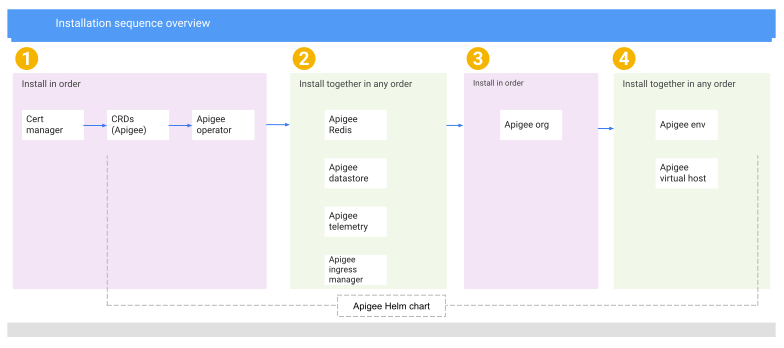
### Installation sequence overview
Installation of components is done from left to
right in sequence as shown in the following figure. Components that are
stacked vertically in the figure can be installed together and in any order.
Once you have installed any component, you can update that component
individually and at any point; for example, replica, memory, CPU, and so on.
### Prepare to install Apigee hybrid with Helm charts
1. Create the namespace that will be used for `apigee` resources. This should match the namespace field in the `overrides.yaml` file. If this is not present in `overrides.yaml`, then the default is `apigee`.
1. Check if the namespace already exists:
```
kubectl get namespace apigee
```
If the namespace exists, your output includes:
```
NAME STATUS AGE
apigee Active 1d
```
2. If the namespace does not already exist, create it:
```
kubectl create namespace apigee
```
2. Create the `apigee-system` namespace used by the Apigee operator resources.
1. Check if the namespace already exists:
```
kubectl get namespace apigee-system
```
2. If the namespace does not already exist, create it:
```
kubectl create namespace apigee-system
```
3.
Create the service accounts and assign the appropriate IAM roles to
them. Apigee hybrid uses the following service accounts:
| Service account | IAM roles |
|---|---|
| `apigee-cassandra` | Storage Object Admin |
| `apigee-logger` | Logs Writer |
| `apigee-mart` | Apigee Connect Agent |
| `apigee-metrics` | Monitoring Metric Writer |
| `apigee-runtime` | No role required |
| `apigee-synchronizer` | Apigee Synchronizer Manager |
| `apigee-udca` | Apigee Analytics Agent |
| `apigee-watcher` | Apigee Runtime Agent |
Apigee provides a tool,
[`create-service-account`](https://docs.cloud.google.com/apigee/docs/hybrid/v1.10/create-service-account.md.txt), in the
`apigee-operator/etc/tools` directory:
```
APIGEE_HELM_CHARTS_HOME/
└── apigee-operator/
└── etc/
└── tools/
└── create-service-account
```
This tool creates the service accounts, assigns the IAM roles to
each account, and downloads the certificate files in JSON format for
each account.
1. Create the directory where you want to download the service account cert files. You will specify this in the following command in the place of SERVICE_ACCOUNTS_PATH.
2. You can create all the service accounts with a single command with the following options:
```
APIGEE_HELM_CHARTS_HOME/apigee-operator/etc/tools/create-service-account --env prod --dir SERVICE_ACCOUNTS_PATH
```
3. List the names of your service accounts for your overrides file:
```
ls service-accounts
```
```
my_project-apigee-cassandra.json my_project-apigee-runtime.json
my_project-apigee-logger.json my_project-apigee-synchronizer.json
my_project-apigee-mart.json my_project-apigee-udca.json
my_project-apigee-metrics.json my_project-apigee-watcher.json
```
For more information see:
- [Step 4: Create service accounts](https://docs.cloud.google.com/apigee/docs/hybrid/v1.10/install-service-accounts.md.txt#production)
- [About service accounts](https://docs.cloud.google.com/apigee/docs/hybrid/v1.10/sa-about.md.txt)
4. Before installing, look at the `overrides.yaml` file to verify the settings:
> [!WARNING]
> **Important:** Apigee hybrid v1.10.5 has been updated with a critical hotfix release. If you wish, you can apply the required configuration settings for the hotfix directly in the configuration overrides file described in this step. If you add the upgrade configurations now, you do not have to perform any further hotfix upgrades later. The configuration settings for the hotfix (v1.10.5-hotfix.1) are listed in the [upgrade guide](https://docs.cloud.google.com/apigee/docs/hybrid/v1.10/upgrade.md.txt#install-hotfix). See also the release note for the hotfix release:
> - [hybrid v1.10.5-hotfix.1](https://docs.cloud.google.com/apigee/docs/hybrid/release-notes.md.txt#hybrid_1105-hotfix1)
```
instanceID: UNIQUE_ID_TO_IDENTIFY_THIS_CLUSTER
namespace: apigee # required for Helm charts installation
# By default, logger and metrics are enabled and requires below details
# Google Cloud project and cluster
gcp:
projectID: PROJECT_ID
region: REGION
k8sCluster:
name: CLUSTER_NAME
region: REGION
org: ORG_NAME
envs:
- name: "ENV_NAME"
serviceAccountPaths:
runtime: "PATH_TO_RUNTIME_SVC_ACCOUNT"
synchronizer: "PATH_TO_SYNCHRONIZER_SVC_ACCOUNT"
udca: "PATH_TO_UDCA_SVC_ACCOUNT"
ingressGateways:
- name: GATEWAY_NAME # maximum 17 characters, eg: "ingress-1". See Known issue 243167389.
replicaCountMin: 1
replicaCountMax: 2
svcType: LoadBalancer
virtualhosts:
- name: ENV_GROUP_NAME
selector:
app: apigee-ingressgateway
ingress_name: GATEWAY_NAME
sslSecret: SECRET_NAME
mart:
serviceAccountPath: "PATH_TO_MART_SVC_ACCOUNT"
logger:
enabled: TRUE_FALSE # lowercase without quotes, eg: true
serviceAccountPath: "PATH_TO_LOGGER_SVC_ACCOUNT"
metrics:
enabled: TRUE_FALSE # lowercase without quotes, eg: true
serviceAccountPath: "PATH_TO_METRICS_SVC_ACCOUNT"
udca:
serviceAccountPath: "PATH_TO_UDCA_SVC_ACCOUNT"
connectAgent:
serviceAccountPath: "PATH_TO_MART_SVC_ACCOUNT"
watcher:
serviceAccountPath: "PATH_TO_WATCHER_SVC_ACCOUNT"
```
This is the same overrides config you will use for this Helm installation. For more settings see the [Configuration property reference](https://docs.cloud.google.com/apigee/docs/hybrid/v1.10/config-prop-ref.md.txt).
For more examples of overrides files, see [Step 6: Configure the hybrid runtime](https://docs.cloud.google.com/apigee/docs/hybrid/v1.10/install-configure-cluster.md.txt#prod).
5. Enable synchronizer access. This is a prerequisite for installing Apigee hybrid.
1. Check to see if synchronizer access is already enabled with the following commands:
```
export TOKEN=$(gcloud auth print-access-token)
```
```
curl -X POST -H "Authorization: Bearer $TOKEN" \
-H "Content-Type:application/json" \
"https://apigee.googleapis.com/v1/organizations/ORG_NAME:getSyncAuthorization" \
-d ''
```
Your output should look something like the following:
```
{
"identities":[
"serviceAccount:SYNCHRONIZER_SERVICE_ACCOUNT_ID"
],
"etag":"BwWJgyS8I4w="
}
```
2. If the output does not include the service account ID, enable
synchronizer access. Your account must have the
[Apigee Organization Admin IAM role](https://docs.cloud.google.com/iam/docs/roles-permissions/apigee.md.txt#apigee.admin)
(`roles/apigee.admin`) to perform this task.
```
curl -X POST -H "Authorization: Bearer $TOKEN" \
-H "Content-Type:application/json" \
"https://apigee.googleapis.com/v1/organizations/ORG_NAME:setSyncAuthorization" \
-d '{"identities":["'"serviceAccount:SYNCHRONIZER_SERVICE_ACCOUNT_ID"'"]}'
```
See [Step 7: Enable Synchronizer access](https://docs.cloud.google.com/apigee/docs/hybrid/v1.10/install-enable-synchronizer-access.md.txt) in the Apigee hybrid
installation documentation for more detailed information.
6. Install Cert Manager with the following command:
```
kubectl apply -f https://github.com/cert-manager/cert-manager/releases/download/v1.11.1/cert-manager.yaml
```
7. Install the Apigee CRDs:
> [!NOTE]
> **Note:** From this step onwards, all commands should be run under the chart repo root.
> [!NOTE]
> **Note:** This is the only supported method for installing Apigee CRDs. Do not use `kubectl apply` without `-k`, do not omit `--server-side`.
> [!NOTE]
> **Note:** This step requires elevated cluster permissions.
1. Use the `kubectl` dry-run feature by running
the following command:
```
kubectl apply -k apigee-operator/etc/crds/default/ --server-side --force-conflicts --validate=false --dry-run=server
```
2. After validating with the dry-run command, run the following command:
```
kubectl apply -k apigee-operator/etc/crds/default/ --server-side --force-conflicts --validate=false
```
3. Validate the installation with the `kubectl get crds` command:
```
kubectl get crds | grep apigee
```
Your output should look something like the following:
```
apigeedatastores.apigee.cloud.google.com 2023-10-09T14:48:30Z
apigeedeployments.apigee.cloud.google.com 2023-10-09T14:48:30Z
apigeeenvironments.apigee.cloud.google.com 2023-10-09T14:48:31Z
apigeeissues.apigee.cloud.google.com 2023-10-09T14:48:31Z
apigeeorganizations.apigee.cloud.google.com 2023-10-09T14:48:32Z
apigeeredis.apigee.cloud.google.com 2023-10-09T14:48:33Z
apigeerouteconfigs.apigee.cloud.google.com 2023-10-09T14:48:33Z
apigeeroutes.apigee.cloud.google.com 2023-10-09T14:48:33Z
apigeetelemetries.apigee.cloud.google.com 2023-10-09T14:48:34Z
cassandradatareplications.apigee.cloud.google.com 2023-10-09T14:48:35Z
```
8. Check the existing labels on the cluster nodes.
By default, Apigee schedules data pods on nodes with the label
`cloud.google.com/gke-nodepool=apigee-data` and runtime pods
are scheduled on nodes with the label
`cloud.google.com/gke-nodepool=apigee-runtime`. You can
customize your node pool labels in the `overrides.yaml` file.
For more information, see
[Configuring dedicated node pools](https://docs.cloud.google.com/apigee/docs/hybrid/v1.10/configure-dedicated-nodes.md.txt).
### Install the Apigee hybrid Helm charts
> [!NOTE]
> **Note:** Before executing any of the Helm upgrade/install commands, use the Helm dry-run feature by adding `--dry-run` at the end of the command. See `helm -h` to list supported commands, options, and usage.
> [!CAUTION]
> **Important *Migration tool*:** If you migrated your cluster to Helm management with the [Apigee
> hybrid Helm migration tool](https://docs.cloud.google.com/apigee/docs/hybrid/preview/helm-migration), you have existing resources in your migrated cluster. To avoid accidentally deleting resources if the `helm upgrade` command fails, do not use the `‑‑atomic` flag.
>
> For example, in the first step, the command will be:
>
> ```
> helm upgrade operator apigee-operator/ \
> --install \
> --namespace apigee-system \
> -f overrides.yaml
> ```
1. Install Apigee Operator/Controller:
> [!NOTE]
> **Note:** This step requires elevated cluster permissions. Run `helm -h` or `helm install -h` for details
```
helm upgrade operator apigee-operator/ \
--install \
--namespace apigee-system \
--atomic \
-f overrides.yaml
```
> [!CAUTION]
> **Important:** Omit the `‑‑atomic` flag for [migrated clusters](https://docs.cloud.google.com/apigee/docs/hybrid/preview/helm-migration.md.txt).
Verify Apigee Operator installation:
```
helm ls -n apigee-system
```
```
NAME NAMESPACE REVISION UPDATED STATUS CHART APP VERSION
operator apigee-system 3 2023-06-26 00:42:44.492009 -0800 PST deployed apigee-operator-1.10.5 1.10.5
```
Verify it is up and running by checking its availability:
```
kubectl -n apigee-system get deploy apigee-controller-manager
```
```
NAME READY UP-TO-DATE AVAILABLE AGE
apigee-controller-manager 1/1 1 1 7d20h
```
2. Install Apigee datastore:
```
helm upgrade datastore apigee-datastore/ \
--install \
--namespace apigee \
--atomic \
-f overrides.yaml
```
> [!CAUTION]
> **Important:** Omit the `‑‑atomic` flag for [migrated clusters](https://docs.cloud.google.com/apigee/docs/hybrid/preview/helm-migration.md.txt).
Verify `apigeedatastore` is up and running by checking its state:
```
kubectl -n apigee get apigeedatastore default
```
```
NAME STATE AGE
default running 2d
```
3. Install Apigee telemetry:
```
helm upgrade telemetry apigee-telemetry/ \
--install \
--namespace apigee \
--atomic \
-f overrides.yaml
```
> [!CAUTION]
> **Important:** Omit the `‑‑atomic` flag for [migrated clusters](https://docs.cloud.google.com/apigee/docs/hybrid/preview/helm-migration.md.txt).
Verify it is up and running by checking its state:
```
kubectl -n apigee get apigeetelemetry apigee-telemetry
```
```
NAME STATE AGE
apigee-telemetry running 2d
```
4. Install Apigee Redis:
```
helm upgrade redis apigee-redis/ \
--install \
--namespace apigee \
--atomic \
-f overrides.yaml
```
> [!CAUTION]
> **Important:** Omit the `‑‑atomic` flag for [migrated clusters](https://docs.cloud.google.com/apigee/docs/hybrid/preview/helm-migration.md.txt).
Verify it is up and running by checking its state:
```
kubectl -n apigee get apigeeredis default
```
```
NAME STATE AGE
default running 2d
```
5. Install Apigee ingress manager:
```
helm upgrade ingress-manager apigee-ingress-manager/ \
--install \
--namespace apigee \
--atomic \
-f overrides.yaml
```
> [!CAUTION]
> **Important:** Omit the `‑‑atomic` flag for [migrated clusters](https://docs.cloud.google.com/apigee/docs/hybrid/preview/helm-migration.md.txt).
Verify it is up and running by checking its availability:
```
kubectl -n apigee get deployment apigee-ingressgateway-manager
```
```
NAME READY UP-TO-DATE AVAILABLE AGE
apigee-ingressgateway-manager 2/2 2 2 2d
```
6. Install Apigee organization:
```
helm upgrade ORG_NAME apigee-org/ \
--install \
--namespace apigee \
--atomic \
-f overrides.yaml
```
> [!CAUTION]
> **Important:** Omit the `‑‑atomic` flag for [migrated clusters](https://docs.cloud.google.com/apigee/docs/hybrid/preview/helm-migration.md.txt).
Verify it is up and running by checking the state of the respective org:
```
kubectl -n apigee get apigeeorg
```
```
NAME STATE AGE
apigee-org1-xxxxx running 2d
```
7. Install the environment.
You must install one environment at a time. Specify the environment with `--set env=`ENV_NAME:
```
helm upgrade apigee-env-ENV_NAME apigee-env/ \
--install \
--namespace apigee \
--atomic \
--set env=ENV_NAME \
-f overrides.yaml
```
> [!CAUTION]
> **Important:** Omit the `‑‑atomic` flag for [migrated clusters](https://docs.cloud.google.com/apigee/docs/hybrid/preview/helm-migration.md.txt).
Verify it is up and running by checking the state of the respective env:
```
kubectl -n apigee get apigeeenv
```
```
NAME STATE AGE GATEWAYTYPE
apigee-org1-dev-xxx running 2d
```
8. Create the TLS certificates. You are required to provide TLS certificates for the runtime ingress gateway in your Apigee hybrid configuration.
1. Create the certificates. In a production environment, you will need to use signed certificates. You can use either a certificate and key pair or a Kubernetes secret.
For demonstration and testing installation, the runtime gateway
can accept self-signed credentials. In the following example,
[openssl](https://www.openssl.org/) is
used to generate the self-signed credentials:
```
openssl req -nodes -new -x509 \
-keyout PATH_TO_CERTS_DIRECTORY/keystore_ENV_GROUP_NAME.key \
-out PATH_TO_CERTS_DIRECTORY/keystore_ENV_GROUP_NAME.pem \
-subj '/CN='YOUR_DOMAIN'' -days 3650
```
For more information, see [Step 5: Create TLS certificates](https://docs.cloud.google.com/apigee/docs/hybrid/v1.10/install-create-tls-certificates.md.txt).
2. Create the Kubernetes secret to reference the certs:
```
kubectl create secret generic NAME \
--from-file="cert=PATH_TO_CRT_FILE" \
--from-file="key=PATH_TO_KEY_FILE" \
-n apigee
```
9. Install virtual host.
You must install one environment group (virtualhost) at a time. Specify the environment group with `--set envgroup=`ENV_GROUP_NAME:
```
# repeat the following command for each env group mentioned in the overrides.yaml file
helm upgrade apigee-virtualhost-ENV_GROUP_NAME apigee-virtualhost/ \
--install \
--namespace apigee \
--atomic \
--set envgroup=ENV_GROUP_NAME \
-f overrides.yaml
```
> [!CAUTION]
> **Important:** Omit the `‑‑atomic` flag for [migrated clusters](https://docs.cloud.google.com/apigee/docs/hybrid/preview/helm-migration.md.txt).
> [!NOTE]
> **Note:** ENV_GROUP_NAME must be unique within the `apigee` namespace. For example, if you have a `prod` env and envgroup, you should set this name to `prod-envgroup`. The later env group name should still be `prod`.
This creates ApigeeRouteConfig (ARC) which internally creates
ApigeeRoute (AR) once the Apigee watcher pulls env group related
details from the control plane. Therefore, check that the corresponding
AR's state is running:
```
kubectl -n apigee get arc
```
```
NAME STATE AGE
apigee-org1-dev-egroup 2d
```
```
kubectl -n apigee get ar
```
```
NAME STATE AGE
apigee-org1-dev-egroup-xxxxxx running 2d
```
## Additional use cases for Helm charts with Apigee hybrid
### Cassandra backup and restore
1. To enable backup:
1. Update the Cassandra backup details in the `overrides.yaml` file:
```
cassandra:
backup:
enabled: true
serviceAccountPath: PATH_TO_GSA_FILE
dbStorageBucket: BUCKET_LINK
schedule: "45 23 * * 6"
```
> [!NOTE]
> **Note:** When using a Cloud Storage bucket, a Google Cloud service account `apigee-cassandra-back` needs to be created and have proper roles and/or permissions to write to the bucket specified in `dbStorageBucket`.
2. Run the Helm upgrade on `apigee-datastore` chart:
```
helm upgrade datastore apigee-datastore/ \
--namespace apigee \
--atomic \
-f overrides.yaml
```
> [!CAUTION]
> **Important:** Omit the `‑‑atomic` flag for [migrated clusters](https://docs.cloud.google.com/apigee/docs/hybrid/preview/helm-migration.md.txt).
2. Similarly, to enable restore:
1. Update the Cassandra restore details in the `overrides.yaml` file:
```
cassandra:
restore:
enabled: true
snapshotTimestamp: TIMESTAMP
serviceAccountPath: PATH_TO_GSA_FILE
cloudProvider: "CSI"
```
2. Run the Helm upgrade on `apigee-datastore` chart:
```
helm upgrade datastore apigee-datastore/ \
--namespace apigee \
--atomic \
-f overrides.yaml
```
> [!CAUTION]
> **Important:** Omit the `‑‑atomic` flag for [migrated clusters](https://docs.cloud.google.com/apigee/docs/hybrid/preview/helm-migration.md.txt).
See [Cassandra backup overview](https://docs.cloud.google.com/apigee/docs/hybrid/v1.10/cassandra-backup-overview.md.txt) for more details on Cassandra backup and restore.
### Multi-region expansion
Multi-region setup with Helm charts requires the same prerequisites as the
current `apigeectl` procedures. For details, see
[Prerequisites](https://docs.cloud.google.com/apigee/docs/hybrid/v1.10/multi-region.md.txt#prerequisites) for multi-region deployments.
The procedure to configure hybrid for multi-region is the same as the
existing procedure up through the process of configuring the multi-region
seed host and setting up the Kubernetes cluster and context.
#### Configure the first region
Use the following steps to configure the first region and prepare for configuring the second region:
1. Follow the steps in [Configure Apigee hybrid for multi-region](https://docs.cloud.google.com/apigee/docs/hybrid/v1.10/multi-region.md.txt#configure-apigee-hybrid-for-multi-region) to Configure the multi-region seed host on your platform.
2. For the first region created, get the pods in the apigee namespace:
```
kubectl get pods -o wide -n apigee
```
3. Identify the multi-region seed host address for Cassandra in this region, for example `10.0.0.11`.
4. Prepare the `overrides.yaml` file for the second region and add in the seed host IP address as follows:
```
cassandra:
multiRegionSeedHost: "SEED_HOST_IP_ADDRESS"
datacenter: "DATACENTER_NAME"
rack: "RACK_NAME"
clusterName: CLUSTER_NAME
hostNetwork: false
```
Replace the following:
- SEED_HOST_IP_ADDRESS with the seed host IP address, for example `10.0.0.11`.
- DATACENTER_NAME with the datacenter name, for example `dc-2`.
- RACK_NAME with the rack name, for example `ra-1`.
- CLUSTER_NAME with the name of your Apigee cluster. By default the value is `apigeecluster`. If you use a different cluster name, you must specify a value for [cassandra.clusterName](https://docs.cloud.google.com/apigee/docs/hybrid/v1.10/config-prop-ref.md.txt#cassandra-clustername). This value must be the same in all regions.
#### Configure the second region
To set up the new region:
1. Install `cert-manager` in region 2:
```
kubectl apply -f https://github.com/cert-manager/cert-manager/releases/download/v1.11.1/cert-manager.yaml
```
2. Copy your certificate from the existing cluster to the new cluster. The new CA root is used by Cassandra and other hybrid components for mTLS. Therefore, it is essential to have consistent certificates across the cluster.
1. Set the context to the original namespace:
```
kubectl config use-context ORIGINAL_CLUSTER_NAME
```
2. Export the current namespace configuration to a file:
```
kubectl get namespace apigee -o yaml > apigee-namespace.yaml
```
3. Export the `apigee-ca` secret to a file:
```
kubectl -n cert-manager get secret apigee-ca -o yaml > apigee-ca.yaml
```
4. Set the context to the new region's cluster name:
```
kubectl config use-context NEW_CLUSTER_NAME
```
5. Import the namespace configuration to the new cluster. Be sure to
update the namespace in the file if you're using a different
namespace in the new region:
```
kubectl apply -f apigee-namespace.yaml
```
6. Import the secret to the new cluster:
```
kubectl -n cert-manager apply -f apigee-ca.yaml
```
3. Now use Helm charts to install Apigee hybrid in the new region with
the following Helm Chart commands (as done in region 1):
> [!NOTE]
> **Note:** You can use the same CRDs for consistency by using the same folder where you have the charts downloaded, you can also keep your overrides file unique between region 1 and 2 by naming your overrides something unique such as `overrides2.yaml`, etc.
helm upgrade operator apigee-operator \
--install \
--namespace apigee-system \
--atomic
-f overrides-DATACENTER_NAME.yaml
helm upgrade datastore apigee-datastore \
--install \
--namespace apigee \
--atomic \
-f overrides-DATACENTER_NAME.yaml
helm upgrade telemetry apigee-telemetry \
--install \
--namespace apigee \
--atomic \
-f overrides-DATACENTER_NAME.yaml
helm upgrade redis apigee-redis \
--install \
--namespace apigee \
--atomic \
-f overrides-DATACENTER_NAME.yaml
helm upgrade ingress-manager apigee-ingress-manager \
--install \
--namespace apigee \
--atomic \
-f overrides-DATACENTER_NAME.yaml
helm upgrade ORG_NAME apigee-org \
--install \
--namespace apigee \
--atomic \
-f overrides-DATACENTER_NAME.yaml
# repeat the below command for each env mentioned on the overrides
helm upgrade apigee-env-ENV_NAME apigee-env/ \
--install \
--namespace apigee \
--atomic \
--set env=ENV_NAME \
-f overrides-DATACENTER_NAME.yaml
# repeat the below command for each env group mentioned on the overrides
helm upgrade apigee-virtualhost-ENV_GROUP_NAME apigee-virtualhost/ \
--install \
--namespace apigee \
--atomic \
--set envgroup=ENV_GROUP_NAME \
-f overrides-DATACENTER_NAME.yaml
> [!CAUTION]
> **Important:** Omit the `‑‑atomic` flag for [migrated clusters](https://docs.cloud.google.com/apigee/docs/hybrid/preview/helm-migration.md.txt).
4. Once all the components are installed, set up Cassandra on all the pods in the new data centers. For instructions, see [Configure Apigee hybrid for multi-region](https://docs.cloud.google.com/apigee/docs/hybrid/v1.9/multi-region.md.txt#configure-apigee-hybrid-for-multi-region), select your platform, scroll to **Set up the new region**, and then locate step 5.
5. Once the data replication is complete and verified, update the seed hosts:
1. Remove `multiRegionSeedHost: 10.0.0.11` from `overrides-DATACENTER_NAME.yaml`.
The `multiRegionSeedHost` entry is no longer needed after data replication is established, and pod IPs are expected to change over time.
2. Reapply the change to update the apigee datastore CR:
```
helm upgrade datastore apigee-datastore/ \
--install \
--namespace apigee \
--atomic \
-f overrides-DATACENTER_NAME.yaml
```
> [!CAUTION]
> **Important:** Omit the `‑‑atomic` flag for [migrated clusters](https://docs.cloud.google.com/apigee/docs/hybrid/preview/helm-migration.md.txt).
### Hosting images privately
Instead of relying on the public Google Cloud repository, you may optionally
want to host the images privately. Instead of overriding each component, you
can add hub details on the overrides:
```
hub: PRIVATE_REPO
```
For example, if the following hub is provided, it will automatically resolve
the image path:
```
hub: private-docker-host.com
```
as:
```
## an example of internal component vs 3rd party
containers:
- name: apigee-udca
image: private-docker-host.com/apigee-udca:1.10.5
imagePullPolicy: IfNotPresent
containers:
- name: apigee-ingressgateway
image: private-docker-host.com/apigee-asm-ingress:1.17.2-asm.8-distroless
imagePullPolicy: IfNotPresent
```
#### *Click to expand a list of Apigee images*
```
apigee:
gcr.io/apigee-release/hybrid/apigee-mart-server:1.10.3
gcr.io/apigee-release/hybrid/apigee-synchronizer:1.10.3
gcr.io/apigee-release/hybrid/apigee-runtime:1.10.3
gcr.io/apigee-release/hybrid/apigee-hybrid-cassandra-client:1.10.3
gcr.io/apigee-release/hybrid/apigee-hybrid-cassandra:1.10.3
gcr.io/apigee-release/hybrid/apigee-cassandra-backup-utility:1.10.3
gcr.io/apigee-release/hybrid/apigee-udca:1.10.3
gcr.io/apigee-release/hybrid/apigee-connect-agent:1.10.3
gcr.io/apigee-release/hybrid/apigee-watcher:1.10.3
gcr.io/apigee-release/hybrid/apigee-operators:1.10.3
gcr.io/apigee-release/hybrid/apigee-redis:1.10.3
gcr.io/apigee-release/hybrid/apigee-mint-task-scheduler:1.10.3
third party:
gcr.io/apigee-release/hybrid/apigee-stackdriver-logging-agent:1.9.12-2
gcr.io/apigee-release/hybrid/apigee-prom-prometheus:v2.45.0
gcr.io/apigee-release/hybrid/apigee-stackdriver-prometheus-sidecar:0.9.0
gcr.io/apigee-release/hybrid/apigee-kube-rbac-proxy:v0.14.2
gcr.io/apigee-release/hybrid/apigee-envoy:v1.27.0
gcr.io/apigee-release/hybrid/apigee-prometheus-adapter:v0.11.0
gcr.io/apigee-release/hybrid/apigee-asm-ingress:1.17.2-asm.8-distroless
gcr.io/apigee-release/hybrid/apigee-asm-istiod:1.17.2-asm.8-distroless
gcr.io/apigee-release/hybrid/apigee-fluent-bit:2.1.8
```
To display a list of the Apigee images hosted in the Google Cloud repository on the command line:
```
./apigee-operator/etc/tools/apigee-pull-push.sh --list
```
### Tolerations
To use the
[Taints and Tolerations feature of Kubernetes](https://kubernetes.io/docs/concepts/scheduling-eviction/taint-and-toleration/), you must define the
`tolerations` override property for each Apigee hybrid component.
The following components support defining tolerations:
- `ao`
- `apigeeIngressGateway`
- `cassandra`
- `cassandraSchemaSetup`
- `cassandraSchemaValidation`
- `cassandraUserSetup`
- `connectAgent`
- `istiod`
- `logger`
- `mart`
- `metrics`
- `mintTaskScheduler`
- `redis`
- `runtime`
- `synchronizer`
- `udca`
- `Watcher`
See [Configuration property reference](https://docs.cloud.google.com/apigee/docs/hybrid/v1.10/config-prop-ref.md.txt) for more information about these
components.
For example, to apply the tolerations to the Apigee operator deployment:
```
ao:
tolerations:
- key: "key1"
operator: "Equal"
value: "value1"
effect: "NoExecute"
tolerationSeconds: 3600
```
To apply the tolerations to the Cassandra StatefulSet:
```
cassandra:
tolerations:
- key: "key1"
operator: "Equal"
value: "value1"
effect: "NoExecute"
tolerationSeconds: 3600
```
## Uninstall Apigee hybrid with Helm
To uninstall a specific update or *release*, you can use the `helm [uninstall/delete] RELEASE-NAME -n NAMESPACE` command.
Use the following steps to completely uninstall Apigee Hybrid from the cluster:
1. Delete the virtualhosts. Run this command for each virtualhost:
```
helm -n apigee delete VIRTUALHOST_RELEASE-NAME
```
2. Delete the environments. Run this command for each env:
```
helm -n apigee delete ENV_RELEASE-NAME
```
3. delete the Apigee org:
```
helm -n apigee delete ORG_RELEASE-NAME
```
4. delete telemetry:
```
helm -n apigee delete TELEMETRY_RELEASE-NAME
```
5. Delete redis:
```
helm -n apigee delete REDIS_RELEASE-NAME
```
6. Delete the ingress manager:
```
helm -n apigee delete INGRESS_MANAGER_RELEASE-NAME
```
7. Delete the datastore:
```
helm -n apigee delete DATASTORE_RELEASE-NAME
```
> [!TIP]
> **Tip:** If the state of the apigeeds/default remains `deleting` but never ends, check the pods to see if a cleanup job failed.
8. Delete operator.
1. Make sure all the CRs are deleted before:
```
kubectl -n apigee get apigeeds, apigeetelemetry, apigeeorg, apigreeenv, arc, apigeeredis
```
2. Delete the Apigee Operator:
```
helm -n apigee-system delete OPERATOR_RELEASE-NAME
```
9. Delete the Apigee hybrid CRDs:
```
kubectl delete -k apigee-operator/etc/crds/default/
```