*This page
applies to **Apigee** and **Apigee hybrid**.*
This page describes the risk assessment available for each API resource in API hub. You can use this view to drill down into the security scores for a specific API across all of its deployments. This allows you to understand the specific risks associated with an API and see the actionable recommendations for improving its security.
This assessment data is aggregated using [Apigee Advanced API Security for multi-gateway projects](https://docs.cloud.google.com/apigee/docs/apihub/advanced-api-security-multi-gateway.md.txt).
## Before you begin
- Enable and configure the Apigee Advanced API Security add-on for your API hub instance. For more information, see [Configure Apigee Advanced API Security for multiple Apigee organizations and gateways](https://docs.cloud.google.com/apigee/docs/apihub/configure-advanced-api-security-multi-gateway.md.txt).
Grant the required IAM roles and permissions to your principal account. For more information, see [IAM roles and permissions](https://docs.cloud.google.com/apigee/docs/apihub/advanced-api-security-multi-gateway.md.txt#iam-roles).
> [!IMPORTANT]
> **Key terms:** Before you begin, you should be familiar with the following terms:
>
> - **Gateway** : An umbrella term representing a specific API hub plugin instance, combining the plugin type and instance name (for example, `Apigee X - instance_name`).
> - **Gateway type** : The type of API hub plugin (for example, `Apigee X`).
> - **Gateway name** : The specific instance name or ID of the API hub plugin (for example, `instance_name`). For Apigee gateways, the instance name corresponds to the Apigee organization name.
> - **Deployment**: Represents a specific API proxy deployment. You can have multiple deployments (using the same name) for a single API proxy. API hub creates a new deployment for each new API version.
## View security scores of an API
You can view the security scores for each deployment of an API. These scores are filterable based on the security profiles that were used to calculate them.
### Console
To view the security scores of an API, do the following:
1. In the Google Cloud console, go to the **API hub \> APIs** page.
[Go to APIs](https://console.cloud.google.com/apigee/api-hub/apis)
2. Click the API for which you want to view the security scores.
The **API details** page appears.
3. Click the **Security** tab.
4. Click **Security profile** and choose the security profile by which you want to filter the API security scores.
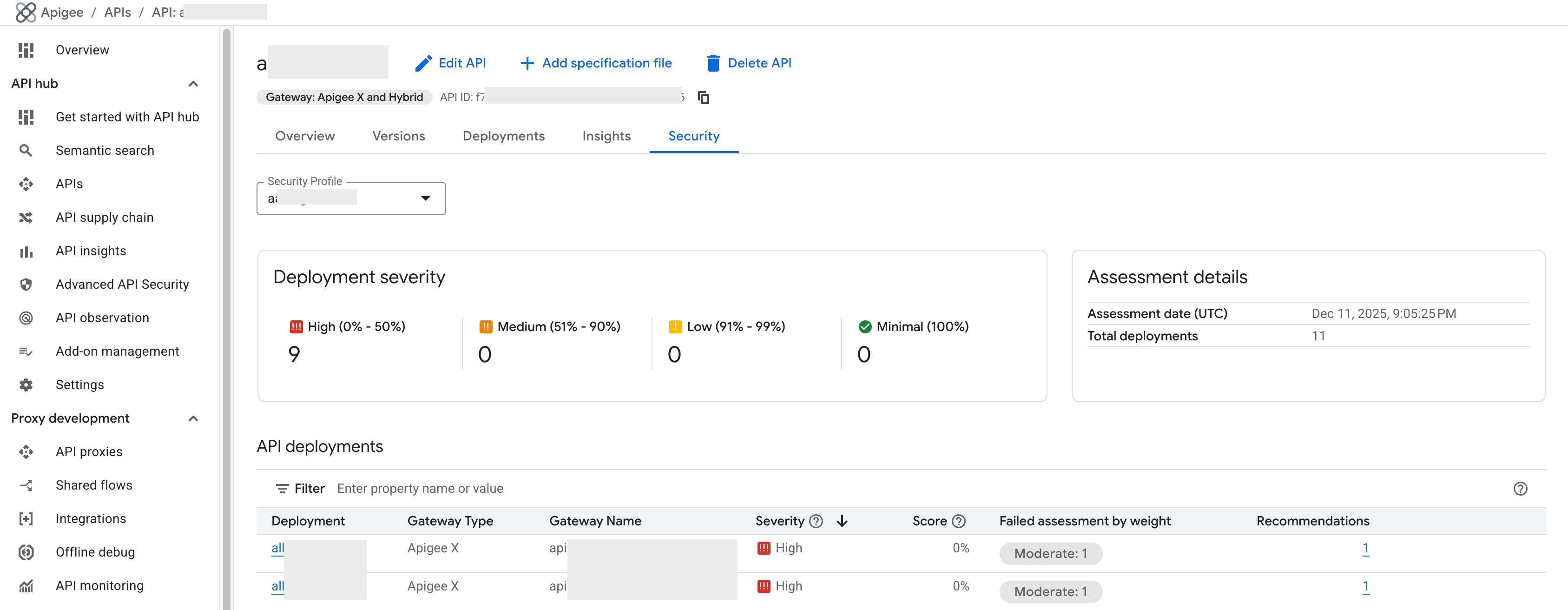
The **Security scores** tab displays the [security score assessment details](https://docs.cloud.google.com/apigee/docs/apihub/view-api-security-scores.md.txt#assessment-details) and [recommendations](https://docs.cloud.google.com/apigee/docs/apihub/view-api-security-scores.md.txt#view-recommendations) for the selected API and security profile.

### REST
To view the security scores for each deployment of an API, make a `POST` request to the `securityAssessmentResults:batchCompute` API.
```
curl -H "Authorization: Bearer $(gcloud auth print-access-token)"
"https://apihub.googleapis.com/v1/organizations/APIGEE_ORG/securityAssessmentResults:batchCompute"
-X POST -H "Content-Type: application/json" -d '
{
"profile": "PROFILE_ID",
"api_hub_apis": {
"apis": ["API_HUB_API_NAME"]
},
"include": {"resources": [{"type": "API_HUB_DEPLOYMENT", "name": "DEPLOYMENT_ID"}]}
}'
```
Replace the following:
- `APIGEE_ORG`: Name of the Apigee organization provisioned in your Google Cloud project.
- `PROFILE_ID`: The name of the security profile.
- `API_HUB_API_NAME`: The name of the API registered in API hub.
- `DEPLOYMENT_ID`: The UUID of the API deployment.
## API security scores
The following security scores are provided for each API deployment:
- [Deployments by severity](https://docs.cloud.google.com/apigee/docs/apihub/view-api-security-scores.md.txt#deployments-by-severity)
- [Assessment details](https://docs.cloud.google.com/apigee/docs/apihub/view-api-security-scores.md.txt#assessment-details)
- [API deployments](https://docs.cloud.google.com/apigee/docs/apihub/view-api-security-scores.md.txt#api-deployments)
### Deployments by severity
The **Deployments by severity** section displays the total number of API deployments in the selected gateway and security profile grouped by severity. The severity for an API deployment is a direct mapping of the score range of the deployment against the selected security profile. For example, if an API deployment has a calculated security score of 45%, it falls into the 0% - 50% range, and its severity is classified as High.
The following table shows the severity and score range mapping for the **Deployments by severity** section:
| Severity | Score range | Meaning |
|---|---|---|
| **High** | 0% - 50% | Indicates significant configuration issues or severe risk. |
| **Medium** | 51% - 90% | Indicates moderate compliance with the profile. |
| **Low** | 91% - 99% | Indicates near full compliance with the profile. |
| **Minimal** | 100% | Indicates full compliance with the profile. |
### Assessment details
The **Assessment details** card displays the total number of API deployments that are included in the selected gateway and security profile along with the assessment date and time.
### API deployments
The **API deployments** card displays the following assessment details for each deployed API proxy:
| Assessment | Description |
|---|---|
| **Deployment** | The specific API proxy name being assessed. |
| **Gateway type** | The type of gateway hosting the deployment (for example, `Apigee X`). |
| **Gateway name** | The specific instance name or ID of the gateway hosting the deployment (for example, `instance_name`). |
| **Severity** | The risk level of the deployment. |
| **Score** | The compliance percentage of the deployment against the selected security profile. |
| **Failed assessment by weight** | A breakdown showing the number of assessment checks that failed, grouped by their assigned significance. **Major** failures carry approximately 15 points, **Moderate** failures carry approximately 5 points, and **Minor** failures carry approximately 1 point towards the weighted score calculation. > [!NOTE] > **Note:** The weight points assigned to each failure may vary based on the number of assessment checks in your security profile.
|
| **Recommendations** | The count of specific, actionable steps needed to fix identified security vulnerabilities and improve the score. |
## View recommendations
To view recommendations for improving your API, do the following:
1. For the API deployment for which you want to view the recommendations for, click the count displayed under the **Recommendations** column.
The **Recommendations** pane displays all assessment checks that require attention and provides the respective recommendation to improve the score.
2. Optional: Click **Edit proxy** to edit the deployment (proxy) and address the security issues identified by the recommendation.
> [!NOTE]
> **Note:** The **Edit proxy** button is only available for Apigee X and Apigee hybrid deployments. For other environments, do the following:
> - **Apigee Edge Public Cloud:** Log in to the Apigee Edge Management Console and directly edit the deployment (proxy).
>
> For more information on deploying proxies, see [Deploy API proxies using the UI](https://docs.apigee.com/api-platform/deploy/deploying-proxies-ui).
## What's next
- View security scores across all projects and gateways, see [View security scores across all projects and gateways](https://docs.cloud.google.com/apigee/docs/apihub/view-security-scores-multi-gateway.md.txt).
- Learn how to [manage security profiles](https://docs.cloud.google.com/apigee/docs/apihub/manage-security-profiles-multi-gateway.md.txt) for your multi-gateway setup.
- Learn how to [manage runtime projects and environments for Advanced API Security](https://docs.cloud.google.com/apigee/docs/apihub/configure-advanced-api-security-multi-gateway.md.txt#manage-api-security-hub).