*This page
applies to **Apigee** and **Apigee hybrid**.*
*View [Apigee Edge](https://docs.apigee.com/api-platform/get-started/what-apigee-edge) documentation.*

> [!WARNING]
>
> **Preview
> --- Archive deployment**
>
>
> This feature is
>
> subject to the "Pre-GA Offerings Terms" in the General Service Terms section of the
> [Service Specific
> Terms](https://docs.cloud.google.com/terms/service-terms#1).
>
> Pre-GA features are available "as is" and might have limited support.
>
> For more information, see the
> [launch stage descriptions](https://cloud.google.com/products/#product-launch-stages).
In this step, you'll promote an archive of your API proxy configuration to a production environment in your Apigee organization.
1. Follow the steps in [Create an environment](https://cloud.google.com/apigee/docs/api-platform/get-started/install-cli#create-environment) to perform the following:
1. Create a new **prod** environment in your Apigee organization, enabling **Archive** as the deployment type. Use the [UI](https://cloud.google.com/apigee/docs/api-platform/fundamentals/environments-working-with#creating-a-new-environment-in-the-ui) or [API](https://docs.cloud.google.com/apigee/docs/reference/apis/apigee/rest/v1/organizations.environments/create.md.txt).
2. Attach the environment to a runtime instance using the [Instances attachment API](https://docs.cloud.google.com/apigee/docs/reference/apis/apigee/rest/v1/organizations.instances.attachments.md.txt).
This command triggers a long-running operation. Ensure that the environment has been attached to the runtime before continuing.
3. Create an environment group if you do not already have one using the [Create environment groups API](https://docs.cloud.google.com/apigee/docs/reference/apis/apigee/rest/v1/organizations.envgroups/create.md.txt).
Ensure that the environment group has been created before continuing. You can check the status of your new group using a
request like the following:
```
curl -i -H "$AUTH" -H "Content-Type:application/json" \
"https://apigee.googleapis.com/v1/organizations/$PROJECT_ID/environments/ENVIRONMENT_NAME"
```
4. Attach the new environment to the environment group using the [Environment group attachment API](https://docs.cloud.google.com/apigee/docs/reference/apis/apigee/rest/v1/organizations.envgroups.attachments.md.txt).
Attaching an environment to the group makes the proxies in that environment
routable via the hostnames in the group. This triggers a long-running operation that can take several minutes to complete. We recommend that you wait a minute or two before continuing to the next step. In the meantime you can check the status of the operation as before.
2. Create a new **prod** environment in your local development environment:
1. In Apigee in VS Code, position your cursor over the **environments** folder in the Apigee section and click .
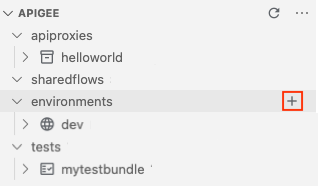
The Create environment wizard opens.
2. Enter **prod** for the environment name and press **Enter** .
The environment is created.
3. Expand the **prod** environment folder in the Apigee section to view its contents.
4. Position your cursor over the **deployments.json** file in the Apigee section and click .
The Deployments wizard opens.
5. Select the **helloworld** API proxy to add it to the deployment and click **OK** .
The `deployments.json` file is opened in the editor. The file has been updated to include the `helloworld` API proxy in the `proxies` deployment array, as shown below:
```
{
"proxies": [
"helloworld"
],
"sharedflows": []
}
```
3. Deploy an archive of your API proxy configuration to the `prod` environment in your Apigee organization.
1. In the **Terminal** tab in Apigee VS Code, navigate to the **myapigeeworkspace** directory.
```
cd myapigeeworkspace
```
2. Run the following command:
```
gcloud beta apigee archives deploy --environment=prod --labels=release=052021.1
```
The following provides an example of the response:
```
Using Apigee organization dev
Waiting for operation [$OPERATION_ID] to complete...⠹
```
3. Run the following command to check the status of the operation, replacing $OPERATION_ID with the operation ID returned in the previous call:
```
gcloud beta apigee operations describe $OPERATION_ID
```
The following provides an example of the response. Note that `state` is set to `IN_PROGRESS`.
```
Using Apigee organization 'prod'
done: true
metadata:
'@type': type.googleapis.com/google.cloud.apigee.v1.OperationMetadata
operationType: INSERT
state: IN_PROGRESS
targetResourceName: uri
name: organizations/prod/operations/$OPERATION_ID
organization: prod
response:
'@type': type.googleapis.com/google.cloud.apigee.v1.CanaryEvaluation
control: 1-5-0-20210319-071117-ghq74
endTime: '2021-03-20T06:15:44.329363950Z'
metricLabels:
env: test
location: us-central1
name: uri
startTime: '2021-03-20T06:14:44.306534584Z'
treatment: 1-5-0-20210319-190954-if0wk
verdict: NONE
uuid: $OPERATION_ID
```
4. Repeat the previous step until `state` is set to `FINISHED` indicating that the archive depoloyment is complete.
5. Run the following command to view all archive deployments in the `prod` environment:
```
gcloud beta apigee archives list --environment=prod
```
The following provides an example of the response:
```
Using Apigee organization 'prod'
ARCHIVE ID ENVIRONMENT DEPLOYED AT LABELS OPERATION STATUS
vrytwbhso558oil53m prod 2021-04-20 21:20:53 release=052021.1 Deployed
```
**Congratulations!** You've successfully promoted your API archive to an Apigee production environment!