*This page
applies to **Apigee** and **Apigee hybrid**.*
*View [Apigee Edge](https://docs.apigee.com/api-platform/get-started/what-apigee-edge) documentation.*

Change your proxy's target endpoint to one that returns more meaningful data.
1. Expand the **helloworld** API proxy bundle and click **default.xml** in the **targets** folder to open the file in the editor.
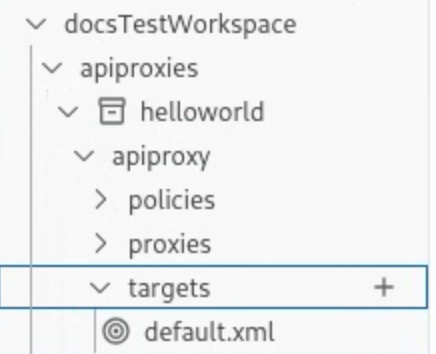
2. Update the `` element to append **xml** to the existing URL:
```
https://mocktarget.apigee.net/xml
```
3. Select **File \> Save** or ⌘S to save your edits.
4. To redeploy the environment, position your cursor over the **dev** environment folder and click .
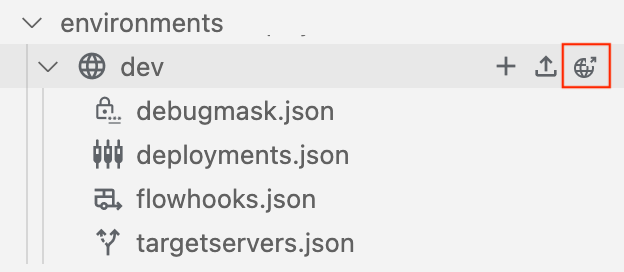
5. When prompted to select a test bundle to export, click **Deploy without a test bundle** because the test bundle has already been exported.

6. Run your API in the **Terminal** tab.
```
curl 0:8998/helloworld?apikey=ZQA5euYtNeJ7ZCGCJMpvd6F2BZOmxOzY
```
The following response is returned:
```
San Jose
John
Doe
CA
```
In the next step, you'll add a new policy to your API.
[1](https://docs.cloud.google.com/apigee/docs/api-platform/local-development/vscode/tutorial-create-workspace.md.txt)
[2](https://docs.cloud.google.com/apigee/docs/api-platform/local-development/vscode/tutorial-create-proxy.md.txt)
[3](https://docs.cloud.google.com/apigee/docs/api-platform/local-development/vscode/tutorial-deploy.md.txt)
[4](https://docs.cloud.google.com/apigee/docs/api-platform/local-development/vscode/tutorial-test.md.txt)
[5](https://docs.cloud.google.com/apigee/docs/api-platform/local-development/vscode/tutorial-change-target-endpoint.md.txt)
[(NEXT) Step 6: Attach a policy](https://docs.cloud.google.com/apigee/docs/api-platform/local-development/vscode/tutorial-attach-policy.md.txt)
[7](https://docs.cloud.google.com/apigee/docs/api-platform/local-development/vscode/tutorial-deploy-apigee.md.txt)
[8](https://docs.cloud.google.com/apigee/docs/api-platform/local-development/vscode/tutorial-promote.md.txt)