*This page
applies to **Apigee** and **Apigee hybrid**.*
*View [Apigee Edge](https://docs.apigee.com/api-platform/get-started/what-apigee-edge) documentation.*

A route determines the path of a request from the `ProxyEndpoint` to the
`TargetEndpoint`. Included in the route is the URL used to access the API
`ProxyEndpoint` and the URL of the backend service defined by the
`TargetEndpoint`.
> [!NOTE]
> **Note:** This video was recorded with a previous version of the Apigee UI; however, the concepts are still valid.
Watch this video for an introduction to routes, describing the relationship between the
`ProxyEndpoint` and the `TargetEndpoint`.
## Determining the URL of the API proxy
endpoint
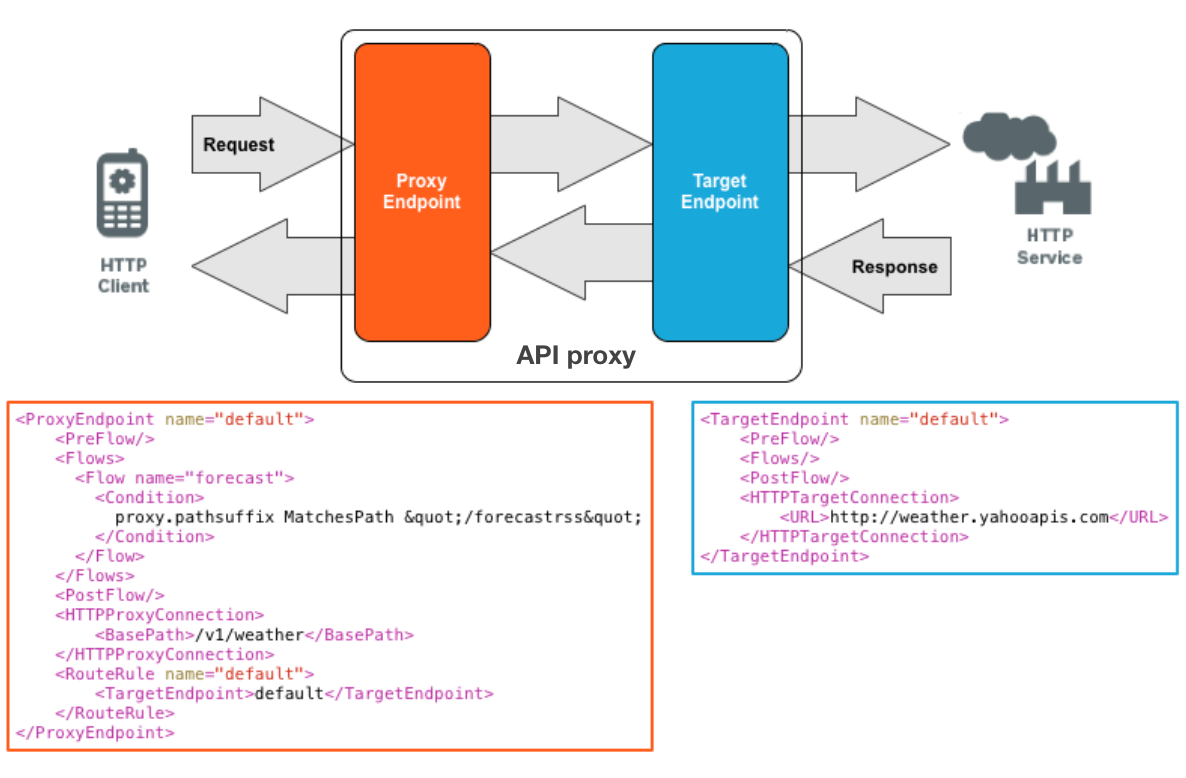
The following image shows a request coming in to the `ProxyEndpoint` from an app, and that
request being directed to the backend service:
After you create an API proxy on Apigee, the default URL that an app uses to access the proxy
has the following form:
```
https://www.example.com/shopping/cart/addItem
|_____________| |___________| |_____|
| | |
hostname basepath resource
```
Where:
- The hostname is either a domain that you have added to DNS or an IP address.
- The base path and resource-path are defined when you create the API proxy.
When a request comes in to Apigee, Apigee parses the URL to direct the request to the correct
`ProxyEndpoint`. For example, the following URL is used to access an API proxy:
```
http://example.com/v1/weather/forecastrss
```
If you examine the `ProxyEndpoint` definition for the API proxy in the figure above,
you can see how this URL is parsed:
1. The domain portion of the URL, `http://example.com`, corresponds to a host name defined on an environment group. The proxy was deployed to one or more environments within that environment group. For more information, see [About environments and
environment groups](https://docs.cloud.google.com/apigee/docs/api-platform/fundamentals/environments-overview).
2. The second part of the URL, `/v1/weather`, is determined by the `` element in the `ProxyEndpoint`. You defined the base path when you created the proxy. The base path must be unique to the API proxy for the environment so that two API proxies in the same environment do not have the same base path.
3. The third part of the URL, `/forecastrss`, is a resource defined by the API proxy with the corresponding conditional flow defined by the `` element.
> [!NOTE]
> **Note:** This video was recorded with a previous version of the Apigee UI; however, the concepts are still valid.
**Video:** Watch a short video to learn more about API proxy endpoints.
## Determining the URL of the target endpoint
The `` element in a
`ProxyEndpoint` definition determines the target of the API proxy, and is evaluated after all
policies in the PreFlow, Conditional Flows, and PostFlow of the `ProxyEndpoint` request are
processed.
A `ProxyEndpoint` can define the target as:
- A direct URL to a backend service.
- A single `TargetEndpoint` definition.
- Multiple `TargetEndpoint`s where the API proxy delegates the request to a target endpoint based on a condition.
- Null route or target, meaning the request is not forwarded to a target. Instead, all of the processing of the request, and the generation of the response, occurs on Apigee.
> [!NOTE]
> **Note:** This video was recorded with a previous version of the Apigee UI; however, the concepts are still valid.
**Video:** Watch a short video to learn more about target endpoints.
### Direct URL
A `ProxyEndpoint` can directly invoke a backend service, bypassing any named
`TargetEndpoint`
configuration. For example, the following `` always makes an HTTP
call to `http://example.com/myAPI:`
```
http://example.com/myAPI
```
However, because there is no `TargetEndpoint`, you can only add policies to the
flows defined by the `ProxyEndpoint`.
### Single target
In a single target definition, the `ProxyEndpoint` references a single
`TargetEndpoint` definition by name, as shown in the figure above:
```
default
```
All requests to this API proxy are directed to the same `TargetEndpoint` definition. The
`` tag in the
`TargetEndpoint` determines the location of the backend service. in the figure above,
the target URL is `http://weather.yahooapis.com`.
### Conditional targets
The `` tag lets
you direct a request to a target based on a condition. You can use flow variables, query
parameters, HTTP headers, message content, or contextual information such time of day and locale
to determine the target endpoint. For example, you might include a geographical area, such as US
and UK, in a request URL. You can then route a request to a target endpoint based on the
region.
The following route rule evaluates an HTTP header in a request. If the HTTP header
`routeTo` has the value
`TargetEndpoint1`, then the request
is forwarded to the `TargetEndpoint` named `TargetEndpoint1`. If not, then
the request is forwarded to `TargetEndpoint2`.
```
request.header.routeTo = "TargetEndpoint1"TargetEndpoint1TargetEndpoint2
```
If you have multiple route rules, create one as the *default*, that is, as a route
rule with no condition. Ensure that the default route rule is defined last in the list
of conditional routes because rules are evaluated top-down in the `ProxyEndpoint`.
See also [Conditional routes](https://docs.cloud.google.com/apigee/docs/api-platform/reference/api-proxy-configuration-reference.md.txt#proxyendpoint-conditionalroutes)
and [Conditions reference](https://docs.cloud.google.com/apigee/docs/api-platform/reference/conditions-reference.md.txt).
> [!NOTE]
> **Note:** **Order is important** :
>
> If you have more than one
> `RouteRule` in a `ProxyEndpoint`, their order in the XML configuration is
> important. The first
> `RouteRule` to *match* gets executed. (`RouteRule` with no condition
> always match.)
>
> In the previous example, if the unconditional *default* `RouteRule` came
> first, it would be executed even if the condition of the `MyRoute` rule would have
> matched. So list your conditional `RouteRule` before an unconditional
> `RouteRule`.
> [!NOTE]
> **Note:** This video was recorded with a previous version of the Apigee UI; however, the concepts are still valid.
**Video:** Watch a short video to learn how to route to a target endpoint using
conditional targets.
### Null route
A null route supports scenarios in which the request message does not need to be forwarded to
a `TargetEndpoint`. This is useful when the `ProxyEndpoint` performs all
of the necessary processing,
for example by using JavaScript to call an external service.
The following example defines a null route:
```
```
## Learn more
- [API proxy configuration reference](https://docs.cloud.google.com/apigee/docs/api-platform/reference/api-proxy-configuration-reference.md.txt)
- [Endpoint properties reference](https://docs.cloud.google.com/apigee/docs/api-platform/reference/endpoint-properties-reference.md.txt)
- [Load balancing
across backend servers](https://docs.cloud.google.com/apigee/docs/api-platform/deploy/load-balancing-across-backend-servers)