
For an initial installation of Google Distributed Cloud software only for VMware, your vSphere environment must have a network that supports the virtual machines (VMs) that you create, a vCenter Server, and the load balancer mode that you choose. All of the VMs must also use the same Network Time Protocol (NTP) server.
Your network needs to support outbound traffic to the internet so that your admin workstation and your cluster nodes can fetch Google Distributed Cloud components and call certain Google services. If you want external clients to call services in your clusters, your network must also support inbound traffic from the internet.
About the VMs in an initial installation
In your initial installation of Google Distributed Cloud, you create these VMs:
- One VM for an admin workstation
- Four VMs for an admin cluster
- Three VMs for a user cluster
Your network must be able to support the creation of those eight VMs.
Example network topology
The following diagram shows one possible network topology:
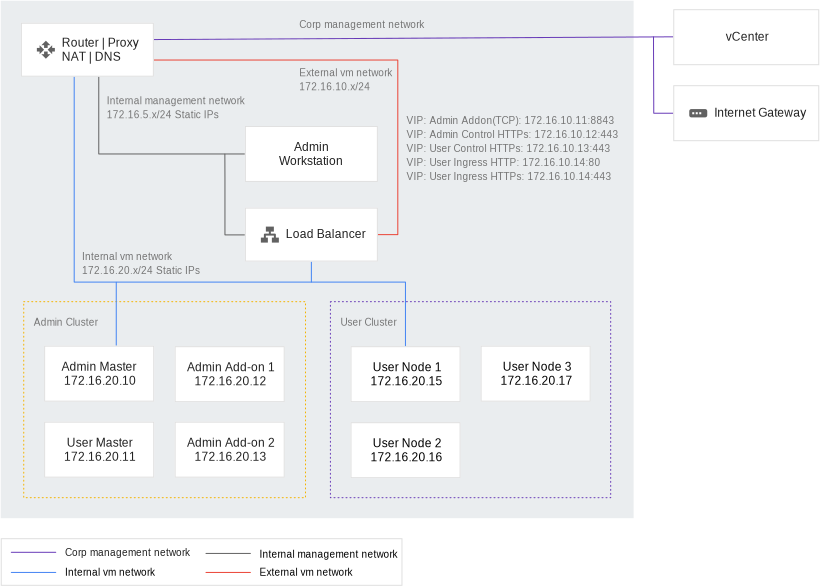
The preceding diagram has the following features:
- The admin workstation is on a private network.
- vCenter Server is on a public network.
- The cluster nodes are on a private network.
- The F5 BIG-IP load balancer is on three private networks.
- The F5 BIG-IP load balancer is configured with Virtual IPs (VIPs) that have private addresses. External clients must use public IP addresses configured in the network address translation (NAT) device. The NAT device uses static NAT to convert the public addresses to the internal VIPs configured on the load balancer.
Network Time Protocol
All the VMs that are part of your Google Distributed Cloud infrastructure must use the same Network Time Protocol (NTP) server.