- [Latest](https://docs.cloud.google.com/anthos/clusters/docs/bare-metal/latest/how-to/egress-nat)
- [Version 1.16](https://docs.cloud.google.com/anthos/clusters/docs/bare-metal/1.16/how-to/egress-nat.md.txt)
- [Earlier versions (unsupported)](https://docs.cloud.google.com/anthos/clusters/docs/bare-metal/1.8/getting-support.md.txt#version-support)
> [!WARNING]
>
> **Preview**
>
>
> This product or feature is
>
> subject to the "Pre-GA Offerings Terms" in the General Service Terms section
> of the [Service Specific
> Terms](https://docs.cloud.google.com/terms/service-terms#1).
>
> Pre-GA products and features are available "as is" and might have limited support.
>
> For more information, see the
> [launch stage descriptions](https://cloud.google.com/products/#product-launch-stages).
This document describes how to set up an egress NAT gateway for
Google Distributed Cloud. This gateway provides persistent, deterministic routing for
the egress traffic from your clusters. When you run workloads that have egress
user traffic (outside of your clusters), your customers want to identify this
traffic by using a few deterministic IP addresses. This allows your customers to
establish IP-based security measures, like allowlisting policies. There is no
charge to use this feature while it is in preview.
> [!NOTE]
> **Note:** This feature does not work with Google Distributed Cloud [release 1.8.3](https://docs.cloud.google.com/anthos/clusters/docs/bare-metal/1.8/release-notes-1.8#release_183).
The egress NAT gateway is enabled using two custom resources. For a given
namespace, the `AnthosNetworkGateway` custom resource specifies floating IP
addresses that can be configured on the network interface of a Node that is
chosen to act as a gateway. The `EgressNatPolicy` custom resource lets you
specify egress routing policies to control the traffic on the egress gateway.
If you do not set up an egress NAT gateway, or if egress traffic does not meet
traffic selection rules, egress traffic from a given Pod to a destination
outside your cluster is masqueraded to the IP address of the node where the Pod
is running. In this scenario, there is no guarantee that all egress traffic from
a particular Pod will have the same source IP address or will masquerade to the
same Node IP address.
## How the egress NAT gateway works
The [egress traffic selection logic](https://docs.cloud.google.com/anthos/clusters/docs/bare-metal/1.8/how-to/egress-nat.md.txt#setting_traffic_selection_rules) is based
on a namespace selector, a Pod selector, and a set of destination IP address
ranges in CIDR block notation. To illustrate how the egress NAT gateway works,
let's consider the flow of a packet from a Pod to an external consumer and the
corresponding response. Assume the Node subnet has IP addresses in the
192.168.1.0/24 CIDR block.
The following diagram shows the network architecture for egress traffic through
a gateway node.
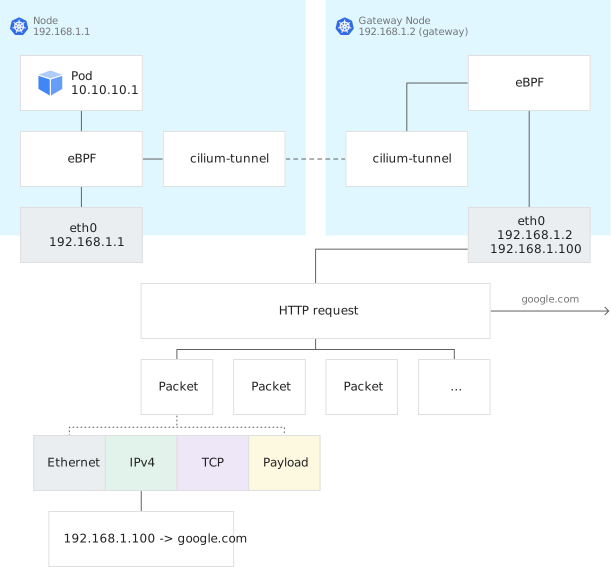
The packet flow through the egress NAT gateway might look like this:
1. Egress traffic is generated from a Pod with IP address `10.10.10.1` in a
Node with IP address `192.168.1.1`.
The traffic's destination address is an endpoint outside of the cluster.
2. If the traffic matches an egress rule, the eBPF program routes the egress
traffic to the gateway Node, instead of directly masquerading with the Node
IP address.
3. The gateway Node receives the egress traffic.
4. The gateway node masquerades the originating traffic's source IP address,
`10.10.10.1`, with the source egress IP address, `192.168.1.100` specified
in the `EgressNATPolicy` custom resource.
5. Return traffic comes back to the gateway Node with destination as
`192.168.1.100`.
6. The gateway node matches the conntrack of the return traffic with that of
the original egress traffic and rewrites the destination IP address as
`10.10.10.1`.
7. `10.10.10.1` is treated as in-cluster traffic, routed to the original Node
and delivered back to the original Pod.
## Configuring floating IP addresses for Node traffic
The Anthos Network Gateway controller is a bundled component of
Google Distributed Cloud. The controller manages a list of one
or more floating IP addresses to use for egress traffic from Nodes in your
cluster. Participating Nodes are determined by the specified namespace. The
Anthos Network Gateway makes a floating IP address available at all times on a
best-effort basis. If a Node using a floating IP address goes down, the
Anthos Network Gateway moves the assigned IP address to the next available Node.
All workload egress traffic using that IP address will move as well.
Include the Anthos Network Gateway details (annotation and spec) in the cluster
configuration file when you create a new 1.8.0 cluster.
> [!NOTE]
> **Note:** The egress NAT gateway capability is for preview only. You can enable the Anthos Network Gateway for a cluster, but we don't support upgrades for clusters that have it enabled. For this reason, we don't recommend upgrading existing production clusters to enable this feature, since it may prevent you from making future upgrades.
### Creating the `AnthosNetworkGateway` custom resource
You enable the Anthos Network Gateway by using the
`baremetal.cluster.gke.io/enable-anthos-network-gateway` annotation in the
cluster config file when you create a cluster. Set the annotation to `true` as
shown in the following example:
```yaml
apiVersion: baremetal.cluster.gke.io/v1
kind: Cluster
metadata:
annotations:
baremetal.cluster.gke.io/enable-anthos-network-gateway: "true"
name: cluster1
namespace: cluster-cluster1
```
When you create the `AnthosNetworkGateway` custom resource, set its namespace to
the cluster namespace and specify a list of floating IP addresses, as shown in
the following example:
> [!NOTE]
> **Note:** The cluster operator creates a copy of the `AnthosNetworkGateway` controller in the `kube-system` namespace. This copy of the `AnthosNetworkGateway` controller in the `kube-system` namespace is responsible for allocating floating IP addresses to gateway nodes.
```yaml
kind: AnthosNetworkGateway
apiVersion: networking.gke.io/v1alpha1
metadata:
namespace: cluster-cluster1
name: default
spec:
floatingIPs:
- 192.168.1.100
- 192.168.1.101
- 192.168.1.102
```
The number of floating IP addresses you specify impacts the reliability of your
cluster. For example, an egress NAT gateway will work with only one specified
floating IP address, but a Node failure may lead to traffic disruptions. If you
add more floating IP addresses, the `AnthosNetworkGateway` assigns and moves
them as needed. We recommend that you provide at least two floating IP addresses
per the L2 domain that is used in the cluster.
The controller assigns the floating IPs to Nodes based on the following
criteria:
- Node subnet - the floating IP address has to match Node's subnet.
- Node role (master, worker) - worker Nodes take precedence over master Nodes when assigning floating IP addresses.
- Whether a Node has a floating IP address - the controller prioritizes assignments to Nodes that do not have a floating IP assigned already.
The address/node mapping can be found in the `status` section when you get the
`AnthosNetworkGateway` object. Note that the `AnthosNetworkGateway` object is in
the kube-system namespace. If a gateway node is down, the controller of the
`AnthosNetworkGateway` assigns the floating IP addresses to the next available
Node.
### Verifying the gateway configuration
After you have applied your gateway configuration changes, you can use `kubectl`
to check the status of the gateway and retrieve the floating IP addresses
specified for the gateway.
1. Use the following command to check the status of the `AnthosNetworkGateway`
and see how the floating IP addresses are allocated:
```bash
kubectl -n kube-system get anthosnetworkgateway.networking.gke.io default -oyaml
```
The response for a cluster with two nodes, `worker1` and `worker2` might
look like this:
```yaml
kind: AnthosNetworkGateway
apiVersion: networking.gke.io/v1alpha1
metadata:
namespace: kube-system
name: default
spec:
floatingIPs:
- 192.168.1.100
- 192.168.1.101
- 192.168.1.102
status:
nodes:
worker1: Up
worker2: Up // Or Down
floatingIPs:
192.168.1.100: worker1
192.168.1.101: worker2
192.168.1.102: worker1
```
2. Use the following command to retrieve the `AnthosNetworkGateway` status and
address allocation for a specific node.
```bash
kubectl -n kube-system get anthosnetworkgatewaynode.networking.gke.io NODE_NAME -oyaml
```
Replace NODE_NAME with the name of the specific
node/machine that you want to inspect.
## Setting traffic selection rules
The `EgressNATPolicy` custom resource specifies traffic selection rules and
assigns a deterministic IP address for egress traffic that leaves the cluster.
When specifying the CR, `egress` (with at least one rule), `destinationCIDRs`,
and `egressSourceIP` are all required.
Use `kubectl apply` to create the `EgressNATPolicy` custom resource. The
following sections provide details and examples for defining the specification.
### Specifying egress routing rules
The `EgressNatPolicy` custom resource lets you specify the following rules for
egress traffic:
- You must specify one or more egress traffic selection rules in the `egress`
section.
- Each rule consists of a `podSelector` and a `namespaceSelector`.
- Selection is based on a namespace label, `namespaceSelector.matchLabels.**user**`, and a Pod label, `podSelector.matchLabels.**role**`.
- If a Pod matches any of the rules (matching uses an OR relationship), it is selected for egress traffic.
- Specify allowed destination addresses in the `destinationCIDRs` section.
- `destinationCIDRs` takes a list of CIDR blocks.
- If outgoing traffic from a Pod has a destination IP address that falls within the range of any of the specified CIDR blocks, it is selected for egress traffic.
In the following example, egress traffic from a Pod is permitted when the
following criteria are met:
- Pod is labeled with `role: frontend`.
- Pod is in a namespace labeled as either `user: alice` or `user: paul`.
- Pod is communicating to IP addresses in the `8.8.8.0/24` range.
```yaml
kind: EgressNATPolicy
apiVersion: networking.gke.io/v1alpha1
metadata:
name: egress
spec:
egress:
- namespaceSelector:
matchLabels:
user: alice
podSelector:
matchLabels:
role: frontend
- namespaceSelector:
matchLabels:
user: paul
podSelector:
matchLabels:
role: frontend
destinationCIDRs:
- 8.8.8.0/24
egressSourceIP: 192.168.1.100
```
For more information about using labels, refer to
[Labels and Selectors](https://kubernetes.io/docs/concepts/overview/working-with-objects/labels/)
in the Kubernetes documentation.
### Specifying a source IP address for egress traffic
Specify the source IP address that you want to use in the `egressSourceIP` field.
The source IP address must match one of the floating IP addresses specified in
the `AnthosNetworkGateway` custom resource.
Using the `EgressNATPolicy` example from the preceding section, if the Pod
selection and destination IP address criteria is met, egress traffic from the
Pod is translated to `192.168.1.100` using SNAT.
In order for the route to be accepted, the `egressSourceIP` address must be in
the same subnet as the gateway Node IP. If the `egressSourceIP` address is
unknown (not assigned) to the gateway node, the route request can't be
fulfilled. In this case, you will get an `UnknownEgressIP` error in the
Kubernetes events.
Use the following `kubectl` command to print the events for the
`EgressNATPolicy` object:
```bash
kubectl describe EgressNATPolicy egress
```
If there are multiple `EgressNATPolicy` CRs, each must have a different
`egressSourceIP` address. To prevent conflicts, coordinate with the development
team.
### Egress traffic selection rules and network policies
The egress NAT gateway is compatible with network policy APIs. Network policies
are assessed first and take precedence over the traffic selection rules of the
egress NAT gateway. For example, if the egress traffic triggers a network policy
resulting in the packet being dropped, egress gateway rules won't check the
packet. Only when the network policy allows the packet to egress will the egress
traffic selection rules be evaluated to decide how the traffic is handled,
either using the egress NAT gateway or directly masquerading with the IP address
of the Node where the Pod is running.
## Limitations
The current limitations for the egress NAT gateway include:
- The egress NAT gateway is only enabled for IPv4 mode.
- Egress IP addresses have to be in the same L2 domain with Node IP addresses
for this preview.
- Upgrades are not supported for clusters that have been configured to use
the preview of the egress NAT gateway.