- [Latest](https://docs.cloud.google.com/anthos/clusters/docs/bare-metal/latest/how-to/upgrade-lifecycle)
- [Version 1.16](https://docs.cloud.google.com/anthos/clusters/docs/bare-metal/1.16/how-to/upgrade-lifecycle.md.txt)
- [Earlier versions (unsupported)](https://docs.cloud.google.com/anthos/clusters/docs/bare-metal/1.16/getting-support.md.txt#version-support)
When you upgrade Google Distributed Cloud, the upgrade process involves multiple steps
and components. To help monitor the upgrade status or diagnose and troubleshoot
problems, it's helpful to know what happens when you run the
`bmctl upgrade cluster` command. This documents details the components and
stages of a cluster upgrade.
## Overview
The upgrade process moves your Google Distributed Cloud cluster from its current
version to a higher version.
This version information is stored in the following locations as part of the
cluster custom resource in the admin cluster:
- `status.anthosBareMetalVersion`: defines the current version of the cluster.
- `spec.anthosBareMetalVersion`: defines the target version, and is set when the upgrade process starts to run.
A successful upgrade operation reconciles `status.anthosBareMetalVersion`
to `spec.anthosBareMetalVersion` so that both show the target version.
### Version skew
The version skew is the difference in versions between an admin cluster and its
managed user clusters. Google Distributed Cloud clusters follow the same style as
Kubernetes: the admin cluster can be at most one minor version ahead of its
managed clusters.
### Version rules for upgrades
When you download and install a new version of `bmctl`, you can upgrade your
admin, hybrid, standalone, and user clusters created or upgraded with an earlier
version of `bmctl`. Clusters can't be downgraded to a lower version.
You can only upgrade a cluster to a version that matches the
version of `bmctl` you are using. That is, if you are using version
1.16.8 of `bmctl`, you can upgrade a cluster to version
1.16.8 only.
#### Patch version upgrades
For a given minor version, you can upgrade to any higher patch version. That is,
you can upgrade a `1.16.X`
version cluster to version
`1.16.Y` as long as
`Y` is greater than
`X`. For example, you can upgrade from
`1.15.0` to `1.15.1` and you can upgrade from
`1.15.1` to `1.15.3`. We recommend that you upgrade
to the latest patch version whenever possible to ensure your clusters have the
latest security fixes.
#### Minor version upgrades
You can upgrade clusters from one minor version to the next, regardless of the
patch version. That is, you can upgrade from
`1.N.X` to
`1.N+1.Y`, where
`1.N.X` is the version
of your cluster and `N+1` is the next available
minor version. The patch versions, `X` and
`Y`, don't affect the upgrade logic in this case. For
example, you can upgrade from `1.15.3` to `1.16.8`.
You can't skip minor versions when upgrading clusters. If you attempt to upgrade
to a minor version that is two or more minor versions higher than the cluster
version, `bmctl` emits an error. For example, you can't upgrade a version
`1.14.0` cluster to version `1.16.0`.
An admin cluster can manage user clusters that are on the same or previous minor
version. Managed user clusters can't be more than one minor version lower than
the admin cluster, so before upgrading an admin cluster to a new minor version,
make sure that all managed user clusters are at the same minor version as the
admin cluster.
The examples in the following [upgrade instructions](https://docs.cloud.google.com/anthos/clusters/docs/bare-metal/1.16/how-to/upgrade-lifecycle.md.txt#upgrade_self_managed) show
the upgrade process from version `1.15.2` to Google Distributed Cloud
`1.16.8`.
#### Node pool versioning rules
When you
[upgrade node pools selectively](https://docs.cloud.google.com/anthos/clusters/docs/bare-metal/1.16/how-to/upgrade.md.txt#select_np_up), the
following version rules apply:
- Cluster version must be greater than or equal to the worker node pool
version.
- The maximum skew between cluster version and worker node pool version is one
minor version.
- Worker node pools can't be at a version that released later than the cluster
version.
For example, with a cluster at version 1.15.4, which wasn't available when
version 1.16.0 released, you can't upgrade to version 1.16.0 and leave a
worker node pool at version 1.15.4. Similarly, if you upgraded to version
1.16.0, but opted to leave a worker node pool at version 1.15.2, you can't
later upgrade the worker node pool to version 1.15.4.
The following table lists the *supported node pool versions* that are allowed
for a specific cluster version:
| Cluster (control plane) version | Supported worker node pool versions ||||
|---|---|---|---|---|
| 1.16.8 | - 1.16.8 - 1.16.7 - 1.16.6 - 1.16.5 - 1.16.4 | - 1.16.3 - 1.16.2 - 1.16.1 - 1.16.0 - 1.15.9 | - 1.15.8 - 1.15.7 - 1.15.6 - 1.15.5 - 1.15.4 | - 1.15.3 - 1.15.2 - 1.15.1 - 1.15.0 |
| 1.16.7 | - 1.16.7 - 1.16.6 - 1.16.5 - 1.16.4 - 1.16.3 | - 1.16.2 - 1.16.1 - 1.16.0 - 1.15.9 - 1.15.8 | - 1.15.7 - 1.15.6 - 1.15.5 - 1.15.4 - 1.15.3 | - 1.15.2 - 1.15.1 - 1.15.0 |
| 1.16.6 | - 1.16.6 - 1.16.5 - 1.16.4 - 1.16.3 - 1.16.2 | - 1.16.1 - 1.16.0 - 1.15.9 - 1.15.8 - 1.15.7 | - 1.15.6 - 1.15.5 - 1.15.4 - 1.15.3 - 1.15.2 | - 1.15.1 - 1.15.0 |
| 1.16.5 | - 1.16.5 - 1.16.4 - 1.16.3 - 1.16.2 | - 1.16.1 - 1.16.0 - 1.15.8 - 1.15.7 | - 1.15.6 - 1.15.5 - 1.15.4 - 1.15.3 | - 1.15.2 - 1.15.1 - 1.15.0 |
| 1.16.4 | - 1.16.4 - 1.16.3 - 1.16.2 - 1.16.1 | - 1.16.0 - 1.15.7 - 1.15.6 - 1.15.5 | - 1.15.4 - 1.15.3 - 1.15.2 - 1.15.1 | - 1.15.0 |
| 1.16.3 | - 1.16.3 - 1.16.2 - 1.16.1 - 1.16.0 | - 1.15.6 - 1.15.5 - 1.15.4 - 1.15.3 | - 1.15.2 - 1.15.1 - 1.15.0 | |
| 1.16.2 | - 1.16.2 - 1.16.1 - 1.16.0 - 1.15.5 | - 1.15.4 - 1.15.3 - 1.15.2 - 1.15.1 | - 1.15.0 | |
| 1.16.1 | - 1.16.1 - 1.16.0 - 1.15.4 - 1.15.3 | - 1.15.2 - 1.15.1 - 1.15.0 | | |
| 1.16.0 | - 1.16.0 - 1.15.3 - 1.15.2 - 1.15.1 | - 1.15.0 | | |
## Upgrade components
Components are upgraded at both the node and the cluster the level. At the
cluster level, the following components are upgraded:
- Cluster components for networking, observability, and storage.
- For admin, hybrid, and standalone clusters, the lifecycle controllers.
- The `gke-connect-agent`.
Nodes in a cluster run as one of the following roles, with different components
upgraded depending on the node's role:
| Role of the node | Function | Components to upgrade |
|---|---|---|
| Worker | Runs user workloads | Kubelet, container runtime (Docker or containerd) |
| Control plane | Runs the Kubernetes control plane, cluster lifecycle controllers, and Google Kubernetes Engine (GKE) Enterprise edition platform add-ons | Kubernetes control plane static Pods (`kubeapi-server`, `kube-scheduler`, `kube-controller-manager`, etcd) Lifecycle controllers like `lifecycle-controllers-manager` and `anthos-cluster-operator` Google Kubernetes Engine (GKE) Enterprise edition platform add-ons like `stackdriver-log-aggregator` and `gke-connect-agent` |
| Control plane load balancer | Runs HAProxy and Keepalived that serve traffic to `kube-apiserver`, and run MetalLB speakers to claim virtual IP addresses | Control plane load balancer static Pods (HAProxy, Keepalived) MetalLB speakers |
> [!NOTE]
> **Note:** Config Sync, Policy Controller, Config Controller, and Cloud Service Mesh aren't included as part of a Google Distributed Cloud upgrade. You can upgrade Google Distributed Cloud clusters before or after you upgrade additional components like Config Sync, Policy Controller, Config Controller, or Cloud Service Mesh. The order of the Google Kubernetes Engine (GKE) Enterprise edition product upgrades doesn't matter. For Google Kubernetes Engine (GKE) Enterprise edition component version compatibility information, see [Google Kubernetes Engine (GKE) Enterprise edition version and upgrade support](https://docs.cloud.google.com/anthos/docs/version-and-upgrade-support).
## Downtime expectation
The following table details the expected downtime and potential impact when you
upgrade clusters. This table assumes you have multiple cluster nodes and an HA
control plane. If you run a standalone cluster or don't have an HA control
plane, expect additional downtime. Unless noted, this downtime applies to both
admin and user cluster upgrades:
| Components | Downtime expectations | When downtime happens |
|---|---|---|
| Kubernetes control plane API server (`kube-apiserver`), etcd, and scheduler | No downtime | N/A |
| Lifecycle controllers and `ansible-runner` job (admin cluster only) | No downtime | N/A |
| Kubernetes control plane `loadbalancer-haproxy` and `keepalived` | Transient downtime (less than 1 to 2 minutes) when the load balancer redirects traffic. | Start of the upgrade process. |
| Observability `pipeline-stackdriver` and `metrics-server` | Operator drained and upgraded. Downtime should be less than 5 minutes. DaemonSets continue to work with no downtime. | After control plane nodes finish upgrading. |
| Container network interface (CNI) | No downtime for existing networking routes. DaemonSet deployed two by two with no downtime. Operator is drained and upgraded. Downtime less than 5 minutes. | After control plane nodes finish upgrading. |
| MetalLB (user cluster only) | Operator drained and upgraded. Downtime is less than 5 minutes. No downtime for existing service | After control plane nodes finish upgrading. |
| CoreDNS and DNS autoscaler (user cluster only) | CoreDNS has multiple replicas with autoscaler. Usually no downtime. | After control plane nodes finish upgrading. |
| Local volume provisioner | No downtime for existing provisioned persistent volumes (PVs). Operator might have 5 minutes downtime. | After control plane nodes finish upgrading. |
| Istio / ingress | Istio operator is drained and upgraded. About 5 minutes of downtime. Existing configured ingress continue to work. | After control plane nodes finish upgrading. |
| Other system operators | 5 minutes downtime when drained and upgraded. | After control plane nodes finish upgrading. |
| User workloads | Depends on the setup, such as if highly available. Review your own workload deployments to understand potential impact. | When the worker node(s) are upgraded. |
## User cluster upgrade details
This section details the order of component upgrades and status information for
a user cluster upgrade. The following section details deviations from this flow
for admin, hybrid, or standalone cluster upgrades.
The following diagram shows preflight check process for a user cluster upgrade:
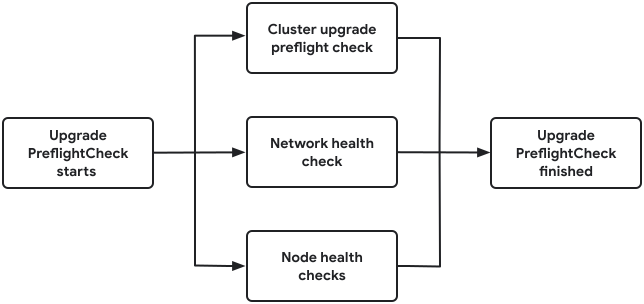
The preceding diagram details the steps that happen during an upgrade:
- The `bmctl upgrade cluster` command creates a `PreflightCheck` custom resource.
- This preflight check runs additional checks such as cluster upgrade checks, network health checks, and node health checks.
- The results of these additional checks combine to report on the ability for the cluster to successfully upgrade to the target version.
If the preflight checks are successful and there are no blocking issues, the
components in the cluster are upgraded in a specified order, as shown in the
following diagram:
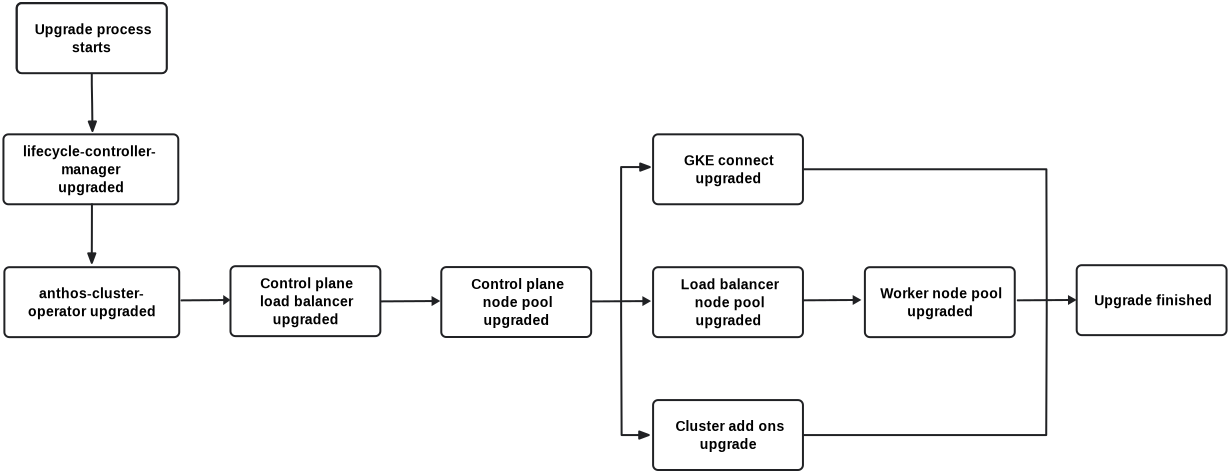
In the preceding diagram, components are upgraded in order as follows:
1. The upgrade starts by updating the `spec.anthosBareMetalVersion` field.
2. The control plane load balancers are upgraded.
3. The control plane node pool is upgraded.
4. In parallel, GKE connect is upgraded, cluster add-ons are upgraded, and the load balancer node pool is upgraded.
1. After the load balancer node pool is successfully upgraded, the worker node pools are upgraded.
5. When all components have upgraded, cluster health checks run.
The health checks continue to run until all checks pass.
6. When all health checks pass, the upgrade is finished.
Each component has its own status field inside the Cluster custom resource. You
can check the status in these fields to understand the progress of the upgrade:
| Sequence | Field name | Meaning |
|---|---|---|
| 1 | `status.controlPlaneNodepoolStatus` | Status is copied from the control plane node pool status. The field includes the versions of the nodes of control plane node pools |
| 2 | `status.anthosBareMetalLifecycleControllersManifestsVersion` | Version of `lifecycles-controllers-manager` applied to the cluster. This field is only available for admin, standalone, or hybrid clusters. |
| 2 | `status.anthosBareMetalManifestsVersion` | Version of the cluster from the last applied manifest. |
| 2 | `status.controlPlaneLoadBalancerNodepoolStatus` | Status is copied from the control plane load balancer node pool status. This field is empty if no separate control plane load balancer is specified in `Cluster.Spec`. |
| 3 | `status.anthosBareMetalVersions` | An aggregated version map of version to node numbers. |
| 4 | `status.anthosBareMetalVersion` | Final status of the upgraded version. |
## Admin, hybrid, and standalone cluster upgrade details
Starting with `bmctl` version 1.15.0, the default upgrade behavior for
self-managed (admin, hybrid, or standalone) clusters is an *in-place* upgrade.
That is, when you upgrade a cluster to version 1.15.0 or higher, the upgrade
uses lifecycle controllers, instead of a bootstrap cluster, to manage the entire
upgrade process. This change simplifies the process and reduces resource
requirements, which makes cluster upgrades more reliable and scalable.
Although using a bootstrap cluster for upgrading isn't recommended, the option
is still available. To use a bootstrap cluster when you upgrade, run the
`bmctl upgrade` command with the `--use-bootstrap=true` flag.
The stages of the upgrade are different, depending on which method you
use.
### In-place upgrades
The default, in-place upgrade process for self-managed clusters is similar to
the user cluster upgrade process. However, when you use the in-place upgrade
process, a new version of the `preflightcheck-operator` is deployed before the
cluster preflight check and health checks run:
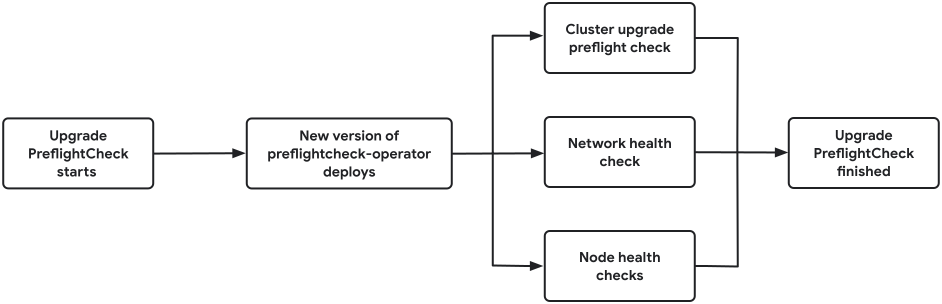
Like the user cluster upgrade, the upgrade process starts by updating the
`Cluster.spec.anthosBareMetalVersion` field to the target version. Two
additional steps run before components are updated, as shown in the following
diagram: the `lifecycle-controller-manager` upgrades itself to the target
version, and then deploys the target version of `anthos-cluster-operator`. This
`anthos-cluster-operator` performs the remaining steps of the upgrade process:
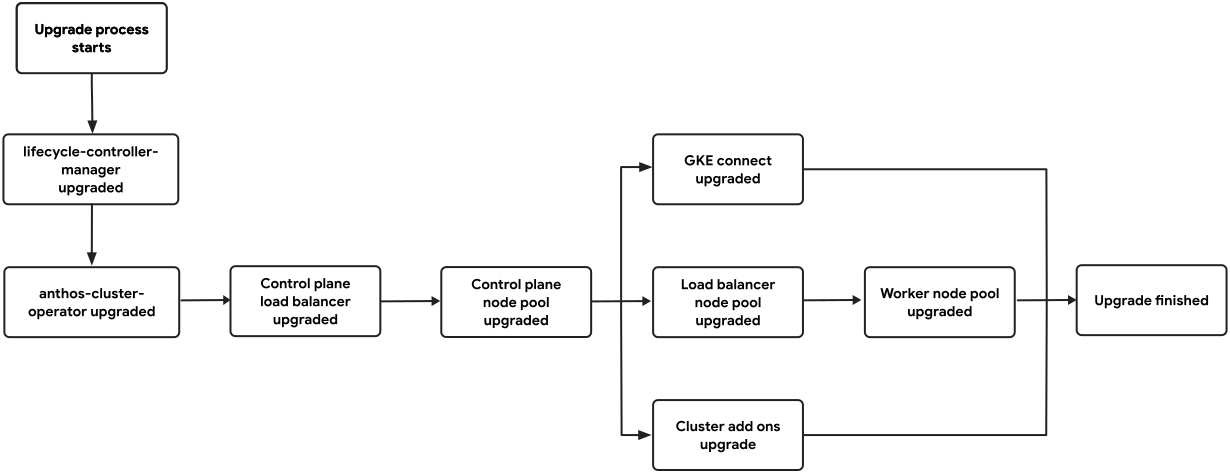
Upon success, the `anthos-cluster-operator` reconciles the target version from
`spec.anthosBareMetalVersion` to `status.anthosBareMetalVersion`.
### Upgrade with a bootstrap cluster
The process to upgrade an admin, hybrid, or standalone cluster is similar to a
user cluster discussed in the previous section.
The main difference is that the `bmctl upgrade cluster` command starts a process
to create a *bootstrap cluster*. This bootstrap cluster is a temporary cluster
that manages the hybrid, admin, or standalone cluster during an upgrade.
The process to transfer the management ownership of the cluster to the bootstrap
cluster is called a *pivot*. The rest of the upgrade follows the same process as
the user cluster upgrade.
During the upgrade process, the resources in the target cluster remain stale.
The upgrade progress is only reflected in the resources of the bootstrap
cluster.
If needed, you can access the bootstrap cluster to help monitor and debug the
upgrade process. The bootstrap cluster can be accessed through
`bmctl-workspace/.kindkubeconfig`.
To transfer the management ownership of the cluster back after the upgrade is
complete, the cluster pivots the resources from the bootstrap cluster to the
upgraded cluster. There are no manual steps you perform to pivot the cluster
during the upgrade process. The bootstrap cluster is deleted after the cluster
upgrade succeeds.
## Node draining
Google Distributed Cloud cluster upgrades might lead to application disruption as the
nodes are drained. This draining process causes all Pods that run on a node to
shut down and restart on remaining nodes in the cluster.
Deployments can be used to tolerate such disruption. A Deployment can specify
multiple replicas of an application or service should run. An application with
multiple replicas should experience little to no disruption during upgrades.
### Pod disruption budgets (PDBs)
Pod disruption budgets (PDBs) can be used to ensure that a defined number of
replicas always run in the cluster under normal running conditions. PDBs let you
limit the disruption to a workload when its Pods need to be rescheduled.
However, Google Distributed Cloud doesn't honor PDBs when nodes drain during an upgrade.
Instead, the node draining process is best effort. Some Pods might get stuck in
a `Terminating` state and refuse to vacate the node. The upgrade proceeds, even
with stuck Pods, when the draining process on a node takes more than 20 minutes.
## What's next
- Review the [best practices for Google Distributed Cloud upgrades](https://docs.cloud.google.com/anthos/clusters/docs/bare-metal/how-to/upgrade-best-practices)
- [Upgrade clusters](https://docs.cloud.google.com/anthos/clusters/docs/bare-metal/how-to/upgrade)
- [Troubleshoot cluster upgrade issues](https://docs.cloud.google.com/anthos/clusters/docs/bare-metal/1.16/troubleshooting/create-upgrade.md.txt#cluster_upgrade_issues)