- [Latest](https://docs.cloud.google.com/anthos/clusters/docs/bare-metal/latest/concepts/about-bare-metal)
- [Version 1.16](https://docs.cloud.google.com/anthos/clusters/docs/bare-metal/1.16/concepts/about-bare-metal.md.txt)
- [Earlier versions (unsupported)](https://docs.cloud.google.com/anthos/clusters/docs/bare-metal/1.16/getting-support.md.txt#version-support)
Google Distributed Cloud (GDC) is our solution that extends
Google Cloud's infrastructure and services into your data center, with
Google-provided software running on your own hardware. Distributed Cloud is
built on
[Google Kubernetes Engine (GKE)](https://docs.cloud.google.com/kubernetes-engine/docs/concepts/kubernetes-engine-overview.md.txt),
with its own *Google Distributed Cloud* package that extends GKE for
use in an on-premises environment. With Google Distributed Cloud you can create,
manage, and upgrade Kubernetes clusters on your own premises while using
Google Cloud features. You can deploy and operate containerized applications on
your Google Distributed Cloud
clusters at scale using Google's infrastructure.
Distributed Cloud is part of GKE Enterprise: an
enterprise tier for GKE with powerful features for governing,
managing, and operating containerized workloads at scale. You can find out more
about GKE Enterprise and the features available for Google Distributed Cloud
clusters in the [GKE Enterprise (Anthos) technical
overview](https://docs.cloud.google.com/anthos/docs/concepts/overview).
## Why Google Distributed Cloud?
Google Distributed Cloud clusters take advantage of your existing enterprise
infrastructure, and help you modernize applications throughout their lifecycle.
### Bring your own node
Google Distributed Cloud lets you deploy applications directly on your own
hardware infrastructure, so it can deliver the best performance and flexibility.
You have direct control over application scale, security, and network latency.
You also get the benefits of containerized applications through
GKE and GKE Enterprise components.
### Improved performance and lowered cost
Google Distributed Cloud manages application deployment and health across existing
corporate data centers for more efficient operation. You can run
Google Distributed Cloud at the edge of the network, so analytic apps can run with
full performance.
Because Google Distributed Cloud runs on physical machines, instead of virtual
machines, you can also manage application containers on a wide variety of
performance optimized hardware types, like GPUs. Google Distributed Cloud also
allows for direct application access to hardware.
### Compatible security
Because you control your node environment, you can optimize your network,
hardware, and applications to meet your specific requirements. As a result,
you can directly control system security, without having to worry about your
compatibility with virtual machines and operating systems.
### Monitored application deployment
Google Distributed Cloud provides advanced monitoring of the health and
performance of your environment. You can more easily adjust the scale of
applications while maintaining reliability despite fluctuations in workload and
network traffic.
You manage monitoring, logging, and analysis of clusters and workloads through
[Connect](https://docs.cloud.google.com/anthos/multicluster-management/connect/overview).
### Network latency and flexibility
Because you manage your network requirements, your network can be optimized
for low latency. This network optimization can be crucial for performance in
commercial or finance analytics and other enterprise or network edge applications.
### Highly available
Google Distributed Cloud includes support for multiple control nodes in a cluster.
If a control plane node goes down, you can still administer your environment.
### Secure design and control
Your infrastructure security can be customized for your own needs, with
minimal connections to outside resources. Most importantly, there is no
additional VM complexity when deploying security systems, and you maintain
complete OS control when interacting with existing security systems.
Google Distributed Cloud works with lightweight secure connections to Google
APIs. You can manage clusters and applications from a central location
with Connect and Cloud Monitoring. This centralization also helps
keep your deployments running smoothly, and lets Google Cloud Support
troubleshoot issues more effectively.
### Preflight checks on installation
Google Distributed Cloud runs on open source and enterprise Linux systems,
and on a minimal hardware infrastructure, and so is flexible in your
environment. Google Distributed Cloud also includes various pre-flight checks
to help ensure successful configurations and installations.
### Application deployment and load balancing
Google Distributed Cloud includes Layer 4 and Layer 7 load balancing mechanisms
at cluster creation.
### Improved `etcd` reliability
To monitor the size and defragment `etcd` databases, Google Distributed Cloud
control planes include an `etcddefrag` Pod. The `etcddefrag` Pod reclaims
storage from large `etcd` databases and recovers `etcd` when disk space is
exceeded.
## How it works
Google Distributed Cloud extends
[Google Kubernetes Engine (GKE)](https://docs.cloud.google.com/kubernetes-engine/docs/concepts/kubernetes-engine-overview.md.txt)
to let you create GKE clusters on your own Linux servers on your
own premises. You manage these Google Distributed Cloud clusters in Google Cloud
along with regular GKE clusters and clusters in other
environments as part of a fleet.
GKE clusters run in Google Cloud where the Kubernetes control
plane and network infrastructure are managed by Google Cloud. Because
Google Distributed Cloud clusters run in your data center, we provide some
administration and control plane software in addition to the GKE
software. The software that runs in your data center is downloaded as part of
the installation and upgrade processes.
The following diagram shows the simplified result of a completed installation:
[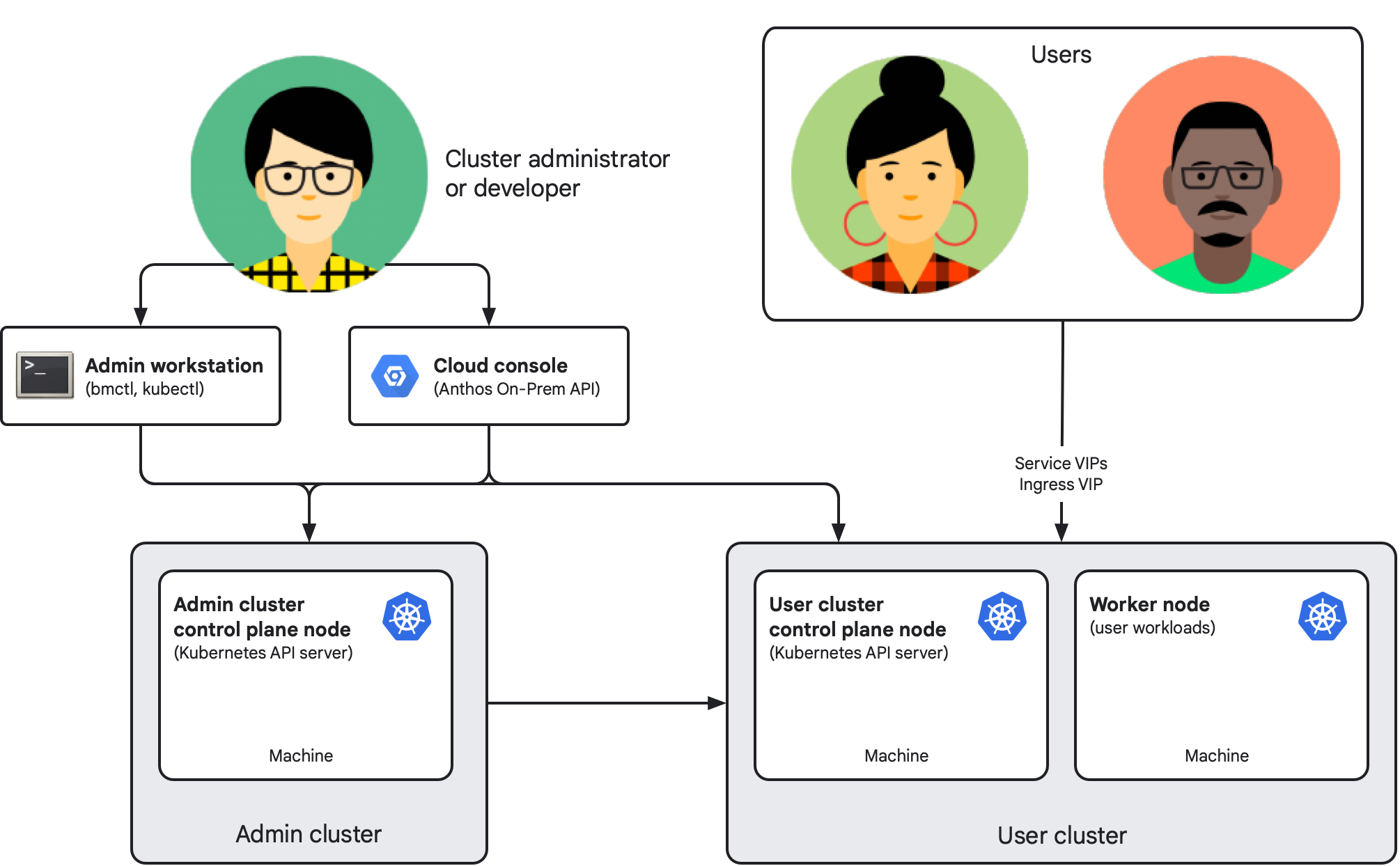](https://docs.cloud.google.com/static/anthos/clusters/docs/bare-metal/1.16/concepts/images/abm-basic-arch-admin_user.svg) Google Distributed Cloud architecture with an admin cluster and a user cluster (Click to enlarge)
### Key components
The following components make up a Google Distributed Cloud installation:
- The admin cluster consists of one or more *control plane nodes*. Each node
is a physical machine running a supported Linux operating system. The
standard deployment consists of an admin cluster that manages the lifecycle
of one or more user clusters through Kubernetes Resource Management (KRM).
Each node machine in the installation has its own IP address.
- A user cluster is where the workloads that implement your applications run,
like in GKE on Google Cloud. Each user cluster consists of at
least one *control plane node* and one *worker node*.
- The admin workstation is a separate machine (typically) that includes the
tools and cluster artifacts, such as configuration files. Cluster creators
and developers use these tools and artifacts to manage
Google Distributed Cloud clusters, with appropriate permissions:
- Running `bmctl` from the admin workstation lets you create and update
clusters and perform some other administrative tasks
- Running `kubectl` from the admin workstation lets you interact with your
admin and user clusters, including deploying and managing workloads
- The GKE On-Prem API is the Google Cloud-hosted API for cluster lifecycle
management. You use the API clients (Google Cloud console, Google Cloud CLI, and
Terraform) to create and manage the lifecycle of your on-premises clusters
as an alternative to logging into the admin workstation to manage your
clusters with the `bmctl` CLI.
- The console also provides a web interface for your
Google Cloud project, including Google Distributed Cloud clusters. The
console displays key metrics about your clusters to help you
monitor cluster health.
- Cluster administrators and developers use `kubectl` to access cluster
control planes through virtual IP addresses (VIPs) specified as part of
cluster configuration. Application users and developers use Service and
Ingress VIPs to access and expose workloads respectively.
### Connecting to the fleet
All Google Distributed Cloud user clusters (and optionally admin clusters) are
members of a [fleet](https://docs.cloud.google.com/anthos/fleet-management/docs): a logical grouping of
Kubernetes clusters. Fleets let your organization extend management from
individual clusters to entire groups of clusters. Fleets can help your teams
adopt similar best practices to those practices used at Google. You can view and
manage fleet clusters together in the Google Cloud console. Fleet-enabled
GKE Enterprise features help you manage, govern, and operate your
workloads at scale. You can see a complete list of available fleet features for
on-premises environments in [GKE Enterprise deployment
options](https://docs.cloud.google.com/anthos/deployment-options#features_available_on_anthos_clusters_outside_of_google_cloud).
Cluster connections to Google Cloud are managed by a Connect Agent, which is
deployed as part of the Google Distributed Cloud cluster creation process. You can
learn more about how this agent works in the [Connect Agent
overview](https://docs.cloud.google.com/anthos/fleet-management/docs/connect-agent).
Fleet membership is also used to manage Google Distributed Cloud cluster pricing,
as described in the next section.
For a deeper discussion of Google Kubernetes Engine (GKE) Enterprise edition features and how they work together,
see the [GKE Enterprise (Anthos) technical
overview](https://docs.cloud.google.com/anthos/docs/concepts/overview).
## Purchasing Distributed Cloud
Enabling GKE Enterprise lets you use all
GKE Enterprise features, including Google Distributed Cloud, for a
single per-vCPU charge for fleet clusters. You enable the platform by enabling
the [Anthos API](https://console.cloud.google.com/apis/library/anthos.googleapis.com)
in your Google Cloud project.
For full pricing information, including how to contact sales, see
[GKE pricing](https://cloud.google.com/kubernetes-engine/pricing).
## Versions
To learn about Google Distributed Cloud versions, see
[Version Support Policy](https://docs.cloud.google.com/anthos/clusters/docs/bare-metal/1.16/getting-support.md.txt#version-support).
## Installing Google Distributed Cloud
Because Google Distributed Cloud clusters run in your own infrastructure, they're
highly configurable. Once you select the [deployment
model](https://docs.cloud.google.com/anthos/clusters/docs/bare-metal/1.16/installing/install-prep) that meets your particular
organizational and use case needs: you can choose from a range of supported load
balancing modes, IP addressing options, security features, connectivity options,
and more. Setting up a Google Distributed Cloud cluster involves making decisions
before and during installation. This documentation set includes guides to help
your team decide on the right features and options for you. To ensure that your
installation meets the needs of your organization, consult with your networking
and application teams.