- [Latest](https://docs.cloud.google.com/anthos/clusters/docs/bare-metal/latest/installing/openstack-k8s-provider)
- [Version 1.16](https://docs.cloud.google.com/anthos/clusters/docs/bare-metal/1.16/installing/openstack-k8s-provider.md.txt)
- [Earlier versions (unsupported)](https://docs.cloud.google.com/anthos/clusters/docs/bare-metal/1.10/getting-support.md.txt#version-support)
This guide explains how to configure the
[OpenStack Cloud Provider for Kubernetes](https://github.com/kubernetes/cloud-provider-openstack)
in your Google Distributed Cloud cluster. The OpenStack Cloud Provider must be
configured to expose Kubernetes Services using the
[OpenStack LBaaS](https://docs.openstack.org/mitaka/networking-guide/config-lbaas.html).
## Prerequisites
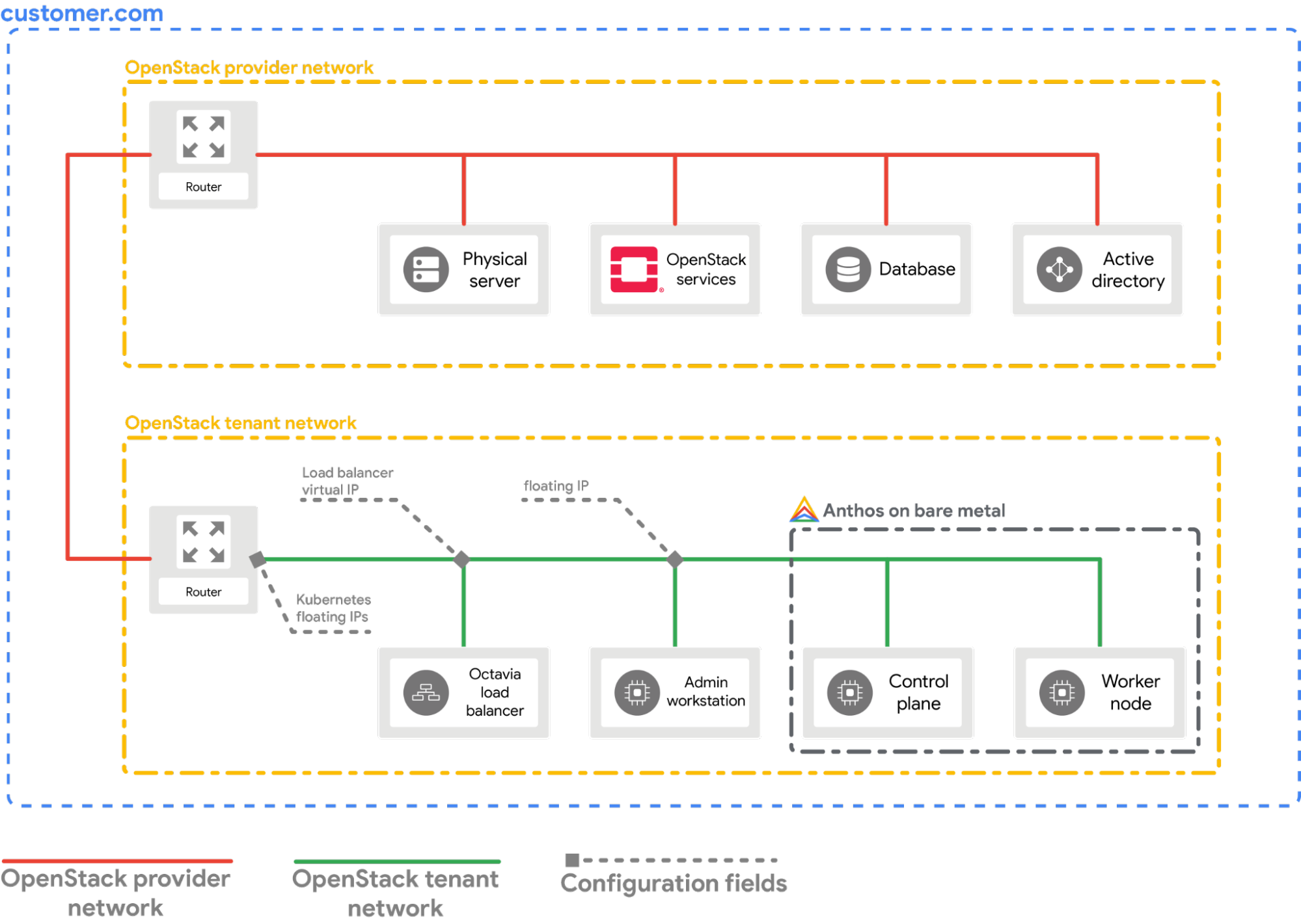
This guide assumes that you have an Google Distributed Cloud cluster running in
your OpenStack environment with a setup similar to what is explained in the
[Deploy Google Distributed Cloud on OpenStack](https://docs.cloud.google.com/anthos/clusters/docs/bare-metal/1.10/installing/openstack-abm-install.md.txt) guide. Please
follow that guide first before trying these steps.
[](https://docs.cloud.google.com/anthos/clusters/docs/bare-metal/1.10/images/openstack-setup.png)
> [!WARNING]
> **Warning:** All the commands that follow assumes that the environment for Google Distributed Cloud in OpenStack was setup using this [Terraform script](https://github.com/GoogleCloudPlatform/anthos-samples/tree/master/anthos-bm-openstack-terraform#terraform-example-to-create-openstack-vms-for-anthos). Thus, the names (VM name, Network name, Root user etc.) used in the commands are what is used by the Terraform script. Please adjust the commands according to your setup if you configured the OpenStack environment manually.
## Configure the provider
The following section assumes that you are starting from a terminal window in
your local workstation.
1. Source the OpenStack client configuration (`openrc`) file. You can download
it from the OpenStack WebUI.
```bash
source PATH_TO_OPENRC_FILE/openrc
```
2. Create the configuration file for the OpenStack Kubernetes Cloud Provider.
cat > cloud.conf << EOF
[Global]
auth-url=${OS_AUTH_URL}
username=${OS_USERNAME}
password=${OS_PASSWORD}
region=RegionOne
tenant-name=admin
domain-id=default
# this is for using a self-signed cert if your using a CA then comment this line
# and point to the CA certificate using the "ca-file" arg
tls-Insecure=true
[LoadBalancer]
use-octavia=true
# this is generally the public network on OpenStack
floating-network-id=PUBLIC_NETWORK_ID
# this should be private network subnet where vip is allocated for the ABM nodes
subnet-id=ABM_NETWORK_SUBNET_ID
[BlockStorage]
bs-version=v2
EOF
Replace the following:
- `OS_AUTH_URL`, `OS_USERNAME`, `OS_PASSWORD`: These variables should be already set in the environment by source-ing the `openrc` file. Thus, they will be automatically picked up.
- `PUBLIC_NETWORK_ID`: This is the publicly accessible network in your OpenStack deployment from which **Floating IPs** are allocated. It is from this network the `LoadBalancer IPs` for the Kubernetes services will be assigned. You can use a command similar to [this one](https://github.com/GoogleCloudPlatform/anthos-samples/blob/master/anthos-bm-openstack-terraform/docs/openstack_cloud_provider.md#4-get-the-id-of-the-public-network-in-openstack) to fetch this IP from your OpenStack environment.
- `ABM_NETWORK_SUBNET_ID`: This is the subnet on the private network in your OpenStack deployment from which IPs are allocated for the VMs running Google Distributed Cloud. You can use a command similar to [this one](https://github.com/GoogleCloudPlatform/anthos-samples/blob/master/anthos-bm-openstack-terraform/docs/openstack_cloud_provider.md#5-get-the-id-of-the-subnetwork-connecting-the-anthos-on-bare-metal-vms-in-openstack) to fetch this IP from your OpenStack environment.
> [!NOTE]
> **Note:** Edit the `cloud.conf` file to meet your needs and environment. What is shown here is only an example. For more information about all configuration parameters, see the [OpenStack Cloud Provider docs](https://github.com/kubernetes/cloud-provider-openstack/blob/master/docs/openstack-cloud-controller-manager/using-openstack-cloud-controller-manager.md#config-openstack-cloud-controller-manager).
3. Fetch the **public floating IP address** of the `abm-ws` VM.
```bash
export OPENSTACK_IPS=$(openstack floating ip list --tags=abm_ws_floatingip -f json)
export FLOATING_IP=$(jq -c '.[]."Floating IP Address"' <<< $OPENSTACK_IPS | tr -d '"')
```
4. Copy the `cloud.conf` file into the `abm-ws` VM in OpenStack.
```bash
scp ./cloud.conf ubuntu@$FLOATING_IP:~
```
> [!NOTE]
> **Note:** If you have public key authentication configured for your VM use the `"-o IdentitiesOnly=yes -i "` flags with the SCP/SSH commands.
5. Log in securely into the `abm-ws` VM via SSH and log in as a `root` user.
The `root` user as configured by the
[Terraform scripts](https://github.com/GoogleCloudPlatform/anthos-samples/tree/master/anthos-bm-openstack-terraform#terraform-example-to-create-openstack-vms-for-anthos)
is `abm`.
```bash
ssh ubuntu@$FLOATING_IP
sudo -u abm -i
```
6. Copy the `cloud.conf` files into the `$HOME` directory of the `root` user.
```bash
cp /home/ubuntu/cloud.conf $HOME
```
7. Create a `Kubernetes Secret` with the configuration.
```bash
# make sure the kubectl client is pointing towards your Anthos on bare metal cluster
export KUBECONFIG=~/bmctl-workspace/CLUSTER_NAME/CLUSTER_NAME-kubeconfig
# store the provider configurations as a Kubernetes secret
kubectl create secret -n kube-system generic cloud-config --from-file=cloud.conf
```
8. Install the OpenStack Cloud Provider for Kubernetes.
```bash
# create the necessary roles for the OpenStack provider
kubectl apply -f https://raw.githubusercontent.com/kubernetes/cloud-provider-openstack/master/manifests/controller-manager/cloud-controller-manager-roles.yaml
# create the required role-bindings for the OpenStack provider
kubectl apply -f https://raw.githubusercontent.com/kubernetes/cloud-provider-openstack/master/manifests/controller-manager/cloud-controller-manager-role-bindings.yaml
# create the OpenStack controller manager
kubectl apply -f https://raw.githubusercontent.com/kubernetes/cloud-provider-openstack/master/manifests/controller-manager/openstack-cloud-controller-manager-ds.yaml
```
## Validate the OpenStack integration
1. Deploy the sample
[Point-Of-Sales application](https://github.com/GoogleCloudPlatform/point-of-sale).
```bash
kubectl apply -f https://raw.githubusercontent.com/GoogleCloudPlatform/anthos-samples/master/anthos-bm-openstack-terraform/resources/point-of-sales.yaml
```
2. Verify if the application pods are running.
```bash
kubectl get pods
```
Expected output:
```bash
NAME READY STATUS RESTARTS AGE
api-server-7db4777f7f-zflk5 1/1 Running 0 74s
inventory-58c6fb5568-dqk2x 1/1 Running 0 74s
payments-68d5d65d5c-5mjl6 1/1 Running 0 74s
```
3. Exposed the application via a service of type `LoadBalancer`.
```bash
kubectl apply -f https://raw.githubusercontent.com/GoogleCloudPlatform/anthos-samples/master/anthos-bm-openstack-terraform/resources/point-of-sales-service.yaml
```
4. Try accessing the service from a browser.
```bash
# wait for the external IP to be assigned
kubectl get service api-server-lb
NAME TYPE CLUSTER-IP EXTERNAL-IP PORT(S) AGE
api-server-lb LoadBalancer 10.203.77.215 172.29.249.159 80:32378/TCP 4m12s
```
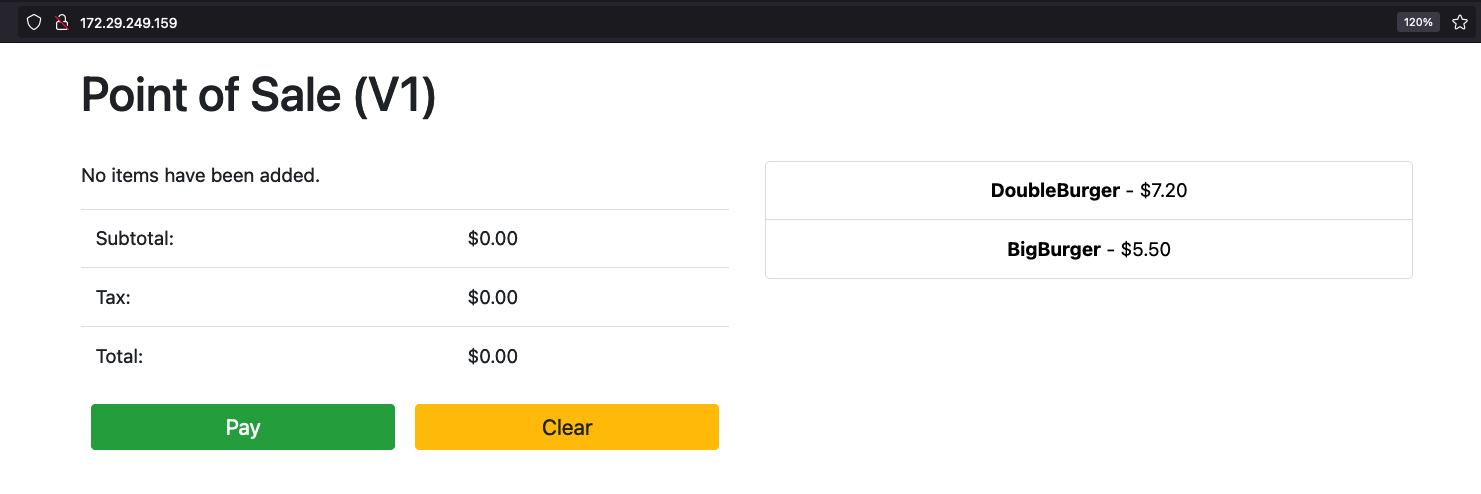
Point-Of-Sales application accessed using the `EXTERNAL-IP`.
[](https://docs.cloud.google.com/anthos/clusters/docs/bare-metal/1.10/images/pos-app.png)
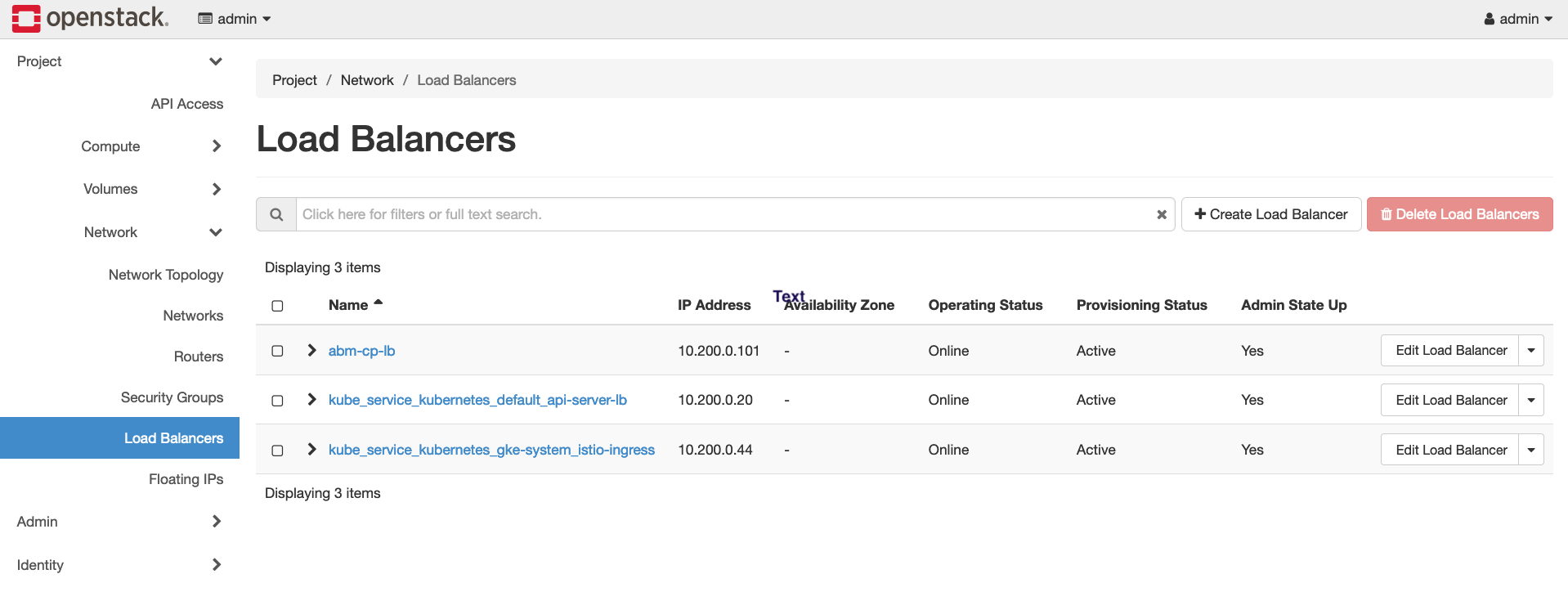
You can notice a new **OpenStack Load Balancer** being created in OpenStack by
visiting the OpenStack WebUI.
[](https://docs.cloud.google.com/anthos/clusters/docs/bare-metal/1.10/images/k8s-lb-openstack.png)