> [!WARNING]
>
> **Preview**
>
>
> This feature is
>
> subject to the "Pre-GA Offerings Terms" in the General Service Terms section of the
> [Service Specific
> Terms](https://docs.cloud.google.com/terms/service-terms#1).
>
> Pre-GA features are available "as is" and might have limited support.
>
> For more information, see the
> [launch stage descriptions](https://cloud.google.com/products/#product-launch-stages).
>
>
> For information about access to this release, see the [access
> request page](https://forms.gle/zxuHekMtV67Bw9Av9).
Select a documentation version:
- [Current (18.4.0)](https://docs.cloud.google.com/alloydb/omni/redhat-orchestrator/current/docs/tls/overview.md.txt)
- [18.4.0](https://docs.cloud.google.com/alloydb/omni/redhat-orchestrator/18.4.0/docs/tls/overview.md.txt)
- [18.3.0](https://docs.cloud.google.com/alloydb/omni/redhat-orchestrator/18.3.0/docs/tls/overview.md.txt)
- [18.1.0](https://docs.cloud.google.com/alloydb/omni/redhat-orchestrator/18.1.0/docs/tls/overview.md.txt)
AlloyDB Omni uses Transport Layer Security (TLS) to secure communications between itself and external components such as PostgreSQL clients, backup servers, and database applications. If you don't configure TLS yourself, then AlloyDB Omni configures it for you using self-signed certificates.
For more information on configuring the TLS certificates required for
AlloyDB Omni, see
[Configure TLS certificates](https://docs.cloud.google.com/alloydb/omni/redhat-orchestrator/current/docs/tls/configure-tls-certificates.md.txt).
The following diagram illustrates the communication and network paths used in
AlloyDB Omni.
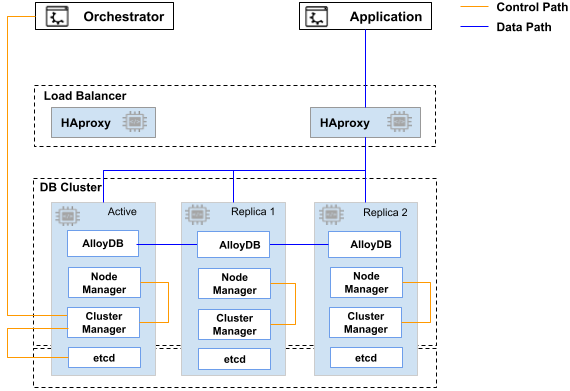
The following table lists each communication path and its required certificate.
| Communication path | Required certificate |
|---|---|
| `etcd` \<--\> `etcd` | `etcd` SSL certificate |
| AlloyDB Omni orchestrator \<--\> Cluster manager | Control path SSL certificate |
| Cluster manager \<--\> `etcd` | `etcd` SSL certificate |
| Cluster manager \<--\> Node manager | Control path SSL certificate |
| PostgreSQL client \<--\> HAProxy \<--\> AlloyDB Omni | Data path SSL certificate |
| PostgreSQL Client \<--\> PgBouncer \<--\> HAProxy \<--\> AlloyDB Omni | Data path SSL certificate |
| AlloyDB Omni \<--\> pgBackRest repository server | Data path SSL certificate |
| AlloyDB Omni \<--\> log server (ELK stack) | Data path SSL certificate |
## What's next
- [Configure TLS certificates](https://docs.cloud.google.com/alloydb/omni/redhat-orchestrator/current/docs/tls/configure-tls-certificates.md.txt).