Select a documentation version:
- [Current (18.4.0)](https://docs.cloud.google.com/alloydb/omni/kubernetes/current/docs/active-directory-overview.md.txt)
- [18.4.0](https://docs.cloud.google.com/alloydb/omni/kubernetes/18.4.0/docs/active-directory-overview.md.txt)
- [18.3.0](https://docs.cloud.google.com/alloydb/omni/kubernetes/18.3.0/docs/active-directory-overview.md.txt)
- [18.1.0](https://docs.cloud.google.com/alloydb/omni/kubernetes/18.1.0/docs/active-directory-overview.md.txt)
- [17.10.0](https://docs.cloud.google.com/alloydb/omni/kubernetes/17.10.0/docs/active-directory-overview.md.txt)
- [17.9.0](https://docs.cloud.google.com/alloydb/omni/kubernetes/17.9.0/docs/active-directory-overview.md.txt)
- [17.7.0](https://docs.cloud.google.com/alloydb/omni/kubernetes/17.7.0/docs/active-directory-overview.md.txt)
- [17.5.0](https://docs.cloud.google.com/alloydb/omni/kubernetes/17.5.0/docs/active-directory-overview.md.txt)
- [16.14.0](https://docs.cloud.google.com/alloydb/omni/kubernetes/16.14.0/docs/active-directory-overview.md.txt)
- [16.13.0](https://docs.cloud.google.com/alloydb/omni/kubernetes/16.13.0/docs/active-directory-overview.md.txt)
- [16.11.0](https://docs.cloud.google.com/alloydb/omni/kubernetes/16.11.0/docs/active-directory-overview.md.txt)
- [16.9.0](https://docs.cloud.google.com/alloydb/omni/kubernetes/16.9.0/docs/active-directory-overview.md.txt)
- [16.8.0](https://docs.cloud.google.com/alloydb/omni/kubernetes/16.8.0/docs/active-directory-overview.md.txt)
> [!WARNING]
>
> **Preview
> --- [AlloyDB Omni](https://docs.cloud.google.com/alloydb/omni/kubernetes/16.9.0/docs/overview.md.txt)**
>
>
> This feature is
>
> subject to the "Pre-GA Offerings Terms" in the General Service Terms section of the
> [Service Specific
> Terms](https://docs.cloud.google.com/terms/service-terms#1).
>
> You can process personal data for
>
> this feature
>
> as outlined in the
> [Cloud Data
> Processing Addendum](https://docs.cloud.google.com/terms/data-processing-addendum), subject to the obligations and restrictions described in the
> agreement under which you access Google Cloud.
>
> Pre-GA features are available "as is" and might have limited support.
>
> For more information, see the
> [launch stage descriptions](https://cloud.google.com/products/#product-launch-stages).
This page describes how PostgreSQL integrates with Active Directory in
AlloyDB Omni using the Generic Security Services Application Programming
Interface (GSSAPI), and it introduces key Kerberos concepts.
[*Kerberos*](https://en.wikipedia.org/wiki/Kerberos_(protocol)) is the
authentication protocol that powers Active Directory.
[Active Directory](https://learn.microsoft.com/en-us/windows-server/identity/ad-ds/get-started/virtual-dc/active-directory-domain-services-overview)
is a directory service developed by Microsoft for Windows domain networks.
Active Directory is a centralized, standardized system that automates network
management of user data, security, and distributed resources. This directory
service provides a single point of administration for user accounts, groups, and
other network objects. A key function of Active Directory is authentication,
which confirms a user's identity and authorization, and grants the user access
to specific resources on the network.
## Active Directory components
A [*realm*](https://web.mit.edu/kerberos/kfw-4.1/kfw-4.1/kfw-4.1-help/html/kerberos_terminology.htm#:%7E:text=Kerberos%20realms%20are%20a%20way,Windows%2C%20realms%20are%20called%20domains.)
is the administrative domain for Kerberos authentication. In the context of
Active Directory, a realm is equivalent to an Active Directory domain. Realms
represent a logical group of users, computers, and services that share a common
authentication database. When you configure Kerberos, you must specify the realm
that your clients and services belong to. A realm is an uppercase version of the
domain name---for example, if the domain is `ad.example.com`, then the realm is
`AD.EXAMPLE.COM`.
The
[*Key Distribution Center*](https://web.mit.edu/kerberos/krb5-1.3/krb5-1.3.3/doc/krb5-install.html#:%7E:text=Introduction%2C%20Up:Introduction-,What%20is%20Kerberos%20and%20How%20Does%20it%20Work?,additional%20tickets%20is%20user%2Dtransparent.)
(KDC) is a core Kerberos service that runs on every domain controller in
Active Directory. The KDC has the following primary functions:
- Authentication Service (AS): verifies a user's identity at the initial sign-in, for example, when you sign into Windows, and issues a Ticket-Granting Ticket (TGT).
- Ticket-Granting Service (TGS): issues service tickets to authenticated users who present a valid TGT. These service tickets grant access to specific services, like a PostgreSQL database.
A
[*principal*](https://web.mit.edu/kerberos/krb5-1.5/krb5-1.5.4/doc/krb5-user/What-is-a-Kerberos-Principal_003f.html)
is a unique identity in a Kerberos realm to which tickets can be assigned. The
following are the main types of principals:
- User principals: represent human users---for example, `username@REALM`.
- Service principals (SPN): represent a specific service on a specific host---for example, `postgres/db-server.ad.example.com@REALM`. For a client to request a service ticket for your database, the database service must have a registered SPN.
A
[*keytab*](https://web.mit.edu/kerberos/krb5-devel/doc/basic/keytab_def.html)
or key table file contains a list of principals and their corresponding secret
keys, which are derived from the principals' passwords. Services use a keytab
file to prove their identity to the KDC and to decrypt service tickets presented
by clients.
This approach allows a service like PostgreSQL to authenticate
itself to the Kerberos system without requiring human interaction or storing a
plain text password on the server. The keytab file is highly sensitive and must
be securely stored and protected.
## PostgreSQL integration with Active Directory
Integrating PostgreSQL with Active Directory gives you centralized
user management based on corporate identities, which enhances your database security.
To support authentication, PostgreSQL offers
the following methods for integrating with Active Directory:
- Lightweight Directory Access Protocol (LDAP): you can configure
PostgreSQL to authenticate users against an Active Directory server using
the LDAP protocol. When a user tries to connect to the
database, PostgreSQL communicates with the Active Directory server over
LDAP to verify the user's credentials, which are typically a username and password.
This method uses Active Directory as an external authentication
provider.
- Generic Security Services Application Program Interface (GSSAPI) with
Kerberos: this is a more secure and complex method that uses the
Kerberos protocol, which is the default authentication mechanism in Active
Directory. GSSAPI provides a standard interface for applications to access
security services.
While both LDAP and GSSAPI achieve the goal of Active Directory integration, GSSAPI
with Kerberos is the more secure and robust approach for
enterprise environments due to its strong, ticket-based cryptographic
authentication. This page addresses implementing Active Directory integration
for AlloyDB Omni using the GSSAPI method.
## Active Directory authentication with GSSAPI
AlloyDB Omni lets you authenticate over Kerberos using Active
Directory as an authentication backend. The steps to achieve authentication are
shown in the following diagram.
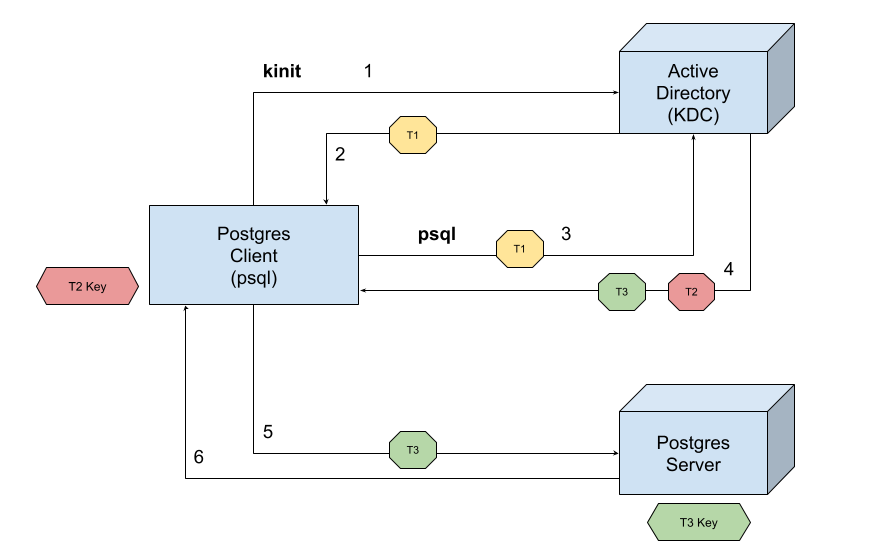
1. The client `psql` initiates an authentication request using the Authentication Service (AS) in the Key Distribution Center (KDC).
2. The AS authenticates the client and issues a Ticket Granting Ticket (TGT) (T1) to the client. The TGT is then used to request service tickets.
3. The client uses the TGT to request a service ticket from the Ticket Granting Service (TGS) in the KDC for the PostgreSQL service. The client is now requesting access to the specific PostgreSQL server.
4. The TGS validates the TGT and issues a service ticket (T2) to the client. This ticket contains a session key (T3) and is encrypted using the PostgreSQL server's secret key.
5. The client sends the encrypted service ticket (T2) to the PostgreSQL server.
6. The PostgreSQL server uses its key (from its keytab file) to decrypt the service ticket (T2), and then the server retrieves the session key (T3) and verifies the ticket's authenticity. If this operation is successful, the server grants access and establishes a secure communication channel with the client using the session key.
## What's next
- [Integrate Active Directory user support with AlloyDB Omni](https://docs.cloud.google.com/alloydb/omni/kubernetes/16.9.0/docs/integrate-active-directory).
- [Integrate Active Directory user support on Kubernetes](https://docs.cloud.google.com/alloydb/omni/kubernetes/16.9.0/docs/integrate-active-directory-kubernetes-operator.md.txt).
- [Integrate Active Directory group support with AlloyDB Omni](https://docs.cloud.google.com/alloydb/omni/kubernetes/16.9.0/docs/integrate-ad-group-support-alloydb-omni).
- [Integrate Active Directory group support on Kubernetes](https://docs.cloud.google.com/alloydb/omni/kubernetes/16.9.0/docs/integrate-ad-group-support-kubernetes-operator.md.txt).
- [Troubleshoot Active Directory integration in AlloyDB Omni](https://docs.cloud.google.com/alloydb/omni/kubernetes/16.9.0/docs/troubleshoot-active-directory-integration.md.txt).