Select a documentation version:
- [Current (18.4.0)](https://docs.cloud.google.com/alloydb/omni/kubernetes/current/docs/protect-data-using-zonal-regional-replication.md.txt)
- [18.4.0](https://docs.cloud.google.com/alloydb/omni/kubernetes/18.4.0/docs/protect-data-using-zonal-regional-replication.md.txt)
- [18.3.0](https://docs.cloud.google.com/alloydb/omni/kubernetes/18.3.0/docs/protect-data-using-zonal-regional-replication.md.txt)
- [18.1.0](https://docs.cloud.google.com/alloydb/omni/kubernetes/18.1.0/docs/protect-data-using-zonal-regional-replication.md.txt)
- [17.10.0](https://docs.cloud.google.com/alloydb/omni/kubernetes/17.10.0/docs/protect-data-using-zonal-regional-replication.md.txt)
- [17.9.0](https://docs.cloud.google.com/alloydb/omni/kubernetes/17.9.0/docs/protect-data-using-zonal-regional-replication.md.txt)
- [17.7.0](https://docs.cloud.google.com/alloydb/omni/kubernetes/17.7.0/docs/protect-data-using-zonal-regional-replication.md.txt)
- [17.5.0](https://docs.cloud.google.com/alloydb/omni/kubernetes/17.5.0/docs/protect-data-using-zonal-regional-replication.md.txt)
- [16.14.0](https://docs.cloud.google.com/alloydb/omni/kubernetes/16.14.0/docs/protect-data-using-zonal-regional-replication.md.txt)
- [16.13.0](https://docs.cloud.google.com/alloydb/omni/kubernetes/16.13.0/docs/protect-data-using-zonal-regional-replication.md.txt)
- [16.11.0](https://docs.cloud.google.com/alloydb/omni/kubernetes/16.11.0/docs/protect-data-using-zonal-regional-replication.md.txt)
- [16.9.0](https://docs.cloud.google.com/alloydb/omni/kubernetes/16.9.0/docs/protect-data-using-zonal-regional-replication.md.txt)
- [16.8.0](https://docs.cloud.google.com/alloydb/omni/kubernetes/16.8.0/docs/protect-data-using-zonal-regional-replication.md.txt)
- [16.3.0](https://docs.cloud.google.com/alloydb/omni/kubernetes/16.3.0/docs/protect-data-using-zonal-regional-replication.md.txt)
- [15.18.0](https://docs.cloud.google.com/alloydb/omni/kubernetes/15.18.0/docs/protect-data-using-zonal-regional-replication.md.txt)
- [15.17.0](https://docs.cloud.google.com/alloydb/omni/kubernetes/15.17.0/docs/protect-data-using-zonal-regional-replication.md.txt)
- [15.15.0](https://docs.cloud.google.com/alloydb/omni/kubernetes/15.15.0/docs/protect-data-using-zonal-regional-replication.md.txt)
- [15.13.0](https://docs.cloud.google.com/alloydb/omni/kubernetes/15.13.0/docs/protect-data-using-zonal-regional-replication.md.txt)
- [15.12.0](https://docs.cloud.google.com/alloydb/omni/kubernetes/15.12.0/docs/protect-data-using-zonal-regional-replication.md.txt)
- [15.7.1](https://docs.cloud.google.com/alloydb/omni/kubernetes/15.7.1/docs/protect-data-using-zonal-regional-replication.md.txt)
This page describes the AlloyDB Omni Premium Availability reference architecture, which includes data protection using zonal replication in a region (high availability), and adds disaster recovery (DR) protection using asynchronous streaming across large geographic boundaries.
This reference architecture is best suited for the following use cases:
- You need regional protection in addition to your zonal protection for your mission-critical applications.
This availability reference architecture incorporates read replicas within the
region for HA and across regions for DR. This multi-region deployment safeguards
against significant disruptions, including widespread power failures and
large-scale natural disasters.
## Availability reference architecture considerations
When you're evaluating this availability reference architecture, consider the
following factors:
- Network latency and bandwidth within the region and across regions
- Geographical placement of databases and application servers
- Strategy for offloading read-only workloads to replicas
- Deploy high availability in the remote DR region
Read-only load balancing might be required, especially if you use regional
application servers, so that requests are forwarded to the closest database for
the fastest response. For more information, see
[Request routing to a multi-region classic Application Load Balancer](https://docs.cloud.google.com/load-balancing/docs/https/setting-up-https.md.txt).
Extra monitoring might be required for cross-region replication to ensure that
replication lag doesn't start to increase due to transaction load or network
capacity.
To ensure that your DR is successful, make sure that you perform thorough DR
testing. It's important to test application functionality and throughput if
there are any high latency network connections between applications servers and
the database.
## In-region HA and cross-region DR architectures
Figure 1 shows a suggested HA and DR configuration with three read-replica
standby databases in three availability zones and two regions.
> [!NOTE]
> **Note:** While the illustrations in this document show Google Cloud physical location-related concepts such as *Zone* and *Region*, AlloyDB Omni can be deployed in any cloud or any customer-managed environment. Consequently, terms such as "data center" or "city" might be more suitable to accurately represent your environments.
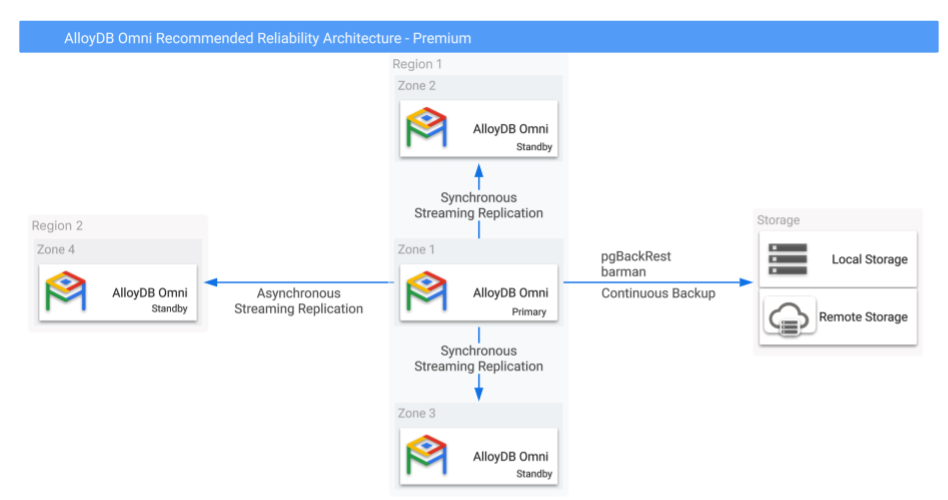
**Figure 1.** AlloyDB Omni with backups and cross-region high
availability options.
As Figure 1 illustrates, synchronous streaming replication to local (within the
same region) replicas provides high availability, while asynchronous streaming
replication to a geographically separated remote replica provides regional
disaster recovery protection. In the entire configuration, only the primary
instance can perform read-write operations while the other replicas can serve
read queries.
Configure the replication from the primary to in-region replicas in synchronous
mode while the replication to the cross-region replicas are to be configured in
asynchronous mode to avoid the latency to impact the primary write performance.
In the event of a regional failure, this setup might lead to a non-zero RPO.
However, this setup enables a faster RTO in case of a failure. This is because
the primary database doesn't need to wait for confirmation from remote standby
databases before committing transactions.
It's possible to have additional cross-region backups take backups from the
read-replica databases and thus add redundancy to the backups taken from the
primary database.
### Read replica backups
When you use Kubernetes deployments, then the secondary deployment in the
alternative region is automatically set up with additional backups.
Consider the following:
- If your remote backup might be susceptible to region failure, then you need to initiate extra backups in the alternative regions.
- If you require backup redundancy, you need to take regional read replica backups.
### Read replica location to support multi-zone availability
AlloyDB Omni Kubernetes operator
operator automatically handles the node placement in zones and which nodes the
pods should be deployed to. Some configuration options that affect placement,
such as pod affinity and tolerance, are available in the database configuration
used to deploy with the AlloyDB Omni operator.
### Migration from an HA-only to HA and DR architecture
For Kubernetes deployments, you need to build a new regional Kubernetes deployment,
called a secondary database cluster, and enable cross-data center replication.
## Implementation
When you choose an availability reference architecture, keep in mind the
following benefits, limitations, and options.
### Benefits
- Protects from zonal and instance failures
- Protects from regional failures
- RTO reduced when the database experiences a regional failure
### Limitations
- You can reduce RPO for regional recovery with synchronous replication, but this approach causes additional latency for transaction performance. For DR and remote region replication, we recommend that you use only asynchronous replication.
- Configuring PostgreSQL WAL streaming in synchronous mode offers zero data loss (`RPO=0`) during normal operation or typical failovers. However, this approach doesn't protect against data loss in specific double-fault situations, such as when all standby instances are lost or become unreachable from the primary, and this is immediately followed by a primary restart.
### Data protection options
- The [Standard Availability Architecture](https://docs.cloud.google.com/alloydb/omni/kubernetes/16.8.0/docs/protect-data-using-backups.md.txt) for backup and recovery options.
- The [Enhanced Availability Architecture](https://docs.cloud.google.com/alloydb/omni/kubernetes/16.8.0/docs/protect-data-using-zonal-replication.md.txt) for high availability options.
## What's next
- [AlloyDB Omni availability reference architecture overview](https://docs.cloud.google.com/alloydb/omni/kubernetes/16.8.0/docs/database-availability-reference-architecture-overview.md.txt).
- [AlloyDB Omni Standard Availability](https://docs.cloud.google.com/alloydb/omni/kubernetes/16.8.0/docs/protect-data-using-backups.md.txt).
- [AlloyDB Omni Enhanced Availability](https://docs.cloud.google.com/alloydb/omni/kubernetes/16.8.0/docs/protect-data-using-zonal-replication.md.txt).
- [Work with cross-data-center replication](https://docs.cloud.google.com/alloydb/omni/kubernetes/16.8.0/docs/cross-data-center-replication/work-with-cross-data-center-replication.md.txt).
- [Request routing to a multi-region classic Application Load Balancer.](https://docs.cloud.google.com/load-balancing/docs/https/setting-up-https.md.txt).