Select a documentation version:
- [Current (18.4.0)](https://docs.cloud.google.com/alloydb/omni/containers/current/docs/protect-data-using-zonal-replication.md.txt)
- [18.4.0](https://docs.cloud.google.com/alloydb/omni/containers/18.4.0/docs/protect-data-using-zonal-replication.md.txt)
- [18.3.0](https://docs.cloud.google.com/alloydb/omni/containers/18.3.0/docs/protect-data-using-zonal-replication.md.txt)
- [18.1.0](https://docs.cloud.google.com/alloydb/omni/containers/18.1.0/docs/protect-data-using-zonal-replication.md.txt)
- [17.10.0](https://docs.cloud.google.com/alloydb/omni/containers/17.10.0/docs/protect-data-using-zonal-replication.md.txt)
- [17.9.0](https://docs.cloud.google.com/alloydb/omni/containers/17.9.0/docs/protect-data-using-zonal-replication.md.txt)
- [17.7.0](https://docs.cloud.google.com/alloydb/omni/containers/17.7.0/docs/protect-data-using-zonal-replication.md.txt)
- [17.5.0](https://docs.cloud.google.com/alloydb/omni/containers/17.5.0/docs/protect-data-using-zonal-replication.md.txt)
- [16.14.0](https://docs.cloud.google.com/alloydb/omni/containers/16.14.0/docs/protect-data-using-zonal-replication.md.txt)
- [16.13.0](https://docs.cloud.google.com/alloydb/omni/containers/16.13.0/docs/protect-data-using-zonal-replication.md.txt)
- [16.11.0](https://docs.cloud.google.com/alloydb/omni/containers/16.11.0/docs/protect-data-using-zonal-replication.md.txt)
- [16.9.0](https://docs.cloud.google.com/alloydb/omni/containers/16.9.0/docs/protect-data-using-zonal-replication.md.txt)
- [16.8.0](https://docs.cloud.google.com/alloydb/omni/containers/16.8.0/docs/protect-data-using-zonal-replication.md.txt)
- [16.3.0](https://docs.cloud.google.com/alloydb/omni/containers/16.3.0/docs/protect-data-using-zonal-replication.md.txt)
- [15.18.0](https://docs.cloud.google.com/alloydb/omni/containers/15.18.0/docs/protect-data-using-zonal-replication.md.txt)
- [15.17.0](https://docs.cloud.google.com/alloydb/omni/containers/15.17.0/docs/protect-data-using-zonal-replication.md.txt)
- [15.15.0](https://docs.cloud.google.com/alloydb/omni/containers/15.15.0/docs/protect-data-using-zonal-replication.md.txt)
- [15.13.0](https://docs.cloud.google.com/alloydb/omni/containers/15.13.0/docs/protect-data-using-zonal-replication.md.txt)
- [15.12.0](https://docs.cloud.google.com/alloydb/omni/containers/15.12.0/docs/protect-data-using-zonal-replication.md.txt)
- [15.7.1](https://docs.cloud.google.com/alloydb/omni/containers/15.7.1/docs/protect-data-using-zonal-replication.md.txt)
This page describes the AlloyDB Omni Enhanced Availability reference architecture, which provides high availability by deploying one or more database replicas within the same region that protects from node-level or zone-level failures.
## Use cases
This availability reference architecture is suitable for the following use
cases:
- Business critical applications that require lower RTO and RPO.
- You want to deploy a replica in another zone or node that provides high availability for your databases and protects from instance, server, and zonal failures.
- You want protection from user error and data corruption (using backups).
## How the reference architecture works
Enhanced availability adds to [Standard Availability](https://docs.cloud.google.com/alloydb/omni/containers/17.5.0/docs/protect-data-using-backups.md.txt) by adding
read-replica instances within the region to enable high availability
([HA](https://en.wikipedia.org/wiki/High_availability))
that reduces the Recovery Time Objective
([RTO](https://en.wikipedia.org/wiki/IT_disaster_recovery#Recovery_Time_Objective)).
This approach also reduces the Recovery Point Objective
([RPO](https://en.wikipedia.org/wiki/IT_disaster_recovery#Recovery_Point_Objective))
by allowing streaming transactional changes to the replica.
High availability in AlloyDB Omni utilizes at least two database
instances. One instance functions as the *primary database* , supporting read and
write operations. The remaining instances serve as *read-replicas*, operating in
a read-only mode.
The following are important HA concepts:
- *Failover* is the procedure during an unplanned outage in which the primary instance fails, or becomes unavailable, and the standby replica is activated to assume the primary (read-write) mode. This process is called *promotion*. Typically in these scenarios when the primary server or database comes back online, the database must be rebuilt and then it must act as a standby. To provide high uptime, mechanisms are in place to make failovers automatic.
- A *switchover*, also known as a role reversal, is a procedure used to switch the modes between the primary and one of the standby databases, such that the primary becomes the standby and the standby becomes the primary. Switchovers typically happen in a controlled, graceful manner, and they can be initiated for any number of reasons, for example, to allow downtime and patching of the former primary database. Graceful switchovers must allow for a future switch-back without needing to re-instantiate the new standby or other aspects of the replication configuration.
## High availability options
In non-Kubernetes deployments, use Patroni and HAProxy. For
more information, see
[High Availability architecture for AlloyDB Omni for PostgreSQL](https://googlecloudplatform.github.io/cloud-solutions/alloydbomni-ha-patroni-etcd/).
| **Note** : [Patroni](https://github.com/patroni/patroni) and [HAProxy](https://github.com/haproxy/haproxy) are non-commercial, third-party party tools, and they are compatible with AlloyDB Omni. |
|---|
We recommend that you have at least two standby databases so that the loss of
one database doesn't impact the high availability of the cluster. In that mode,
you have at least one HA pair in the event of a failover or during any planned
maintenance of a node.
To plan the size and shape of your AlloyDB Omni deployment, see [Plan your AlloyDB Omni installation on a VM](https://docs.cloud.google.com/alloydb/omni/containers/17.5.0/docs/plan-installation.md.txt).
### Load balancers
Another important mechanism that aids smoother switchover and failover
procedures is the presence of a load balancer.
For non-Kubernetes deployments,
HAProxy software provides load balancing. HAProxy offers load balancing by
distributing network traffic across multiple servers. HAProxy also maintains the
health state of the backend servers it connects to by performing health checks.
If a server fails a health check, HAProxy stops sending traffic to it until it
passes the health checks again.
### High availability
The read-replica databases deployed within a region provide high availability
if the primary database fails. When primary database failure occurs, the
standby database is promoted to replace the primary and the application
continues with little or no outage.
It's generally a good practice to perform regular yearly or half-yearly checks
in the form of switchovers to ensure that all applications that rely on these
databases are still able to connect and respond in a suitable timeframe.
Zone-level protection can be achieved using either deployment type by placing
one of the standby read-replicas in a different availability zone from the
primary database.
An additional benefit of having read-replicas is the ability to offload
read-only operations to the standby databases, which can act as reporting
databases using up-to-date data. This approach reduces the load and overhead on
the read-write primary.
## Backups and high availability configuration
Read replicas can be set up in multiple zones that provide high availability.
While they provide low RTO and RPO, it doesn't protect from certain outages
like logical data corruption such as accidental table drops or incorrect data
updates. Hence regular backups are to be done in addition to HA setup. See
Standard Availability Architecture documentation for details.
Figure 1 shows a recommended HA configuration with two read-replica standby
databases in two different availability zones.
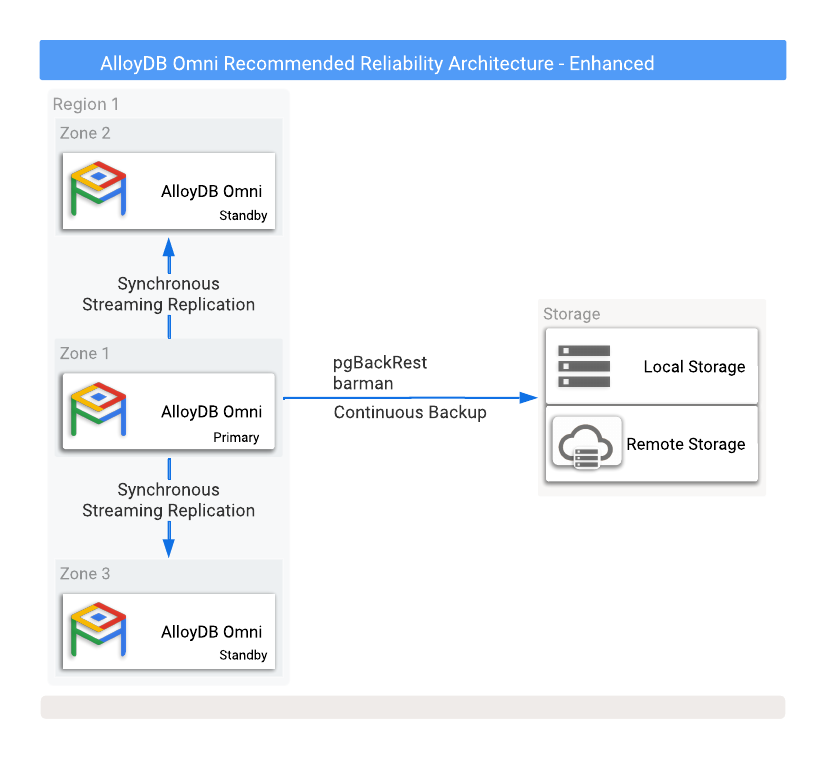
**Figure 1.** AlloyDB Omni with backups and high availability
options.
> [!NOTE]
> **Note:** While the illustrations in this document show Google Cloud physical location related concepts and terminology such as "Zone" and "Region", AlloyDB Omni can be deployed in any cloud or any customer-managed environment. Consequently, terms such as "data center" or "city" might be more suitable to accurately represent your environments.
To protect against data loss if the primary instance fails, configuring
replication in synchronous mode is required. While this method provides strong
data protection, it can impact primary database performance because all commits
need to be written to both the primary and all synchronized standby databases. A
low-latency network connection between these database instances is crucial for
this setup.
### Non-Kubernetes HA deployments
The standalone non-Kubernetes deployment is a manual configuration that
requires third-party tooling which is more complex to set up and maintain than
the Kubernetes deployment.
When you use a non-Kubernetes deployment, there are some parameters that affect
how a failover is detected and how soon a failover occurs after the primary
becomes unavailable. The following is a brief summary of those parameters:
- `Ttl`: the maximum time that it takes to acquire a lock for the primary database before initiating a failover. The default is 30 seconds.
- `Loop_wait`: the amount of time to wait before rechecking. The default is 10 seconds.
- `Retry_timeout`: the timeout before demoting the primary instance due to network failure. The default is 10 seconds.
For more information, see
[High Availability architecture for AlloyDB Omni for PostgreSQL](https://googlecloudplatform.github.io/cloud-solutions/alloydbomni-ha-patroni-etcd/).
## Implementation
When you choose an availability reference architecture, keep in mind the
following benefits, limitations, and alternatives.
### Benefits
- Protects from instance failures.
- Protects from server failures.
- Protects from zone failures.
- RTO dramatically reduced from Standard Availability.
### Limitations
- No extra protection for regional disasters.
- Potential performance impact on the primary due to synchronous replication.
- Configuring PostgreSQL WAL streaming in synchronous mode offers zero data loss (`RPO=0`) during normal operation or typical failovers. However, this approach doesn't protect against data loss in specific double-fault situations, such as when all standby instances are lost or become unreachable from the primary, and this is immediately followed by a primary restart.
### Alternatives
- The [Standard Availability Architecture](https://docs.cloud.google.com/alloydb/omni/containers/17.5.0/docs/protect-data-using-backups.md.txt) for backup and recovery options.
- The [Premium Availability Architecture](https://docs.cloud.google.com/alloydb/omni/containers/17.5.0/docs/protect-data-using-zonal-regional-replication.md.txt) for region-level disaster recovery, additional read replicas, and expanded disaster recovery reach.
## What's next
- [AlloyDB Omni availability reference architecture overview](https://docs.cloud.google.com/alloydb/omni/containers/17.5.0/docs/database-availability-reference-architecture-overview.md.txt).
- [AlloyDB Omni Standard Availability](https://docs.cloud.google.com/alloydb/omni/containers/17.5.0/docs/protect-data-using-backups.md.txt).
- [AlloyDB Omni Premium Availability](https://docs.cloud.google.com/alloydb/omni/containers/17.5.0/docs/protect-data-using-zonal-regional-replication.md.txt).
- [Plan your AlloyDB Omni installation on a VM](https://docs.cloud.google.com/alloydb/omni/containers/17.5.0/docs/plan-installation.md.txt).
- [High Availability architecture for AlloyDB Omni for PostgreSQL](https://googlecloudplatform.github.io/cloud-solutions/alloydbomni-ha-patroni-etcd/).