You can reduce operational costs and improve query responsiveness by using
optimized AI functions in AlloyDB for PostgreSQL. Optimized AI functions minimize the use of
large language models (LLMs) for row-by-row classification or filtering tasks by
processing most of your queries with a smaller, faster proxy model, and falling
back to a larger LLM only when necessary.
> [!NOTE]
> **Note:** Optimized AI functions support multiple `ai.if()` clauses in a single query, provided that all arguments to each `ai.if()` function reference a single table alias. By default, the [`google_ml_integration.proxy_models_enable_llm_fallback`](https://docs.cloud.google.com/alloydb/docs/reference/model-endpoint.md.txt#optimized-database-flags) flag, which controls remote LLM fallback, is enabled (`on`).
AlloyDB AI functions like `ai.if()` can have high latency due to remote
calls to LLMs. Optimized functions address this latency issue by using smaller,
locally trained proxy models (such as logistic regression models) to process
your queries. These models are trained on a sample of your data, using the LLM's
output as the source of truth.
You can configure accuracy checks to be performed at runtime using the
[`google_ml_integration.proxy_models_enable_accuracy_check`](https://docs.cloud.google.com/alloydb/docs/reference/model-endpoint.md.txt#optimized-database-flags)
flag, which is set to `off` by default. Accuracy checks evaluate a sample of
rows from the query using the baseline LLM to ensure that accuracy meets the
threshold defined by the
[`google_ml_integration.proxy_models_f1_score_threshold`](https://docs.cloud.google.com/alloydb/docs/reference/model-endpoint.md.txt#optimized-database-flags)
flag. If the accuracy check fails, the query falls back to using the LLM (or
throws an error if fallback is disabled).
## Optimized AI functions workflow
When you use an optimized AI function and you set the `google_ml_integration.proxy_models_enable_accuracy_check`
flag to `true`, AlloyDB does the following.
> [!NOTE]
> **Note:** If the [`google_ml_integration.proxy_models_enable_llm_fallback`](https://docs.cloud.google.com/alloydb/docs/reference/model-endpoint.md.txt#optimized-database-flags) flag is set to `off`, the query returns an error instead of calling the remote LLM if the proxy model is untrained or if it fails accuracy checks.
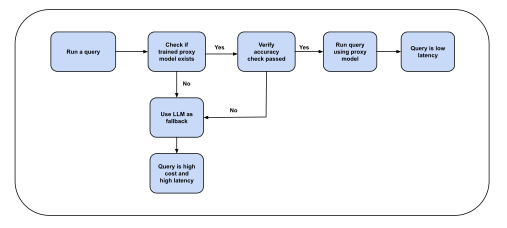
1. **Schedules training:** When you execute a query containing the
`ai.if()` function on a table, AlloyDB automatically schedules the
training of a lightweight proxy model in the background.
2. **Falls back to the LLM:** While the proxy model is training, or if a proxy
model isn't available, AlloyDB falls back to using the remote
LLM to evaluate the query (unless fallback is disabled).
3. **Executes optimized queries:** After the model is trained,
AlloyDB uses the trained proxy model to process subsequent
queries locally, which accelerates performance.
The following diagram shows the logic flow for processing queries with
optimized AI functions:
## Before you begin
Before you use optimized AI functions, do the following:
- [Connect to your database using psql](https://docs.cloud.google.com/alloydb/docs/connect-psql.md.txt). You can also connect using AlloyDB Studio either as the `postgres` user, or as a user that has access to the table where the data resides.
- Verify that the `google_ml_integration` extension version 1.6.3 or later is
installed.
```sql
SELECT extversion FROM pg_extension WHERE extname = 'google_ml_integration';
```
The output is similar to the following:
extversion
---
1.6.3
(1 row)
If the extension isn't installed or is earlier than version 1.6.3, update the extension:
```sql
CREATE EXTENSION IF NOT EXISTS google_ml_integration;
ALTER EXTENSION google_ml_integration UPDATE;
```
- Configure AlloyDB to work with
Gemini Enterprise Agent Platform. For more information, see
[Integrate with
Agent Platform](https://docs.cloud.google.com/alloydb/docs/ai/configure-vertex-ai).
- Verify that the following instance-level database flags are enabled. For
more information, see [Supported database flags](https://docs.cloud.google.com/alloydb/docs/reference/database-flags.md.txt),
[Database flags for optimized AI functions](https://docs.cloud.google.com/alloydb/docs/reference/model-endpoint.md.txt#optimized-database-flags),
and [Configure an instance's database flags](https://docs.cloud.google.com/alloydb/docs/instance-configure-database-flags.md.txt).
- [`google_ml_integration.enable_model_support`](https://docs.cloud.google.com/alloydb/docs/reference/alloydb-flags.md.txt#google_ml_integration_enable_model_support)
- [`google_ml_integration.enable_ai_query_engine`](https://docs.cloud.google.com/alloydb/docs/reference/alloydb-flags.md.txt#google_ml_integration_enable_ai_query_engine)
- [`google_ml_integration.enable_ai_function_acceleration`](https://docs.cloud.google.com/alloydb/docs/reference/alloydb-flags.md.txt#google_ml_integration_enable_ai_function_acceleration)
- [`google_ml_integration.enable_cost_optimized_ai_functions`](https://docs.cloud.google.com/alloydb/docs/reference/alloydb-flags.md.txt#google_ml_integration_enable_cost_optimized_ai_functions)
- Review the fallback and accuracy validation database flags, which you can
configure at the session or database level using SQL (`SET` or
`ALTER DATABASE`):
- [`google_ml_integration.proxy_models_enable_llm_fallback`](https://docs.cloud.google.com/alloydb/docs/reference/model-endpoint.md.txt#optimized-database-flags): Controls whether a query falls back to a remote LLM if a proxy model is unavailable. This flag is set to `on` by default. When set to `off`, the database throws an error instead of falling back to the remote LLM.
- [`google_ml_integration.proxy_models_enable_accuracy_check`](https://docs.cloud.google.com/alloydb/docs/reference/model-endpoint.md.txt#optimized-database-flags): Enables runtime accuracy checks against the baseline LLM. This flag is set to `off` by default.
- Review the periodic retraining database flags:
- [`google_ml_integration.proxy_models_retraining_interval_minutes`](https://docs.cloud.google.com/alloydb/docs/reference/model-endpoint.md.txt#optimized-database-flags): Controls the frequency of the background retraining job in minutes. Default is `1440` (24 hours). Setting it to `0` disables periodic retraining.
- [`google_ml_integration.proxy_models_retraining_batch_size`](https://docs.cloud.google.com/alloydb/docs/reference/model-endpoint.md.txt#optimized-database-flags): Controls the number of models retrained in a single iteration (default is `1`).
- For AlloyDB Omni, verify that the following extensions are
loaded in [`shared_preload_libraries`](https://www.postgresql.org/docs/current/runtime-config-client.html#GUC-SHARED-PRELOAD-LIBRARIES):
- `google_job_scheduler`
- `google_ml_integration`
- Generate embeddings for the table that you want to query. For more
information, see [Generate and manage auto vector embeddings for large
tables](https://docs.cloud.google.com/alloydb/docs/ai/generate-manage-auto-embeddings-for-tables).
- Consider the following requirements:
- The source data column must be of type `TEXT` or `VARCHAR`.
- The embedding column that provides input to the optimized AI function must be of type `REAL[]` or `VECTOR`.
- Optimized AI functions are available only in regions where Agent Platform generative models are available. For a list of available regions, see [Deployments and
endpoints](https://docs.cloud.google.com/gemini-enterprise-agent-platform/resources/locations).
## Execute an optimized query
Follow this example to execute a standard `SELECT` statement with the `ai.if()`
function:
1. Create a `restaurant_reviews` table. The `review` column that holds the
source data is of type `TEXT`, and the `review_embedding` column used for
queries is of type `VECTOR(768)`.
```sql
CREATE TABLE restaurant_reviews (
id SERIAL,
name VARCHAR(64),
city VARCHAR(64),
review TEXT,
review_embedding VECTOR(768)
);
```
2. Generate vector embeddings for the source data by using the
`ai.initialize_embeddings()` procedure:
```sql
CALL ai.initialize_embeddings(
model_id => 'text-embedding-005',
table_name => 'restaurant_reviews',
content_column => 'review',
embedding_column => 'review_embedding'
);
```
Generating embeddings is required because optimized AI functions rely on
vector embeddings as feature inputs to train and evaluate the lightweight
proxy model. Instead of sending raw text to a remote LLM for every row,
the proxy model performs fast, local inference directly on the vector
representations. If embeddings aren't generated, AlloyDB
can't train the proxy model and falls back to evaluating all rows with the
remote LLM.
Note the following embedding requirements:
- The `ai.if()` output evaluates to `NULL` if the embedding column contains `NULL` values. Both model training and inference require valid embeddings.
- The `ai.if()` function throws an error if the querying embedding dimensions don't match the dimensions stored in the trained proxy model.
For more information about embedding options and incremental refreshes, see
[Generate and manage auto vector embeddings for large
tables](https://docs.cloud.google.com/alloydb/docs/ai/generate-manage-auto-embeddings-for-tables).
3. Run a `SELECT` statement with the `ai.if()` function. This query
automatically schedules the training of a proxy model for optimized AI functions in the
background:
```sql
SELECT r.name, r.city
FROM restaurant_reviews r
WHERE ai.if('Is the following a positive review? Review: ' || r.review, r.review_embedding, 'gemini-3.5-flash-lite')
GROUP BY r.name, r.city
HAVING COUNT(*) > 500;
```
The first query execution triggers training asynchronously. While the
proxy model trains, if the
[`google_ml_integration.proxy_models_enable_llm_fallback`](https://docs.cloud.google.com/alloydb/docs/reference/model-endpoint.md.txt#optimized-database-flags) flag is set to
`on` (the default), AlloyDB falls back to evaluating the
query with the remote LLM and returns a warning that the optimized AI
function is not yet available. If
[`google_ml_integration.proxy_models_enable_llm_fallback`](https://docs.cloud.google.com/alloydb/docs/reference/model-endpoint.md.txt#optimized-database-flags) is set to `off`,
the query returns an error instead of falling back.
Subsequent queries matching the same content expression (`content_expr`),
embedding column, and table use the trained proxy model
for acceleration. Updating row values, deleting rows, or adding data to the table doesn't
cause AlloyDB to fall back to the LLM. The proxy model
continues to process the data locally, and data drift is addressed by
[periodic background retraining](https://docs.cloud.google.com/alloydb/docs/ai/accelerate-queries-optimized-functions.md.txt#retrain-manage-proxy-models).
Proxy models are uniquely identified by the function type, table OID,
content expression, and embedding column (`func_type`, `table_oid`,
`content_expr`, `embedding_column`). With this architecture, you can share
models across different SQL queries as long as the inputs to `ai.if()`
remain unchanged.
AlloyDB doesn't use the existing proxy model, and instead
initiates background training for a new proxy model and falls back to the
remote LLM (subject to the [`google_ml_integration.proxy_models_enable_llm_fallback`](https://docs.cloud.google.com/alloydb/docs/reference/model-endpoint.md.txt#optimized-database-flags) flag),
in the following scenarios:
- The `CONTENT` expression inside `ai.if()` changes (for example, the prompt string or concatenated column expression is modified).
- The `EMBEDDING_COLUMN` name inside `ai.if()` changes.
- The `llm_model_id` parameter changes.
- If runtime accuracy checks are enabled, and the proxy model fails the accuracy check at the beginning of the query.
### Online training and blocking execution
AlloyDB supports an online training workflow for optimized
functions, controlled by the
[`google_ml_integration.proxy_models_enable_online_training`](https://docs.cloud.google.com/alloydb/docs/reference/model-endpoint.md.txt#optimized-database-flags) database flag. By default, this
flag is set to `off`.
When this flag is enabled and an untrained `ai.if()` function is executed, the
query triggers the training process and uses blocking execution. The
initial query actively blocks and waits for the background proxy model training
to finish before proceeding. This ensures the query utilizes the optimized proxy
model immediately, avoiding remote LLM inference costs on the initial execution.
The maximum duration the query blocks and waits for online training to complete
is controlled by the
[`google_ml_integration.proxy_models_training_wait_timeout`](https://docs.cloud.google.com/alloydb/docs/reference/model-endpoint.md.txt#optimized-database-flags) flag (in seconds,
default is `60`). If training doesn't complete within this interval, the query
times out or falls back according to your fallback settings.
To enable online training:
```sql
-- Enable online training (blocking execution)
SET google_ml_integration.proxy_models_enable_online_training = on;
-- Set the maximum wait timeout in seconds (default is 60)
SET google_ml_integration.proxy_models_training_wait_timeout = 30;
```
### Configure remote LLM fallback
By default, fallback to the remote LLM is enabled. If a proxy model is
untrained, is being trained, or fails accuracy checks, the query falls back
to the remote LLM and incurs standard
Agent Platform API costs.
You can configure fallback behavior using the
[`google_ml_integration.proxy_models_enable_llm_fallback`](https://docs.cloud.google.com/alloydb/docs/reference/model-endpoint.md.txt#optimized-database-flags) database flag:
- **When fallback is enabled (`on`, default):** If the proxy model is
unavailable, AlloyDB evaluates the query using the remote
LLM and returns a warning:
```text
WARNING: Optimized AI Function is unavailable. Expect reduced performance.
```
- **When fallback is disabled (`off`):** If the proxy model is unavailable or
fails accuracy validation, the query immediately raises an error instead of
calling the remote LLM:
```text
ERROR: Optimized AI Function: Optimized model fallback to LLM prevented by GUC google_ml_integration.proxy_models_enable_llm_fallback
```
To disable LLM fallback for the current session:
```sql
SET google_ml_integration.proxy_models_enable_llm_fallback = off;
```
To disable LLM fallback for the entire database:
```sql
ALTER DATABASE DATABASE_NAME SET google_ml_integration.proxy_models_enable_llm_fallback = off;
```
Replace `DATABASE_NAME` with the name of your database.
### Configure runtime accuracy checks
Runtime accuracy checks evaluate a sample of rows from the query using the
remote LLM to ensure the proxy model meets baseline accuracy requirements
before executing.
Accuracy checks are controlled by the
[`google_ml_integration.proxy_models_enable_accuracy_check`](https://docs.cloud.google.com/alloydb/docs/reference/model-endpoint.md.txt#optimized-database-flags) database flag
(disabled by default).
To enable accuracy checks for the current session:
```sql
SET google_ml_integration.proxy_models_enable_accuracy_check = on;
```
To disable accuracy checks for the current session:
```sql
SET google_ml_integration.proxy_models_enable_accuracy_check = off;
```
To enable accuracy checks for the entire database:
```sql
ALTER DATABASE DATABASE_NAME SET google_ml_integration.proxy_models_enable_accuracy_check = on;
```
## View existing proxy models
To inspect existing proxy models, check their training status, and review their
model metadata, query the `google_ml.optimized_functions_view` view (or its
alias in the `ai` schema, `ai.optimized_functions_view`):
`sql
SELECT * FROM ai.optimized_functions_view;`
For descriptions of the columns in this view, see [`ai.optimized_functions_view` view](https://docs.cloud.google.com/alloydb/docs/reference/model-endpoint.md.txt#optimized-functions-view).
You can filter this view by `table_name` or `status` to verify whether a model has
completed training (`READY`), or to identify the exact `content_expr` and
`embedding_column` values needed for manual retraining.
## Retrain and manage proxy models
Proxy models are trained on the data present in your table at the time of initial
training. If newer data is added to the table, or if rows are modified or
deleted, the proxy model might become stale over time. To maintain accuracy as
data changes, proxy models can be automatically retrained periodically in the background or
manually on demand.
### Periodic background retraining
On instances with 32 or more vCPUs with default configuration
settings, AlloyDB can retrain proxy models periodically in the
background.
Periodic retraining is controlled by the following database flags:
- [`google_ml_integration.proxy_models_retraining_interval_minutes`](https://docs.cloud.google.com/alloydb/docs/reference/model-endpoint.md.txt#optimized-database-flags): Controls the frequency of the background retraining job in minutes. Default is `1440` (24 hours). Setting it to `0` disables periodic retraining.
- [`google_ml_integration.proxy_models_retraining_batch_size`](https://docs.cloud.google.com/alloydb/docs/reference/model-endpoint.md.txt#optimized-database-flags): Controls the number of models retrained in a single iteration (default is `1`).
> [!NOTE]
> **Note:** Periodic background auto-retraining is not supported on database instances with fewer than 32 vCPUs. On these instances, or when you need immediate retraining after significant data updates, use manual retraining.
### Manual retraining
You can manually retrain proxy models using functions in the `ai` schema (or
their equivalents in the `google_ml` schema).
#### Retrain all models for a table
To retrain all proxy models associated with a specific table, or to retrain a
filtered subset of models for a table, call `ai.retrain_optimized_models()`:
```sql
SELECT ai.retrain_optimized_models(
table_name => 'restaurant_reviews',
embedding_column => 'review_embedding', -- Optional
content_expr => '(''Is the following a positive review? Review: ''::text || review)', -- Optional
llm_model_id => 'LLM_MODEL_ID' -- Optional
);
```
For parameter descriptions, see [`ai.retrain_optimized_models()` function](https://docs.cloud.google.com/alloydb/docs/reference/model-endpoint.md.txt#retrain-optimized-models).
#### Retrain a specific model by model ID
To retrain a specific proxy model using its unique model identifier, call
`ai.retrain_optimized_model()` with the `model_id` parameter:
```sql
SELECT ai.retrain_optimized_model(model_id => 'MODEL_ID');
```
For parameter descriptions, see [`ai.retrain_optimized_model()` function](https://docs.cloud.google.com/alloydb/docs/reference/model-endpoint.md.txt#retrain-by-model-id).
#### Retrain a specific model by model training parameters
To retrain a specific proxy model using its table name, content expression, and
embedding column, call `ai.retrain_optimized_model()`:
```sql
SELECT ai.retrain_optimized_model(
table_name => 'restaurant_reviews',
embedding_column => 'review_embedding',
content_expr => '(''Is the following a positive review? Review: ''::text || review)',
llm_model_id => 'LLM_MODEL_ID' -- Optional
);
```
For parameter descriptions, see [`ai.retrain_optimized_model()` function](https://docs.cloud.google.com/alloydb/docs/reference/model-endpoint.md.txt#retrain-by-signature-components).
### Delete proxy models
You can delete individual proxy models or all models using the following
functions. These operations must be performed by a user with
[`alloydbsuperuser`](https://docs.cloud.google.com/alloydb/docs/database-users/overview.md.txt#alloydbsuperuser)
privileges, or with permissions granted by an administrator.
To find the internal `model_id` required to delete a specific proxy model, query
the `google_ml.proxy_models_expr_mapping` table:
```sql
SELECT model_id, table_oid::regclass, content_expr
FROM google_ml.proxy_models_expr_mapping;
```
```sql
-- Delete a specific proxy model
SELECT ai.delete_optimized_model('com_if_12345_67890');
-- Delete all proxy models and stop the background automated retraining job
CALL ai.delete_all_optimized_models();
```
## Monitor
You can monitor background worker training jobs and check model operational status.
### Check model training status and history
To verify whether a proxy model completed training, failed, or is in the process of
retraining, query `ai.optimized_functions_view`:
```sql
SELECT table_name, content_expr, status, last_trained_at, training_duration
FROM ai.optimized_functions_view;
```
The `status` column indicates the current operational status of the model and
provides the following values:
- `READY`: The proxy model completed training successfully and is ready to accelerate incoming queries.
- `UNTRAINED`: The model has been registered or scheduled, but background training has not yet finished. If initial background training fails, the model remains in the `UNTRAINED` state and queries fall back to the remote LLM (or error if fallback is disabled).
- `RETRAINING_IN_PROGRESS`: Background retraining is underway.
- `RETRAINING_FAILED`: The most recent background or manual retraining run failed. In most scenarios, if pre-retraining model weights exist, AlloyDB continues using those existing model weights for inference. If existing model weights aren't available (or if runtime accuracy checks fail), AlloyDB falls back to evaluating queries using the remote LLM (subject to `google_ml_integration.proxy_models_enable_llm_fallback`) until the model is successfully retrained.
For more information about all columns available in this view, see
[View existing proxy models](https://docs.cloud.google.com/alloydb/docs/ai/accelerate-queries-optimized-functions.md.txt#view-existing-proxy-models).
## Limitations
- Optimized AI functions only support the `ai.if()` function.
- Periodic background auto-retraining of proxy models is not supported on database instances with fewer than 32 vCPUs.
- Row-level security (RLS): Models trained on tables using row-level security (RLS) policies might leak security information by training under the permissions of a specific initiating user. Training proxy models on tables with RLS policies is disabled.
- Input modifications: If you modify the source content column, the embedding column, the prompt string, or the base LLM model ID supplied to `ai.if()`, the existing proxy model is bypassed and a new background training request is initiated for that combination.
- SQL restrictions:
- The query must contain a valid `FROM` clause.
- All arguments to the AI function must originate from the same table alias.
- Include columns in the `ai.if()` expression as source columns for the embedding.
- Don't place the `ai.if()` function inside a subquery or a common table expression (CTE).
## What's next
- [Troubleshoot optimized AI functions](https://docs.cloud.google.com/alloydb/docs/troubleshoot/troubleshoot-optimized-func.md.txt).