

主動式生成知識輔助功能會追蹤進行中的對話,並主動提供搜尋查詢建議和答案。這項功能支援搜尋內容和多個建議查詢,您也可以自訂啟動事件。
搜尋脈絡
主動式生成知識輔助功能會生成搜尋查詢和脈絡。這項功能會從對話中擷取資訊做為鍵/值組合,藉此改善搜尋背景資訊,並提供更符合搜尋查詢的答案。
您也可以停用搜尋情境。在某些情況下,您可以選擇不使用搜尋情境,只使用查詢本身。請使用 disable_query_search_context 欄位控制這項設定。當這個欄位設為 true 時,主動式生成 knowledge assist 會生成搜尋情境,但不會將其新增至傳送至知識庫的搜尋查詢。
多個建議查詢
主動式生成知識輔助功能可針對對話中討論的不同主題,生成多個相關查詢。這項功能會使用主要查詢自動搜尋知識,並在回覆中提供額外查詢,供服務專員視需要使用。
自訂事件啟動
根據預設,CUSTOMER_MESSAGE 會啟動主動生成式知識輔助建議。如要定義哪個事件會觸發新的主動式生成知識輔助建議,請為 suggestion_trigger_event 欄位選擇下列其中一個值選項。
CUSTOMER_MESSAGE:保留使用者傳送的預設訊息。AGENT_MESSAGE:真人服務專員傳送的訊息。END_OF_UTTERANCE:主動式生成知識輔助功能偵測到使用者語音輸入結束。
實作主動式生成式知識輔助
如要開始使用主動式生成知識輔助功能,請按照下列步驟操作。
步驟 1:建立對話設定檔
使用 Agent Assist 控制台或 API 建立對話設定檔。建議您使用 Agent Assist 控制台建立對話設定檔。
控制台
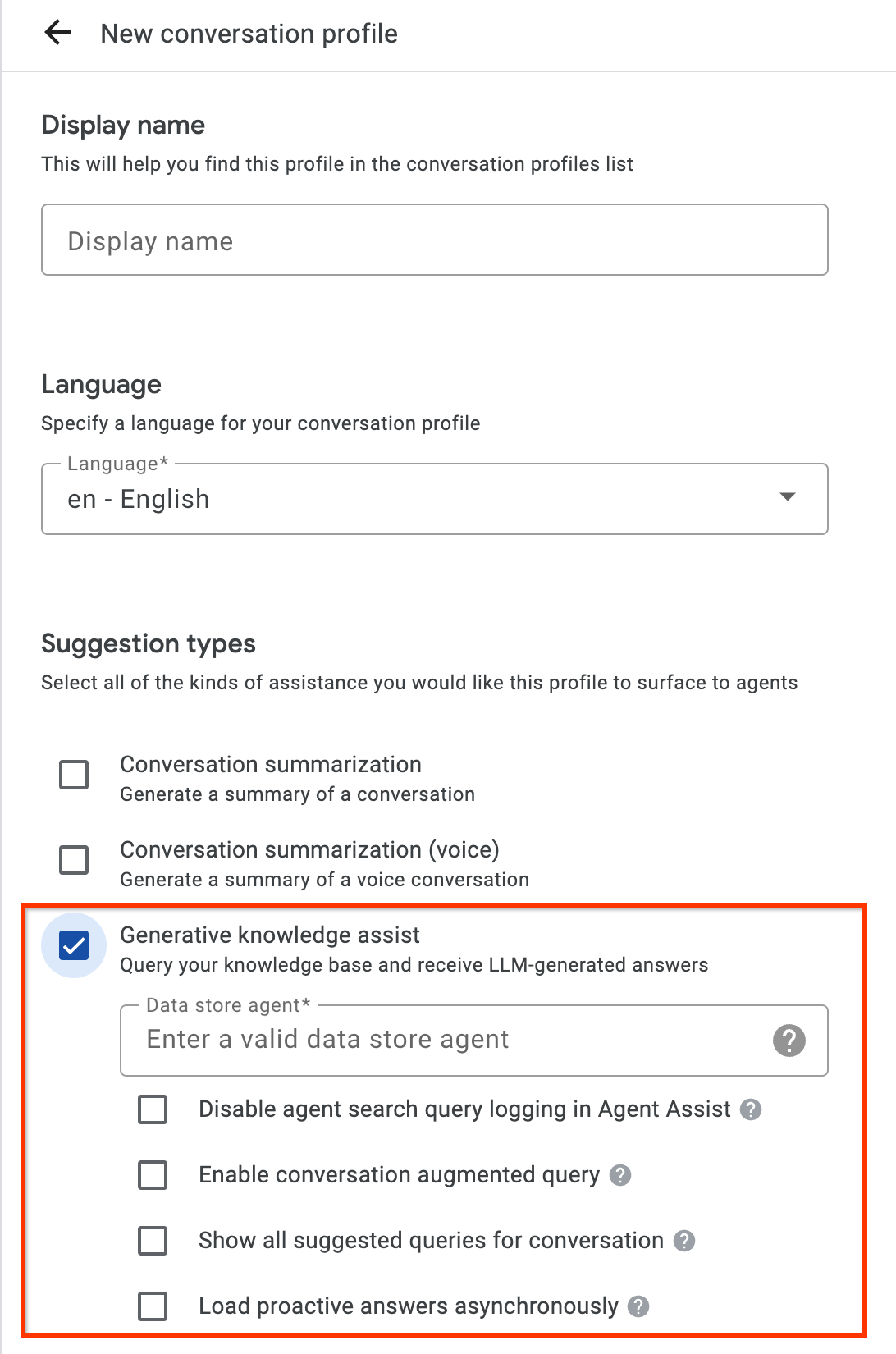
- 啟用「生成式知識輔助」建議類型,並連結至上一步的流程型資料儲存庫代理或應對手冊型資料儲存庫代理。這樣一來,流程型資料儲存庫代理或應對手冊型資料儲存庫代理就能主動提供查詢和回答建議,並回答真人服務專員的手動搜尋查詢。
- 選用:勾選「顯示對話的所有建議查詢」核取方塊,讓流程型資料儲存庫代理或應對手冊型資料儲存庫代理顯示所有查詢,即使知識文件找不到答案也一樣。這項功能適用於測試可從進行中的對話擷取哪些查詢。
- 選用:勾選「Load proactive answers asynchronously」(非同步載入主動式答案) 核取方塊,只取得查詢建議。您可以手動將建議的查詢提交至 SearchKnowledge API,並在 Agent Assist 控制台模擬器和 UI 模組中自動提交。
API
下列步驟會建立含有 HumanAgentAssistantConfig 物件的 ConversationProfile。您也可以使用 Agent Assist 控制台執行這些動作。
如要建立對話設定檔,請在 ConversationProfile 資源上呼叫 create 方法,並更新 `baseline_model_version`。
使用任何要求資料之前,請先修改下列項目的值:- PROJECT_ID:專案 ID
- LOCATION_ID:位置 ID
- AGENT_ID:上一個步驟中的流程型資料儲存庫代理或劇本型資料儲存庫代理 ID
 {
  "name": "projects/PROJECT_ID/locations/LOCATION/conversationProfiles/PROFILE_ID",
  "human_agent_assistant_config": {
    "human_agent_suggestion_config": {
      "feature_configs": [
        {
          "suggestion_feature": {
            "type": "KNOWLEDGE_ASSIST"
          },
          "query_config": {
            "dialogflow_query_source": {
              "agent": "projects/PROJECT_ID/locations/LOCATION/agents/AGENT_ID"
            }
          },
          "conversation_model_config": {
            "baseline_model_version": "2.0"
          }
        "disable_query_search_context": false,
    "enableQuerySuggestionWhenNoAnswer": false,
    "suggestion_trigger_event": "END_OF_UTTERANCE",
        }
      ]
    }
  }
}
步驟 2:在執行階段處理對話
主動生成知識輔助功能會在執行階段處理對話,根據目前的對話內容和答案,主動提供搜尋查詢建議。
建立對話
首先,您必須建立對話:
REST
如要建立對話,請呼叫 Conversation 資源的 create 方法。
使用任何要求資料之前,請先修改下列項目的值:
- PROJECT_ID:您的雲端專案 ID
- LOCATION_ID:您的地區 ID
- CONVERSATION_PROFILE_ID:建立對話設定檔時收到的 ID
HTTP 方法和網址:
POST https://dialogflow.googleapis.com/v2/projects/PROJECT_ID/locations/LOCATION_ID/conversations
JSON 要求主體:
{
  "conversationProfile": "projects/PROJECT_ID/locations/LOCATION_ID/conversationProfiles/CONVERSATION_PROFILE_ID",
}
請展開以下其中一個選項,以傳送要求:
您應該會收到如下的 JSON 回覆:
{
  "name": "projects/PROJECT_ID/locations/LOCATION_ID/conversations/CONVERSATION_ID",
  "lifecycleState": "IN_PROGRESS",
  "conversationProfile": "projects/PROJECT_ID/locations/LOCATION_ID/conversationProfiles/CONVERSATION_PROFILE_ID",
  "startTime": "2018-11-05T21:05:45.622Z"
}
conversations 後方的路徑區段包含了您的新對話 ID。
Python
詳情請參閱 Agent Search Python API 參考文件。
如要向 Agent Search 進行驗證,請設定應用程式預設憑證。 詳情請參閱「為本機開發環境設定驗證機制」。
建立使用者參與者
在對話中新增使用者和服務專員參與者,即可查看建議。首先,請在對話中新增使用者參與者:
REST
如要建立使用者參與者,請呼叫 Participant 資源的 create 方法。
使用任何要求資料之前,請先修改下列項目的值:
- PROJECT_ID:您的雲端專案 ID
- LOCATION_ID:您的地區 ID
- CONVERSATION_ID:您的對話 ID
HTTP 方法和網址:
POST https://dialogflow.googleapis.com/v2/projects/PROJECT_ID/locations/LOCATION_ID/conversations/CONVERSATION_ID/participants
JSON 要求主體:
{
  "role": "END_USER",
}
請展開以下其中一個選項,以傳送要求:
您應該會收到如下的 JSON 回覆:
{
  "name": "projects/PROJECT_ID/locations/LOCATION_ID/conversations/CONVERSATION_ID/participants/PARTICIPANT_ID",
  "role": "END_USER"
}
participants 後方的路徑區段包含新的使用者參與者 ID。
Python
詳情請參閱 Agent Search Python API 參考文件。
如要向 Agent Search 進行驗證,請設定應用程式預設憑證。 詳情請參閱「為本機開發環境設定驗證機制」。
建立代理程式參與者
在對話中新增代理參與者:
REST
如要建立代理程式參與者,請呼叫 Participant 資源的 create 方法。
使用任何要求資料之前,請先修改下列項目的值:
- PROJECT_ID:您的雲端專案 ID
- LOCATION_ID:您的地區 ID
- CONVERSATION_ID:您的對話 ID
HTTP 方法和網址:
POST https://dialogflow.googleapis.com/v2/projects/PROJECT_ID/locations/LOCATION_ID/conversations/CONVERSATION_ID/participants
JSON 要求主體:
{
  "role": "HUMAN_AGENT",
}
請展開以下其中一個選項,以傳送要求:
您應該會收到如下的 JSON 回覆:
{
  "name": "projects/PROJECT_ID/locations/LOCATION_ID/conversations/CONVERSATION_ID/participants/PARTICIPANT_ID",
  "role": "HUMAN_AGENT"
}
participants 後方的路徑區段包含了您新的人工服務專員參與者 ID。
Python
詳情請參閱 Agent Search Python API 參考文件。
如要向 Agent Search 進行驗證,請設定應用程式預設憑證。 詳情請參閱「為本機開發環境設定驗證機制」。
新增及分析代理程式的訊息
每當任一參與者在對話中輸入訊息時,您都需要將該訊息傳送至 API 進行處理。資料儲存庫代理程式會根據對真人服務專員和使用者訊息的分析結果,提供建議。在下列範例中,真人服務專員會先詢問「有什麼需要幫忙嗎?」來開啟對話。
回覆中尚未傳回任何建議。
REST
如要在對話中新增及分析真人客服訊息,請呼叫 Participant 資源的 analyzeContent 方法。
使用任何要求資料之前,請先修改下列項目的值:
- PROJECT_ID:專案 ID
- CONVERSATION_ID:您的對話 ID
- PARTICIPANT_ID:真人服務專員參與者 ID
HTTP 方法和網址:
POST https://dialogflow.googleapis.com/v2/projects/PROJECT_ID/conversations/CONVERSATION_ID/participants/PARTICIPANT_ID:analyzeContent
JSON 要求主體:
{
  "textInput": {
    "text": "How may I help you?",
    "languageCode": "en-US"
  }
}
請展開以下其中一個選項,以傳送要求:
您應該會收到如下的 JSON 回覆:
{
  "message": {
    "name": "projects/PROJECT_ID/conversations/CONVERSATION_ID/messages/MESSAGE_ID",
    "content": "How may I help you?",
    "languageCode": "en-US",
    "participant": "PARTICIPANT_ID",
    "participantRole": "HUMAN_AGENT",
    "createTime": "2020-02-13T00:01:30.683Z"
  }
}
Python
詳情請參閱 Agent Search Python API 參考文件。
如要向 Agent Search 進行驗證,請設定應用程式預設憑證。 詳情請參閱「為本機開發環境設定驗證機制」。
新增使用者提供的訊息,以取得建議
使用者向服務專員詢問:「我何時可以收到退貨退款?」 這次 API 回應會包含建議查詢,以及根據知識文件生成的生成式 AI 答案。
REST
如要為對話新增及分析使用者訊息,請呼叫 Participant 資源的 analyzeContent 方法。
使用任何要求資料之前,請先修改下列項目的值:
- PROJECT_ID:專案 ID
- CONVERSATION_ID:您的對話 ID
- PARTICIPANT_ID:您的使用者參與者 ID
HTTP 方法和網址:
POST https://dialogflow.googleapis.com/v2/projects/PROJECT_ID/conversations/CONVERSATION_ID/participants/PARTICIPANT_ID:analyzeContent
JSON 要求主體:
{
  "textInput": {
    "text": "When can I get my return refund?",
    "languageCode": "en-US"
  }
}
請展開以下其中一個選項,以傳送要求:
您應該會收到如下的 JSON 回覆:
{
  "message": {
    "name": "projects/PROJECT_ID/conversations/CONVERSATION_ID/messages/MESSAGE_ID",
    "content": "When can I get my return refund?",
    "languageCode": "en-US",
    "participant": "PARTICIPANT_ID",
    "participantRole": "END_USER",
    "createTime": "2020-02-13T00:07:35.925Z"
  },
  "humanAgentSuggestionResults": [
    {
      "suggestKnowledgeAssistResponse": {
        "knowledgeAssistAnswer": {
          "suggestedQuery": {
            "queryText": "Refund processing time"
          },
          "suggestedQueryAnswer": {
            "answerText": "After your return is processed, you receive your refund in 7 days. The refund amount should be for the full value of the items returned, but doesn't include shipping & service fees.",
            "generativeSource": {
              "snippets": [
                {
                  "title": "Returns & refunds - Help",
                  "uri": "https://example.com/",
                  "text": "When the package with your return arrives at the seller's return center, it may take up to 7 additional business days to process. Check the status of your refund with the return tracking number found on your orders page."
                }
              ]
            },
          },
          "answerRecord": "projects/PROJECT_ID/answerRecords/ANSWER_RECORD_ID"
        },
      }
    }
  ]
}
Python
詳情請參閱 Agent Search Python API 參考文件。
如要向 Agent Search 進行驗證,請設定應用程式預設憑證。 詳情請參閱「為本機開發環境設定驗證機制」。
完成對話
對話結束後,請使用 API 完成對話。
REST
如要完成對話,請呼叫 conversations 資源的 complete 方法。
使用任何要求資料之前,請先修改下列項目的值:
- PROJECT_ID:您的 GCP 專案 ID
- CONVERSATION_ID:建立對話時收到的 ID
HTTP 方法和網址:
POST https://dialogflow.googleapis.com/v2/projects/PROJECT_ID/conversations/CONVERSATION_ID:complete
請展開以下其中一個選項,以傳送要求:
您應該會收到如下的 JSON 回覆:
{
  "name": "projects/PROJECT_ID/conversations/CONVERSATION_ID",
  "lifecycleState": "COMPLETED",
  "conversationProfile": "projects/PROJECT_ID/conversationProfiles/CONVERSATION_PROFILE_ID",
  "startTime": "2018-11-05T21:05:45.622Z",
  "endTime": "2018-11-06T03:50:26.930Z"
}
Python
詳情請參閱 Agent Search Python API 參考文件。
如要向 Agent Search 進行驗證,請設定應用程式預設憑證。 詳情請參閱「為本機開發環境設定驗證機制」。
模擬工具
您可以在 Agent Assist 模擬工具中,測試以流程為基礎的資料儲存庫代理程式或以劇本為基礎的資料儲存庫代理程式。
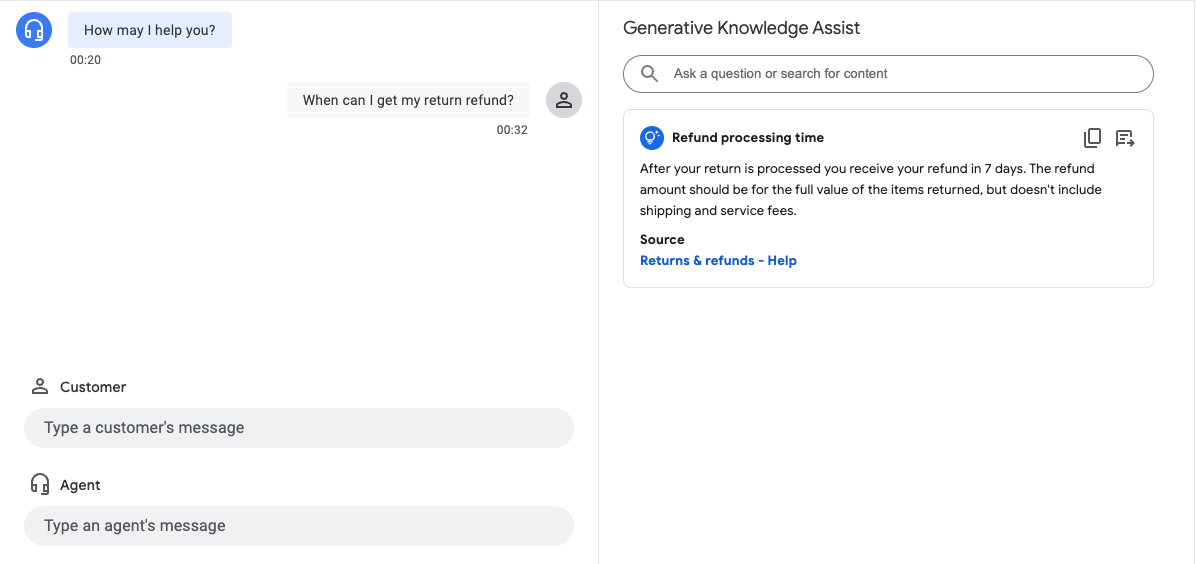
在上述範例中,以流程為基礎的資料儲存庫代理程式會提供下列建議:
- 建議的查詢:退款處理時間。
- 生成式 AI 生成的答案:退貨程序完成後,你將在 7 天內收到退款。退款金額應為退回商品的全額價值,但不含運費和服務費。
- 相關知識文件標題:「退貨與退款 - 說明」。
步驟 3:Pub/Sub 建議通知
建立對話設定檔時,您可以設定 notificationConfig 欄位,接收建議通知。這個選項會使用 Pub/Sub,在對話進行期間有新建議時,將建議通知傳送至應用程式。
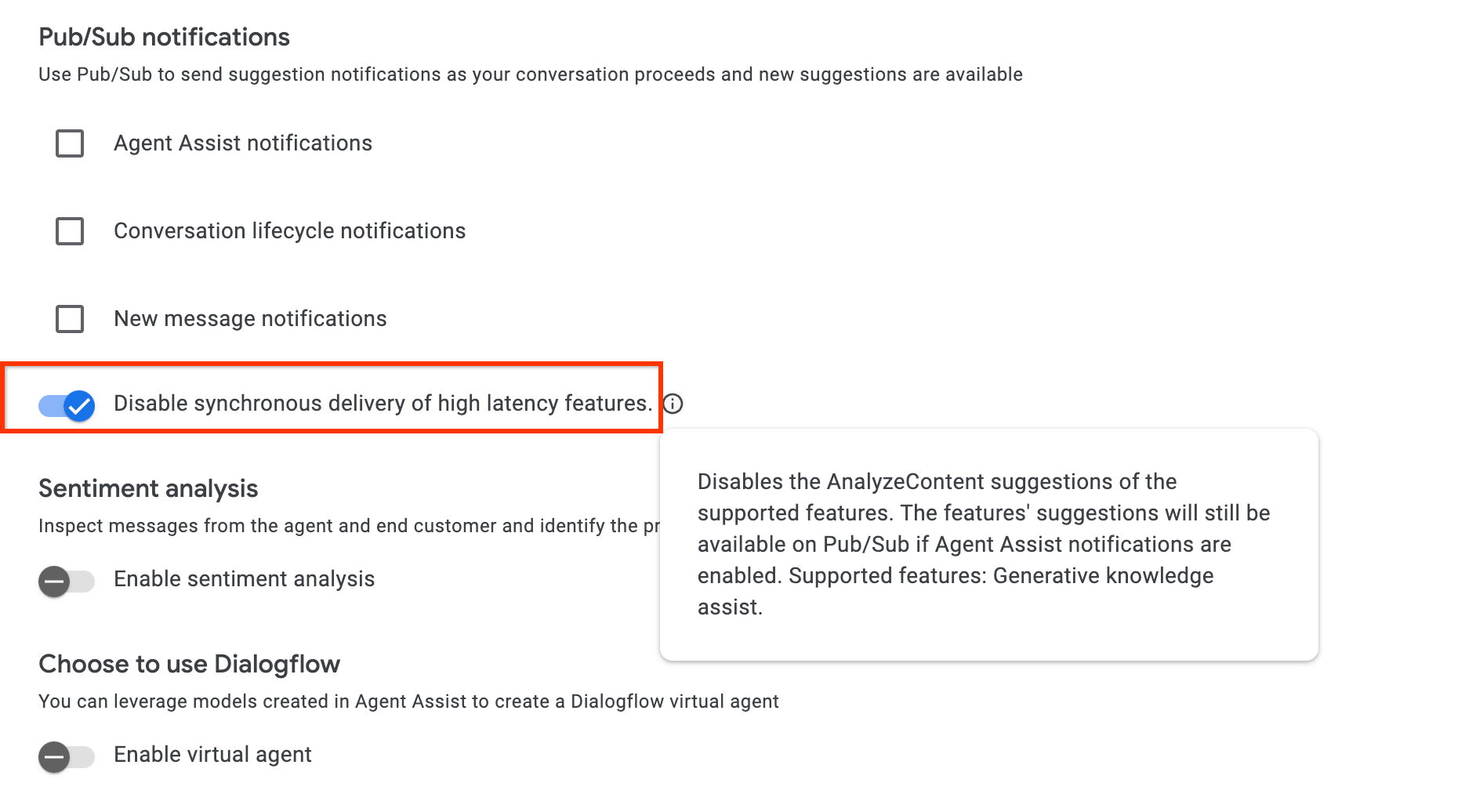
如果您是透過 AnalyzeContent API 整合,可以選擇在 ConversationProfile 中啟用 disable_high_latency_features_sync_delivery 設定,確保 AnalyzeContent API 會回應,不必等待主動式生成知識輔助建議,並透過 Pub/Sub 提供建議。
您也可以從 Agent Assist 控制台啟用這項設定。
透過 Customer Experience Insights 存取資料
此外,主動式生成知識輔助功能生成的查詢和答案,也會自動填入 Customer Experience Insights。如要存取這項資料,請按照「啟用 Dialogflow 執行階段整合功能」一文中的操作說明進行。
提供意見
如需傳送意見回饋的步驟,請參閱「傳送意見回饋給 Agent Assist」。
回答代理商問題
以下是傳送有關回答代理商問題意見回饋的 JSON 要求範例。
{
 "name": "projects/PROJECT_ID/locations/LOCATION_ID/answerRecords/ANSWER_RECORD_ID",
 "answerFeedback": {
   "displayed": true
   "clicked": true
   "correctnessLevel": "FULLY_CORRECT"
   "agentAssistantDetailFeedback": {
     "knowledgeSearchFeedback": {
       "answerCopied": true
       "clickedUris": [
         "url_1",
         "url_2",
         "url_3",
       ]
     }
   }
 }
}
主動建議問與答
以下是針對主動建議傳送意見回饋的 JSON 要求範例。
{
 "name": "projects/PROJECT_ID/locations/LOCATION_ID/answerRecords/ANSWER_RECORD_ID",
 "answerFeedback": {
   "displayed": true
   "clicked": true
   "correctnessLevel": "FULLY_CORRECT"
   "agentAssistantDetailFeedback": {
     "knowledgeAssistFeedback": {
       "answerCopied": true
       "clickedUris": [
         "url_1",
         "url_2",
         "url_3",
       ]
     }
   }
 }
}